POP-FE
======
Pop-fe is an all-in-one solution for creating PSX Classics for the PS3.
It is supported for both Linux and Windows. It should work on OSX too with little trouble.
It:
1, will automatically detect the disc-id and game title from the disc image.
2, will automatically download PSX cover, logo and background images.
3, will automatically download theme song and convert to ATRAC3 for the XMB
4, handles multi-disc games. Up to 5 discs are supported.
5, will automatically disable libcrypt.
6, will automatically convert any CDDA tracks into ATRAC3 format and inject them into the EBOOT.
7, contains emulator config settings to tweak hundreds of games to run better on ps1_netemu emulator.
You specify the image files and then the tool is an all-in-one solution to create the PS3 Package file.
It is used from the command line, like this:
./pop-fe.py -ps3-pkg=LSSS.pkg LSSS1.cue LSSS2.cue --snd0=auto
See the README file at https://github.com/sahlberg/pop-fe/blob/master/README for the full set of features and capabilities.
As a python script it has a fair number of external dependencies so see the INSTALLATION section in the README for instructions on how to install and set it up on Linux or Windows.
(Aside from PS3 packages it can also convert the games for use on PSP/VITA/PS2/PSIO/...)
POP-FE-PS3
==========
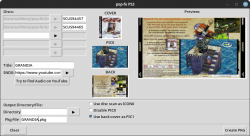
For creating PS3 packages there is a simple GUI frontend called : ./pop-fe-ps3.py.
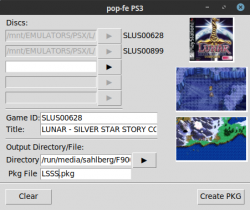
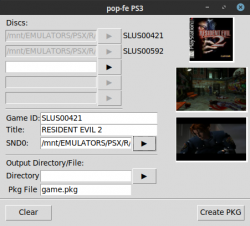
It will auto-populate the disc cover image and the gameplay images as well as disc-id and title based on the first disc image. But you can change it by clicking on these widgets.
To use it:
1, specify the CUE file(s) for the disc(s)
1b, OPTIONAL: click on image/game-id/title to select something different.
(Or, for the images, use drag-and-drop to select a file or a http link. Linux only)
2, select output directory
3, provide a package filename
4, click CreatePKG
That's it.
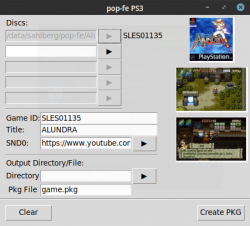
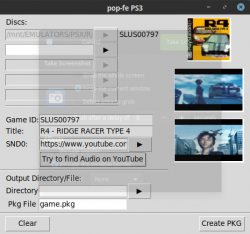
It looks like this :

In SND0 you can specify an audio file that will play when the game is highlighted in the XMB.
Alternatively you can provide a youtube link to the audio you want to use.
Or, you can use the newly added "Try to find audio on youtube" button
and pray that the search gods are kind to you.
Prebuilt Windows binaries are available under the Releases tab on the github page.
For Linux users there are a handful of simple steps that can be cut-n-pasted into a shell to install and configure everything.
Updates:
=======
Current master branch:
On Linux you can now drag-and-drop either a file or a http link and drop onto the ICON0/PIC0/PIC1 canvases to select a different image. This only works for Linux as I have not been able to get the dnd toolkits to work under Windows. Patches welcome.
Version 0.0.13:
Fixes a bug computing related to multi-disc offsets in PS3 PKGs.
Version 0.0.12:
Minor updates and also a new PREVIEW for how it will look like on the XMB.
Update: THEME SUPPORT
The latest version of pop-fe adds support for THEMES to pop-fe and pop-fe-ps3. Themes are sets of manually crafted assets to make the games show up in a consistent and beautiful way on the XMB.
The initial theme added is from a very talented user 98DEMAKE that has started building assets for all favorite games. The collection is small right now but can be expanded upon. If you are interested, please help expand it. If you want to create your own theme, just let me know and I will add a link.
98DEMAKE's theme is hosted at https://github.com/98DEMAKE/pop-fe-theme-98demake and can be selected from pop-fe/pop-fe-ps3 by specifying the theme 98DEMAKE.
Here are some screenshots of his theme:
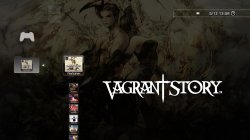
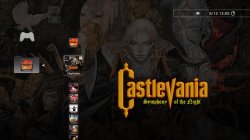


These games deserve to look great on the XMB. Please help add curated assets and themes to make these games justice. And if you don't want to make your own theme, I am certain 98DEMAKE would love to get contributions to his beautiful theme from PSX fans.
Please try it and help out if you want. You know you want the games to look like this on the XMB!
======
Pop-fe is an all-in-one solution for creating PSX Classics for the PS3.
It is supported for both Linux and Windows. It should work on OSX too with little trouble.
It:
1, will automatically detect the disc-id and game title from the disc image.
2, will automatically download PSX cover, logo and background images.
3, will automatically download theme song and convert to ATRAC3 for the XMB
4, handles multi-disc games. Up to 5 discs are supported.
5, will automatically disable libcrypt.
6, will automatically convert any CDDA tracks into ATRAC3 format and inject them into the EBOOT.
7, contains emulator config settings to tweak hundreds of games to run better on ps1_netemu emulator.
You specify the image files and then the tool is an all-in-one solution to create the PS3 Package file.
It is used from the command line, like this:
./pop-fe.py -ps3-pkg=LSSS.pkg LSSS1.cue LSSS2.cue --snd0=auto
See the README file at https://github.com/sahlberg/pop-fe/blob/master/README for the full set of features and capabilities.
As a python script it has a fair number of external dependencies so see the INSTALLATION section in the README for instructions on how to install and set it up on Linux or Windows.
(Aside from PS3 packages it can also convert the games for use on PSP/VITA/PS2/PSIO/...)
POP-FE-PS3
==========
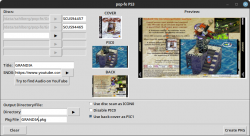
For creating PS3 packages there is a simple GUI frontend called : ./pop-fe-ps3.py.
It will auto-populate the disc cover image and the gameplay images as well as disc-id and title based on the first disc image. But you can change it by clicking on these widgets.
To use it:
1, specify the CUE file(s) for the disc(s)
1b, OPTIONAL: click on image/game-id/title to select something different.
(Or, for the images, use drag-and-drop to select a file or a http link. Linux only)
2, select output directory
3, provide a package filename
4, click CreatePKG
That's it.
It looks like this :
In SND0 you can specify an audio file that will play when the game is highlighted in the XMB.
Alternatively you can provide a youtube link to the audio you want to use.
Or, you can use the newly added "Try to find audio on youtube" button
and pray that the search gods are kind to you.
Prebuilt Windows binaries are available under the Releases tab on the github page.
For Linux users there are a handful of simple steps that can be cut-n-pasted into a shell to install and configure everything.
Updates:
=======
Current master branch:
On Linux you can now drag-and-drop either a file or a http link and drop onto the ICON0/PIC0/PIC1 canvases to select a different image. This only works for Linux as I have not been able to get the dnd toolkits to work under Windows. Patches welcome.
Version 0.0.13:
Fixes a bug computing related to multi-disc offsets in PS3 PKGs.
Version 0.0.12:
Minor updates and also a new PREVIEW for how it will look like on the XMB.
Update: THEME SUPPORT
The latest version of pop-fe adds support for THEMES to pop-fe and pop-fe-ps3. Themes are sets of manually crafted assets to make the games show up in a consistent and beautiful way on the XMB.
The initial theme added is from a very talented user 98DEMAKE that has started building assets for all favorite games. The collection is small right now but can be expanded upon. If you are interested, please help expand it. If you want to create your own theme, just let me know and I will add a link.
98DEMAKE's theme is hosted at https://github.com/98DEMAKE/pop-fe-theme-98demake and can be selected from pop-fe/pop-fe-ps3 by specifying the theme 98DEMAKE.
Here are some screenshots of his theme:
These games deserve to look great on the XMB. Please help add curated assets and themes to make these games justice. And if you don't want to make your own theme, I am certain 98DEMAKE would love to get contributions to his beautiful theme from PSX fans.
Please try it and help out if you want. You know you want the games to look like this on the XMB!