

SATURN-fPKG
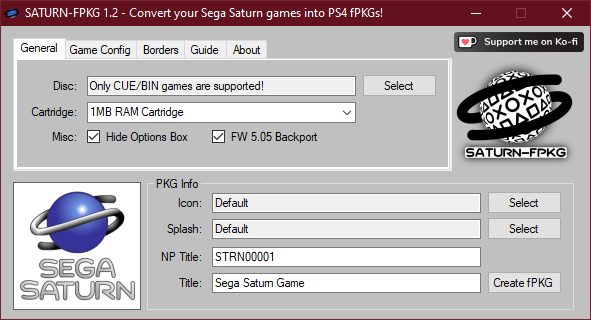
This app converts your Sega Saturn games into PS4 fPKGs.
This app converts your Sega Saturn games into PS4 fPKGs.
-
How to use it:- Run SATURN-FPKG.exe
- Select a CUE file of your Saturn game in "Disc"
- Customize some settings(you can change the icon, ram cartridge, game title, some screen settings, borders etc)
- Make sure the auto-generated npTitle is unique(so the pkg doesn't overwrite another game, but thats unlikely now)
- If you want the game to work on firmwares lower than 9.00, make sure you check the "FW 5.05 Backport" checkbox
- Click "Create fPKG" and choose a storage location
- Install the created fPKG on your PS4 and play
-
Notes:
- The emulator now works on Firmware 5.05 and up, make sure you use the latest GoldHen payload on firmwares lower than 9.00 for it to work!
- ISOs are probably not supported by the emulator and won't work(use proper CUE/BIN game images!)
- A uniqe npTitle based on the game product id will be now automatically selected
- You can righ-click on a text box to reset it's value
- You can select which RAM cartridge should be used for a game(eg Street Fighter Zero 3 uses the 4MB cart for better animations) but most games should run fine on the default setting
- You can hide the in-game "Press Options for Options" box by checking the "Hide Options Box" checkbox.
- When playing a game press the touchpad or hold the Options button for a settings menu, you can change some display options and button configs there, you can also quick save/load/rewind the game there.
- The emulator now works on Firmware 5.05 and up, make sure you use the latest GoldHen payload on firmwares lower than 9.00 for it to work!
-
Changelog:
V1.2- The emulator now works from FW 5.05 and up, thanks to Cyber1000's backport.
Make sure you check the "FW 5.05 Backport" option, works best with GoldHen on firmwares lower than 9.00. - Added a Polish translation which can be selected from the "About" tab, it's also possible to add more languages by creating .lng files in the stuff/lng/ folder(see polish.lng for more info)
- It's now possible to import custom game guides(well 3 pages for now)
- Improved TEX conversion, custom borders/guides bigger than ~1,19MB work fine now
- PKG Creation was moved to a thread so the app doesn't look like it froze anymore
V1.1- The UI was redesigned(it's not so ugly anymore)
- Some under-the-hood code cleanups/changes
- Improved CUE parsing, no more problems with absolute paths and the app will now check if all .bin files exist
- The app will now check if a valid Track1 .bin file is used in the CUE file
- Added an error message when selectiong a game in ISO format, ISOs are not supported by the emulator and won't work(use proper CUE/BIN game images!)
- Added automatic npTitle selection using a crc16 hash based on the games product id(no need to use the Randomize npTitle button anymore)
- Added a True Transparency option(no more meshes!)
- Added a Widescreen option(it just stretches the game into 16:9)
- It's now possible to select a config file from the users pc(it overrides all config related options, like the widescreen and the transparency option!)
- It's now possible to import custom game borders, .tex and .png files are supported(png images will be converted and rescaled automatically)
- The Readme has been updated
- Initial release
-
Known Issues:
- Savestates won't work when a 4MB RAM cartridge is used.
- Custom Borders can sometimes get corrupted, idk why yet(but it doesn't happen as much as it did before)
-
Creation test:
Earthworm Jim 2 test:
-
Thanks to k6stor for support.
And thanks to Cyber1000 for his backport.
Download:
- v1.2: https://www.mediafire.com/file/0a8z2zh80viu4n7/SATURN-FPKG_v1.2.7z
- v1.1: https://www.mediafire.com/file/h97h7g3i4l3wqbz/SATURN-FPKG_v1.1.7z
- v1.0: https://www.mediafire.com/file/mhj1at6tn5723pq/SATURN-FPKG_v1.0.7z
7-Zip - https://7-zip.org/
LibOrbisPkg - https://github.com/maxton/LibOrbisPkg
gengp4 - https://github.com/xvortex/ps4-dumper-vtx/


