

STLcardsWS
Administrator
-
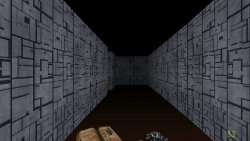
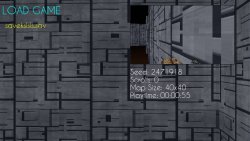
Labyrinth 3D is my first 3D homebrew which uses RayCast3D Engine . It can be considered as a showcase for how powerful and simple to use RayCast3D engine is.
Labyrinth 3D is, as the title says, a game where you have to find the exit from the labyrinth you're in. It supports different map sizes and you'll have some scrolls according to map size. These scrolls can be used to "mark" a wall of the labyrinth so you can see where you already went (after marking a wall, it will became golden).
Labyrinths are generated through Primm's Algorithm so you'll have infinite random mazes to solve. Any generated maze will provide a seed so you can share these labyrinths with others and play them through the voice "Start game with Seed".
Latest >> Changelog v1.4
- Updated both Lua Player Plus and RayCast3D to their respectively latest nightly builds.
- Improved game performances in general.
- Replaced old clunky Seed Keyboard with Sony's Numpad Keyboard.
- Added possibility to skip Credits pressing START button.
- Fixed a bug causing the game to crash when attempting to close it via "Exit Game" button.
Controls:
- DPad / Analogs = Move Player/Camera
- X = Mark a block with a scroll
- START = Pause Game
- SQUARE = Delete a savegame (when in save/load screen)
- Misledz for RayCast3D, Lua Player Plus and Labyrinth 3D logos
- ihaveamac and gnmmarechal for testing the game
- ETTiNGRiNDER for the player sprite
- aliashparow for the main menu BGM
- soundjay.com for SFX sounds
- oddcast.com for the synthetic voices used in gameboot
-
Cheats and Easter Eggs
- When starting the homebrew, holding L+R will result in engine logos skip
- When on logo screen (Press Start screen) use these buttons sequence to enable cheats/easter eggs:
- UP UP DOWN DOWN LEFT RIGHT LEFT RIGHT - Allows you to move inside the mini Labyrinth on background
- X UP X DOWN O LEFT O RIGHT - Gives you 99 scrolls for any game difficulty
- UP DOWN LEFT RIGHT UP DOWN LEFT RIGHT O X - Enables no clip mode (walking through walls)
Download & Source: vitadb.rinnegatamante.it
