LilCheezyWeezy
Forum Noob
I have a PS3 fat model (CECHK01) that I'm trying to get working again. It was freezing years ago which is why we bought a new one and put this in storage. Recently pulled it out to see if I could fix it and I'm stuck.
The symptom: Right when I turn on my PS3 it works perfect for about 1 minute before it completely locks up and freezes. I can't do anything. It will unfreeze for 30 seconds and act normal before repeating the process. I do not even make it to booting into a game. Thought it was bad thermal paste and when I was replacing the paste the old looked fine and not hardened up but I still cleaned it off and replaced it with new paste. This did not work or help at all. No matter if the PS3 just booted from cold or after running for a bit it will still freeze for a minute then unfreeze for 30 seconds..
What I've already tried:
update- Did the syscon via the solder method, actually a fun process. All I was getting was:
External: $ ERRLOG GET 00 - 00000000 FFFFFFFF FFFFFFFF
Internal: errlog - ofst[ 0]:err_code:0xffffffff, clock:0xffffffff
Nothing in the 'bringup' either so I reassembled the console to try commands during an actual freeze. Got consistent readings of:
tmp 1 - TZone No:01 - RSX Primary Temperature: 47.75
tmp 0 - TZone No:00 - 1st BE Primary Temperature: 59.70
Normal temps which was a good sign. Then it hit me, I vaguely remembered why we put this PS3 in storage in the first place. Something about the Blu-ray drive. So with really nothing to lose since the syscon was no help I unplugged the ribbon cable from the motherboard and the freezing completely stopped.
Left the syscon jumpers soldered and electrical taped just in case the NEC/TOKIN caps cause issues down the road.
Also these bringup stats were eye opening:
Bringup: 407 times
Shutdown: 74 times
Power-on: 5 days 3 hours 4 minutes
TLDR: Faulty Blu-ray ribbon cable was causing all the freezing. Syscon showed normal temps and no error codes. Unplugging the Blu-ray ribbon fixed it completely. Left syscon jumpers in place for future use.

UPDATE #2: PS3 fat CECHK01, freezing solved but now dealing with 8002F14E Blu-ray error.
Unplugging the Blu-ray ribbon cable completely solved the freezing from my last post.
With it disconnected I now get error 8002F14E when trying to update, which points to a Blu-ray or Bluetooth/Wi-Fi hardware failure. Cleaned all the ribbon cables and slots inside the drive and on the motherboard side & no change.
I've seen the No-BD Custom Firmware workaround mentioned but I don't want to go that route since it prevents ISO game loading. I want the drive properly fixed.
What's strange is I genuinely can't find anyone else online with this exact problem. The console also only has 5 days of total power on time according to syscon which makes it even more frustrating. Nothing showed up in the syscon error log either which makes diagnosing this really difficult.

EDIT / FINAL UPDATE (SOLVED):
Just wanted to wrap this thread up in case anyone runs into this nightmare in the future. I finally managed to fix the issue!
I ended up hopping on eBay and scoring a dead, used CECHK model PS3 Fat for $40 that had the Yellow Light of Death (YLOD), just crossing my fingers that the bluray drive was still physically healthy.
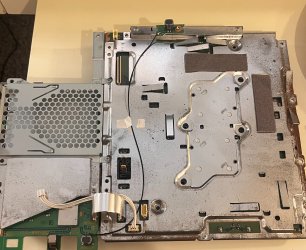
Once it arrived, I tore both consoles down, pulled the cooked Blu-ray drive out of my working system, and swapped the YLOD console's drive straight into mine. Because the drive daughterboards are locked to their original motherboards, it wouldn't read games immediately, but since I am running Custom Firmware (CFW), I was able to easily run the "Remarry Blu-ray Drive" tool through the service menu.
The system accepted the new hardware perfectly, took the handshake, and it's now reading discs and launching games flawlessly. Total fix cost me 40 bucks and an afternoon of tinkering. Thanks to everyone for the help!
The symptom: Right when I turn on my PS3 it works perfect for about 1 minute before it completely locks up and freezes. I can't do anything. It will unfreeze for 30 seconds and act normal before repeating the process. I do not even make it to booting into a game. Thought it was bad thermal paste and when I was replacing the paste the old looked fine and not hardened up but I still cleaned it off and replaced it with new paste. This did not work or help at all. No matter if the PS3 just booted from cold or after running for a bit it will still freeze for a minute then unfreeze for 30 seconds..
What I've already tried:
- Cleaned all the dust out
- Wiped off old thermal paste and applied fresh paste (spread it manually)
- Ran Safe Mode (still freezing through it all), got "the hard disk file system is corrupted and will restored." on the old drive. Did not fix anything.
- Replaced the original HDD with a brand new Samsung PM881 512GB SSD, exact same freezing behavior. Did not fix anything.
- Attempted a heat gun reflow on the CPU and RSX, & re-spread thermal paste manually. Did not fix anything.
update- Did the syscon via the solder method, actually a fun process. All I was getting was:
External: $ ERRLOG GET 00 - 00000000 FFFFFFFF FFFFFFFF
Internal: errlog - ofst[ 0]:err_code:0xffffffff, clock:0xffffffff
Nothing in the 'bringup' either so I reassembled the console to try commands during an actual freeze. Got consistent readings of:
tmp 1 - TZone No:01 - RSX Primary Temperature: 47.75
tmp 0 - TZone No:00 - 1st BE Primary Temperature: 59.70
Normal temps which was a good sign. Then it hit me, I vaguely remembered why we put this PS3 in storage in the first place. Something about the Blu-ray drive. So with really nothing to lose since the syscon was no help I unplugged the ribbon cable from the motherboard and the freezing completely stopped.
Left the syscon jumpers soldered and electrical taped just in case the NEC/TOKIN caps cause issues down the road.
Also these bringup stats were eye opening:
Bringup: 407 times
Shutdown: 74 times
Power-on: 5 days 3 hours 4 minutes
TLDR: Faulty Blu-ray ribbon cable was causing all the freezing. Syscon showed normal temps and no error codes. Unplugging the Blu-ray ribbon fixed it completely. Left syscon jumpers in place for future use.
UPDATE #2: PS3 fat CECHK01, freezing solved but now dealing with 8002F14E Blu-ray error.
Unplugging the Blu-ray ribbon cable completely solved the freezing from my last post.
With it disconnected I now get error 8002F14E when trying to update, which points to a Blu-ray or Bluetooth/Wi-Fi hardware failure. Cleaned all the ribbon cables and slots inside the drive and on the motherboard side & no change.
I've seen the No-BD Custom Firmware workaround mentioned but I don't want to go that route since it prevents ISO game loading. I want the drive properly fixed.
What's strange is I genuinely can't find anyone else online with this exact problem. The console also only has 5 days of total power on time according to syscon which makes it even more frustrating. Nothing showed up in the syscon error log either which makes diagnosing this really difficult.
- What within the Blu-ray hardware would cause system-wide freezing like this?
- Is this the drive itself or a motherboard issue?
EDIT / FINAL UPDATE (SOLVED):
Just wanted to wrap this thread up in case anyone runs into this nightmare in the future. I finally managed to fix the issue!
I ended up hopping on eBay and scoring a dead, used CECHK model PS3 Fat for $40 that had the Yellow Light of Death (YLOD), just crossing my fingers that the bluray drive was still physically healthy.
Once it arrived, I tore both consoles down, pulled the cooked Blu-ray drive out of my working system, and swapped the YLOD console's drive straight into mine. Because the drive daughterboards are locked to their original motherboards, it wouldn't read games immediately, but since I am running Custom Firmware (CFW), I was able to easily run the "Remarry Blu-ray Drive" tool through the service menu.
The system accepted the new hardware perfectly, took the handshake, and it's now reading discs and launching games flawlessly. Total fix cost me 40 bucks and an afternoon of tinkering. Thanks to everyone for the help!