
This project was started in early 2024 and it can be read about on my other thread PS3 Slim PSU & Cooling mod. Back then I envisioned the final result to be different but it turned out as it did with many parts either 3D printed or made in the garage by melting and bending plastic panels. On the performance side, I did a few tests to see how it performs and the results can be found below in a graph, but overall overheating from overclocking is not an issue.
For how the console was modified I will separate the text below into sections explaining what I did and what materials were used. Otherwise, the final result can be viewed in the video showing the removal of the top cover. The only main parts from the original console used in this build (excluding the controller itself) includes:


Case
Starting with the case itself. It is made of ABS plastic sheets 30x40x1.5 cm, melted into shape using a heat gun and a contraption assembled from 4 wooden panels and tape. Large panels were bent to a 90-degree angle on the edges, giving it the form of a case. Most outer case parts were painted matt black and used ABS plastic. The only exception were the protruding parts, like handles, vent ports and 3D printed skirting, applied to edges that did not have a clean cut.
The inspiration for the design would somewhat come from PC's while at the same time keeping the look of a console. For thickness and stability, the base platform (on which the motherboard stands) was made out of 2 ABS sheets being glued together with epoxy, this will prevent bending and deformation if temperatures get high. The motherboard was screwed on to hex spacer standoffs that were all epoxy glued to the base. The top covers are composed of one sheet each, similar to the PS4, there is a separate cover over the HDD and one over the RSX/CELL, bent to shape to protect from dust and tightly held to the bases hex spacers. The cover over the HDD is slightly higher to accommodate for the dual HDD bay and the power prongs. The only peculiarity is the large square cut-out in the middle but that is to accommodate for the large cooling towers.
The back and front covers (to protect the components around USB ports and the power supply port in the back) were also made of ABS with 3D printed skirting applied around i/o ports. Couldn't figure out why, even though there appears to be more than enough space, the port printed for the HDMI does not seem to be able to slide on, either way this doesn't prevent it from being used. Additionally, there are also a few vents drilled into the back. The internal support components in and around the motherboard were all 3D printed using PETG (that can withstand temperatures under 80°C). After hours of gaming there was no issue of deformation or the PETG melting.
ABS plastic is not the same plastic used in official PS3 console cases; from what I could find they use polypropylene. In my situation ABS was a cheaper and easier to source alternative which was easier to work with although the result is not ideal, considering I did this in my spare time in the garage with the most advanced tool in my arsenal being a 3D printer, the result still turned out quite good, in my opinion. Nevertheless, what should be noted is that compared to polypropylene (that has a melting point of 160°C) ABS begins to soften at 95-100°C, although it doesn't start melting straight away as that temperature needs to be upheld for a certain period of time.
Although the choice of material might not appear as adequate at first, in this design the consoles custom PC cooling should help as well as the layer of epoxy holding the base together. The high temperature primarily comes from the RSX and the CELL so using the custom cooling system the PC cooling towers redirect most of the heat away keeping the CELL and RSX at temperatures below 45°C.
Power Supply
The PS3 slim requires a power output of around 90w. For this I used a Pico PSU capable of outputting 160w which should prevent any strain. The small form factor was quite ideal as I planned on integrating it into the console rather than having an external PSU. Note: this is a supply unit intended for a mini-PC but retooled to be used with the PS3's motherboard. The idea for using computer PSU's to power a PS3 has been widely discussed online with guides on how to do it for those interested in making something similar.
I had to make slight modifications to the Pico's power wires as those were too long. The original wires were soldered off and replaced with much thicker silicone coated 18 awg wires connected directly to the power port. Using the holes in the motherboard I screwed on a 24-pin plug to act as a hub between the Pico and the PS3. From here I could solder, rewire and connect practically any component that requires power easily. The Pico is held in place thanks to the strong connection provided by the 24-pin hub. In order to avoid any contact with the motherboard the Pico is in its own 3D printed case with silicone pads. The case is screwed to a strip which is then screwed to a support on the edge of the motherboard.
A small fan has been added in the back to blow external air towards the HDD and the Pico.
To power the Pico an AC/DC adapter is needed. I bought one from Amazon which provides 12v 15a, the high-power output prevents the adapter from being strained.
Additional HDD (requires soldering)
A fully functional HDD bay was added just above the original. This makes it possible to play games directly from the second HDD using software such as webMAN MOD and multiMAN.
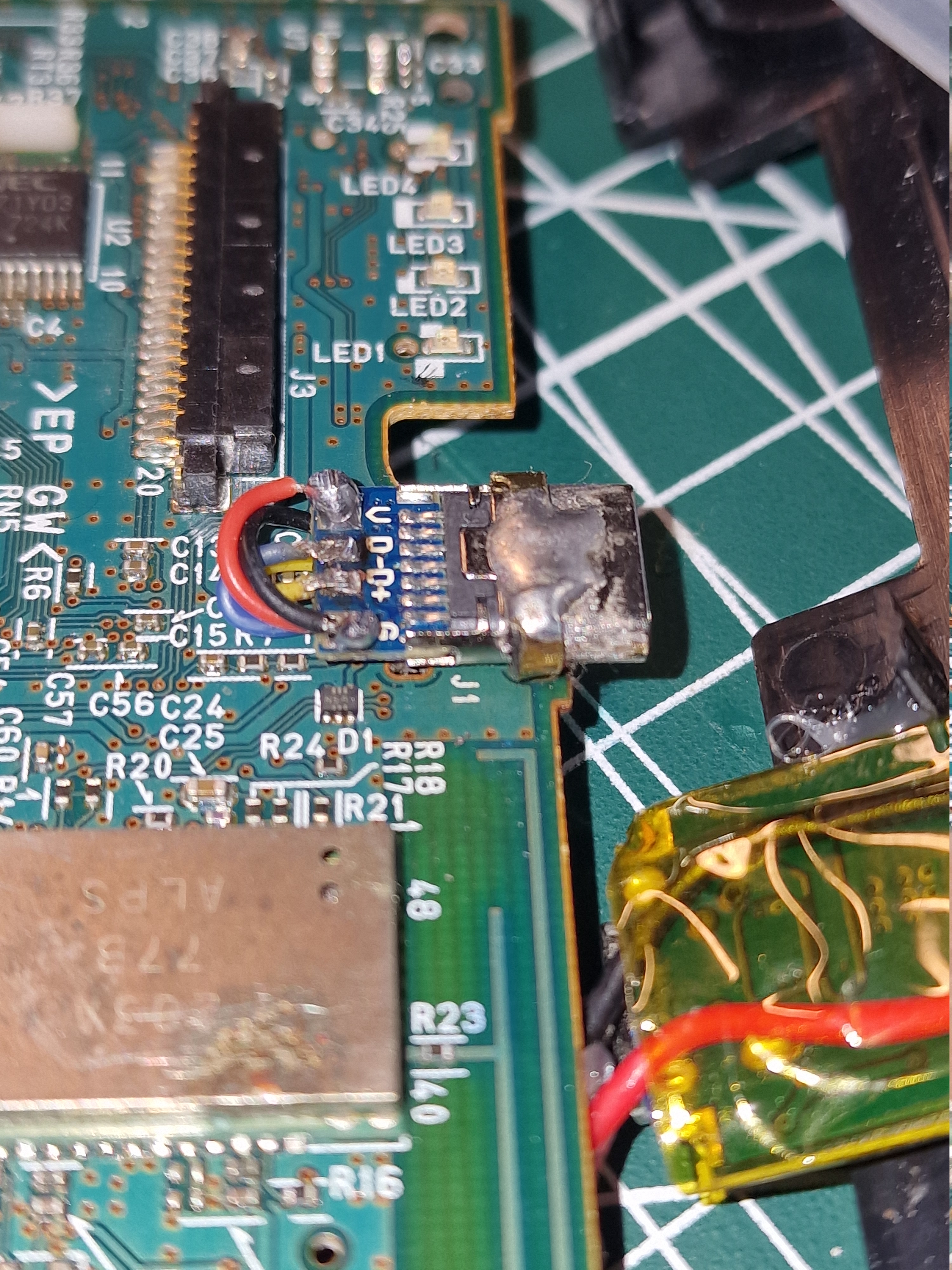
To support the second HDD a two storied bay was made to hold the upper drive. It connects to a USB 3.0 hard disk adaptor which was gutted, disassembled and resoldered to suit this purpose. At most only 4 wires need to be connected since the PS3 does not have functionality for a 3.0 USB interface. The only wires necessary include; Power Ground, VBUS (+5 VDC), D+ and D-. The D+ and D- wires need to be soldered to the PS3s USB port and for that there exist two small pins just beneath the USB on the motherboard. The power and ground were connected directly to the Pico preventing the issue of the USB not providing enough power to support the HDD. The HDD adaptor was screwed on to a 3D printed structure made to support it as well as resist the pulling and pushing of the HDD when it needs to be taking out or slotted back in.
In essence this works like connecting a USB. The USB port on the PS3 does not get damaged in any way and is still usable although it should not be used with the HDD at the same time. I tried connecting a USB while it was reading of off the HDD and it simply did not read the USB I plugged in; however, I still would not recommend doing this. In order to still use the original USB port, I wired the D+ and D- via 2 micro on-off switches and 3D printed one large extruding toggle on the front of the console.
Some might ask, why not just use a USB or get a bigger hard drive? Well, the answer is that, there would have still been a very large amount of space just above the original HDD bay. This is due to the power prongs sticking out, I would have had to cut off these prongs to lower the overall height of the console but I decided against. This space is quite useless as it is too small for a Blu-ray drive but was suitable for another HDD. As for getting a bigger drive, with the high prices these days for storage devices I remembered I have a large amount of various 2.5" hard drives, old but still functional, hence why buy new stuff when the old works perfectly? Plenty of space to store games, music, films, etc.
Additional USB-A and USB-C Port
This one was quite straight forward, all that was done was that both ports were directly connected to the 24-pin hub (5v pin) on the Pico power supply. This is purely used to charge the controller (which was also modified) or any other device and does not relay information from the controller to the console.
Modified Controller (USB-C port)
The main task here was getting the controller to charge without the need for a USB data handshake between it and the PS3 (or any other device for that matter) and changing the redundant USB mini to a USB-C. There do exist videos and guides on how to modify the charging port for the DS3 although there are very few guides on how to modify the battery to circumvent the data handshake. However, I did find one video that used a charging module to charge the DS3 bypassing the handshake. As a result, I soldered a TP4056 charging module to the battery. This resulted in the controller having 2 USB-C ports (both can be used for charging) however just one can accept the handshake and the other does not.


Air Cooling Towers & Temperatures
I won't be writing too much here on how these were made these since they are actually discussed on another thread and not much has changed. Link. Using a custom designed, and 3D printed bracket, I managed to firmly attach two air cooling towers to the RSX and CPU. Each with its independent cooling tower for maximum efficiency and heat dissipation. In essence I used an AM4 socket retention mounting bracket as a basis for the design.
These towers are efficient enough to enable PS3 overclocking while keeping the temperatures for both RSX and CPU below 40°C. Initially, however, the PS3's CPU (non-overclocked) would reach 70°C while the RSX stayed below 36°C. This was fixed by delidding the CPU and applying new thermal paste, now temperatures rarely go above 38°C even when overclocked.


*ambient temperature 22-23°C (71.6-73.4°F)
*fan rotary switch set to around 80%
Overclocking
I tested a few games to find acceptable overclocking parameters that wont cause issues during gameplay (like freezing, lag, artifacts, etc) and compiled a small graph.
NOTE: I did test the PS3 on the maximum overclock settings (1050/1050) and it just shuts down the console as soon as you choose it. I also tested it on the second highest (900/1050) and it freezes the console forcing you to unplug it.
*During testing I noticed that after using the listed overclocking parameters they might still have artifacts/flashes during gameplay while other times overclocking using the same yields a stable experience. Hence these numbers should not be considered as clear cut but rather as a starting point, increase or lower as needed.
For how the console was modified I will separate the text below into sections explaining what I did and what materials were used. Otherwise, the final result can be viewed in the video showing the removal of the top cover. The only main parts from the original console used in this build (excluding the controller itself) includes:
- Motherboard
- On/Off Control Board
- Cell and RSX support pressure pads
Case
Starting with the case itself. It is made of ABS plastic sheets 30x40x1.5 cm, melted into shape using a heat gun and a contraption assembled from 4 wooden panels and tape. Large panels were bent to a 90-degree angle on the edges, giving it the form of a case. Most outer case parts were painted matt black and used ABS plastic. The only exception were the protruding parts, like handles, vent ports and 3D printed skirting, applied to edges that did not have a clean cut.
The inspiration for the design would somewhat come from PC's while at the same time keeping the look of a console. For thickness and stability, the base platform (on which the motherboard stands) was made out of 2 ABS sheets being glued together with epoxy, this will prevent bending and deformation if temperatures get high. The motherboard was screwed on to hex spacer standoffs that were all epoxy glued to the base. The top covers are composed of one sheet each, similar to the PS4, there is a separate cover over the HDD and one over the RSX/CELL, bent to shape to protect from dust and tightly held to the bases hex spacers. The cover over the HDD is slightly higher to accommodate for the dual HDD bay and the power prongs. The only peculiarity is the large square cut-out in the middle but that is to accommodate for the large cooling towers.
The back and front covers (to protect the components around USB ports and the power supply port in the back) were also made of ABS with 3D printed skirting applied around i/o ports. Couldn't figure out why, even though there appears to be more than enough space, the port printed for the HDMI does not seem to be able to slide on, either way this doesn't prevent it from being used. Additionally, there are also a few vents drilled into the back. The internal support components in and around the motherboard were all 3D printed using PETG (that can withstand temperatures under 80°C). After hours of gaming there was no issue of deformation or the PETG melting.
ABS plastic is not the same plastic used in official PS3 console cases; from what I could find they use polypropylene. In my situation ABS was a cheaper and easier to source alternative which was easier to work with although the result is not ideal, considering I did this in my spare time in the garage with the most advanced tool in my arsenal being a 3D printer, the result still turned out quite good, in my opinion. Nevertheless, what should be noted is that compared to polypropylene (that has a melting point of 160°C) ABS begins to soften at 95-100°C, although it doesn't start melting straight away as that temperature needs to be upheld for a certain period of time.
Although the choice of material might not appear as adequate at first, in this design the consoles custom PC cooling should help as well as the layer of epoxy holding the base together. The high temperature primarily comes from the RSX and the CELL so using the custom cooling system the PC cooling towers redirect most of the heat away keeping the CELL and RSX at temperatures below 45°C.
Power Supply
The PS3 slim requires a power output of around 90w. For this I used a Pico PSU capable of outputting 160w which should prevent any strain. The small form factor was quite ideal as I planned on integrating it into the console rather than having an external PSU. Note: this is a supply unit intended for a mini-PC but retooled to be used with the PS3's motherboard. The idea for using computer PSU's to power a PS3 has been widely discussed online with guides on how to do it for those interested in making something similar.
I had to make slight modifications to the Pico's power wires as those were too long. The original wires were soldered off and replaced with much thicker silicone coated 18 awg wires connected directly to the power port. Using the holes in the motherboard I screwed on a 24-pin plug to act as a hub between the Pico and the PS3. From here I could solder, rewire and connect practically any component that requires power easily. The Pico is held in place thanks to the strong connection provided by the 24-pin hub. In order to avoid any contact with the motherboard the Pico is in its own 3D printed case with silicone pads. The case is screwed to a strip which is then screwed to a support on the edge of the motherboard.
A small fan has been added in the back to blow external air towards the HDD and the Pico.
To power the Pico an AC/DC adapter is needed. I bought one from Amazon which provides 12v 15a, the high-power output prevents the adapter from being strained.
Additional HDD (requires soldering)
A fully functional HDD bay was added just above the original. This makes it possible to play games directly from the second HDD using software such as webMAN MOD and multiMAN.
To support the second HDD a two storied bay was made to hold the upper drive. It connects to a USB 3.0 hard disk adaptor which was gutted, disassembled and resoldered to suit this purpose. At most only 4 wires need to be connected since the PS3 does not have functionality for a 3.0 USB interface. The only wires necessary include; Power Ground, VBUS (+5 VDC), D+ and D-. The D+ and D- wires need to be soldered to the PS3s USB port and for that there exist two small pins just beneath the USB on the motherboard. The power and ground were connected directly to the Pico preventing the issue of the USB not providing enough power to support the HDD. The HDD adaptor was screwed on to a 3D printed structure made to support it as well as resist the pulling and pushing of the HDD when it needs to be taking out or slotted back in.
In essence this works like connecting a USB. The USB port on the PS3 does not get damaged in any way and is still usable although it should not be used with the HDD at the same time. I tried connecting a USB while it was reading of off the HDD and it simply did not read the USB I plugged in; however, I still would not recommend doing this. In order to still use the original USB port, I wired the D+ and D- via 2 micro on-off switches and 3D printed one large extruding toggle on the front of the console.
Some might ask, why not just use a USB or get a bigger hard drive? Well, the answer is that, there would have still been a very large amount of space just above the original HDD bay. This is due to the power prongs sticking out, I would have had to cut off these prongs to lower the overall height of the console but I decided against. This space is quite useless as it is too small for a Blu-ray drive but was suitable for another HDD. As for getting a bigger drive, with the high prices these days for storage devices I remembered I have a large amount of various 2.5" hard drives, old but still functional, hence why buy new stuff when the old works perfectly? Plenty of space to store games, music, films, etc.
Additional USB-A and USB-C Port
This one was quite straight forward, all that was done was that both ports were directly connected to the 24-pin hub (5v pin) on the Pico power supply. This is purely used to charge the controller (which was also modified) or any other device and does not relay information from the controller to the console.
Modified Controller (USB-C port)
The main task here was getting the controller to charge without the need for a USB data handshake between it and the PS3 (or any other device for that matter) and changing the redundant USB mini to a USB-C. There do exist videos and guides on how to modify the charging port for the DS3 although there are very few guides on how to modify the battery to circumvent the data handshake. However, I did find one video that used a charging module to charge the DS3 bypassing the handshake. As a result, I soldered a TP4056 charging module to the battery. This resulted in the controller having 2 USB-C ports (both can be used for charging) however just one can accept the handshake and the other does not.
Air Cooling Towers & Temperatures
I won't be writing too much here on how these were made these since they are actually discussed on another thread and not much has changed. Link. Using a custom designed, and 3D printed bracket, I managed to firmly attach two air cooling towers to the RSX and CPU. Each with its independent cooling tower for maximum efficiency and heat dissipation. In essence I used an AM4 socket retention mounting bracket as a basis for the design.
These towers are efficient enough to enable PS3 overclocking while keeping the temperatures for both RSX and CPU below 40°C. Initially, however, the PS3's CPU (non-overclocked) would reach 70°C while the RSX stayed below 36°C. This was fixed by delidding the CPU and applying new thermal paste, now temperatures rarely go above 38°C even when overclocked.
| ___________________ | RSX °C (°F) | CPU °C (°F) |
| Cold Boot | 28 (82.4) | 31 (87.8) |
| XMB (30 minutes) | 33 (91.4) | 34 (93.2) |
| using mmCM (30 minutes) | 36 (96.8) | 37 (98.6) |
| Playstation 2 emulation (30 minutes)(Game: Mashed) | 35 (95) | 39 (102.2) |
| Call of Duty: Modern Warfare 3 (30 minutes)(overclocked) | 36 (96.8) | 37 (98.6) |
| Midnight Club: Los Angeles (overclocked) | 36 (96.8) | 37 (98.6) |
*fan rotary switch set to around 80%
Overclocking
I tested a few games to find acceptable overclocking parameters that wont cause issues during gameplay (like freezing, lag, artifacts, etc) and compiled a small graph.
NOTE: I did test the PS3 on the maximum overclock settings (1050/1050) and it just shuts down the console as soon as you choose it. I also tested it on the second highest (900/1050) and it freezes the console forcing you to unplug it.
| Game | GPU | VRAM | Notes |
| Midnight Club: Los Angeles (2008) | 650 | 750 | Overclocking to 700/800 has caused instability and freezing. |
| Grand Theft Auto 5 (2013) | 750 | 800 | 30-26 fps average. Dips to 22 fps when driving in urban areas. |
| Fallout New Vegas (2010) | 750 | 900 | Heavy frame drops in urban areas. |
| Call of Duty: Modern Warfare 3 (2011) | 600 | 750 | Attempted to overclock higher but the experience becomes unstable with artifacts and game freezes. In general Call of Duty games tend to be well optimised on base speeds. |
Last edited:

