

BDM Assault
A homebrew project for PS2 that aims to bring EXFAT USB support to those old closed source homebrew apps that can load external USB drivers that people still use today (POPStarter, FreeMcBoot).
Usage
To use this project you have to place the two IRX binaries provided into the path that your app looks for them.
POPStarter
- bdm_assault.irx must be pasted into mc?:/POPSTARTER/usbd.irx
- usbd_bd_assault.irx must be pasted into mc?:/POPSTARTER/usbhdfsd.irx
https://github.com/israpps/BDMAssault/releases/tag/mx4sio.
These IRX drivers will make POPStarter read PS1 games from an MX4SIO card located on memory card port 2 (the right one).
Put the IRX files at mc0:/POPSTARTER/ and everything should work.
MMCEMAN for POPSTARTER [TEST BUILD]:
https://github.com/ps2-mmce/mmceman/releases/tag/popstarter.
Put usbd.irx & usbhdfsd.irx files on the POPSTARTER/ directory of the memory card.
Doing so, will make POPStarter read games from MMCE SDCard on port 0.
All same rules and requirements from POPStarter for USB apply!
FreeMcBoot
- bdm_assault.irx must be pasted into mc?:/SYS-CONF/USBD.IRX
- usbd_bd_assault.irx must be pasted into mc?:/SYS-CONF/USBHDFSD.IRX
- bdm_assault.irx must be pasted into hdd0:__sysconf/FMCB/USBD.IRX
- usbd_bd_assault.irx must be pasted into hdd0:__sysconf/FMCB/USBHDFSD.IRX
- bdm_assault.irx must be pasted into the path you configured for USBD.IRX
- usbd_bd_assault.irx must be pasted into the path you configured for USBHDFSD.IRX
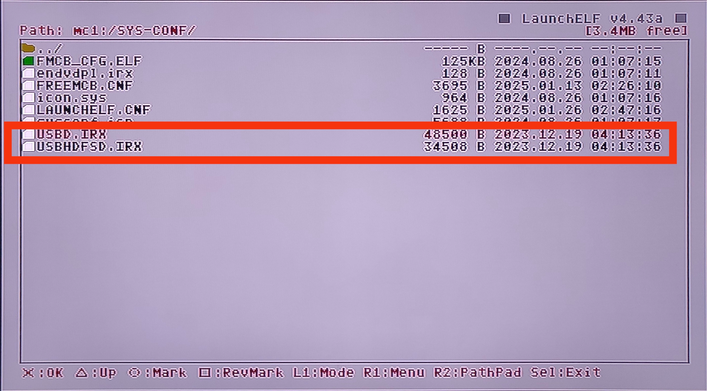
1. Copy your BDM Assault drivers to a memory card.
I choose to copy them into mc1:/SYS-CONF and replace the original drivers that comes with FMCB:
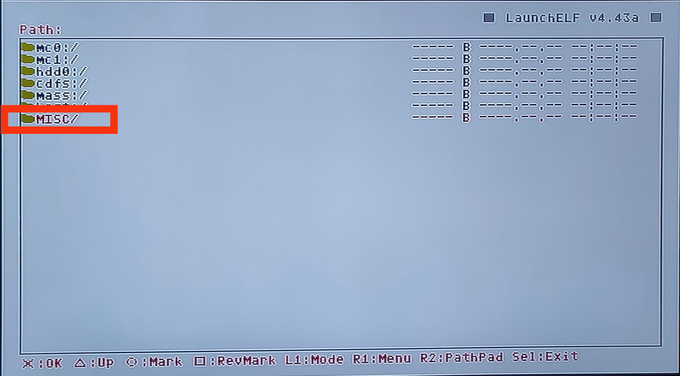
2. Now go back to the main screen and look for MISC/*:
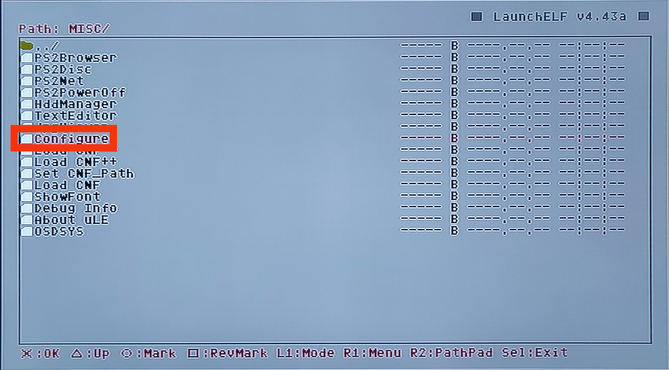
3. Look for Configure and enter it:
4. Look for Startup Settings... and enter it:

5. Look for USB IRX and enter it:

6. Now browse through your memory card to search for USBD.IRX:

7. Look for USB Mass and enter it:

8. Now browse through your memory card to search for USBHDFSD.IRX:

9. Once you set these files you can press RETURN:

10. Press OK:

11. Your config should be saved:

* Or Configure:

I choose to copy them into mc1:/SYS-CONF and replace the original drivers that comes with FMCB:
2. Now go back to the main screen and look for MISC/*:
3. Look for Configure and enter it:
4. Look for Startup Settings... and enter it:
5. Look for USB IRX and enter it:
6. Now browse through your memory card to search for USBD.IRX:
7. Look for USB Mass and enter it:
8. Now browse through your memory card to search for USBHDFSD.IRX:
9. Once you set these files you can press RETURN:
10. Press OK:
11. Your config should be saved:
* Or Configure:
So you can only use one USB at the time.
Additionally these drivers do not work with uLaunchELF 4.42d.
Works with wLaunchELF 41e4ebe (14\01\2019).
Checkout: https://www.psx-place.com/resources/wlaunchelf-4-43x_isr.1112/.
FunTuna Fork
- bdm_assault.irx must be pasted into mc?:/BOOT/USBD.IRX
- usbd_bd_assault.irx must be pasted into mc?:/BOOT/USBHDFSD.IRX
bdm_assault.irx must be pasted into mc?:/SMS/USBD.IRXusbd_bd_assault.irx must be pasted into mc?:/SMS/USBM.IRX
Other devices
When I was making BDMAssault, I realized I could do the same thing with iLink and UDPBD drivers. if you are interested (for whatever reason) in overriding USB support of some homebrew, and replacing it with iLink or UDPBD support, take a look here.
iLink assault:
https://www.psx-place.com/threads/bdmassault.42352/#post-377738.
Why do we need this?
In order to make this happen, we had to fuse 4 IRX modules into 2 IRX modules. because before BDM, USB access was splitted into 2 IRX drivers, but with BDM we have 4.
Original design:
BDM Design:
BDMAssault design:


