PS3 4.70 REBUG REX / D-REX + COBRA (v7.10)

UPDATE- ( REX Build has been released): Exciting news as the REBUG Team (evilsperm, cyberskunk, Joonie ,Habib & Abkarino) has released their latest CFW. 4.70 REBUG REX / D-REX + COBRA . In this version of REX (D-REX) there is an updated REBUG Toolbox (v02.02.04), Full COBRA v7.10 Features, Integrated webMAN MOD (v1.41.38 REBUG Edition) and also [break]..[/break]the usual REX Features such as full Cinavia Disabled, Fake Save Owner, Dual LV2 CEX/ DEX Kernel and all the REBUG Features you have loved from previous versions are present. Plus the developers have managed to improve stability of using COBRA on DEX mode among various other advancements.. See all the details in the information provided below and in the links included:

[strike]Note: D-REX is released but REX version will be uploaded soon:[/strike]
(REX build now available)


REBUG.png
4.70 REBUG REX / D-REX (+ Cobra v7.10)
REBUG CFW FEATURES:

  • INCLUDED REBUG TOOLBOX v02.02.04 - Install included Rebug Toolbox or higher for full compatibility
    • Changelog v02.02.04:
      • Dump root key on more CFW builds
        • 4.46 CEX
        • 4.65 CEX
        • 4.66 CEX
        • 4.70 CEX
        • 4.70 DEX
      • Toggle PS2 Emulator
        • Original PS2 emulator files are included to support full swapping to fix PS2 bug related.

  • FEATURE COBRA v7.10 Features Implemented - Disabled by default, Toolbox required to enable

  • FEATURE webMAN 1.41.38 MOD REBUG EDITION - Full Webman intergration supports both CEX/DEX 4.70

  • FEATURE REBUG Package Manager -Replacement for the standard 'Install Package Files' option on XMB

  • FEATURE Dual LV2 Kernels CEX/DEX - Swap your EID0/LV2 kernel using Rebug Toolbox in seconds

  • FEATURE ALL Retail functions available in CEX mode - No need to install different firmware

  • FEATURE ALL Debug functions available in DEX mode - No need to install different firmware

  • FEATURE ProDG Connectivity in DEX mode - Full Support on Normal mode, Partial Support on Cobra mode

  • FEATURE QA Token compatibility - Toggle in REBUG Toolbox

  • FEATURE OtherOS++ support enabled - Use Rebug Toolbox to Boot OtherOS with different LV1 patches

  • FEATURE Retro Emu Support - PS2/PS1/PSP Supported by various methods and procedures

  • FEATURE - NPDRM FSELF support - (DEX only with debug vsh), allows you to attach process on both npdrm fself and non-drm fself by disabling Kakaroto's sig patches in VSH.
FUN FEATURES:

  • FUN FEATURE Fake Save Data Owner Use Game Saves from ANY Owner

  • FUN FEATURE Enhanced Remote Play with PC - This unlocks the limitation of working apps/games for remote play with PC

  • FUN FEATURE Lock/Unlock Trophies- Lock/Unlock Trophies

  • FUN FEATURE Cinavia protection fully disabled - Supports optical media/bd iso, AACS must be decrypted)
PATCHES FOUND IN REBUG REX 4.70:

  • PATCHED LV1: Disable System Integrity Check - Safe to use with mismatched COREOS/SYSCON versions or if PS3 is not QA enabled

  • PATCHED LV1: Undocumented function 114 - Safe to use with mismatched COREOS/SYSCON versions or if PS3 is not QA enabled

  • PATCHED LV1: Skip all ACL Checks- Needed to allow booting of OtherOS

  • PATCHED LV1: Peek and Poke support -Unused LV1 call 182 and 183)

  • PATCHED LV2: Peek and Poke support- LV2 Syscall 6 and 7

  • PATCHED LV2: Peek and Poke support for LV1- LV2 Syscall 8 and 9

  • PATCHED LV2: LV1 CALL System call- LV2 Syscall 10

  • PATCHED VSH: Allow Unsigned act.dat and *.rif files

  • PATCHED -VSH: Disable Unlinking/Deleting of act.dat
Homebrew Updated for REBUG 4.70 REX


  • Eid root key dumper 1.00 for 4.70 dex ---> LINK * (SRC)
* 4.70 DEX Supported (Apps updated by Joonie)
COBRA v7.10 Feature Overview

  • PRX plugins at boot time (sprx)

  • ISO Suppport: PS1/PS2/PS3/PSP/DVD/BluRay (Split ISO support on FAT32 drives)

  • Network Support: PS1/PS3 /DVD/BluRay / PKGs (guide)

  • Blu Ray Movie region free functionality

  • NTFS HDD Support (prepNTFS, or multiMAN Required to scan contents)

  • PS2 ISO Support for BC (HW) / non-BC (SW) Consoles **

  • Syscall 11 Cobra lv1 Peek

  • PSNPatch stealth plugin support *ISO rip is required to get 100% support, folder rip won't be supported due to its ability to disable COBRA's disc-less feature for folder JB rips*

  • PS3API support, allows you to attach process on both CEX/DEX via its own API app.

  • NPDRM FSELF support, allows you to attach process on both npdrm fself by disabling Kakaroto’s sig patches in VSH.

  • Backup Protection Removal, Add full PS3 Backup support on all multiMAN/webMAN,IRIS manager forks and Managunz.

  • Target Manager 4.20-4.70 fully supported.

  • ***IMPROVED Stability with DEX mode, the annoying issue with hanging on boot on some old converted DEX models is fixed.
** PS2 Support on Internal HDD ONLY: dev_hdd0/PS2ISO/ **
www.rebug.me

logo.png
D-REX Cobra 7.1 EDITION INSTALL ON DEX PS3 SYSTEM
REBUG 4.70.1 D-REX EDITION APR. 2nd 2015

REX Cobra 7.1 EDITION INSTALL ON CEX PS3 SYSTEM
REBUG 4.70.1 REX EDITION APR. 2nd 2015


REBUG Team
  • Cyberskunk
  • Evilsperm
  • Joonie
  • Habib
  • Abkarino


**** UNOFFICIAL VIDEO ****
[video=youtube;wh5gd8pT0Ew]https://www.youtube.com/watch?v=wh5gd8pT0Ew[/video]
UNOFFICIAL VIDEO by T
heCorrellRoyHD


CLICK HERE TO VIEW USEFUL INFO WHEN INSTALLING A CFW:
---> LINK
DOWNLOAD @: www.rebug.me +
 
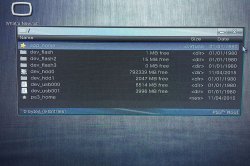
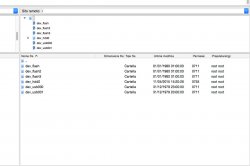
I have a strange thing happened when installing this CFW because of a problem, just within the hard disk of my ps3 via filezilla or file manager multiman all folders except dev_hdd0 are as date 01/01/1980, what is due to you? A bug?

I apologize if there are grammatical errors but I'm Italian, I use google translator

337064.jpg

337065.jpg
 
[MENTION=124]kokotonix[/MENTION]

Now I see what is doing when using debug vsh

It redirects pkg folder's path to app_home, but app_home is completely removed from xml due to prevent from double listing.. and [MENTION=872]sandungas[/MENTION]'s xml doesn't work at all with mm's pkg installation.
[MENTION=124]kokotonix[/MENTION]

I was able to fix the issue by readding app_home query in the xml back.. but this will possibly make that pkg double listing bug again.

http://www.mediafire.com/download/u60xmma5a91cj3g/category_game_rbg.rar
Finally I was with my PS3 and could test this.
It worked just great !
Now, folder mapping is working just fine for both retail and debug XMB modes.

Thank YOU [MENTION=29]Joonie[/MENTION] :)
 
I have a strange thing happened when installing this CFW because of a problem, just within the hard disk of my ps3 via filezilla or file manager multiman all folders except dev_hdd0 are as date 01/01/1980, what is due to you? A bug?

I apologize if there are grammatical errors but I'm Italian, I use google translator

Non ti preoccupare, è normale.

It's normal.
 
Succede con tutti i CFW, magari prima non ci hai fatto caso.

In effetti.. ho dato un occhiata ad un pò di video su youtube e anche loro hanno la stessa data, eppure ricordo di non averlo mai notato nonostante utilizzi tanto il file manager di multiman e/o filezilla ecc.
Strano pero. Il perché lo sai?

In fact .. I took a look at some videos on youtube and they too have the same date, but remember that he had never noticed much despite using the file manager multiman and / or filezilla etc.
Strange however. Why do you know?

Sorry [MENTION=118]kozarovv[/MENTION]... habit :D
 
Last edited:
This .raf extraction method by using the trick with p3textractor is obsolete and is not perfect, now the tool you need to use is "cxml decompiler" (is compatible with .raf .qrc and .p3t) it makes a perfect extraction, but before using cxml decompiler is needed to make the zlib decompression as you explained, by removing the first 8 bytes + simplyzip
Download cxml decompiler alpha Multi Upload biz
CXML Containers - PS3 Developer wiki
Coldboot.raf - PS3 Developer wiki

Edit:
After the extraction you need to look at the .xml file generated by the tool (this file is a very accurate representation of the original .raf internal structure), inside the .xml you can identify the file names and file extensions, then you can rename the files

For the images (in .gtf format) the only option is gft2dds as you said... and when the images are in .dds you can use any standard image tool to convert them like irfanview
For the script (in .jsx format) you can use rcomage (with the decompile or decode options) but the output is broken, by now doesnt supports ps3 scripts format.... or you can use the tool jsxviewer made by tyzzyt (is still in beta but works better than rcomage)... or you can decompile the opcodes manually one by one like i did with the coldboot.js i published in coldboot.raf page in wiki, is the same "playstation javascript format" used in the scripts inside dynamic themes (i spent a week of nightmares with the manual decompiling of the official coldboot script, heheh)
Also, with the .xml generated by cxml decompiler... is posible to prepare another .xml that can be used to make a full rebuild of the .raf file in a very accurate way with raf_compiler.exe (the .xml generated by cxml decompiler and the .xml needed for raf_compiler are pretty similar)... this file is the "coldboot.xml" i published in coldboot.raf page in wiki

if u mean the decoding mechanic resulting in hanzi making reencoding impossible, I've found a way around that. I used that method when rebuilding iceman/extreme's coldboot via someone else's source code. I don't believe that issue with scripts happens with all coldboots (don't think it happens at all with normal white coldboots), but it sometimes happens.

u can find the names of files within the hex. for example, the configuration file of the wave is actually a series of configuration files, but they appear next to one another in the hex itself.
 
u can find the names of files within the hex. for example, the configuration file of the wave is actually a series of configuration files, but they appear next to one another in the hex itself.

NO WAY!!! YOU MEAN THERE ARE FILES THAT ARE INSIDE OF OTHER FILES? XD

//sarcasm off
 
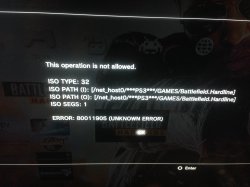
Try change ***PS3*** folder name to PS3, also if you are mounting ISO then correct folder for them is PS3ISO not GAMES.
 
Probably a super easy question, but I've only done downgrades. If I have a system with 3.50 firmware on it now. Can i just put OFW 3.55 and install this right over top of that or do I need to do something else. Also, can I QA flag once in the new rebug or do I need to put 3.55 CFW, QA flag, then install this?
 
Probably a super easy question, but I've only done downgrades. If I have a system with 3.50 firmware on it now. Can i just put OFW 3.55 and install this right over top of that or do I need to do something else. Also, can I QA flag once in the new rebug or do I need to put 3.55 CFW, QA flag, then install this?

Everybody say that best way is 3.55 OFW --> 3.55 CFW, QA Flag ---> New rebug or whatever you want. But QA Flag now can be enabled on Rebug 4.70.1 so you don't need to install 3.55 CFW. But is recomended (idk why...).
 
Everybody say that best way is 3.55 OFW --> 3.55 CFW, QA Flag ---> New rebug or whatever you want. But QA Flag now can be enabled on Rebug 4.70.1 so you don't need to install 3.55 CFW. But is recomended (idk why...).

Is there a particular 3.55 that is recommended?
 
Rogero 3.55 v3.7 or Rebug REBUG 3.55.4 but i thinked about this and process (3.55-3.55cfw-4.xx) is needed only for dehashing syscon but if your PS3 wasn't downgraded then you can install 3.55 OFW then any 4.xx i think because your ROS 0 and 1 are now correct (3.55).

Anyway both paths are correct and if i good understand dehashing process can be done any time thru 3.55 downgader if needed.
 
[MENTION=29]Joonie[/MENTION]

My Ps3 Slim're following error - 80010514
Ie can no longer play via Bluray games.


PS3 SLIM CECH2504
 

Featured content

Trending content

Back
Top