PS3 4.76.1 REBUG REX (D-REX) Now Available !!!!

As Rebug developer's Evilsperm hinted recently of a "near release" and as Joonie recently announced the new changes since the last update to REBUG REX. The wait is over as the official release has dropped after approved testing has satisifed the REBUG Custom Firmware developers. The most notiable changes in this build of REBUG REX (D-REX) is that you now have the ability for BD / DVD playback on DEX thanks to Mysis findings and release a couple of months ago, Cobra 7.2 makes its introduction to REBUG Firmware's, An update to the Rebug Toolbox (Add-on) that corrects an issue with the MAMBA payload. View all the changes and features outlined in the details [break]s[/break] below about this latest CFW release from Team Rebug. For full documentation on this CFW release be sure to view and read all the details provided by the REBUG developers on the official website as they really do a great job in documentation their firmware's and its features for its user base.


So the question now remains will we seen an Official Firmware Update around the corner as that seems to be the trend on the last few Rebug Releases. Stay Tuned to psx-place.com for the latest coverage !!!!


Rebug.PNG
CFW Release
CFW TypeDeveloper4.76 Apps & CFW
Download


4.76.1 REBUG REX (D-REX) - RELEASED

LATEST REBUG FIRMWARE BUILDS
REBUG 4.76.1 REX - Cobra 7.2 EDITION – INSTALL ON CEX PS3 SYSTEM
REBUG 4.76.1 D-REX - Cobra 7.2 EDITION – INSTALL ON DEX PS3 SYSTEM


What's new since 4.75.3?

  • Cobra payload has been updated from 7.1 to 7.2
    • (Minor bug fixes and improvement)
  • REBUG Toolbox has been updated from 2.02.07 to 2.02.08
    • (No more issue with mamba payload due to syscall 8 handling)
  • Full BD/DVD movie playback support on FULL DEX mode.
    • (Unlike previous REBUG REX/D-REX CFW, now you can watch BD/DVD movies on both kernels!)
  • Host IP address display on DEX mode.
    • (Same as normal DEX OFW/CFW)

FEATURES FOR REBUG REX/D-REX EDITION


  • FEATURE Dual LV2 Kernels CEX/DEX (Swap your EID0/LV2 kernel using Rebug Toolbox in seconds)
  • FEATURE ALL Retail functions available in CEX mode (No need to install different firmware)
  • FEATURE ALL Debug functions available in DEX mode (No need to install different firmware)
  • FEATURE FULL ProDG Connectivity in DEX mode (Full Support on both Normal mode and Cobra mode)
  • FEATURE QA Token compatibility
  • FEATUREOtherOS++ support enabled (Use Rebug Toolbox to Boot OtherOS with different LV1 patches)
  • FEATURE Package Manager (Replacement for the standard 'Install Package Files' option)
  • INCLUDED Rebug Toolbox 02.02.08 (Install included Rebug Toolbox or higher for full compatibility)
  • PATCHED Appldr: LV2 memory hash check is disabled (Memory protection on LV2 is disabled in higher level)
  • PATCHED LV1: Disable System Integrity Check (Safe to use with mismatched COREOS/SYSCON versions or if PS3 is not QA enabled)
  • PATCHED LV1: Undocumented function 114 (Allow mapping of protected memory)
  • PATCHED LV1: Skip all ACL Checks (Needed to allow booting of OtherOS)
  • PATCHED LV1: Peek and Poke support (Unused LV1 call 182 and 183)
  • PATCHED LV2: Peek and Poke support (LV2 Syscall 6 and 7)
  • PATCHED LV2: Peek and Poke support for LV1 (LV2 Syscall 8 and 9)
  • PATCHED LV2: LV1 CALL System call (LV2 Syscall 10)
  • PATCHED Recovery: Prevent accidental OFW update while on Recovery mode
  • PATCHED VSH: Allow Unsigned act.dat and *.rif files
  • PATCHED VSH: Disable Unlinking/Deleting of act.dat (Improved patches applied)
  • PATCHED VSH: Disable NEW PSP DRM Check (Allowing unsigned PSP pkg contents on 4.76 or higher CFW)
  • PATCHED VSH: Disable Epilepsy Warning for Faster Boot-Up Speed
  • FUN FEATURE Fake Save Data Owner (Use Game Saves from ANY Owner)
  • FUN FEATURE In Game Screenshot (Allows taking screenshots in Game)
  • FUN FEATURE Disabled flag check in PARAM for Remote Play (For better compatibility with remote play, custom flags in PARAM is recommended)
  • FUN FEATURE Lock/Unlock Trophies (Offline only)
  • *NEW* FEATURE Full BD/DVD Playback support on both CEX/DEX mode (BD/DVD movies can now be played on DEX mode, major thanks to mysis!)
  • FEATURE Cinavia protection fully disabled (Supports optical media/bd iso, AACS must be decrypted)
  • FEATURE Cobra 7.2 (Disabled by default, Toolbox required to enable)
  • FEATURE 1.43.21 MOD REBUG EDITION (Full Webman intergration supports both CEX/DEX 4.76)
  • FEATURE PSN/SEN Accessibility (PSN /SEN Accessible , until the next OFW update)


---> Additional Details / Download Information about this CFW can be viewed @
www.rebug.me <---

Thanks to @Zwei for the News Alert!!

Download: via rebug,me
Source: rebug,me
 
Last edited by a moderator:
[MENTION=89]aldostools[/MENTION] I found [MENTION=11]No0bZiLLa[/MENTION]'s a part of cover not show at gamelist's bug info: If your game cover name is gameid.jpg (note the'jpg'is lowercase) after scan game and reboot,the cover will not show at xmb,it will show game's defalut icon.If your game cover name is gameid.JPG (note the 'JPG' is uppercase) after scan game and reboot,the cover will show at xmb.This maybe a cover filename detection bug? I only test this at ps3 games.
 
Last edited:
http://aldostools.org/temp/test/webMAN_MOD_1.43.23_Updater.pkg

[MENTION=2]STLcardsWS[/MENTION] [MENTION=8]Tranced[/MENTION]
I think you've missed the following post about the new themes by MaxModding
http://www.psx-place.com/forum/webman-mod/webman-mod-information-thread-27-post30433.html#post30433

They have been on my list of things :) .. Always appreciate reminders and alerts though.
[MENTION=214]SNK[/MENTION] and his guys have done some good things with some of the mods.
 
So much cool stuff out this last two weeks. Like Xmas all over again. One of the things I love most about the PS3 is the customization we can do. Full total control for it to look and behave as we see fit.
 
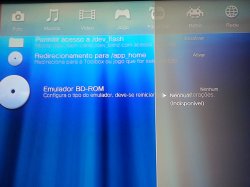
Good good day, all right with CFW, but for me, the multiman firmware error "error bd non-functional emulator firmware not supported" ... REX version - PS3 chech 2501a, this occurs because the multiman have to suffer one update ?? More at rest, it's all right ...
 
Last edited:
Good good day, all right with CFW, but for me, the multiman firmware error "error bd non-functional emulator firmware not supported" ... REX version - PS3 chech 2501a, this occurs because the multiman have to suffer one update ?? More at rest, it's all right ...

Multiman 4.75 or 4.76 both should work just fine. 4.76.00 was tested on both cex/dex


Sent from my iPhone using Tapatalk
 
good, I do not know if it's just me that setback, most already reinstalled mman and continues the same way, activating the snake function, or standard, plus the error continues .. or server for accessing games on pc, nor bd emulator, in configurations the mman says have no bd emulator, well, I do not know if it's just me .. mman version 4.76 I'm using ... hugs
 
good, I do not know if it's just me that setback, most already reinstalled mman and continues the same way, activating the snake function, or standard, plus the error continues .. or server for accessing games on pc, nor bd emulator, in configurations the mman says have no bd emulator, well, I do not know if it's just me .. mman version 4.76 I'm using ... hugs

Looks like your COBRA is still not enabled since all your issues are cobra related.

Make sure to reinstall the CFW and the Toolbox 2.02.08 then try it again.
 
Looks like your COBRA is still not enabled since all your issues are cobra related.

Make sure to reinstall the CFW and the Toolbox 2.02.08 then try it again.


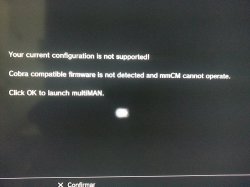
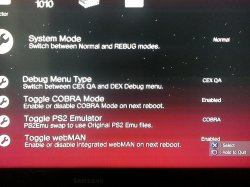
ok, I will show the steps made now and the results ...
1 - reinstalled CFW rebug 4.76.1 REX
2 - The function activated COBRA
1.1.jpg
3 - reinstalled multiMAN
1.2.jpg
4th - deleted and reinstalled REBUG_TOOLBOX_FULL_02.02.08
2.jpg

and these healthful results as you can see the photos.
the server for accessing via the PC games, also does not work and neither recognizes, both in function and COBRA or the NORMAL in REBUG_TOOLBOX_FULL_02.02.08
 
ok, I will show the steps made now and the results ...
1 - reinstalled CFW rebug 4.76.1 REX
2 - The function activated COBRA
View attachment 4572
3 - reinstalled multiMAN
View attachment 4573
4th - deleted and reinstalled REBUG_TOOLBOX_FULL_02.02.08
View attachment 4574

and these healthful results as you can see the photos.
the server for accessing via the PC games, also does not work and neither recognizes, both in function and COBRA or the NORMAL in REBUG_TOOLBOX_FULL_02.02.08

Do you use PSNPatch or SEN Enabler? That is really ODD..

Or did you disable syscalls from webMAN?

Otherwise it does not explain much to me.

Again my multiMAN is 4.76.00 as you can see from the picture.

aqnxb198q66c9q9zg.jpg
 
[MENTION=1948]marcaoperigoso[/MENTION] You should delete toolbox ,delete boot_plugins.txt from dev_hdd0 if exist, then reinstall firmware, then install toolbox (one that is already included in firmware, not downloaded one), then activate cobra. Important to do this step by step like i wrote.
 
[MENTION=89]aldostools[/MENTION] I found [MENTION=11]No0bZiLLa[/MENTION]'s a part of cover not show at gamelist's bug info: If your game cover name is gameid.jpg (note the'jpg'is lowercase) after scan game and reboot,the cover will not show at xmb,it will show game's defalut icon.If your game cover name is gameid.JPG (note the 'JPG' is uppercase) after scan game and reboot,the cover will show at xmb.This maybe a cover filename detection bug? I only test this at ps3 games.

Well, it's not exactly a bug... it was intentional that only the covers named as titleid + .JPG or .PNG (upper case) were detected, due the covers packs are formatted in that way.

Anyway I've modified the code to add the detection of the file extensions in upper and lower case (titleid + .JPG / .PNG / .jpg / .png). Try downloading again the pkg for 1.43.23.
 
like i said, the covers are all properly formatted and within the right sizes it seems, and they all end in uppercase '.JPG' and have correct game_id. ill get that xml for you as soon as i can. i ran prep ntfs and tried refreshing xml... tried deleting wmtmp and i even went through and formatted the hdd on PC and tried to redo it, but was still the same outcome.

also i didnt realize this was in rebugs thread... i thought i was in webman thread, so pardon me :p
 
[MENTION=89]aldostools[/MENTION] [MENTION=913]Metion[/MENTION] [MENTION=1060]Rommy667[/MENTION] [MENTION=16381]shinyoyo[/MENTION]

I think the issue with game lists not showing was caused by "Disable grouping of content in "webMAN Games"

[MENTION=89]aldostools[/MENTION]

i finally got some free time to check this issue. I can confirm that if Disable grouping of content in webMAN Games is enabled it doesn't show any game on XMB (on .21 and .22), the thing is that i have already tried to enable and disable this option but if you press click restart to apply changes on webman settings page it doesn't actually apply the new setting, you need to use /reboot.ps3 or manually reboot.

Anyway it's fixed now in .23.
 
[MENTION=1060]Rommy667[/MENTION]
The problem you have with webMAN-MOD is not due to the cfw release...
[MENTION=29]Joonie[/MENTION]
Thank you for this release.
I have a problem with movian in DEX (DEX kernel) though. The issue is not new as you know but now the way you recommended to install movian ends up with fatal error...

If I follow your instructions & install the last CEX pkg (then update within movian), half the movies I try to play crash on start (Cell Codec error). It looks like some streams can be played & others cannot. As soon as a crash occurs, movian shuts down & from then on, I cannot start the bru anymore, even after reboot. I get a 9xxxxxx error & must reinstall movian....

I decided to try the latest movian build pkg instead, I experience the same crashes but I can restart movian. No need for a reinstall.

Either way, the only solution for me right now is to swap kernel back to CEX whenever I need to use movian....

Just for info, everything works well with DEX kernel, movian is the only exception so far....

Has anybody else been facing this issue??
Any idea?


Sent with Tapatalk
For me, Movian has never been able to play any content from DVD/BR, unless retail discs, which the PS3 could already do. CECHE REX 4.76.1. Error is always "Unable to probe file: not owner". Dev says it sounds like a kernel issue, but I've tried Habib's 4.76 1.00, as an alternative, to no avail. Same error on both cfw. I think Movian's issues aren't going to be fixed, since I've been waiting on him to fix optical disc reading for a year, now. Years back, Showtime was able to read content from burned discs, but when I try a super-old build of Showtime, it gives the same error. Is/Are there any option(s) I could change in ReBug Toolbox that would change anything?
 
For me, Movian has never been able to play any content from DVD/BR, unless retail discs, which the PS3 could already do. CECHE REX 4.76.1. Error is always "Unable to probe file: not owner". Dev says it sounds like a kernel issue, but I've tried Habib's 4.76 1.00, as an alternative, to no avail. Same error on both cfw. I think Movian's issues aren't going to be fixed, since I've been waiting on him to fix optical disc reading for a year, now. Years back, Showtime was able to read content from burned discs, but when I try a super-old build of Showtime, it gives the same error. Is/Are there any option(s) I could change in ReBug Toolbox that would change anything?

Umm I don't really use any burned dvd or bd movies on my PS3 as COBRA can already run DVD/BD ISO files just fine without needing any extra homebrew except for backup managers.

As far as the kernel, there is nothing wrong with it since patches have always been the same since 4.21.

I don't think I can help you with fixing issues with movian, however comparing sources of those working versions of old showtime and the latest movian may help finding the clue.

As far as the CFW, there is nothing you can do.
 
Umm I don't really use any burned dvd or bd movies on my PS3 as COBRA can already run DVD/BD ISO files just fine without needing any extra homebrew except for backup managers.

As far as the kernel, there is nothing wrong with it since patches have always been the same since 4.21.

I don't think I can help you with fixing issues with movian, however comparing sources of those working versions of old showtime and the latest movian may help finding the clue.

As far as the CFW, there is nothing you can do.

Thanks for your input, Joonie :) As for older versions, what I meant was that older builds of Showtime worked with older ReBug releases ~2014 That's why I wasn't sure if the issue was a ReBug change. I'll try rolling back to ReBug 4.46, or older, which I know worked with discs.
 
Thanks for your input, Joonie :) As for older versions, what I meant was that older builds of Showtime worked with older ReBug releases ~2014 That's why I wasn't sure if the issue was a ReBug change. I'll try rolling back to ReBug 4.46, or older, which I know worked with discs.

I do have a bd burner, I'll try myself as well

*EDIT

[MENTION=2187]youwish[/MENTION] @bgurville

I made a conclusion that showtime via multiMAN can watch a burned bd movie disc without any problem, however this isn't really ideal as it is too slow to launch multiple apps and navigate files, I wonder why you need this.

anyways, standalone movian/showtime don't even let me browse files correctly, and impossible to watch movies, however showtime called via multiMAN 4.76.00 (non COBRA mode) showed it properly and didn't have any problems with movies.

Tested on CECHA01, 4.76 DEX, multiMAN 4.76.00 (multiMAN mode)
Tested media : BD-RE that contains Madagascar 3

I guess Movian's missing stuff that multiMAN + Showtime do, also, I tried making a standalone showtime mixed with SHOWTIME.SELF taken from multiMAN, it also behaved the same as the normal standalone showtime

StDISC homebrew wasn't used at all as its support was stopped since StDISC 8 ( FW up to 4.70)
 
Last edited:
Thanks for your input, Joonie :) As for older versions, what I meant was that older builds of Showtime worked with older ReBug releases ~2014 That's why I wasn't sure if the issue was a ReBug change. I'll try rolling back to ReBug 4.46, or older, which I know worked with discs.
Like [MENTION=29]Joonie[/MENTION], I never use dvdr so I need to try first... However I have a few dvdr on hand so I will give it a go & report.
Meanwhile am trying to figure out why movian keeps crashing on a regular basis for me on DEX (on a 2504B), interestingly I have noticed that those video files that crash via DLNA or P2P will play fine when stored locally..

Sent with Tapatalk
 
Back
Top