
We have two version of 4.84 Dualboot firmware that was released for CFW user's. One by developer @littlebalup and also one by developer @Bobby_Downgrades (Overflow) (bobby did make a mistake on his previous Overflow dualboot version but is an experienced developer and took full credit for the mistake while trying to making it right for user's that had issues.) .Now for those of you who do not know about a DB firmware, A dualboot firmware is an official firmware with one key difference and that being it has the ability to install a CFW over it. An idea originally brought to the scene by @habib
So here is the scenario you on CFW already (this is only for CFW user's only) and you have your Gran Turismo 5 (or any disc game) like pictured and you want to play/connect to PSN. However you do not want to be banned and want to reduce your chance of a ban . The good news is you can by simply installing a dualboot firmware for the latest firmware, in this case in one of these 4.84 release and when your done gaming online with your disc based game and you want to play Super Mario Bros. or the Legend of Zelda on your PS3 through RetroArch simply re-install the 4.84 CFW of your choice and be back in CFW land of features, This has been a very effective way to avoid bans on games like first person shooter that are much more proactive in detecting modded consoles (as they should be) ..
So here is the scenario you on CFW already (this is only for CFW user's only) and you have your Gran Turismo 5 (or any disc game) like pictured and you want to play/connect to PSN. However you do not want to be banned and want to reduce your chance of a ban . The good news is you can by simply installing a dualboot firmware for the latest firmware, in this case in one of these 4.84 release and when your done gaming online with your disc based game and you want to play Super Mario Bros. or the Legend of Zelda on your PS3 through RetroArch simply re-install the 4.84 CFW of your choice and be back in CFW land of features, This has been a very effective way to avoid bans on games like first person shooter that are much more proactive in detecting modded consoles (as they should be) ..
-
4.84 littlebalup - Dualboot Firmware
Here my flavour of a 4.84 "Dualboot" firmware : https://www.mediafire.com/file/p03t8u2ns2sliw0/DB_4.84_littlebalup.zip/file
- Made out from OFW 4.84.
- Patched isoldr and spu_pkg_rvk_verifier to disable ecdsa protections allowing to install CFW 4.84 and above over it.
- Core OS patched files have the exact same size than the OFW.
- Core OS file table is exactly the same than the OFW.
- PUP size is exactly the same than the OFW.
- More stealth than it, its an OFW

Tested on both NAND (CECHC04) and NOR (CECH-2004B).
Enjoy
-
4.84 OVERLOW - Dualboot Edition- Built from 4.84 ofw
- Safely play disc games online with no risk of ban
- Lv0 isoldr security disabled
- Pkg verifier security disabled
- Gives the impression of official firmware
- No cfw features
- Can have cfw 4.84 installed onto it
- Can have ROGERO 9.99 downgrader installed onto it
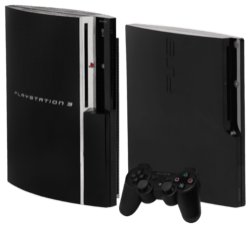
- CECH-A00
- CECH-A01
- CECH-C03
- CECH-G04
- CECH-L04
- CECH-2003a
- CECH-2503b
All worked flawless with no problem.
How to install: Make sure your usb is formatted to fat 32.
1. Create a folder on your usb called PS3. (in capitals)
2. Inside the PS3 folder make another folder called UPDATE. (in capitals)
3. Put the PS3UPDAT.PUP file inside the UPDATE folder.
4. Put your usb into your ps3 and go to the settings column, go to system update and update via storage device... ps3updat.com (homepage)
Download Choice / Source Link:
Last edited:







