PS3 4.84 FERROX COBRA ( 7.55) CFW by Alexander

PS3 Custom Firmware developer @Alexander has now released his 4.84 FERROX COBRA (7.55) CFW adding a new flavor to the 4.84 Custom Firmware mix. This Cobra CFW comes equipped with the latest Cobra 7.55 payload (which should perform like 4.83 FERROX Cobra) and allows for all the usual Cobra (v7.55) CFW features. Some of those features include Plugin Support (like webMAN), as well as ISO Support (Ps1/PS2/PS3/PSP/BD/DVD) are just a few abilities that Cobra adds to a firmware. Also developer Alexander includes an optional MOD Installer for some extra features and eye candy (see tab for more info). For full feature set and details checkout the included (translated) release notes provided​

if you have any feedback you can find @Alexander at his home site of Cybermodding.it and also here in our psx-place forums.

ferrox2017_2.png

Checkout other 4.84 related releases in this thread here.


  • Features of 4.84 FERROX COBRA (v7.55)
    • Built on the base of OFW 4.84 SONY.
    • PSN / SEN Enabled.
    • Ability to Update from any CFW (CEX).
    • Possibility of Update from OFW 3.55 "And from original firmware 4.82 [PS3Xploit exploit - compatible consoles only]"
    • Possibility of Downgrade from any CFW with active QA Flags.
    • QA Flags active if previously enabled.
    • FEATURE - COBRA Patches 7.55 added
    • FEATURE - New Look of the XMB (See FERROX Mod Installer (next tab)).
    • FEATURE - PS2 Games compatibility.
    • FEATURE - PSP Games compatibility in ISO / Minis / Remaster format.
    • FEATURE - Compatibility with the latest version of ReactPSN.
    • FEATURE - RSOD Screen Bypass for Consoles affected by RSOD.
    • FEATURE - Keys 4.84 to start Games signed with keys 4.84
    • FEATURE - App_home / PS3_GAME.
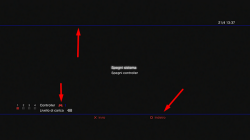
    • FEATURE - XMB In-Game Screenshot - find the option in the Photos column of the XMB In-Game.
    • FEATURE - Remote Play support.
    • FEATURE - Integrated Package Manager replaces the classic Install Package Files.
    • FEATURE - Addition of Temperature display in XMB In-Game on PS2 Games. Thanks to 3141card.
    • PATCH - LV1: Patch to remove LV2 protection.
    • PATCH - LV1: Patched the coreOS Hash Check to prevent the Brick on a non-Dehashed Downgraded Console.
    • PATCH - LV1: Peek & Poke.
    • PATCH - LV2: Peek & Poke.
    • PATCH - PS3 BT Remote Patch.
    • PATCH - PS3 BluRay Disc Patch.
    • PATCH - Disabled Epilepsy Message at the Boot.
    • PATCH - CINAVIA protection Disabled completely.

  • FERROX Mods Installer
    UNSR.png

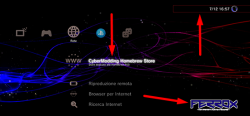
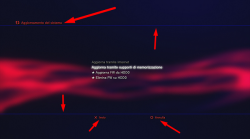
    If you like our Homebrew Store, or the Graphic Mods seen in the FERROX 4.80, this Installer is for you.

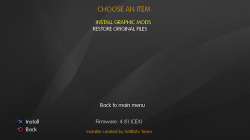
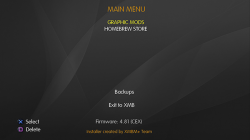
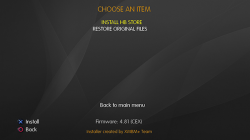
    This Installer was created on the basis of the XMBM + Team installer and inside it you will find the possibility to install or uninstall the Mods and the Homebrew Store. The installer was introduced into the Custom Firmware. This means that you will always have it available, without having to use a USB stick
    .​

    To install the PKG, simply go to the "Package Manager", and navigate to Install the File Package - Internal Storage of the PS3 system. The installer will always be there, but if you want you can delete it via File Manager from the dev_blind / ferrox / pkg directory.

    Below are some screens:
    HVGU.png I8YX.png I8ZU.png

    Use is really simple, there is not much to explain. You can install the Mods, and you can always reinstall the original files from the installer at any time. Ditto for the Store.

    Below I leave a video demonstration


    Mod Graphics by MiZiO90
    .
    FrxMods1.png
    BVYI.png 04HM.png

    CyberModding Homebrew Store
    .
    In addition to the Graphic Mods you see, the installer integrated into the CFW gives us the possibility to install the Cybermodding homebrew Store. I think now all of you Cybermodding users know our store. We have recently added and updated lots of mods for GTAV.

    If you want to take a look at our post on the latest version of the Store, here is the Link: Click HERE!


Downloads: 4.84 FERROX COBRA (7.55) v1.00 CFW
MD5: BEEFC45ADD365E6DA5C12976AA802F19

Source: cybermodding.it
 
Last edited:
first time you need to do all rogero downgrader route to be able to enable it,it's not just turning the setting in rebug toolbox.also,this is ferrox thread,so it's safe to assume that he doesn't have rebug anyway.

What bull sh!t you spewing now?

1. No you do not have to use Rogero downgrader!
2. Install Habibs Standalone QA Toogler> this will enable QA on any CFW.
3. Once enbaled its as simple as installing the PUP of whatever CFW you want.

EDIT: BTW using the downgrader when not needed can put the SYSCON in a panic by setting it to 9.99. You should never use this unless really needed> eg downgrading the old school way with a hardware flasher.
 
What bull sh!t you spewing now?

1. No you do not have to use Rogero downgrader!
2. Install Habibs Standalone QA Toogler> this will enable QA on any CFW.
3. Once enbaled its as simple as installing the PUP of whatever CFW you want.

Thank you! I thought there was something fishy about that guy lol... All jokes aside tho I hope the guy asking for help fixes his problem.
 
there's no harm in doing it,if your bd is fine you can simply flash regular cfw back.

Really...? It has been know that from time to time installing a NoBD CFW on a PS3 with a working BD Drive can perminantly f*ck up the drive. So if it was working before it might not be afterwards.

You should make sure first before you do and also PS3's that have the BD daughterboard interagted onto to PS MB do not have to install a NoBD CFW as they will not blackscreen, they will just refuse to play PS3 game disc ect..
 
Last edited:
I'm having a problem installing the newest wMM 1.47.25... when I launch the installer it just hangs with a blank screen... Now I'm also having the same issue with mmCM blank screen... I've checked to make sure my BD drive works and yes it works fine... I switched from rebug to ferrox and everything was working fine except when I installed wMM v.1.47.24 then uninstalled it that's when the problems started...

Edit #2: I've just tried rebuild database and restore filesystem with no luck. I'm thinking this is just a problem with Ferrox...?
 
Last edited:
Please help, why my multiman cannot open and just black screen appear ? After i upgrade cfw 4.82 to 4.84, with the same cfw ferrox cobra of course

I have a solution to your problem, I was having the same problem also. Just install the Ferrox update.pup again from the system update menu. It worked for me, hopefully works for you. Good luck.
 
No, you don't need to install noBD cfw unless your drive is really the problem. Try deleting multiman completely and reinstall it. If the problem is still there and all other Homebrew give a blank screen then trying downgrading back to 4.82 and see if they work then.
Thank for all the advice for my problem, my problem was solved, with install noBD CFW. I think my BD has been broken, i don't know for sure, but at least my PS3 working again thank you all of you. God bless you all.
 
Hey guys, found a problem with webMAN MOD v1.47.25 PS2 Auto CONFIGs on "FERROX 4.84 COBRA 7.55" firmware. With enabled "Auto CONFIG" option of ps2emu the CONFIG files created correctly but patches didn't make any effect (tried Silent Hill Origins with its white screen fog bug, both NTSC and PAL versions).

Then I've installed firmware "REBUG 4.84.2 REX" and tried CONFIGs again - they work! (also on this firmware CPU/RSX temperature is shown in PS2 mode). I made a backup of REBUG's /dev_flash/ps2emu folder and returned back on firmware "4.84 FERROX Cobra 7.55 CFW by Alexander" (mostly because I like the look of vanilla blue PS logos rather than red).

I've noticed that sizes of all ps2emu files are different with REBUG ones. After changing FERROX ps2emu files with REBUG's ps2emu files the CONFIGs started working properly.

So, there's something messed up with default FERROX ps2emu. @Alexander please make a fixed version of your firmare if it's possible.
 
Hey guys, found a problem with webMAN MOD v1.47.25 PS2 Auto CONFIGs on "FERROX 4.84 COBRA 7.55" firmware. With enabled "Auto CONFIG" option of ps2emu the CONFIG files created correctly but patches didn't make any effect (tried Silent Hill Origins with its white screen fog bug, both NTSC and PAL versions).

Then I've installed firmware "REBUG 4.84.2 REX" and tried CONFIGs again - they work! (also on this firmware CPU/RSX temperature is shown in PS2 mode). I made a backup of REBUG's /dev_flash/ps2emu folder and returned back on firmware "4.84 FERROX Cobra 7.55 CFW by Alexander" (mostly because I like the look of vanilla blue PS logos rather than red).

I've noticed that sizes of all ps2emu files are different with REBUG ones. After changing FERROX ps2emu files with REBUG's ps2emu files the CONFIGs started working properly.

So, there's something messed up with default FERROX ps2emu. @Alexander please make a fixed version of your firmare if it's possible.

I had the exact same problem when I installed ferrox... The config file will get created but it won't read for some reason. It has to be a ferrox issue not webman..
 
Had the same issue, but my mind didn't go so far to switch ps2emu files. but tried Starbuged 4.84 after i saw these two last posts, and problem was solved. I hope there's gonna be a patch for that, since Ferrox is one of the best releases.
 
ferrox and rebug are editions of cfw (custom firmware) developed by a separate persons and/or teams.

cobra/mamba are payloads mainly connected to iso's on cfw. both ferrox and rebug have versions of their cfw with and without cobra,and mamba are usually used on cfw without cobra (in homebrew app or patched afterwise).

usually you can see if your ps3 have cfw on it already in system settings and/or in homebrew (multiman for example) but it's not guaranteed that will either ps3 or homebrew display system info correctly due to various reasons.sometimes it's obvious because xmb will display custom logo and/or screen (rebug usually have custom logo on xmb for example).
 
ferrox has its own coldboot as well, so that may be a way to know which cfw you're on. and, ferrox is just as stable as rebug, so if you don't need all the extra features, ferrox is fine. :)
 
Which PS3 Slim Hack should me buy ?

- I went PS3 have Rebug REX can unlock and lock Trophies

Every shop I go to ask him I need PS3 hack
He tell me I have Cobra hack

When I'm check here about the top hack

He show me 3 hack ( Cobra , Mamba , Rebug REX ) I know In Rebug I can do everything but the question how can I know my PS3 Rebug not cobra or Mamba

Please forgive me about this question but I need know how I can chose good one

Best Regards
 
Which PS3 Slim Hack should me buy ?

- I went PS3 have Rebug REX can unlock and lock Trophies

Every shop I go to ask him I need PS3 hack
He tell me I have Cobra hack

When I'm check here about the top hack

He show me 3 hack ( Cobra , Mamba , Rebug REX ) I know In Rebug I can do everything but the question how can I know my PS3 Rebug not cobra or Mamba

Please forgive me about this question but I need know how I can chose good one

Best Regards
The latest Rebug CFW (4.84.2 REX) has Cobra 8.1 built in to it. Cobra is a feature of CFW and not a firmware itself. It's a payload which is integrated into the CFW to allow additional features. Mamba is the same thing, but is distinct from Cobra but essentially does the same thing.

Cobra Ferrox also has Cobra built into it by default, whereas with Rebug it can be toggled on or off using Rebug Toolbox. Hope this clears the issue up for you.
 
Back
Top