PS3 4.85.1 REBUG LITE CFW with new COBRA v8.2 Released

Developer Joonie of Team Rebug has announced today the latest cfw release (following 4.84.2 rex) of the REBUG brand. This is not the iconic REX flavor of PS3 Custom Firmware, which is a hybrid of dex/cex, In order for the creation of REX, the team is dependent and still in search for file's needed for the creation of REX (4.85 DEX PUP). However, they have the LITE version (a CEX based Cobra CFW) ready to go for 4.85 user's seeking a new 4.85 CFW. This is a welcomed update from Team Rebug as the 4.85 PS3 CFW landscape has been a bit light in choices (for 4.85). So having the developer's with one of the best name's in Custom,Firmware development is great to see now as an available option. Also, they have updated the Cobra payload to now version 8.2 & also the Rebug Toolbox has been updated (toolbox addon requires installation in "install package files" pkg is waiting for you there after installing REBUG) You can checkout all the feature's/patche's in the provided list below for this PlayStation 3 Custom FirmWare and then checkout full details/documentation of the release at rebug.me the official website (direct link found at bottom of article).

Also note that 4.85 SPY COBRA CFW has also been a good/stable CFW flavor as well , more details on that release can be Seen here. Also note that SPY Cobra CFW will not be using the latest Cobra v8.2 (without an update) as its debuting here on 4.85.1 REBUG Lite.

Rebug-1.png

  • Rebug 4.85.1 LITE – Cobra 8.2 – Toolbox 2.03.03
    (Oct 27th. 2019)

    THE LATEST REBUG FIRMWARE BUILD

    (We are still looking for providers of DEX OFW for future "REX/D-REX" releases)
    INSTALL ON CEX PS3 SYSTEM

    What's new since 4.84.1 LITE EDITION?

    • Stability* (4.85 OFW change)
      • (This system software update improves system performance)
    • REBUG TOOLBOX 2.03.03 MULTI
      • (The latest REBUG TOOLBOX with Multi Language support -16 languages)
    • COBRA 8.2 Updated
      • (Built-in reactPSN feature supported)


    FEATURES FOR REBUG LITE EDITION
    • FEATURE – QA Token compatibility
    • FEATURE – OtherOS++ support enabled
      • (Use Rebug Toolbox to Boot OtherOS with different LV1 patches)
    • FEATURE – Package Manager
      • (Replacement for the standard 'Install Package Files' option)
    • INCLUDED – Rebug Toolbox 02.03.03 Multi
      • (Install included Rebug Toolbox or higher for full compatibility)
    • FEATURE – FSELF compatibility
      • (Fake Signed ELF is supported on both CEX and DEX modes.)
    • PATCHED – Appldr: LV2 memory hash check is disabled
      • (Memory protection on LV2 is disabled in higher level)
    • PATCHED – LV1: Disable System Integrity Check
      • (Safe to use with mismatched COREOS/SYSCON versions or if PS3 is not QA enabled)
    • PATCHED – LV1: Undocumented function 114
      • (Allow mapping of protected memory)
    • PATCHED – LV1: Skip all ACL Checks
      • (Needed to allow booting of OtherOS)
    • PATCHED – LV1: Peek and Poke support
      • (Unused LV1 call 182 and 183)
    • PATCHED – LV2: Peek and Poke support
      • (LV2 Syscall 6 and 7)
    • PATCHED – LV2: Peek and Poke support for LV1
      • (LV2 Syscall 8 and 9)
    • PATCHED – LV2: LV1 CALL System call
      • (LV2 Syscall 10)
    • PATCHED – LV2: Allow execution of any LV2 internal function
      • (LV2 Syscall 15)
    • PATCHED – Recovery: Prevent accidental OFW update while on Recovery mode
    • PATCHED – VSH: Allow HAN Signed EDAT/PKGs
    • PATCHED – VSH: Allow Unsigned act.dat and *.rif files
    • PATCHED – VSH: Auto unlocks c00 demo contents (Improved patches applied)
    • PATCHED – VSH: Disable NEW PSP DRM Check
      • (Allowing unsigned PSP pkg contents on 4.75 or higher CFW)
    • PATCHED – VSH: Disable Epilepsy Warning for Faster Boot-Up Speed
    • FUN FEATURE – In Game Screenshot
      • (Allows taking screenshots in Game)
    • FEATURE – Full Polish support for XMB/PS2 Emu
      • (Provide full Polish character support)
    • FUN FEATURE – Enhanced Remote Play
      • (This unlocks the limitation of working apps/games for remote play, by disabling SFO flag check)
    • FEATURE – Cinavia protection fully disabled
      • (Supports optical media/bd iso, AACS must be decrypted)
    • FEATURE – COBRA 8.2 *UPDATED
      • (Enabled by default )
    • FEATURE – Homebrew store compatibility
      • (Downloading debug signed packages is now available on retail CFW.)
    • FEATURE – XMB CFW settings v0.1a
      • (XMB icons for simple CFW tasks available via REBUG TOOLBOX)
    • FEATURE – PSN/SEN Accessibility
      • (PSN /SEN Accessible , until the next OFW update)
    • FEATURE – XMBM+ Compatibility
      • (XMB Manager Plus developed by Team XMBM now supported via standalone pkgs.)
    • FEATURE – HAN Toolbox Compatibility
      • (HAN Toolbox Support added for testing HAN Signed pkgs on CFW)


Full details & Download @ >> rebug.me
 
Last edited:
Strange. Obviously you'll need Cobra if you want to play an ISO PS3 game while signed in, so I would maybe suggest trying a different 4.85 CFW - Spy Cobra or Ferrox Cobra are your two other options at the moment. See if the problem persists with either CFW. I'm not sure what else you could try, aside from seeing if the same thing happens with PSNpatch or SEN Enabler on the current Rebug firmware.

Okay, thank you very much Coldheart2236
I choose to wait for Rebug 4.85 REX/D-REX, then the system can't get any worse at least :)
Or maybe someone else has the same problem and a fix ;)
 
Mister @Joonie, on github forked from project Cobra 7.3 of @aldostools I saw the stage2.cex and the stage2.dex compiled for Firmware 4.85.

So I ask you if you expect the OFW 4.85 DEX to be released, in order to create the REBUG REX / D-REX ?

Is it also possible to use Cobra 8.2 on the current REX 4.84.2 Rebug?

I can replace the stage2.cex and the stage2.dex I have to wait for a release of the current REX Rebug ?


Thanks, always fantastic.
 
Mister @Joonie, on github forked from project Cobra 7.3 of @aldostools I saw the stage2.cex and the stage2.dex compiled for Firmware 4.85.
@smikk
I think
  • stage2.cex is stage2.cex.release (finalized version it can't debug output log using socat) and
  • stage2.dex is stage2.cex.debug (which can debug output log using socat to let user see what happens in ps3)
what rco/sprx/self is called when click on/launch something but maybe i am wrong maybe he create stage2.dex for 4.85 as no changes between firmwae 4.84 and 4.85 (CEX) and he made it for DEX

Mister @Joonie
So I ask you if you expect the OFW 4.85 DEX to be released, in order to create the REBUG REX / D-REX ?
I think he always expect to get sooner OFW DEX when new OFW (CEX) is released to make REBUG Full Edition(REX/D-REX) faster but that depends on devs,users,people who own a real debugging station and accept to share/leak OFW DEX PUP to joonie so he can release his REBUG REX/D-REX Edition

Mister @Joonie
Is it also possible to use Cobra 8.2 on the current REX 4.84.2 Rebug?

You can replace Cobra files from Evilnat's git he update Cobra 8.2 source for diffrent firmware bins will not cause any harm only it could lead to soft-brick if you do something wrong but lv2*kernel.self need to be replaced in unpacked REBUG 4.84 REX PUP but lv2 kernel can lead to perma-brick if you do something wrong or something happend by accident file can be damaged if you have pc with viruses and this cannot be recovered even if you have hardware flasher as it can kill your ps3 as lv2kernel can call/read/write to diffrent places in ps3 and SYSCON is one of them and those can have no way back to return to working PS3 even if you have valid dump before and HW Flasher so i suggest you to wait for @Joonie maybe he can update REBUG 4.84 with Cobra 8.2 :)

Mister @Joonie
I can replace the stage2.cex and the stage2.dex I have to wait for a release of the current REX Rebug ?

Nope i think when you do it you will get no display till you pull out your HDD ,one of my friend try that before and he gets his PS3 like it still ON but no display till he format the HDD then he gets his ps3 to work
 
Last edited:
In CFW 4.84 I had the error 80028F10 with PSX PAL games.
In 4.85 I still can't play PSX PAL games. :(
Have you tried using IRISMAN? I haven't been on PS3 much lately, or tried this version of REBUG, but IRISMAN always worked well for me to play PAL PSX games.
 
Have you tried using IRISMAN? I haven't been on PS3 much lately, or tried this version of REBUG, but IRISMAN always worked well for me to play PAL PSX games.

In IRISMAN they work. When I use 4.83 they work with webman.


Will it be a bug in CFW 4.84 and 4.85?
 
Hello I'm getting a error code 80023017 and I have already updated the Np environment to np, is there anything else I can do so I can access games online?
 
So how come I have a menu set and everything and I go into bo2 and I get the welcome screen but i do what it says on how to open the menu and nothing happens at all?????
 
I have a NTSC CECHA01 and while playing NTSC PS1 bins I have a lot of audio stuttering.
I'm playing using webman with cobra enabled and my games are installed in the internal HDD
 
I have downgraded back to 4.82.2 DEX and the problem persists but while launching from Irisman the games work properly.
Is there a way to disable the "video type fix" from cobra?
 
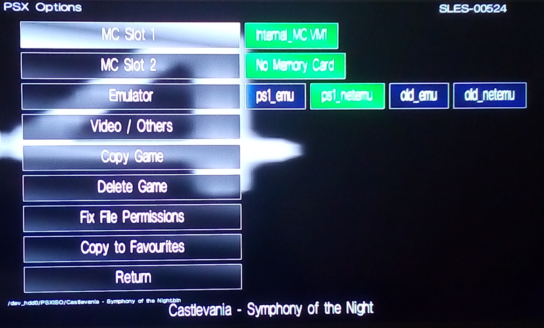
Did you tried to change PS1 emu?
At default IRISMAN is using ps1_netemu:
emu-select.png


In webMAN MOD hold R2 or L2 while mounting a PSX ISO to choose ps1_netemu or ps1_emu.
 
Last edited:
hey guys whats up, i just a got a ps3 slim from my brother which im trying to put rebug lite on but there's a problem... its missing the bluray drive... i put in a blank hard drive and a flash drive with the OFW 4.85 in the correct folder but the problem is, it wont read any flash drive i've tried... i know for a fact that all my usb flash drives work, and i know for sure that the ports on the console work because I'm able to connect several controllers via USB... how can i get it to recognize my flash drives? thanks in advance.
 
hey guys whats up, i just a got a ps3 slim from my brother which im trying to put rebug lite on but there's a problem... its missing the bluray drive... i put in a blank hard drive and a flash drive with the OFW 4.85 in the correct folder but the problem is, it wont read any flash drive i've tried... i know for a fact that all my usb flash drives work, and i know for sure that the ports on the console work because I'm able to connect several controllers via USB... how can i get it to recognize my flash drives? thanks in advance.
Your USB must be formatted with FAT32 file system and MBR partition not GPT
 
Back
Top