
PS3 [4.88.2 Evilnat Cobra] Is it possible to free more space from a newly swapped HDD?

Ifreedan

Forum Noob
I installed a fresh new 1 TB HDD on my PS3 and after reinstalling the CFW and formatting the HDD, I noticed that the free space was much smaller than what I've expected: 827 GB/931 GB.
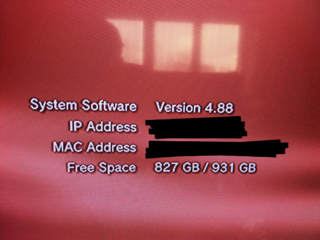
image-2021-12-07-235043.png


I wasn't expecting to have the full 1 TB of space, but I was wondering how I've lost more than 100 GB of free space (931 - 827 = 104). A Google search lead me to a post explaining that the PS3's file system reserves 8% of the drive's free space (and even in that case, 104 GB is about 11% of that 931 GB Free Space, way more than 8%, since 931 x 0.08 = 74.48) and that it was possible to reduce it to 1% by using the PS3 Unlock HDD Space v1.0 homebrew, which I did and, in fact, it helped me to recover some free space, raising the Free Space from 827 GB to 890 GB.
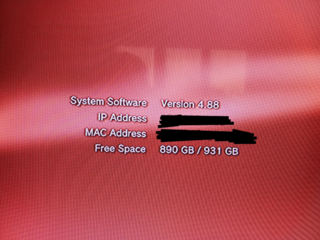
image-2021-12-07-235955.png


So while I recovered 63 GB of the wasted 104 GB thanks to the homebrew, I'm still losing 41 GB (4.4%).

I would like to set that reserved space to 1% (or 9.37 GB, which should be more than enough, since the first PS3 models had only 20 GB HDD).

That said, is there something that can be done in order to recover more Free Space?

Obs.: The only game installed is Super Street Fighter 2 Turbo HD Remix, which is very small (less than 400 MB).
 
I installed a fresh new 1 TB HDD on my PS3 and after reinstalling the CFW and formatting the HDD, I noticed that the free space was much smaller than what I've expected: 827 GB/931 GB.

image-2021-12-07-235043.png


I wasn't expecting to have the full 1 TB of space, but I was wondering how I've lost more than 100 GB of free space (931 - 827 = 104). A Google search lead me to a post explaining that the PS3's file system reserves 8% of the drive's free space (and even in that case, 104 GB is about 11% of that 931 GB Free Space, way more than 8%, since 931 x 0.08 = 74.48) and that it was possible to reduce it to 1% by using the PS3 Unlock HDD Space v1.0 homebrew, which I did and, in fact, it helped me to recover some free space, raising the Free Space from 827 GB to 890 GB.

image-2021-12-07-235955.png


So while I recovered 63 GB of the wasted 104 GB thanks to the homebrew, I'm still losing 41 GB (4.4%).

I would like to set that reserved space to 1% (or 9.37 GB, which should be more than enough, since the first PS3 models had only 20 GB HDD).

That said, is there something that can be done in order to recover more Free Space?

Obs.: The only game installed is Super Street Fighter 2 Turbo HD Remix, which is very small (less than 400 MB).


you can use webMAN mod for it:

  • /unlockhdd.ps3?<0-9>&opt=<0/1> - sets % of minimum free space & HDD optimization status
just use the above web command
 
Thank you everybody for your help.

Indeed, it seems that the PS3 Unlock HDD Space v1.0 homebrew was accurate after all.

I installed the webMAN MOD v1.47.37 (yes, I'm a newcomer to the PS3 homebrew scene) and as suggested above, I tested the following webMAN MOD commands using the web browser on my PC:

http://<My PS3 IP address>/unlockhdd.ps3?enable
http://<My PS3 IP address>/unlockhdd.ps3?<0>&opt=<1>
http://<My PS3 IP address>/unlockhdd.ps3?<0>&opt=<0>

The best Full Size I could achieve was 890.6 GB, which was the same as the homebrew.

1TB = 1,000,000,000,000 bytes = 931 GiB (the PS3 and Windows use GB for Gibibyte)

PS3 HDD Unlock actually recovers 7%. It changes the 8% reserved space to 1%.

The rest of the space is used by /dev_hdd0, /dev_hdd1, /dev_flash, /dev_flash2, etc.

So from that 40~41 GB chunk of space, 9.31 GB (1%) would be the reserved space and the all the rest (somewhere around 30.69~31.69 GB) is being used for the rest? Both numbers sound as an overkill, considering that by default, the PS3 use to have a much smaller HDD (my previous HDD was 160 GB).
 
That's the way it is.... If you need more space, install a larger disk (up to 1.5TB is known to be supported without issues).

The kernel, system files and some garbage files are stored in the HDD for NOR models.
dev_hdd1 partition reserves 2GB for system cache.

Use a file manager (e.g. ManaGunZ, multiMAN or IRISMAN) to navigate your file system and check if you have files like pkgs, ads, logs, etc. that you can delete.
 
That's the way it is.... If you need more space, install a larger disk (up to 1.5TB is known to be supported without issues).

On Black Friday/Cyber Monday, I was considering to purchase a 2 TB 2.5" HDD and use some tool to shrink the partition to 1.5 TB, but since I found some people still saying there were some issues, I decided to pick a 1 TB 2.5" HDD because I was sure I wouldn't have any issue.

In any case, perhaps 1 TB will be enough since I want to use the PS3 to play PS3 exclusive games (e.g.: God of War: Ascension, Metal Gear Solid 4: Guns of the Patriots, InFamous, etc) or those PS3/Xbox 360 games that weren't ported to later generation or PC (e.g.: Asura's Wrath, etc).

Use a file manager (e.g. ManaGunZ, multiMAN or IRISMAN) to navigate your file system and check if you have files like pkgs, ads, logs, etc. that you can delete.

I will check that. No matter how much free space is left, it's always a good idea to delete unnecessary stuff.

Thank you all.
 
Back
Top