4.93 EVILNAT (Cobra 8.5)

PS3 4.93 Evilnat w/ Cobra v8.5 - (CEX/PEX/D-PEX) 4.93

I installed Evilnat CFW 4.93 (2026-03-31) and dumped meta loader. It seems different than one I dumped via metldrpwn on Linux in 3.55 times. I.e, what starts from 0x0 in that file, it starts from 0xC6B0 in current dump. Does it means metldrpwn didn't extract whole loader from SPE while stage1 does?

@Evilnat
 
Where can I find information on how to create a noFSM patch? I understand it's a modified CORE_OS_PACKAGE. But how do I modify it? There's no patch for the current version 4.93 yet, so I'm curious.
 
Where can I find information on how to create a noFSM patch? I understand it's a modified CORE_OS_PACKAGE. But how do I modify it? There's no patch for the current version 4.93 yet, so I'm curious.
@bguerville has been waiting for one so we can test toolset updates. Was trying to get a hold of @Evilnat , @littlebalup I was told cannot make one at this time. @Joonie also maybe knows how to make one ;)
 
@bguerville has been waiting for one so we can test toolset updates. Was trying to get a hold of @Evilnat , @littlebalup I was told cannot make one at this time. @Joonie also maybe knows how to make one ;)

That's exactly why I wanted to understand this technology, because the nofsm patch is designed not only for software firmware but also for hardware. It's important to be on the safe side in case people aren't available. ;)

A quick analysis of patch 4.92 showed that some files were taken from cfw, some from ofw, and two files were patched.

from cfw (Firmware_4.92.2 Evilnat [CEX]\CORE_OS)
262 144 creserved_0
10 144 default.spp
546 480 emer_init.self
462 740 eurus_fw.bin
819 760 lv0
1 280 lv0.2
576 pkg.srvk
736 prog.srvk
23 136 sb_iso_spu_module.self
8 sdk_version
53 200 spp_verifier.self
62 240 spu_pkg_rvk_verifier.self
49 520 spu_token_processor.self

from ofw (Firmware_4.92\CORE_OS)
17 048 aim_spu_module.self
262 144 creserved_0
462 740 eurus_fw.bin
418 528 hdd_copy.self
1 280 lv0.2
4 776 manu_info_spu_module.self
32 908 mc_iso_spu_module.self
34 960 me_iso_for_ps2emu.self
34 960 me_iso_spu_module.self
576 pkg.srvk
736 prog.srvk
119 512 sc_iso.self
8 sdk_version
25 552 spu_utoken_processor.self
91 936 sv_iso_for_ps2emu.self
91 936 sv_iso_spu_module.self

patch this file:
1 280 128 lv1.self
1 586 440 lv2_kernel.self
 
Last edited:
Hey friends, I have a question, I started playing ff8 for the ps1 on the ps3, but I noticed something, I thought the widescreen was built into the PS1 Emu or Netemu, is that true?

If so, the problem is when I set it to full screen for the game, the whole game changes with that means the objects and example inputs are shifted and it's kind of buggy, but if I set the picture to normal, then it's completely normal again, has anyone noticed it yet, can someone walk through the Balamb garden at the beginning?
 
Hey friends, I have a question, I started playing ff8 for the ps1 on the ps3, but I noticed something, I thought the widescreen was built into the PS1 Emu or Netemu, is that true?

If so, the problem is when I set it to full screen for the game, the whole game changes with that means the objects and example inputs are shifted and it's kind of buggy, but if I set the picture to normal, then it's completely normal again, has anyone noticed it yet, can someone walk through the Balamb garden at the beginning?
you are right. there is widescreen mod in fullscreen
 
Never understand why it even called Nofsm in the first place.

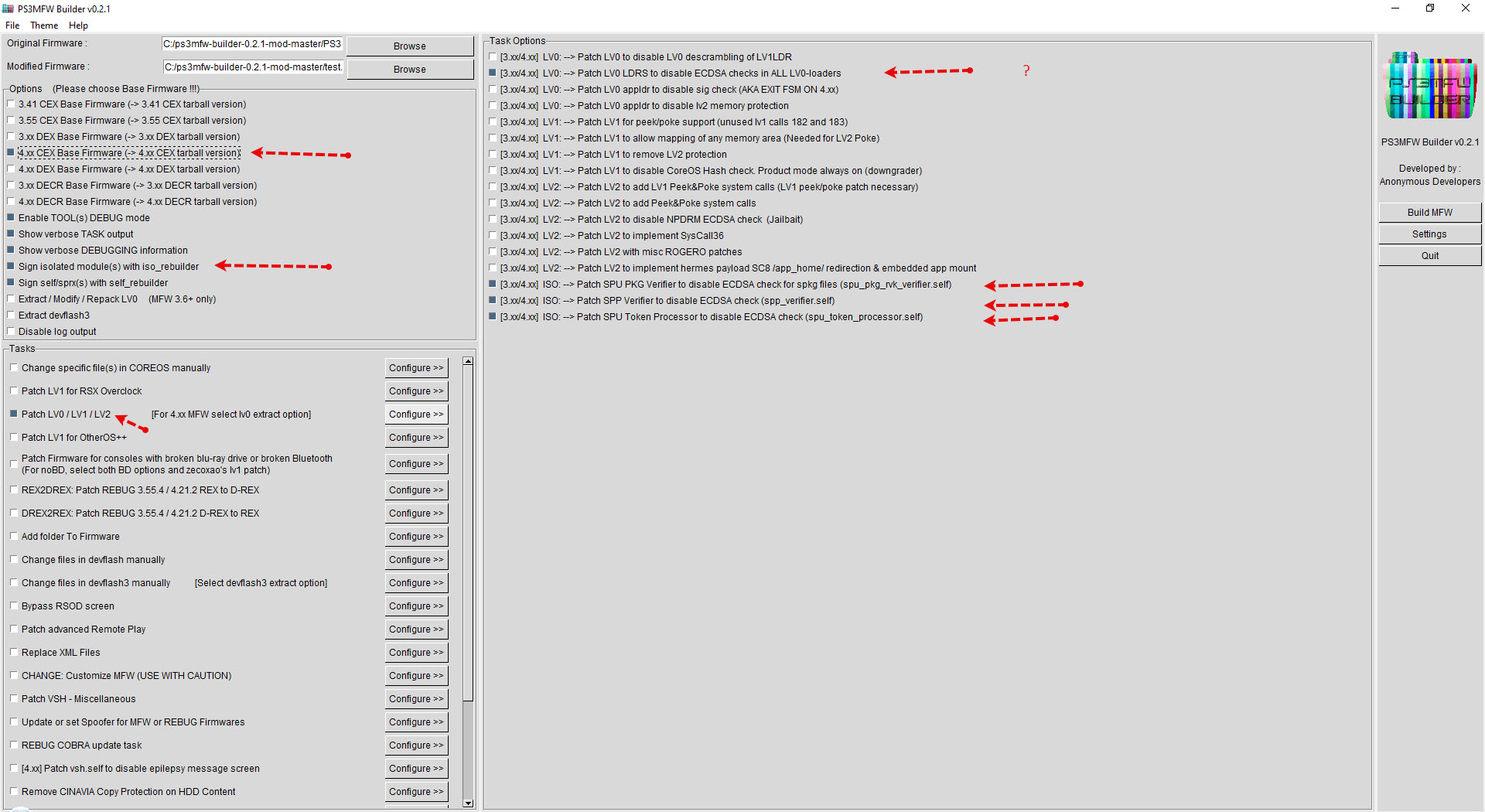
All you need to do to install CFW is patch isoldr and iso module to bypass pup check.

Which is always done on CFW or MFW builder.

So you just take CoreOS directly from CFW and flash it. dev_flash doesn't matter.

Do I understand the options correctly?

2026-04-13_22-34-58.jpg
 
I'm thinking of Installing the latest version of Irisman as well as 4.93 Evilnat CFW via USB, but I don't know which to put in first, or if I should put both in at the same instance. What is the best course of action?
 
Last edited:
I'm thinking of Installing the latest version of Irisman as well as 4.93 Evil CFW via USB, but I don't know which to put in first, or if I should put both in at the same instance. What is the best course of action?

doesn't matter just put both in the usb device, it won't cause any conflict
put 4.93 cfw inside PS3 > UPDATE.
Irisman you can put in the root of the device.
If you already have a cfw installed in your ps3 you can install Irisman before or after you install the latest Evilnat CFW.
 
I don't use Webman on my Slim console, and even though I've selected Syscon for the fan settings, the fan speed gradually reaches 50% during every PS3 game. I replaced the thermal paste last year. Could this be related to the EvilNAT version?
 
@Evilnat I'm not sure is it a problem wih cfw 4.93 or not. Sometimes my xmb has stutters, it feels like 15fps. Webman mod show 60, but...
I have such issue on 4.93: cecha/cechb models, ssd, hdd, 90nm rsx, frankie: sony/custom. In games it feels the same. Did you get such problem?
 
The overclock with txt didn't work for me idk why I did everything and put it in dev_hdd0 root but still get the same freq


I got the same problem I was using 700/900 on the last update now it causes artifacts on the xmp and froze my system right after the startup once
Update on this Issue: I installed the new 4.93 update and the issue is still there when using cfw tools or the txt file for OC but If I use mfw builder all the instability is gone
 
Back
Top