Developer Aldostools brought (or re-brought) to our attention with a tutorial of a feature you may not be aware is within multiMAN's mmCM mode. As developer aldostools was having a private conversation with developer deank, the developer of multiMAN pointed out that the AIO manager not only has an FTP Server that we all know and use, but the less known and perhaps just as useful PS3 NET SERVER is built into mmCM. So this means you can mount and play a ISO stored on another PS3. This is a a great feature that many are unaware of and this feature has been around since v4.15.00 (as seen here in my coverage back in 2012), developer aldostools has provided us with a couple of methods to get this working with webMAN or multiMAN and its not very difficult at all. View all the details below for some additional information about this feature .
aldostools said:I'm posting this because probably many users are not aware of this feature... even myself was not 100% aware of it until deank pointed it to me few days ago.
Here we go....
multiMAN (aka mmCM) not only has an ftp server... it also has a PS3 NET SERVER that runs on PS3.... and this feature has been there in mmCM for ages!!!! :crazy:
That means that it's possible to mount the ISOs stored on another PS3 (that is running multiMAN) using webMAN, webMAN MOD or multiMAN on your PS3.
The steps are quite simple:
1- Start multiMAN on the PS3 that will act as server (the one that has the ISO that we want to run).
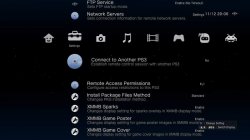
2- On multiMAN go to Settings column and set "Remote Access Permissions" to Full
3- On another PS3 use webMAN or multiMAN to connect to the PS3.
a) If you use webMAN:
- Go to /setup.ps3, put a check mark on Scan for LAN games/videos PS3NETSRV#1 (2 or 3...), enter the IP address of the PS3 acting as server, enter 38008 as port and save!!
- Use webMAN file browser to navigate to the folder containing the ISO in /net0 (or /net1, etc.) and mount it clicking on the 2nd column (size column).
b) If you use multiMAN:
- Go to Settings column, press X on Network Servers option, enable /net_host0 and enter the IP address of the PS3 acting as server, enter 38008 as port, enter a friendly name (press START on each prompt).
- Now you can go to mmOS (SELECT+START), navigate to the folder containing the ISO in /net_host0 and mount it double clicking on the file (press X twice).
IMPORTANT: multiMAN must be always running on the PS3 acting as server, unless you use webMAN MOD "full edition" (which has implemented its own PS3 NET Server).
Multi-part ISO or games in JB folders cannot be mounted with multiMAN's PS3 NET Server (neither with webMAN MOD's PS3 NET Server).
Enjoy it!!! ... all credits (and your base) belong to deank
Source: psx-place.com
Last edited: