PS2 Actual 'Hello World' using Game Screen on PS2

VTSTech

Developer
This took me way too long to figure out.

We can't actually see the first 80 or so lines of text output to the screen. So I had to pad things a bit before I could see anything. (not really)

Turns out the real culprit was a need to sleep(1) after init_scr. if a program does nothing else but scr_printf after init_scr, 8 lines can execute before it is complete. (also not really)

Turns out the real, real culprit was emulation accuracy on PCSX2 itself. The code always worked on a real PS2... :shame:

Source+Compiled binaries attatched. Compiled with "Prebuilt MinGW Playstation 2 Toolchain - 2018/10/19" https://github.com/ps2dev/ps2toolchain/releases/download/2018-10-19/ps2toolchain-20181019.7z

hello.c

Code:
// An actual 'Hello World' using the main game display of a PS2
// No longer infinite loop. Now fully commented
// Written by VTSTech ([email protected])

// v0.4 11/29/2019 8:42:50 AM
// Now not using any loops at all.
// sleep() for 1 second allows for inital lines to display
// just scr_printf() right off the bat, first 8 lines can execute before init_scr complete

// v0.3 11/27/2019 5:47:29 AM
// Using unistd.h and sleep() instead of kernel.h and SleepThread()
// Now sleeps for only 30s and quits instead of sleeping forever
// Now using for loop instead of infinite loop
// aligned comment fields, commented all lines

// v0.2 11/25/2019 9:04:00 AM
// Now breaking infinite loop and sleeping forever
// Added newline buffer to cause text to display
// Added comments

// v0.1 05/06/2019 7:20:00 AM
// Text displays on game screen
// An infinite loop simply saying "It Works!"

#include <debug.h>  //needed for init_scr();
#include <unistd.h> //needed for sleep();

int main()         //int main() is automatically called/started with all programs
{
  init_scr();         //Initialize Screen
  sleep(1);                       //PS2 is old. Give it a second...
  scr_printf("Hello World!\n"); //print our string
  sleep(30);         //Wait here for 30 seconds instead of exiting (ret 0) with sleep();
  return 0;         //This exits and returns to system menu
}

Makefile
Code:
EE_BIN = hello.elf
EE_OBJS = hello.o
EE_LIBS = -ldebug -lc

all: $(EE_BIN)

clean:
   rm -f $(EE_BIN) $(EE_OBJS)

run: $(EE_BIN)
   ps2client execee host:$(EE_BIN)

reset:
   ps2client reset

include $(PS2SDK)/samples/Makefile.pref
include $(PS2SDK)/samples/Makefile.eeglobal
 

Attachments

Last edited:
Updated :)
// v0.3 11/27/2019 5:47:29 AM
// Using unistd.h and sleep() instead of kernel.h and SleepThread()
// Now sleeps for only 30s and quits instead of sleeping forever
// Now using for loop instead of infinite loop
// aligned comment fields, commented all lines

// v0.2 11/25/2019 9:04:00 AM
// Now breaking infinite loop and sleeping forever
// Added newline buffer to cause text to display
// Added comments

// v0.1 05/06/2019 7:20:00 AM
// Text displays on game screen
// An infinite loop simply saying "It Works!"
 
This took me way too long to figure out.

We can't actually see the first 80 or so lines of text output to the screen. So I had to pad things a bit before I could see anything.

Source+Compiled binaries attatched. Compiled with "Prebuilt MinGW Playstation 2 Toolchain - 2018/10/19" https://github.com/ps2dev/ps2toolchain/releases/download/2018-10-19/ps2toolchain-20181019.7z

I'm not sure what you mean. It should be the other way around: we should be unable to see anything beyond the first 56 or so "lines", depending on the video mode (assuming each character is 8px in height). In fact, the code prevents us from drawing anything beyond the first 40 lines.

If you wanted to set the cursor position, the scr_setXY() will allow you to do that.
 
I'm not sure what you mean. It should be the other way around: we should be unable to see anything beyond the first 56 or so "lines", depending on the video mode (assuming each character is 8px in height). In fact, the code prevents us from drawing anything beyond the first 40 lines.

If you wanted to set the cursor position, the scr_setXY() will allow you to do that.

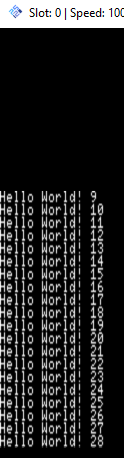
Earlier when I had it scr_printf with the value of x on every line, the first one I could see was 40. Displays until x=67 then loops on top of itself starting at top and overwriting previous output.

It appears lines 68 thru 79 are never displayed in a visible area...

dd57587cf4246ff2be059c227ca78391.png
 
  • Like
Reactions: TnA
hmm. So I can use scr_getX/Y() and find out what the first visible x/y is and just use scr_setXY(x,y) ; and forgo a loop altogether :)

Well, After trying that. Didn't work.

int x = scr_getX();
int y = scr_getY();

both report as 0 on start. scr_printf and nothing displayed for many lines.

do scr_setXY(0,0); try again. nothing for many lines.
do scr_setXY(0,40); & scr_setXY(0,80); still nothing

issuing scr_clear(); and nothing else. no padding no scr_set. It works at 0,0 .... (But not in this program ... )

I think I have solved it! For some reason. If i sleep(1) after init_scr and scr_clear it will print at 0,0. even in this program. I guess it needs that extra second to cleanly init some modules....

This code now works :)

Code:
  init_scr();         //Initialize Screen
   scr_clear();                   //Clear screen.
  sleep(1);                       //PS2 is old. Give it a second...
  scr_printf("Hello World!\n"); //print our string
  sleep(30);         //Wait here for 30 seconds instead of exiting (ret 0) with sleep();
  return 0;         //This exits and returns to system menu

Testing:

Code:
while(1) {  
  if (x<=39) {
  scr_printf("Hello World! %d\n",x); //print our string
  }
  x++;
  }

Without sleep(1)
6fef8e0d98bc2749aef20a61479b45e0.png


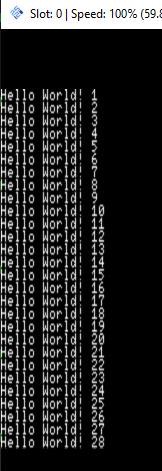
With sleep(1)
3b0eda8ac9abc1384f2b786e05f8f01f.png
 
Last edited:
I don't think that is the right thing to do. Even though it's a 20-year old console, it isn't that slow.

There might be a problem with init_scr(). Did you try putting the sleep() between init_scr() and scr_clear()?
Particularly if that helped, what would happen if you added a call to Dma02Wait(), after init_scr():
Code:
static inline void Dma02Wait(void)
{
  unsigned dma_addr;
  unsigned status;

  asm volatile ("  .set push  \n"
  "  .set noreorder  \n"
  "  lui  %0, 0x1001  \n"
  "  lw  %1, -0x6000(%0)  \n"
  "1:  andi  %1, %1, 0x100  \n"
     "  nop  \n"
     "  nop  \n"
     "  nop  \n"
     "  nop  \n"
  "  bnel  %1, $0, 1b  \n"
  "  lw  %1, -0x6000(%0)  \n"
  "  .set pop  \n"
  : "=&r" (dma_addr), "=&r" (status) );
}

If it helps, then the fix would be to add it to init_scr() itself, after the initial configuration is sent via DMA.

By the way, your original code had an array of size 80, but you iterated 81 times (from x=0 to x=80). That would have possibly corrupted memory after the end of the buffer.
 
Last edited:
scr_clear(); doesn't appear to be required. Even with just a sleep(1) first lines will display.

Using Dma02Wait() without scr_clear() after and nothing displays (at first)

I think a good fix would just be ... to add sleep(1) to init_scr - That'd solve all problems wouldn't it ? (After testing, maybe add Dma02Wait AND scr_clear to init_scr ?, Dma02Wait is already there .. so just a scr_clear then?)
--
Displays nothing (for a long time, almost a minute)

Code:
  int x=0;
  init_scr();         //Initialize Screen
  Dma02Wait();                       //PS2 is old. Give it a second...
   while(1) {
     if (x<=39) {
       scr_printf("Hello World! %d\n",x); //print our string
     }
     x++;
   }

And then this

c3844337f9d101c50177877e9f33a633.png


This actually worked

Code:
  int x=0;
  init_scr();         //Initialize Screen
  Dma02Wait();                       //PS2 is old. Give it a second...
  scr_clear();
   while(1) {
     if (x<=39) {
       scr_printf("Hello World! %d\n",x); //print our string
     }
     x++;
   }

Displays Lines 1 to 27
--
Calling init_scr() twice w\ scr_clear() also works. Then I don't have to define Dma02Wait
 
Last edited:
scr_clear(); doesn't appear to be required. Even with just a sleep(1) first lines will display.

Technically, the screen is cleared by default - so you would not need to clear it. Once the GS is reset via the CSR (as part of the library's initialization), it is cleared.

Using Dma02Wait() without scr_clear() after and nothing displays (at first)

Then I'm not sure what could be wrong. Neither have I seen this happen. Granted, I haven't been using libdebug in most of my works, other than those small side projects.
Are you using a the latest revision of the ps2sdk, from here?

I think a good fix would just be ... to add sleep(1) to init_scr - That'd solve all problems wouldn't it ?

No. What exactly did you fix by doing that?
If you just added something for the sake of making things work, then did you really fix the problem? Even if you "fixed" it by waiting - how do you know what you are waiting for and how long to wait for?

(After testing, maybe add Dma02Wait AND scr_clear to init_scr ?, Dma02Wait is already there .. so just a scr_clear then?)

It's missing from the end of scr_init(), which is why I asked whether adding a call to it would help.
Since it is declared as a static function of scr_printf.c, it is not possible to call directly. The only solution would be to add a copy to your program and call it after calling scr_init().

Code:
  init_scr();
  Dma02Wait();

--
Displays nothing (for a long time, almost a minute)

Code:
  int x=0;
  init_scr();         //Initialize Screen
  Dma02Wait();                       //PS2 is old. Give it a second...
   while(1) {
     if (x<=39) {
       scr_printf("Hello World! %d\n",x); //print our string
     }
     x++;
   }

And then this

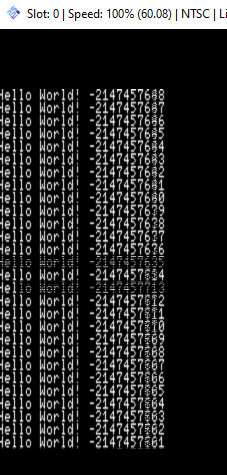
That's because it will only print something when x is less than 40. Once x goes beyond 39, it must be incremented until it overflows to negative, before you see lines appear.

Calling init_scr() twice w\ scr_clear() also works. Then I don't have to define Dma02Wait

scr_clear() actually draws blank squares over every position on the screen. It's not actually something special, which is why I would also find it strange that calling scr_clear() somehow fixes things.
Technically, the clearing of a screen could be done by drawing 1 large rectangle over the screen, instead of drawing over every square.
 
Using a version of ps2sdk built likely 2 weeks ago in wsl. It has commits from as recently as Feb 2019 in it.

My main issue is that it doesn't print anything even when x *is* less than 40. All those lines get missed unless i do something extra... I only have it stop there because at 41 it starts to overwrite the screen. In tests the first 8 lines do not display

It's not really a big deal to me to have to sleep(1) to start putting things on screen, it just added some speed bumps to my learning curve here.
 
This thread should be marked for those who are beginners to PS2-Development (not necessarily C and programming itself)!

I like that!

Those who are interested, can basically follow step by step and become Homebrew-Developers for consoles themself!

Please continue on your journey! :)
 
I've been a developer for windows for a long time. Just not in C. Only formally educated in Visual Basic and Python, Rest is self taught and just transferable knowledge between the two. Still very rare for me to write something not for a PC thou :P First time doing that.
 
Using a version of ps2sdk built likely 2 weeks ago in wsl. It has commits from as recently as Feb 2019 in it.

I see. Great!

My main issue is that it doesn't print anything even when x *is* less than 40. All those lines get missed unless i do something extra... I only have it stop there because at 41 it starts to overwrite the screen. In tests the first 8 lines do not display

It's not really a big deal to me to have to sleep(1) to start putting things on screen, it just added some speed bumps to my learning curve here.

What I'm trying to say is that this isn't normal behaviour. You're trying to get it to wait for something, which should not happen.

I realize that you have only been showing us output from PCSX2. Have you tried it on real hardware? At the end of the day, PCSX2 is still an emulator. If it's caused by something PCSX2 is doing/not doing, then we probably should not try to shape the code for that.

I edited a piece of old software I wrote in 2014 (old version of PS1VModeNeg), to not reboot the IOP. And it also gave the same problem. Anything that seems to be able to cause a delay, such as an IOP reset, can cause it to start working. I wonder how we can get a timing problem like that in PCSX2, in a single-threaded program...

By comparing the code against what libgs (which I once used as a target for replicated functions from the Sony libgraph) and gsKit does, there were some errata found, but none of which seemed to matter:
  • When the DMA channel is initialized, the wrong CHCR register is cleared (clears CH3 instead of CH2).
  • Calls SetGsCrt to use FRAME mode, but we want FIELD mode. The SMODE2 register is later manually written to, which (silently) corrects this.
 
I'm testing on PCSX2 first, and then real PS2 later.. If nothing shows or shows incorrectly in PCSX2 i don't usually try it on real PS2.

I'll try some of my breaking examples on real ps2....

UPDATE:

Well, After testing on real PS2. All examples that didn't work/showed nothing in PCSX2 work in actual PS2...

hello-1-28.elf shows 1-28, exits cleanly after 30s
hello-nothing-overflow.elf, shows nothing in PCSX2, until overflow. displays as expected in real ps2
hello-nothing2.elf, same as above either with or without an scr_clear();

none of these are using sleep(1)

So it looks like it's an issue with PCSX2/emulation accuracy and nothing to do with the code or ps2sdk...
 

Attachments

Last edited:
  • Like
Reactions: TnA

Similar threads

Back
Top