Analog sticks ps3 doesnt work at all

Moonlte

Forum Noob
Hello guys. Yesterday, a friend gifted me a controller that he was thinking it was dead, but it was a batery problem. The controller works but the l2 is not working (I think that is the conductivity paper, dont know how is called).

But the real issue here is that both sticks doesnt work. Only when I press them. I used Controller Test by Zar and it recognized the l3 and r3 pressed but the screen shows the sticks like "vibrating" and they doesnt move. I used to touch the board on the rear part of sticks and they move to the up (on the controller test).

Do you know guys what can I do? Sorry for my english problems lol.
 
I'm not real familiar with the innards of the ps3 controller, but the 360 has the analog sticks on a square box. you can easily install new analog sticks, but usually the problem is dirt or something. if by vibrate you mean the dual shock, the 360 also has those tumblers on either side of the handles of the controller. they're soldered to board using wires. those are probably replaceable, thought I've never replaced that portion of the controller.
 
Hello guys. Yesterday, a friend gifted me a controller that he was thinking it was dead, but it was a batery problem. The controller works but the l2 is not working (I think that is the conductivity paper, dont know how is called).
The selllers uses many names for that "conductive paper", sometimes is named RCB (ribbon circuit board)
There is a list here, incase you need to buy one check the compatibility https://www.psdevwiki.com/ps3/DualShock_3#Ribbon_Circuit_Boards

The problem of the L2 is related with the RCB for sure

First you need to check the "copper pins" in the RCB (check the images uploaded in wiki, there is one where you can see the exact pin where is connected the L2), originally that pins had a goldie color and shiny but after years they could have a dark-brown color
In that case, you need to clean them very softly with alcohol and cotton, but dont insist while doing it because is not posible to return to the original goldie color
That brown substance are metalic particles (oxidation of the copper), and is deep into the copper

After that, you can use a graphite pencil to paint in top of them, i know it shound too much ghetto but the graphite is electrical conductive, it just works and is super easy

The other easy thing you can do is to increase the height of a "rubber piece" that pushes that pins. That rubber can be removed, insert a piece of cardboard under it, place the rubber again in his place and is done. Usually this tricks works even if the pins are very oxidized

And the last thing you can do... incase there is some line "broken" at a middle point... you can create your own "conductive glue", i was talking about it in the forum before, use the forum search engine with "conductive glue" or "graphite powder", etc...
In this post i was mentioning some of this things
https://www.psx-place.com/threads/ds3-not-charging.26833/page-2#post-213746
But the real issue here is that both sticks doesnt work. Only when I press them. I used Controller Test by Zar and it recognized the l3 and r3 pressed but the screen shows the sticks like "vibrating" and they doesnt move
The fact that L3 and R3 works doesnt gives any hint, are lines completly separated from the sticks X and Y sensors
The first thing i would do is to disconnect the RCB and see if the sticks works fine without it, is long to explain but an intermitent connection in the pins of the RCB could generate "phantom button presses" (thats another good keyword for the forum search engine btw) and im not so sure if more unestabilities
At this point i dont think the problems in the RCB could affect the sticks, but im not so sure, so better check it

If you still have the problem in the sticks after removing the RCB i guess we are going back to this kind of talk:
https://www.psx-place.com/threads/dualshock-3-analog-stick-replacement.33361/#post-288957
There are many differences in that circuit for every diffrent DS3 model, the model is printed in white texts

I used to touch the board on the rear part of sticks and they move to the up (on the controller test).

Do you know guys what can I do? Sorry for my english problems lol.
Wait, i dont understand well what you did, but better dont mess around touching in the pins of the pots (that little plastic squared blocks attached at the sides of every stick to meassure X and Y rotations)
You are not going to damage the pot itself... but there is a chip connected to them, im sure that pins have some kind of protection inside it but probably are very limited... one mistake and you can fry it internally

 
The selllers uses many names for that "conductive paper", sometimes is named RCB (ribbon circuit board)
There is a list here, incase you need to buy one check the compatibility https://www.psdevwiki.com/ps3/DualShock_3#Ribbon_Circuit_Boards

The problem of the L2 is related with the RCB for sure

First you need to check the "copper pins" in the RCB (check the images uploaded in wiki, there is one where you can see the exact pin where is connected the L2), originally that pins had a goldie color and shiny but after years they could have a dark-brown color
In that case, you need to clean them very softly with alcohol and cotton, but dont insist while doing it because is not posible to return to the original goldie color
That brown substance are metalic particles (oxidation of the copper), and is deep into the copper

After that, you can use a graphite pencil to paint in top of them, i know it shound too much ghetto but the graphite is electrical conductive, it just works and is super easy

The other easy thing you can do is to increase the height of a "rubber piece" that pushes that pins. That rubber can be removed, insert a piece of cardboard under it, place the rubber again in his place and is done. Usually this tricks works even if the pins are very oxidized

And the last thing you can do... incase there is some line "broken" at a middle point... you can create your own "conductive glue", i was talking about it in the forum before, use the forum search engine with "conductive glue" or "graphite powder", etc...
In this post i was mentioning some of this things
https://www.psx-place.com/threads/ds3-not-charging.26833/page-2#post-213746

The fact that L3 and R3 works doesnt gives any hint, are lines completly separated from the sticks X and Y sensors
The first thing i would do is to disconnect the RCB and see if the sticks works fine without it, is long to explain but an intermitent connection in the pins of the RCB could generate "phantom button presses" (thats another good keyword for the forum search engine btw) and im not so sure if more unestabilities
At this point i dont think the problems in the RCB could affect the sticks, but im not so sure, so better check it

If you still have the problem in the sticks after removing the RCB i guess we are going back to this kind of talk:
https://www.psx-place.com/threads/dualshock-3-analog-stick-replacement.33361/#post-288957
There are many differences in that circuit for every diffrent DS3 model, the model is printed in white texts


Wait, i dont understand well what you did, but better dont mess around touching in the pins of the pots (that little plastic squared blocks attached at the sides of every stick to meassure X and Y rotations)
You are not going to damage the pot itself... but there is a chip connected to them, im sure that pins have some kind of protection inside it but probably are very limited... one mistake and you can fry it internally

Hey man sorry for not explain very well. I can send photos, but my net is really slow, so i need to take photos and try to upload them.

Your explanation about rcb is just a masterpiece and I will try it now.

My problem with sticks is that they dont recognize my actions with them. Just when i pressed them. I use gamepad test and in screen, they are like vibrating or something. Is easy to explain with photo/video, but i have net issues and that will be quite hard to do :c
 
I'm not real familiar with the innards of the ps3 controller, but the 360 has the analog sticks on a square box. you can easily install new analog sticks, but usually the problem is dirt or something. if by vibrate you mean the dual shock, the 360 also has those tumblers on either side of the handles of the controller. they're soldered to board using wires. those are probably replaceable, thought I've never replaced that portion of the controller.

Yes, I think that resolder the sticks can help but I wanted to make sure if there are anothet solution
 
I have another rcb from another controller (yes, my house is filled up with consoles/pc junk lol)

So my rcb is sa1q188a and the other is sa1q195a
So I think that is not compatible.
 
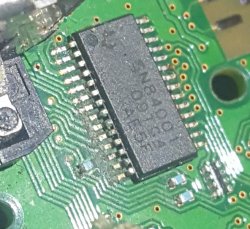
Hey!!! I noticed this. I think that is screwed up. Don't know if that have something to do with my problem.
 

Attachments

  • 20210405_231045.jpg
    20210405_231045.jpg
    326.1 KB · Views: 129
From the photo it appears that there are two or three cut tracks (pin 14?, 13? and 12). They can be repaired with great care.
 
Last edited:
From the photo it appears that there are two or three cut tracks (pin 14?, 13? and 12). They can be repaired with great care.

Yes, they where cuted down. That control has stoped working just because my friend's sister throw it away. I think that soldering that tracks I can fix it
 
Hey!!! I noticed this. I think that is screwed up. Don't know if that have something to do with my problem.
Yes, they where cuted down. That control has stoped working just because my friend's sister throw it away. I think that soldering that tracks I can fix it
By looking at your photo im not sure if the lines are broken, and i cant imagine how that damage was caused (im wondering if it could be coca cola ?). Anyway, only you can check it, with a multimeter

If the lines at the corner are damaged you can fix 3 of them with thin wires this way
nHJrP96.jpg

The next 8 pins in that row goes directly to the stick pots, follow the image i posted in the other thread, but you should review it because that drawing was a dirty sketchup
 
By looking at your photo im not sure if the lines are broken, and i cant imagine how that damage was caused (im wondering if it could be coca cola ?). Anyway, only you can check it, with a multimeter

If the lines at the corner are damaged you can fix 3 of them with thin wires this way
nHJrP96.jpg

The next 8 pins in that row goes directly to the stick pots, follow the image i posted in the other thread, but you should review it because that drawing was a dirty sketchup

Sorry for stupid question but, how i can repair them?
 
Sorry for stupid question but, how i can repair them?
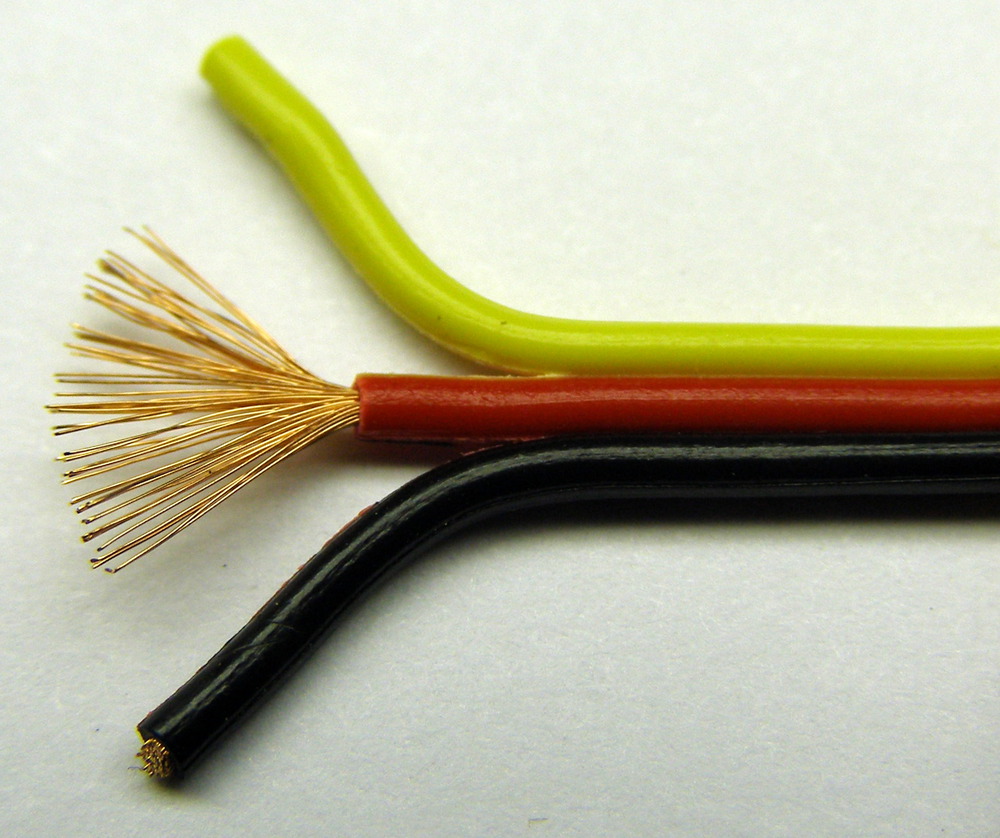
What i would do for the 3 lines i painted is to take a normal wire, remove the plastic insulation and cut one of the thin copper threads
Like in this photo, it can be seen the red wire have lot of threads inside, you just need one of them for every pin
51155039ce395f2754000001.JPG

And solder them with a low-power solder iron because the blue resistors are "high precission" i dont think the heat can do any good to them so better dont overheat them much
If you only have a solder iron with high power... i suggest to do the solders as fast as posible (dont touch the components with the solder iron for more than 2 seconds)

And is going to be a lot easyer if the solder iron have a small tip because is going to be tricky to solder the wires to the texas instrument pins without bridging several pins together, there are some tricks to prevent this, anyway if you brige several pins dont panic, is posible to clean them with "desolder braid" (sometimes named also desolder wick), after that cleanup you can try again... and again... and again...
 
Back
Top