
You are using an out of date browser. It may not display this or other websites correctly.
You should upgrade or use an alternative browser.
You should upgrade or use an alternative browser.

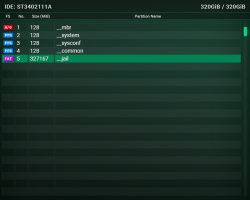
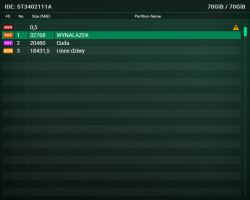
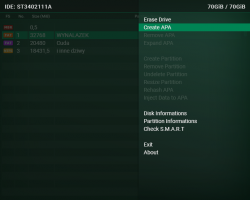
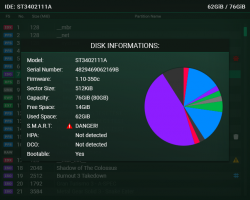


 Nice work

I don't think I have ever said it before so I will say it now.
Thanks Berion for all your contributions, for providing GUI elements in various homebrew projects & for making regular design proposals in an attempt to take things forward.
This design is nice.. as usual. ;-)
Thanks Berion for all your contributions, for providing GUI elements in various homebrew projects & for making regular design proposals in an attempt to take things forward.
This design is nice.. as usual. ;-)

Berion
Developer
Thanks for a warm words. ^^
@bguerville Thanks. I like designing interfaces, especially for ancient devices.
@bguerville Thanks. I like designing interfaces, especially for ancient devices.
Berion
Developer
I have updated first post with some fixes to old screenshots/mockup plus S.M.A.R.T menu.
I have also updated assets archive.
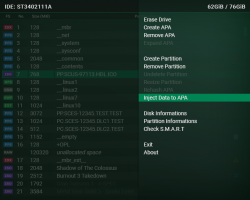
Options explanations (in case someone want to write such app ^^):
I have also updated assets archive.
Options explanations (in case someone want to write such app ^^):
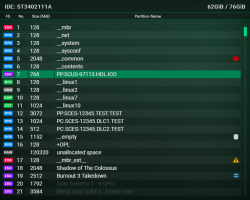
Oh, and I forgot to explain badges:1. Erase Drive:
a. Quick Erase:
Overwriting first 1MiB of selected drive, making it visible as empty to all operating systems and devices.
b. Full Erase:
Overwriting entire selected drive. Because of speed of USB 1.1, should be allowed only for IDE connected drives.
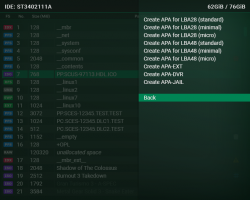
2. Create APA:
a. Create APA for LBA28 (standard):
Making all standard partitions with their standard size, which means: "__mbr" (128MiB), "__net" (128MiB), "__system" (256MiB), "__sysconf" (512MiB) and "__common" (1GiB). Partition Index for maximum 128GiB storage.
b. Create APA for LBA28 (minimal):
Making all standard partitions but all with 128MiB in size. Partition Index for maximum 128GiB storage.
c. Create APA for LBA28 (micro):
Making only "__mbr". Partition Index for maximum 128GiB storage.
d. Create APA for LBA48 (standard):
Making all standard partitions with their standard size, which means: "__mbr" (128MiB), "__net" (128MiB), "__system" (256MiB), "__sysconf" (512MiB) and "__common" (1GiB). Partition Index for maximum 2TiB storage.
e. Create APA for LBA48 (minimal):
Making all standard partitions but all with 128MiB in size. Partition Index for maximum 2TiB storage.
f. Create APA for LBA48 (micro):
Making only "__mbr". Partition Index for maximum 2TiB storage.
g. Create APA-EXT:
Making all standard partitions with their standard size, which means: "__mbr" (128MiB), "__net" (128MiB), "__system" (256MiB), "__sysconf" (512MiB) and "__common" (1GiB). First Partition Index (inside "__mbr") for maximum 128GiB storage. Second Partition Index (inside "__mbr_ext__") for maximum 2TiB (minus 128GiB) storage. This specific partitioning splitting available space into two areas: first for all software with LBA28 compatibility and second for ToxicOS where games are stored. Currently this is obsolete and rather useless with exception of use original Sony HDD with installed original HDD OSD or PSBBN plus ToxicOS.
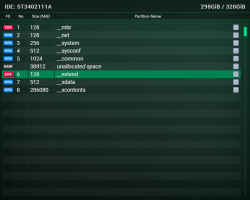
h. Create APA-DVR:
Making all standard partitions with their standard size, which means: "__mbr" (128MiB), "__net" (128MiB), "__system" (256MiB), "__sysconf" (512MiB) and "__common" (1GiB). First Partition Index (inside "__mbr") for maximum 40GiB storage. Second Partition Index (inside "__extend") for maximum 320GiB (minus 40GiB) storage. This specific partitioning splitting available space into two areas: first for all software with LBA28 compatibility and second for DVR functionalities where films and updates are stored. Drive is in DECRYPTED state, so You need encrypt it after formatting or else DESR will not recognize drive.
i. Create APA-JAIL:
Making base PFS partitions in size: "__mbr" (128MiB), "__system" (128MiB), "__sysconf" (128MiB) and "__common" (1GiB). And from all available space above, one huge exFAT partition (but not written to "__mbr" index of course). More details here: https://www.psx-place.com/threads/apa-jail.34847/
3. Remove APA:
a. Remove APA-EXT:
Deleting "hdd0:/__mbr_ext__" and all partitions further.
b. Remove APA-DVR:
Deleting "hdd0:/__extend" and all partitions further.
4. Expand APA:
Expand partition index in "hdd0:/__mbr" to covering up whole disk.
5. Create Partition:
Creating partition with PFS file system on chosen by user size.
6. Remove Partition:
Changing partition name to "__empty" which makes it flagged as not used any more.
7. Undelete Partition:
Changing partition name from "__empty" to i.e "__undelete" to make it visible again. However, sub partitions can be already overwritten so it will not works always.
8. Resize Partition:
Changing PFS partition size (but I'm not sure if this is possible) to user choice size.
9. Rehash APA:
Creating checksum from APA of highlighted partition and overwrite old. Option can be useful if user have edited first 512 bytes of APA "header" outside PS2 and didn't correct checksum.
10. Inject Data to APA:
Reading "mass:/PS2/APA/<partition name>/*" ("list.ico", "icon.sys", "system.cnf", "boot.xlf") contents and injecting to highlighted partition.
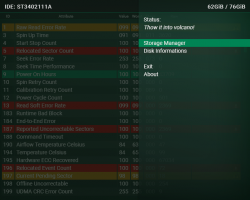
11. Disk Informations:
Showing base informations about disk like vendor, model number, serial number, firmware version, capacity, how much space is in use etc.
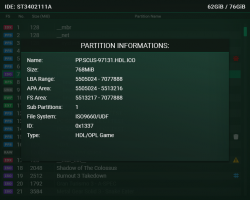
12. Partitions Informations:
Showing base informations about highlighted partition like sectors range, start sector of fs table, file system type, size, how much space is in use etc.
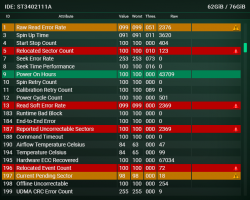
13. Check S.M.A.R.T:
Showing S.M.A.R.T report from short test.
14. Exit:
Run "rom0:/OSDSYS".
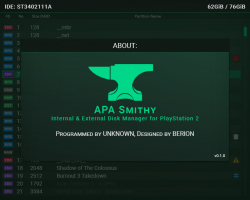
15. About:
Showing informations about authors of this application.
- "warning yellow/red" - something is worth user attention (more details displayed in partition information)
- "red bug" - PFS is broken
- "blue hash" - APA checksum doesn't match to header checksum, so this and all next partitions in chain must be dim (this points user that he must rehash it or PS2 will not see them)
- "safe" - partition is encrypted (DESR models)
- "trash can" - partition was deleted but can be attempt to be restored
Last edited:
