
You are using an out of date browser. It may not display this or other websites correctly.
You should upgrade or use an alternative browser.
You should upgrade or use an alternative browser.


RoboKing's Cosmos
Member

jolek
Senior Member
Apollo Save Tool v2.0.2 is out!
Added
Added
- Delete PS3 saves from USB
- PS2 Virtual Memory Card images (VMC)
- Support additional import formats: .XPS, .CBS, .MAX, .SPS
- Online DB: show PS1 icons
- User Tools:
- Convert PS1/PS2 saves to .PSV format
- Convert .PSV saves to .MCS/.PSU formats
- Re-sign .PSV saves
- "Copy to HDD" option is only available when browsing USB saves
- Updated Apollo Patch Engine to v1.1.2
- Fixed SW Code search bug when bytes are not found
- Add AES CBC, BSD script command aes_cbc(key, iv)
- Improve SW Code type 3 (add Subtypes 3/7/B/F)
- Improve SW code type 4 (add Subtypes 4/5/6/C/D/E)
- Option to launch an external app
- (L1 + START) executes /dev_hdd0/game/NP0APOLLO/USRDIR/EXTRA.SELF
jolek
Senior Member
Apollo Save Tool v2.2.0 is out!
Added
Added
- FTP Server support (Saves Cloud Backup)
- Zip, Upload, and backup saves to a user-defined FTP server
- List, Download, and restore saves from a user-defined FTP server
- Backup PS1, PS2, and PS3 saves
- Improved Copy save to HDD option
- Settings Menu:
- Added FTP Server URL option
- Added selector option (FTP/Online DB) for save-game downloads
- Added USB Source selector option
- Persistent Debug log option
- Removed Save Owner option
- Updated Apollo Patch Engine to v1.3.0
- Add djb2 hash function
- Add tag support for user-selected options on .savepatch files
- E.g., {ZZ}val=name;03E7=999 gold;...;270F=9999 gold{/ZZ}
- Support for SaveWizard and BSD codes with multiple options
Kevstah2004
Member
How do I import ps2 .psu saves from hdd?
it says no data is found in folder /dev_hdd0/tmp/fakeusb
usb path is dev_usb00x/PS2/SAVEDATA
shouldn't hdd be
dev_hdd0/PS2/SAVEDATA ?
it says no data is found in folder /dev_hdd0/tmp/fakeusb
usb path is dev_usb00x/PS2/SAVEDATA
shouldn't hdd be
dev_hdd0/PS2/SAVEDATA ?

bucanero
Developer
How do I import ps2 .psu saves from hdd?
it says no data is found in folder /dev_hdd0/tmp/fakeusb
usb path is dev_usb00x/PS2/SAVEDATA
shouldn't hdd be
dev_hdd0/PS2/SAVEDATA ?
if you're using the fake USB option, it should be /dev_hdd0/tmp/fakeusb/PS2/SAVEDATA/
Kevstah2004
Member
if you're using the fake USB option, it should be /dev_hdd0/tmp/fakeusb/PS2/SAVEDATA/
Ok i'll try that, it's set as auto-detect though not fakeusb.
I recently noticed that the "Apollo Save Tool" app causes my PS3 to freeze.
As soon as I start the app, the PS3 gets stuck on a black screen and stays there forever. There is no HDD activity, the system is simply frozen and can only be restarted by hard shutdown (holding down the power button until the PS3 turns off).
I then tried to delete the app from the XMB -> same result, when deleting, the PS3 freezes and nothing works anymore.
Next, I tried to delete the app via file browser (multiMan MOD or IRISMAN) under /dev_hdd0/game/NP0APOLLO -> same result, when deleting, the PS3 freezes and nothing works anymore.
Finally, I tried to delete the app via FTP (FileZilla) from my Mac (/dev_hdd0/game/NP0APOLLO) -> same result, when deleting, the PS3 freezes and nothing works anymore.
When I download the latest Apollo app and copy it to a USB memory stick, I can install it on the PS3 normally and without errors, but when I try to start the app, everything freezes again.
What can I do?
As soon as I start the app, the PS3 gets stuck on a black screen and stays there forever. There is no HDD activity, the system is simply frozen and can only be restarted by hard shutdown (holding down the power button until the PS3 turns off).
I then tried to delete the app from the XMB -> same result, when deleting, the PS3 freezes and nothing works anymore.
Next, I tried to delete the app via file browser (multiMan MOD or IRISMAN) under /dev_hdd0/game/NP0APOLLO -> same result, when deleting, the PS3 freezes and nothing works anymore.
Finally, I tried to delete the app via FTP (FileZilla) from my Mac (/dev_hdd0/game/NP0APOLLO) -> same result, when deleting, the PS3 freezes and nothing works anymore.
When I download the latest Apollo app and copy it to a USB memory stick, I can install it on the PS3 normally and without errors, but when I try to start the app, everything freezes again.
What can I do?
jolek
Senior Member
What can I do?
Do you have CFW or HEN?
What is your console revision (CECH-XXXX)?
Did you check the HDD if it has any errors (S.M.A.R.T.)?
Do you have CFW or HEN?
Evilnat 4.92 CFW
What is your console revision (CECH-XXXX)?
It's a CFW capable PS3 slim (can't remember the CECH number).
Did you check the HDD if it has any errors (S.M.A.R.T.)?
Its an 1TB Samsung HDD which was tested beforehand at my Mac. No SMART errors, no bad blocks, etc.
In the meantime, I even took a completely new Toshiba 1TB HDD and copied the contents from the PS3 (Samsung 1TB) using the CFW HDD Exchange clone function.
The new HDD then starts up normally like the previous HDD, but the error with Apollo Save Tool remains.
jolek
Senior Member
Apollo Save Tool v2.2.4 is out!
Added
Misc
Added
- Localization support
- Auto-detect system language setting
- Languages: English, French, Italian, Japanese, Polish, Portuguese, Russian, Spanish
- Show save details window for items in Online DB (Triangle button)
- Improved ARMax PS2 save-game conversion to .PSV
Misc
- Updated Apollo Patch Engine to v1.4.0
- Update custom mod tags
- Support multiple mod options per line
- Add AES CTR, Blowfish CBC encryption
- Add DBZ Xenoverse 2 custom checksum
Apollo Save Tool v2.2.4 is out!
Unfortunately, that doesn't help me either, or rather, the update can't be installed at all (the installer gets stuck at 95%), apparently because it also accesses the /dev_hdd0/game/NP0APOLLO folder, which causes my PS3 to freeze.
Is there no way to connect the PS3 HDD to my computer (iMac M3) via a SATA to USB adapter so that I can delete the affected folder somehow?
jolek
Senior Member
Is there no way to connect the PS3 HDD to my computer (iMac M3) via a SATA to USB adapter so that I can delete the affected folder somehow?
This operation can be done only on Linux as far I know.
It also requires unique EID Root Key for decryption.
Additionally only FTP method could help but unfortunately in your scenario:
Finally, I tried to delete the app via FTP (FileZilla) from my Mac (/dev_hdd0/game/NP0APOLLO) -> same result, when deleting, the PS3 freezes and nothing works anymore.
Since you have 2 HDDs.
What I suggest is to make a backup one of your PS3 HDD.
Plug in the 2nd drive via SATA to USB to a computer.
Delete all partitions from it.
Download CFW 4.92.2 Evilnat Cobra 8.5 [CEX]:
https://www.psx-place.com/resources/4-92-evilnat-cobra-8-5.1479/.
Copy the firmware to a flashdrive.
Check its md5sum: 46C72AE8ABF5656AD9EAE03C68B3FC37.
Plug in the new (2nd) HDD and the flashdrive to PS3.
Install firmware.
Install Apollo Save Tool v2.2.4.
If everything will be fine the problem is elsewhere.
Maybe a broken save game?!
BTW did you try to rebuild database or\and restore file system from the recovery menu?
BTW did you try to rebuild database or\and restore file system from the recovery menu?
Yes, this i've also done multiple times, but with no success.
I've already considered formatting the HDD and completely reinstalling the CFW.
But then there's the issue of my purchased PSN content. When the PS3 was released, I didn't give much thought to the PSN account and the email address stored there. So I bought a lot of content (mostly PS1 games) with my PSN account at the time. The problem today? That old email address is no longer valid (it was discontinued by the provider), so I can no longer log in with my old PSN account to reload it.
The only way I can still play this content is to transfer all the data from my old FAT to the SLIM PS3 using the official PS3 data transfer utility, and then activate the system at the SLIM via CFW. The problem with this is that this data transfer via Ethernet cable takes two weeks (no joke!).
To be honest, I don't want to go through this absolutely tedious procedure again. But somehow, I don't seem to have any other choice...
I'll probably make a copy of the Apollo Save Tool folder on the FAT PS3 and then uninstall the tool and the folder. This is the only way I can ensure that no Apollo data is copied with the PS3 data transfer utility and that I can then reinstall Apollo on the SLIM and try to copy the Apollo folder back.
Of course, with the CFW i could download the PS1 ISO's of my purchased games from the internet, same i could do with the other PS3 Games, but not sure if i could also save and restore my game save files somehow.
Anyway, i'm still frustrated that a obviously corrupt folder could cause so much trouble...

GuilloteTesla
Moderator
Of course, with the CFW i could download the PS1 ISO's of my purchased games from the internet, same i could do with the other PS3 Games, but not sure if i could also save and restore my game save files somehow.
No piracy talking. Read the rules: https://www.psx-place.com/threads/site-forum-rules-guidelines.79/
jolek
Senior Member
But then there's the issue of my purchased PSN content. When the PS3 was released, I didn't give much thought to the PSN account and the email address stored there. So I bought a lot of content (mostly PS1 games) with my PSN account at the time. The problem today? That old email address is no longer valid (it was discontinued by the provider), so I can no longer log in with my old PSN account to reload it.
From what I remember your email address should be displayed once you try to log in into PSN on PS3:


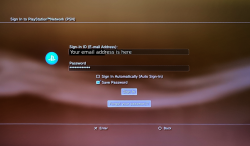
You only need to remember your password.
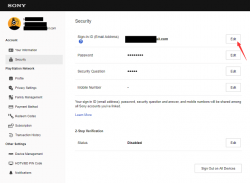
If you remember the password you can change your email from a PC:
https://www.playstation.com/en-us/playstation-network/.
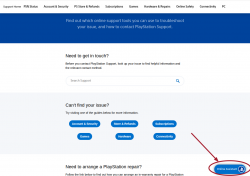
If you at lest remember your nick name (ID) and email try to contact online assistance to recover your account:
https://www.playstation.com/en-us/support/playstation-support-contact-guide/.
The only way I can still play this content is to transfer all the data from my old FAT to the SLIM PS3 using the official PS3 data transfer utility, and then activate the system at the SLIM via CFW. The problem with this is that this data transfer via Ethernet cable takes two weeks (no joke!).
This process should not take more than a day or even two.
If it takes more than that there is something wrong, probably with an HDD.
@jolek
Thank you for trying to help me recover my old PSN account.
I followed all the steps you listed, and that's exactly where the problem lies.
I was able to find the email address I used at the time, but of course I no longer knew the PSN password. So what happens when I click on "forgot my password"? That's right, Sony sends a recovery link to the email address provided. Unfortunately, this address has not been in use for years (it was deactivated by the provider), so I have no way of accessing these recovery links.
Even contacting Sony Support directly was unsuccessful; without access to the email address on file, it is no longer possible to recover my old PSN account for security reasons.
In other words, if the email address you used to register with PSN is no longer accessible and you've forgotten your PSN password, you're screwed.
Fortunately, the content purchased with the inaccessible PSN account is still on my FAT PS3, which luckily was also activated for this account. This means I can still play the games with my new working PSN account and transfer them to my second PS3 SLIM via the PS3 data transfer utility. It just takes forever (two weeks via Ethernet, no joke...).
Thank you for trying to help me recover my old PSN account.
I followed all the steps you listed, and that's exactly where the problem lies.
I was able to find the email address I used at the time, but of course I no longer knew the PSN password. So what happens when I click on "forgot my password"? That's right, Sony sends a recovery link to the email address provided. Unfortunately, this address has not been in use for years (it was deactivated by the provider), so I have no way of accessing these recovery links.
Even contacting Sony Support directly was unsuccessful; without access to the email address on file, it is no longer possible to recover my old PSN account for security reasons.
In other words, if the email address you used to register with PSN is no longer accessible and you've forgotten your PSN password, you're screwed.
Fortunately, the content purchased with the inaccessible PSN account is still on my FAT PS3, which luckily was also activated for this account. This means I can still play the games with my new working PSN account and transfer them to my second PS3 SLIM via the PS3 data transfer utility. It just takes forever (two weeks via Ethernet, no joke...).
jolek
Senior Member
Fortunately, the content purchased with the inaccessible PSN account is still on my FAT PS3, which luckily was also activated for this account. This means I can still play the games with my new working PSN account and transfer them to my second PS3 SLIM via the PS3 data transfer utility. It just takes forever (two weeks via Ethernet, no joke...).
It takes too long.
Anyway read this:
https://www.psx-place.com/threads/h...on-3-hdd-on-pc-tutorials-tools-hub-faq.36261/.

pingponghs
Forum Noob
Hey, I'm trying to transfer a RPCS3 LittleBigPlanet 2 save file to my PS3.
What I understand is that I have to put my RPCS3 profile export into /dev_hdd0/tmp/apollo/BCUS98245, then take a profile export I made inside my PS3, then hit "Import decrypted save files", right? Because when I do that I don't see any of the files from my RPCS3 save (0, BIG000, BIG001... to BIG009), only the ones from my PS3 save (0, BIG000).
What am I doing wrong?
Edit: Forget about it, I found another way to do what I wanted to do without RPCS3.
What I understand is that I have to put my RPCS3 profile export into /dev_hdd0/tmp/apollo/BCUS98245, then take a profile export I made inside my PS3, then hit "Import decrypted save files", right? Because when I do that I don't see any of the files from my RPCS3 save (0, BIG000, BIG001... to BIG009), only the ones from my PS3 save (0, BIG000).
What am I doing wrong?
Edit: Forget about it, I found another way to do what I wanted to do without RPCS3.
Last edited:
jolek
Senior Member
Apollo Save Tool v2.3.0 is out!
Added
Added
- Apollo Patch Engine v2.0.2
- Add Python scripting support
- Run custom Python scripts on the console (for save-game editing)
- Add apollo module for Python scripts to interact with Apollo's features
- Add Hex Search option to Hex Editor
- New cheat codes
- Dragon Ball Xenoverse
- Persona 4 Arena
- Persona 4 Arena Ultimax
- The Legend of Heroes: Trails of Cold Steel
- Custom save decryption support
- Max Payne 3
- L.A. Noire
- Custom save decompression support
- Batman: Arkham Origins
- BioShock
- Sacred 2: Fallen Angel
- Batman: Arkham Asylum
- BioShock 2
- Batman: Arkham City
- BioShock Infinite
- I Am Alive
- The Legend of Heroes: Trails of Cold Steel II
- Custom checksum support
- Dragon Ball Xenoverse
- World Soccer: Winning Eleven 2012
Similar threads
-
PS3 Resigned saves with Apollo not working, Trophies not detected
- Started by lucas1122
- Replies: 6
-
PS VITA / PS TV [RELEASE] Vita Slim's Editor v1.0 - Ratchet & Clank HD Save Editor
- Started by myname24
- Replies: 1
-
 PS5 Porkfolio All in One PS5 Utility (Game Library, Backporks, FTP Transfers, Cheats, Saves, Pa
- Started by Red
- Replies: 0
-
