PS3 Artemis PS3 (r6.3): Cheating system updated with 4.8x CFW Support & New Features added

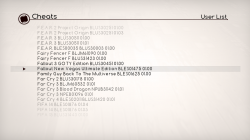
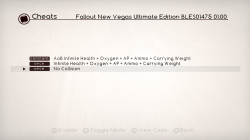
Developer @dnawrkshp originally ported Lazy Bastards's Artemis to the PS3. The PlayStation 3 port is a cheating system for applying cheat to games utilized on CFW/HEN enabled console's that also comes with a companion plugin (sprx) for additional functionality. @bucanero who you may recall is the developer who ported PKGi recently to the PS3. has now turned attention to updating Artemis-PS3 for 4.85 use and the developer has added two new features to go along. First, we have an Online Cheat Database that will allow you keep your cheats up to date with a simple online download and also a Local Database Update feature has also been incorporated into the system. Also a shoutout to @Berion who's designs still looks great in the GUI :) .
-STLcardsWS

main.png

  • games.png cheats.png

    Hello,

    As a little side project, I've forked Artemis PS3 and added the following network features:
    • Online Cheat Database: access to the latest cheats for over +2300 games online.
    • Local Database Update: download and update your local cheat database with the latest codes.

    on the UI, these are the new features available:
    • Added Online DB option (main menu)
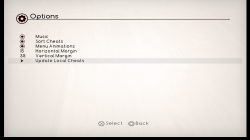
    • Added Update local cheats (options menu)
    • Added :but l1:/:but r1: triggers to improve game list browsing
    • Added user confirmation dialog when unloading the plugin ( :but square: on the main menu)
    • Added exit to XMB without changes ( :but cir: on the main menu)

    I've also included the modded Artemis plugin from vr5 (by @haxxxen ).

    Find more information at https://bucanero.github.io/ArtemisPS3/

    Submitting cheat codes to the online database

    To share new games and cheat codes with the community:
    1. Fork the repository and add your changes to this folder.
    2. Submit a pull request so the updated cheats are available to every Artemis user.

    Source code available on GitHub

  • Artemis r6.3
    https://github.com/bucanero/ArtemisPS3/releases/tag/r6.3

    Added

    • Alternative Joker Select plugin
    • Code Type 5 support using Joker plugin (See notes)
    Fixed

    • Fix online database URL
    Misc

    • Update offline cheat database with latest codes

    .Artemis r6.2
    https://github.com/bucanero/ArtemisPS3/releases/tag/r6.2

    Added
    • Analog stick support
    • Uses PS3MAPI for plugin management
      • Detects if internal/external plugin is loaded
      • External plugin can be loaded via boot_plugins.txt, wMM, etc.
    • New and updated cheat codes
    • Added "Installed games" filter option
    Removed
    • Remove MAMBA/PRX Loader
    Changes
    • Uses original Artermis r5 plugin as default

    .Artemis r6.1
    https://github.com/bucanero/ArtemisPS3/releases/tag/r6.1

    Added
    • Local Cheat DB installer on first run
    • New version check and auto-update
    • New "Clean local cache" option
    • New plugin selector option
    • New loading screen transitions
    • Shortcut to Main screen from Cheats screen by pressing START
    Fixed
    • Improved game list parsing (detect Title-IDs and versions)

    .Artemis r6.net
    https://github.com/bucanero/ArtemisPS3/releases/tag/r6.net

    Added
    • Added network features:
      • Online Cheat Database: online access to the latest cheats for over +2300 games.
      • Local Database Update: download and update your local cheat database with the latest codes.
    • Added L1/R1 triggers to improve game list browsing
    • Added user confirmation dialog when unloading the plugin (SQUARE on the main menu)
    • Added exit to XMB without changes (CIRCLE on the main menu)
    • Updated to MAMBA PRX Loader 4.84.2
    • Updated Artemis .sprx plugin to vr5 version by @haxxxen

  • ArtemisPS3
    options.png
    An Open Source Playstation 3 Hacking System created under the Project Artemis initiative (http://www.gamehacking.org/artemis)​

    Your PS3 must be running CFW 3.55 or above (DEX and CEX supported)!

    Installing Artemis PS3


    Installing cheat codes

    • Choose between installing the .ncl file on a flash drive or in the Artemis installation directory
    • For the flash drive make a new folder on the root called USERLIST
    • Inside the folder place any .ncl files inside it
    • Insert the usb drive into the right usb slot of your PS3 and launch Artemis PS3
    • For the installation directory method launch an FTP server on your PS3 (multiman)
    • Navigate to /dev_hdd0/game/ARTPS3001/USRDIR/USERLIST/
    • Place any .ncl files inside the folder and launch Artemis PS3

    Using Artemis

    • Launch Artemis from the XMB and selected your codes
    • Once you have selected your codes Press X on Start in the main menu
    • You should hear a single beep (if you hear three MAMBA failed to install)
    • From here you can launch the game or launch homebrew to mount the game
    • When the game has launched, a notification will appear telling you to press Start to attach
    • Once you are ready to use your codes in the game, open the in game XMB by pressing the PS button
    • HOLD Start until Artemis says that it has attached
    • At this point any codes chosen to constant write will be constantly writing
    • For any single write codes you wish to write again, just enter the in game XMB again and hold Start
    • If you wish the detatch (and therefore stop constant writing), enter the in game XMB and HOLD Select

    Creating cheat lists (.ncl)

    • NetCheat List Files are built into NetCheat PS3
    • Download and run NetCheatPS3
    • In the codes tab create a new code and name it as you wish
    • Within the textbox enter any NetCheat PS3 codes (or use the Codelist by clicking the square on the bottom left)
    • Finally click Save All and specify a save location for the new .ncl

    Creating advanced cheat lists (.ncl)


    New in Artemis PS3 is the ability to add option tags.
    These tags enable you to specify options for a code that has multiple effects for one address.
    Using tags instead of multiple codes condenses the overall cheats list.
    The format for an option tag is very specific and must be used exactly as described.
    A tag begin with brackets that surround an ID ([Z]).
    This ID must be a collection of capital Z's.
    For instance, a tag such as [ZZZZ] has an ID of ZZZZ. [zz] is not a valid ID.
    Following the opening tag are the elements, or options.
    Each element begins with the value that the option represents, an equal sign (=), and the name of the option.
    Elements are separated by semicolons (;).
    So right now an option tag would look something like this: [ZZ]0010=This is 0x10;0020=This is 0x20
    But now we have to end the tag. To end an option tag you simply add a forward slash (/) in front of the ID and surround that with brackets ([/Z]).
    Finally to actually implement this as a value for a code, simply put the ID of the tag anywhere in the code you'd like.
    For instance, in Jak 1 there are 4 different types of eco states you can be in. Red, blue, green, and yellow.
    Each uses the same line. So the appropriate code using option tags would be:
    0 201FEE08 ZZ
    0 201FEE18 FFFFFF7F
    0 201FEE0C 00000040
    [ZZ]01=Yellow;02=Red;03=Blue;04=Green[/ZZ]


Last edited:
thanks @Cypher_CG89 , good to know that @ramzidz15 's issue was solved. :encouragement:
I've experienced some lock-ups or freezes while fooling around with Artemis myself, but I've never seen such kind of crash that needs to re-install the system firmware.

You don't need to re-install the firmware if this happens, just press the PS button to attempt to restart the system and it should reboot ok.

Normally happens when the System RAM is used up, and that's normally caused by attaching the cheats at the wrong time when the PS3 is under load and using this RAM so the GameOS cannot run correctly.

Sometimes depending on the cheats used it could be some kind of conflict or unstable patch used in the cheats, but that should normally just crash the game.

A normal game crash could usually indicate that 1 or more of the cheats to be wrote are patched out, bad offset etc used, or just plainly don't work. If I get a game crash I normally go through each of the cheats I used one by one to see which one, or ones, it is.

What I did with @ramzidz15 is to use a known working NCL file and cheats with the game. In this case we used FarCry3 to sort the issues out as I know these cheats for the BLES version of the game work. Its the NCL file I attached to an earlier post. Set webMAN to its minimum memory allocation, then attached the cheats in the right place> during game play> and it worked.

Oh and the Skyrim one's work as well, so is another good game to use as trouble shooter.

I would recommend that people have at least 2,000KB left of usable system RAM before using Artemis, 1,900 kb should be fine but I would say that is pushing it especially if they are going to be playing a PS3 resource intensive game> TLoU, COD games, FarCry, Bethesda game's like Skyrim.

I have used it with lower than 1,900KB, but I found the game to become very laggy at times, this was on RE: Operation Raccoon City and it annoyed the hell out of me and this game is not as intensive on the PS3 as other game's.

And this also seems to have a bearing on if you set the Cheats to constant meaning the app will constantly be writing the patches into the game on the fly while your playing so will be suing RAM constantly compared to if set to write once.
 
Last edited:
nice! :) a lot of good info from @Cypher_CG89 on how to troubleshoot and use Artemis :encouragement:

As you said, attaching at the right time is critical. From my experience, I attach to the game after I've loaded the savegame, and I'm already playing the level. (e.g., shooting bad guys in Army of Two).
 
Developer @dnawrkshp originally ported Lazy Bastards's Artemis to the PS3. The PlayStation 3 port is a cheating system for applying cheat to games utilized on CFW/HEN enabled console's that also comes with a companion plugin (sprx) for additional functionality on CFW. @bucanero who you may recall is the developer who ported PKGi recently to the PS3. has now turned attention to updating Artemis-PS3 for 4.85 use and the developer has added two new features to go along. First, we have an Online Cheat Database that will allow you keep your cheats up to date with a simple online download and also a Local Database Update feature has also been incorporated into the system. Also a shoutout to @Berion who's designs still looks great in the GUI :) .
-STLcardsWS


  • Hello,

    As a little side project, I've forked Artemis PS3 and added the following network features:
    • Online Cheat Database: access to the latest cheats for over +2300 games online.
    • Local Database Update: download and update your local cheat database with the latest codes.

    on the UI, these are the new features available:
    • Added Online DB option (main menu)
    • Added Update local cheats (options menu)
    • Added :but l1:/:but r1: triggers to improve game list browsing
    • Added user confirmation dialog when unloading the plugin ( :but square: on the main menu)
    • Added exit to XMB without changes ( :but cir: on the main menu)

    I've also updated the MAMBA payloads (PRX Loader 4.84.2), and used the Artemis sprx plugin from vr5 (by @haxxxen ).

    Find more information at http://artemis.nerv.gq/

    Submitting cheat codes to the online database

    To share new games and cheat codes with the community:
    1. Fork the repository and add your changes to this folder.
    2. Submit a pull request so the updated cheats are available to every Artemis user.

    Source code available on GitHub

  • ArtemisPS3
    View attachment 21910
    An Open Source Playstation 3 Hacking System created under the Project Artemis initiative (http://www.gamehacking.org/artemis)​

    Your PS3 must be running CFW 3.55 or above (DEX and CEX supported)!

    Installing Artemis PS3


    Installing cheat codes

    • Choose between installing the .ncl file on a flash drive or in the Artemis installation directory
    • For the flash drive make a new folder on the root called USERLIST
    • Inside the folder place any .ncl files inside it
    • Insert the usb drive into the right usb slot of your PS3 and launch Artemis PS3
    • For the installation directory method launch an FTP server on your PS3 (multiman)
    • Navigate to /dev_hdd0/game/ARTPS3001/USRDIR/USERLIST/
    • Place any .ncl files inside the folder and launch Artemis PS3

    Using Artemis

    • Launch Artemis from the XMB and selected your codes
    • Once you have selected your codes Press X on Start in the main menu
    • You should hear a single beep (if you hear three MAMBA failed to install)
    • From here you can launch the game or launch homebrew to mount the game
    • When the game has launched, a notification will appear telling you to press Start to attach
    • Once you are ready to use your codes in the game, open the in game XMB by pressing the PS button
    • HOLD Start until Artemis says that it has attached
    • At this point any codes chosen to constant write will be constantly writing
    • For any single write codes you wish to write again, just enter the in game XMB again and hold Start
    • If you wish the detatch (and therefore stop constant writing), enter the in game XMB and HOLD Select

    Creating cheat lists (.ncl)

    • NetCheat List Files are built into NetCheat PS3
    • Download and run NetCheatPS3
    • In the codes tab create a new code and name it as you wish
    • Within the textbox enter any NetCheat PS3 codes (or use the Codelist by clicking the square on the bottom left)
    • Finally click Save All and specify a save location for the new .ncl

    Creating advanced cheat lists (.ncl)


    New in Artemis PS3 is the ability to add option tags.
    These tags enable you to specify options for a code that has multiple effects for one address.
    Using tags instead of multiple codes condenses the overall cheats list.
    The format for an option tag is very specific and must be used exactly as described.
    A tag begin with brackets that surround an ID ([Z]).
    This ID must be a collection of capital Z's.
    For instance, a tag such as [ZZZZ] has an ID of ZZZZ. [zz] is not a valid ID.
    Following the opening tag are the elements, or options.
    Each element begins with the value that the option represents, an equal sign (=), and the name of the option.
    Elements are separated by semicolons (;).
    So right now an option tag would look something like this: [ZZ]0010=This is 0x10;0020=This is 0x20
    But now we have to end the tag. To end an option tag you simply add a forward slash (/) in front of the ID and surround that with brackets ([/Z]).
    Finally to actually implement this as a value for a code, simply put the ID of the tag anywhere in the code you'd like.
    For instance, in Jak 1 there are 4 different types of eco states you can be in. Red, blue, green, and yellow.
    Each uses the same line. So the appropriate code using option tags would be:
    0 201FEE08 ZZ
    0 201FEE18 FFFFFF7F
    0 201FEE0C 00000040
    [ZZ]01=Yellow;02=Red;03=Blue;04=Green[/ZZ]


can someone explain what this does . i tried it out and its got mods for all the games ..but basic mods..?
 
My Artemis R6 also freezes everytime on attach. And same cheats work on R5 (though must reapply every time which sucks).
I am on HEN though, 4.85. Not sure if that matters, or if some of the prx files needs to be "signed" manually again to not make it crash?

Also from what Cypher has said, my ram is locked to 1500kb when nothing is running except webman. Not sure what steps I could take to "up" that number. Its a normal slim model ps3.
 
Last edited:
My Artemis R6 also freezes everytime on attach

There are several post by me in this thread which will help you with this app, but the info is spread across a few posts so cannot link to a specific post for you that may help the most, I would say read through this thread and you should find something that might help. If not we'll see what we can do to sort it out.

A game crash is common when the cheats are attached at the wrong time, or some/all/one of the cheats you have selected do not work, as there a many that are untested or just plain do not work in the first place.

And same cheats work on R5 (though must reapply every time which sucks).

When you have selected the cheat you want press square on it and it will change to constant from once. This should stop the need to keep attaching them.
 
Not sure if that matters, or if some of the prx files needs to be "signed" manually again to not make it crash?

No the SPRX file's don't need to be resigned for HEN.

my ram is locked to 1500kb when nothing is running except webman. Not sure what steps I could take to "up" that number. Its a normal slim model ps3.

Just seen your edit to your post and I think this post will help you with this:

https://www.psx-place.com/threads/a...t-new-features-added.27690/page-3#post-221548

If you take notice of the 1st screenshot of the allocated system RAM and set it to what you see in the screenshot which is 320KB...

EDIT: Also be sure to only attach the cheats during game play, not on any game menu's, while loading, or game video/cut scenes.
 
Just for compatibility, I was thinking about making an option to choose which Artemis plugin version you want to load (e.g. r6, r5, r4,.... r1)

but I'm still thinking if it's helpful or if it will bring more confusion and mix-ups. Maybe I'll do it under some kind of "Advanced option" so the user is aware that it's "for experimental use only".
 
No the SPRX file's don't need to be resigned for HEN.


If you take notice of the 1st screenshot of the allocated system RAM and set it to what you see in the screenshot which is 320KB...

EDIT: Also be sure to only attach the cheats during game play, not on any game menu's, while loading, or game video/cut scenes.

I have tried several games, and yes, both constant and once written. Always freezes on attachement on R6. And I have already set the plugin size to 320kb aswell, and thats when its even at 1500kb. And also tried on different occasions of gameplay. So im really just stuck with using R5 for now.
 
Just for compatibility, I was thinking about making an option to choose which Artemis plugin version you want to load (e.g. r6, r5, r4,.... r1)

but I'm still thinking if it's helpful or if it will bring more confusion and mix-ups. Maybe I'll do it under some kind of "Advanced option" so the user is aware that it's "for experimental use only".

I would say leave it as is, this version works great and if it had this then people might start loading different versions or something on 4.85 and that ain't going to work great on a higher fw version.

For example with r5 if you were on DEX you needed to switch the lv2 kernel to CEX so it was more stable. I tested this repeatedly on SW:The force unleashed, with a DEX kernel it would crash the game when it auto saved but with a CEX lv2 kernel it worked fine.

But with r6 its stable on DEX lv2 kernel as I have tested again with SW:the force Unleashed and it plays fine and does not crash on auto save of the game. I did some some other game as well and the results were more or less the same.

I don' think it has anything to do with compatibility but more with the cheats themselves mainly, and also a whats what how to use and trouble shoot guide for the app, as I don't get half or any of the issues people report, so other's can fully understand how to use this properly and understand that some of these cheats will not work.

But we don't know exactly which ones as there are so many of them, and it would take ages to debug and go through all of them and for that you need all the game's that have NCL files for them or other people who know how to live debug a game who may have game other's do not.
 
I have tried several games, and yes, both constant and once written. Always freezes on attachement on R6. And I have already set the plugin size to 320kb aswell, and thats when its even at 1500kb. And also tried on different occasions of gameplay. So im really just stuck with using R5 for now.

Which games game have you tried and which NCLs did you load and with what cheats..? This is on the off chance I have the game myself and can test it.
 
Which games game have you tried and which NCLs did you load and with what cheats..? This is on the off chance I have the game myself and can test it.

I have tested LOTR War In The North (both memory cheats, and asm eboot cheats)
Tekken 6 (same there) on both 1.00 and 1.03 versions. Also tried with memory cheats and asm.
And yes, both with once and always on. :)
Also some smaller indie PSN games like hitogata happa, with memory cheats only, but it freezes in each of them as i hit start to attach. To the point the confirmation window of attached and wrote doesnt even appear :o
 
I asked for the BL NP code of the MGS PW game not for Dynasty Warriors 7. I ask for MGS as I can test it as I have that game if its the same as the version I have for it.


Which MGS5 game as there are 2 > Ground Zeros and The Phantom Pain... BL or NP ID of the game please......

blus30847 metal gear pw .make sure u add more cheat like heroism and money
pp bles02102
 
I have tried several games, and yes, both constant and once written. Always freezes on attachement on R6. And I have already set the plugin size to 320kb aswell, and thats when its even at 1500kb. And also tried on different occasions of gameplay. So im really just stuck with using R5 for now.

If you want to use R6.net with the r5 plugin, just install r6 and overwrite "artemis_ps3.sprx" with this file (using FTP or a backup manager):
https://github.com/bucanero/ArtemisPS3/raw/r5/ArtemisPS3-PRX/artemis_ps3.sprx
 
Last edited:
I would say leave it as is, this version works great and if it had this then people might start loading different versions or something on 4.85 and that ain't going to work great on a higher fw version.

yes, that was my concern, if people start to play around without knowing what they're doing, they could get a lot of "random issues" and it could be a total headache.

In any case, I'll leave the info here for future reference.

Artemis plugin versions

:sfun oldguy: This information is for advanced users only. Use at your own risk. :sfun oldguy:

If for whatever reason you want to use a different plugin with Artemis r6.net , you can download the plugin from the following URL and replace the .sprx file in your PS3 hard drive ( /dev_hdd0/game/ARTPS3001/USRDIR/ ).

Beware that using anything below r5 might bring unexpected results.

Note that R5 can be unstable to use on 4.84 DEX with a DEX Lv2 Kernel; using a CEX lv2 kernel is recommended.

 
Last edited:
yes, that was my concern, if people start to play around without knowing what they're doing, they could get a lot of "random issues" and it could be a total headache.

In any case, I'll leave the info here for future reference.

Artemis plugin versions

:sfun oldguy: This information is for advanced users only. :sfun oldguy:

If for whatever reason you want to use a different plugin with Artemis r6.net , you can download the plugin from the following URL and replace the .sprx file in your PS3 hard drive ( /dev_hdd0/game/ARTPS3001/USRDIR/ ).

Be aware that using anything below r5 might bring unexpected results. Use at your own risk.

Can I ask if the R6 version, when you say its been fixed for always writing pointers when set to constant and such, also works if using r5 plugin then via R6 app?
As I do notice, any cheat that is stored in memory and outside eboot region, will only write once and needs to be reapplied all the time :)
 
Can I ask if the R6 version, when you say its been fixed for always writing pointers when set to constant and such, also works if using r5 plugin then via R6 app?
As I do notice, any cheat that is stored in memory and outside eboot region, will only write once and needs to be reapplied all the time :)

no, the constant-write fix (done by @haxxxen ) is only available in the r6 plugin.

You're free to use the r5 plugin + r6 app, but the constant write will behave just like r5, as the cheat code is actually applied by the plugin. (The app is basically a front-end to browse games, select codes, and then load the plugin.)
 
Last edited:
no, the constant-write fix (done by @haxxxen ) is only available in the r6 plugin.

You're free to use the r5 plugin + r6 app, but the constant write will behave just like r5, as the cheat code is actually applied by the plugin.
(The app is basically a front-end to browse games, select codes, and then load the plugin.)

I see, That blows :p Tested some more out with the R6 plugin over the morning, but cannot get away from freezing issues. Really baffling my mind xD

Im still wondering how Cypher manage to get over 2k kb RAM running. Newer PS3 model that runs this stuff better?
 
Last edited:

Similar threads

Back
Top