PS3 BETA v0.3 - 4.75 HABIB (COBRA v7.10)

Here comes a BETA RELEASE of 4.75 HABIB (COBRA v7.10) CFW (v0.3), Fellow CFW developer Joonie played a big assist in the release of this COBRA CFW by porting COBRA 7.10 to HABIB's firmware. This is labeled as a beta release (by HABIB) as there is a couple of bugs that need to be addressed and both developer's HABIB and Joonie are on separate vacations currently. So,[break]ss[/break] the developer's will not have time to address these minor bugs until they get back from thier respective trips, thus they decided on this public BETA release (that has been tested but poses a few bugs outlined below). View all the details from Habib nnouncement below:



HABIB Cobra v710.png
FW Version:
FW Type:CFW Type:Developer:

  • 4.75

  • CEX

  • Cobra (V7.10) CFW


HABIB said:

BETA --- 4.75 HABIB (COBRA v7.10) v0.3


These beta have been taking place by joonie for a while, we thought to make this public beta since we both dont have pc access and we both are on holiday trips as well(what a coincidence).

Known bugs:
1. psx region bug(it might be fixed in v1.00 but we dont have pc access atm)
2. syscall 11 sc_ctrl is disabled(will be available in v1.00)

Now don't act selfish if you get these minor bugs which otherwise would've been ignored!(:p)

Bug Fixed since last habib 4.70 v1.03:
1. minor bug which enabled ps2 iso launcher on semi-bc and bc ps3 causing iso loading if ps2 iso is mounted and you are trying to play a ps2 classic/iso launcher(it could be counted as feature but...meh....)

HOW TO CHECK IF YOU NEED PS2 ISO LAUNCHER OR NOT:


All in all, this is the feature set:


  • [*=1]MADE OUT OF 4.75 OFW
    [*=1]COBRA v7.10 ADDED
    [*=1]INSTALL PACKAGE FILES AND APP_HOME
    [*=1]REACTPSN COMPATIBILITY
    [*=1]ABILITY TO RUN GAMES SIGNED WITH KEYS UP TO 4.75
    [*=1]THIS CFW CAN BE UPDATED OVER ANY CFW.
    [*=1]THIS CFW CAN BE UPDATED OVER 3.55 OFW
    [*=1]SPECIAL PAYLOAD FOR COBRA TOGGLE IN LV2
    [*=1]REMOVED CINAVIA DRM FOR HDD CONTENT
    [*=1]REMOVED CINAVIA FOR BDMV
    [*=1]REMOVED CINAVIA FOR BDVD
    [*=1]QA FLAG ENABLED BY DEFAULT IF PS3 WAS QA ON 3.55
    [*=1]RSOD BYPASS
    [*=1]REMOTE PLAY FLAG NOT REQUIRED
    [*=1]VSH SPEEDUP BY DISABLING EPILEPSY WARNING
    [*=1]webMAN MOD 1.42.01 integration in cobra mode(default)

Major thanks to @Joonie for porting cobra and testing the bug fix

Thanks to @STLcardsWS for the developers/mod section for letting us do private beta tests

Thanks to all the beta testers and all the developers who helped including @haxxxen , @aldostools , @littlebalup , @Orion and everyone

Tested models


  • [*=1]CECHA01
    [*=1]CECHE01
    [*=1]CECH-2001B
    [*=1]CECH-2501
    [*=1]CECH-2505A
    [*=1]CECHH04 [littlebalup]
    [*=1]CECH-2XXX [Orion]

P.S: i'm still not working physically, this release has seen the light of the day because of @Joonie and i might kick in soon in a month or something...


via ReadME said:
Change notes in V3 since the sample V2.
1. fixed the issue with ps2netemu working properly on BC consoles and Semi BC consoles, however
do not use ps2 classic launcher with mounted ISO as it will make issues on BC Consoles/Semi BC consoles.
Non-BC console users can ignore this as this does not affect the result.
2. Removed the unnecessary original ps2_netemu.self.swap for swapping as this is not needed anymore due to the change no.1
3. mysis's game_ext_plugin patch added to ignore SFO check for remote play4. Changed image version to 99999 to fix the issue with PUP installation on XMB
For some reason, it was impossible to install this CFW over previous HABIB 4.75 on BC/Semi-BC consoles
Changing the image version fixed the problem.

Change notes in V2 since the sample V1.

1. fixed the issue with pspiso playback due to missing hash checks for HABIB/FERROX in COBRA source
2. fixed the issue with category xml by replacing it with old one that was used in HABIB 4.70 COBRA 1.01
3. added debug payload for devs [dev_flash/sys/stage2.bin.debug], if you want to use this payload simply replace it with stage2.bin
otherwise stage1 inside lv2kernel won't mount the payload on boot.
4. disabled epilepsy message on boot, so it boots up faster

Download:MD5 Checksum (PUP FILE):


  • MD5: 263ec20cb8018af2b3408af9fe77ec8e
Install CFW At Your Own Risk


Source:
PSX-Place.com

View additional Apps / CFW / Tools that have been updated or support 4.75 CFW ---> LINK

 
I confirmed the issue with current COBRA 7.1 port, it was due to syscall11 got blocked, now it works fine with changes, thanks for your report.
Great to hear! As said by another member, your dedication is sure appreciated. Will you upload the fixed version soon or should we all sit back and wait for the "official" 4.75.1.00
 
Great to hear! As said by another member, your dedication is sure appreciated. Will you upload the fixed version soon or should we all sit back and wait for the "official" 4.75.1.00

I think I got all the issues sorted out ... currently these issues have been worked on since V3 version.

Change notes in V4 [upcoming]

1. webMAN MOD has been removed for public beta builds [due to too many people dislike having a pre-loaded bloatware trying to help cooling ps3 with loud noises]
2. fixed the issue with netserv with multiMAN [mmCM] causing 800 error when mounting games
3. fixed the issue with blocking syscall 11 causing issues with some of those habib's homebrew that using syscall 11 [ex) habib's qa toggle
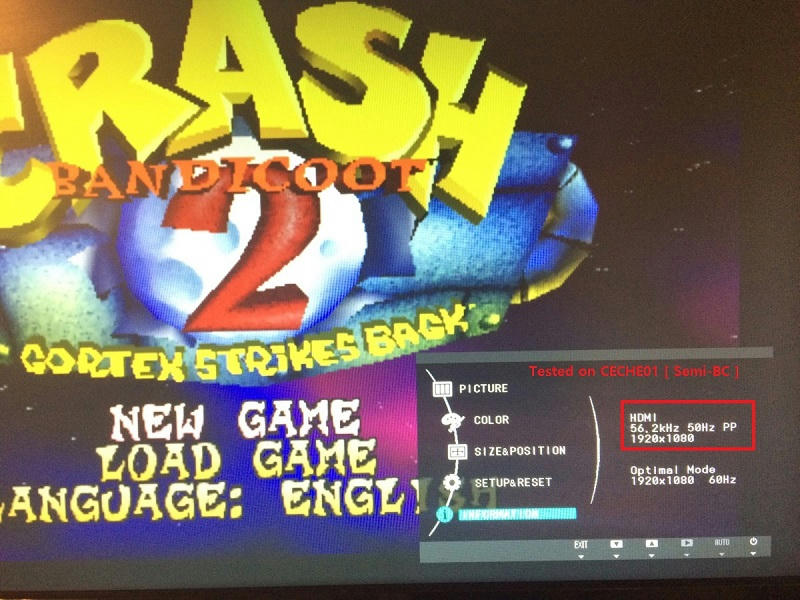
4. PSX region issue, [this needs reviewed, currently it doesn't change the refresh rate on my tv, however PAL games don't have framedrops on my CECHE01 / NTSC]

These are the changes for upcoming V4 ports on my COBRA port.

For COBRA port on 4.75 FW, my project was started as an universal support, which means any devs can use this source available on my github to release their own COBRA CFW with their changes

it's noted here

https://github.com/Joonie86/COBRA7.1/tree/master/475

The webMAN integration was just one of my preferences, I didn't mean to release this under my own, however [MENTION=20]habib[/MENTION] insisted having public beta before having any upcoming CFW release as a team, and I agreed with his opinion, so now we have public beta CFW for you guys.
Thanks for all the feedback to improve our COBRA port, hopefully the official release will meet your expectation by providing all the promised features from the official release note without bugs.

I'll upload my updated binaries shortly, probably a cobra updater pkg too. if anyone wants to help us out with the test, I'd appreciate your support, eventually a standalone CFW with updated binaries will be released as well, either as a beta or the official.
 
Last edited:
Can you tell me which games used to work on which FW? I'd appreciate if you be more specific that will help our research with this broken PSX region function

on my CECHE01, both Rogero 4.46 / habib 4.75 make issues with Crash Bandicoot 2 - Cortex Strikes Back (E) and Crash Bandicoot (E) (No EDC), however I can play Re-Volt with its original code,

COBRA thinks Re-volt EU version was NTSC and it let it played @ 60hz,

Hi Joonie, I have two CECHA01 units and I've tested on all cfw builds after HABIB 4.65 V1.02 and they all have the psx region problem. The games I found that have the problem are: Crash Bandicoot (E), Crash Bandicoot 2(E) not sure about if it's (EDC) or not, Crash Bandicoot -Warped (E), and Earthworm Jim 2(E).

I also noticed the that trying to load psx titles by quitting one game and loading another causes a black screen. If you shutdown first then it's fine.

Thanks,
mm
 
for me this CFW is the best that i had.
work with this webman has been amazing

aldostools Thanks a lot sensei

:dgernade::dgernade::dgernade::dcheese::dgernade::dgernade::dgernade:​
 
I'm willing to test whatever, but I only have two slims right now, 210X, 250X.

SLIM models have never had this problem, so it's hard to expect feedback regarding that specific matter, I appreciate your offer, CFW will be out soon

Hi Joonie, I have two CECHA01 units and I've tested on all cfw builds after HABIB 4.65 V1.02 and they all have the psx region problem. The games I found that have the problem are: Crash Bandicoot (E), Crash Bandicoot 2(E) not sure about if it's (EDC) or not, Crash Bandicoot -Warped (E), and Earthworm Jim 2(E).

I have a problem with those two games on ROGERO 4.46 COBRA as well, can you confirm the issue also? I identified the bug from the original code itself and currently being reviewed.

Will the epilepsy warning be removed on both upcoming Habib and Rebug CFWS?

most likely yes

FYI [MENTION=7]atreyu187[/MENTION] [MENTION=48]littlebalup[/MENTION] [MENTION=20]habib[/MENTION] [MENTION=89]aldostools[/MENTION] [MENTION=142]MannyMania[/MENTION]

I think we finally managed this,, this is a yet another solution but it seems better than I discovered yesterday :)

ztvurquuz833fv6zg.jpg


EDIT
[MENTION=142]MannyMania[/MENTION]

I have good news and bad news...

I was able to get those non working games on both A01/E01, even with the official REBUG 4.70.1 ...

My problem was tv's video setting.. I have total 3 ps3s and 3 tvs in my house..

one of them does NOT support 1080p, it only supports upto 1080i and as a result, it wouldn't work unless I disabled the video setting check [which resulted 60hz on PAL games, however I didn't notice the frame-drop.]

Two other TVs DO support 1080p, and I was able to get those non -working games working on both A01/E01

swo1iu9ei7ute7hzg.jpg


This was required to fix the issue..so if your TV doesn't let you change this setting, I don't think you will be able to have "PERFECT" solution, which I mean I can fix the issue partially for that type of situation where as it ignores video setting and not applying the proper refresh rate at the same time.
 
Last edited:
SLIM models have never had this problem, so it's hard to expect feedback regarding that specific matter, I appreciate your offer, CFW will be out soon


I have a problem with those two games on ROGERO 4.46 COBRA as well, can you confirm the issue also? I identified the bug from the original code itself and currently being reviewed.


most likely yes

FYI [MENTION=7]atreyu187[/MENTION] [MENTION=48]littlebalup[/MENTION] [MENTION=20]habib[/MENTION] [MENTION=89]aldostools[/MENTION] [MENTION=142]MannyMania[/MENTION]

I think we finally managed this,, this is a yet another solution but it seems better than I discovered yesterday :)

ztvurquuz833fv6zg.jpg

[MENTION=29]Joonie[/MENTION]

when I patch 4.70.1 Rebug with MFW Builder latest build v1.0.0 build 2.6.0 and use the task from ps3devwiki to patch epilepsy warning out the warning is only gone while in "normal" mode in CEX and not "Rebug" mode in CEX or DEX at all.

I choose the Rebug option only first to get this. Then once I noticed it I tried with Rebug, CEX & DEX checked for options. It only found the Rebug patch. So then I tried CEX only on the Rebug patched PUP & the unpatched PUP and it couldn't find the pattern. I also tried the DEX only option on a patched and unpatched PUP and again it couldn't find the pattern.

I just want the warning gone in CEX & DEX as well as in "normal" & "Rebug" modes. I know I can wait for 4.75.1 Rebug REX Cobra 7.1 (or use what you have done for Habibs firmware but I want the fake save data owner as so many of my saves have been used with this option due to me using multiple profiles. Anyhow I'm not gonna upgrade to 4.75 of any variant as it took me so long to get all my XMB mods to my firmware dependant and don't want to do it all over again as it took way to long and there is no real reason to upgrade for me TBH.

I'm spoofed and don't go online anyhow. So what I am asking is can I edit the TCL task to take this warning out for the faster boot times? I have modded the RCO files to just erase the text but doesn't increase boot times unless I'm in normal mode where it was actually patched out.
 
[MENTION=29]Joonie[/MENTION]

when I patch 4.70.1 Rebug with MFW Builder latest build v1.0.0 build 2.6.0 and use the task from ps3devwiki to patch epilepsy warning out the warning is only gone while in "normal" mode in CEX and not "Rebug" mode in CEX or DEX at all.

I choose the Rebug option only first to get this. Then once I noticed it I tried with Rebug, CEX & DEX checked for options. It only found the Rebug patch. So then I tried CEX only on the Rebug patched PUP & the unpatched PUP and it couldn't find the pattern. I also tried the DEX only option on a patched and unpatched PUP and again it couldn't find the pattern.

I just want the warning gone in CEX & DEX as well as in "normal" & "Rebug" modes. I know I can wait for 4.75.1 Rebug REX Cobra 7.1 (or use what you have done for Habibs firmware but I want the fake save data owner as so many of my saves have been used with this option due to me using multiple profiles. Anyhow I'm not gonna upgrade to 4.75 of any variant as it took me so long to get all my XMB mods to my firmware dependant and don't want to do it all over again as it took way to long and there is no real reason to upgrade for me TBH.

I'm spoofed and don't go online anyhow. So what I am asking is can I edit the TCL task to take this warning out for the faster boot times? I have modded the RCO files to just erase the text but doesn't increase boot times unless I'm in normal mode where it was actually patched out.

Umm,,REBUG REX CFW comes with 3 vsh files, vsh.self [DEX] / vsh.swp [DEX] / vsh.cexsp [CEX], I think his task only takes care of default vsh.self [DEX] for NORMAL mode considering what you reported.

I think it has to have an option to decrypt those rebug specific VSH files to complete the patch task.

by the way, it will be very difficult to implement that "FAKE SAVE OWNER" feature to retail VSH since that option is only available from DEBUG VSH taken from DEX FW.
 
I know its not really practical to add fake save to just CEX. But I have tried Rebug, CEX & DEX options of the task and it can't find CEX nor DEX files to patch. The task only sees Rebug option in the PUP. I know it uses three VSH files. This is why I choose all three, separately and a combo of all of them two and three at a time. It only sees and patches it for "normal" mode. Not Rebug or DEX. The multiple VSH has been new to Rebug as of recently this is why I tried more then just Rebug option. 4.21.2 works for all modes as it only uses one VSH. I was wondering if there was a way to patch all three with MFW Builder as the current task can't handle the multie VSH files.
 
I know its not really practical to add fake save to just CEX. But I have tried Rebug, CEX & DEX options of the task and it can't find CEX nor DEX files to patch. The task only sees Rebug option in the PUP. I know it uses three VSH files. This is why I choose all three, separately and a combo of all of them two and three at a time. It only sees and patches it for "normal" mode. Not Rebug or DEX. The multiple VSH has been new to Rebug as of recently this is why I tried more then just Rebug option. 4.21.2 works for all modes as it only uses one VSH. I was wondering if there was a way to patch all three with MFW Builder as the current task can't handle the multie VSH files.

ah I just found out it gives three options, if that's the case then you can maybe duplicate the task with different numbering so you could choose all three together..
 
ah I just found out it gives three options, if that's the case then you can maybe duplicate the task with different numbering so you could choose all three together..

That is what I was asking I have not been able to figure out how to manage to patch all three at one time I've tried many different options and nothing have done has been successful unfortunately I have managed to make a non working PUP file. I was hoping for a little guidance to figure out how to do all three of them as I have been successful at building an older one like my 4.21.2 I use when using CU3 dongle (my favorite firmware, would be my only one but I love the DS4 to much and isn't an option with 4.21). If I could get a little direction is all I need. Or if you could be so kind to document how one would go about modifiying the PUP via a hexedit I would be happy. I have tried to edit the TCL/text file to no avail.
 
CHECH 2004B tested and ok.

1. webMAN MOD has been removed for public beta builds [due to too many people dislike having a pre-loaded bloatware trying to help cooling ps3 with loud noises]

I liked this, Maybe the PS3 is a bit louder now and then but atleast it keeps it cool:x:.

Update:

Wanted to install some PKG files from my ps3netsvr.


In Webman:

/net0/PKG

"PKG LOADED"

error /net0/PKG
 
Last edited:
Hey Joonie, I was out at a friends cottage so I'm just getting the info now. I have two 1080p TV's and both give the same video error. I've tried resetting the PS3 video mode and manually picking different resolutions but nothing worked. I'm sure you guys will work your Awesome Magic.

Thanks,
mm
 
[MENTION=7]atreyu187[/MENTION]
you can use my builder mod to patch rebug cfws. but on cobra, you have to update hashes in stage2. otherwise you will get unwanted behaviour (not only ps2/psp malfunction)
 
Hey Joonie, I was out at a friends cottage so I'm just getting the info now. I have two 1080p TV's and both give the same video error. I've tried resetting the PS3 video mode and manually picking different resolutions but nothing worked. I'm sure you guys will work your Awesome Magic.

Thanks,
mm

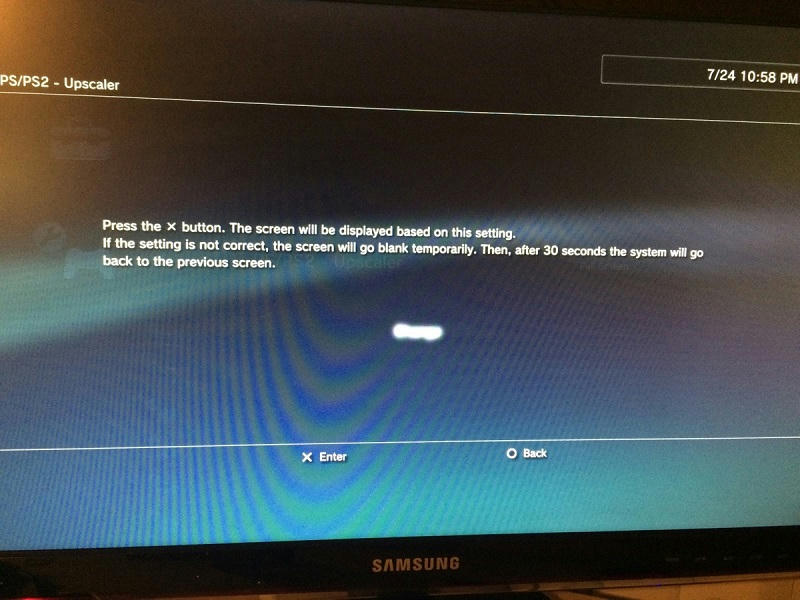
Try turn off (or change setting) PSX upscaler in PS3 setting.

[h=3]PS - Upscaler[/h]Upscaling is a technique that can be used to enable video content recorded in SD resolution (NTSC: 480p / 480i, PAL: 576p / 576i) to be displayed in HD resolution (1080p / 1080i / 720p). Because the video content of PlayStation®2 and PlayStation® format software is recorded in SD resolution, the content can be upscaled. Higher resolution video can be achieved by enabling upscaled output.
Set to disable upscaled output.
Set to upscale and display at a size that matches the screen size.
Set to upscale and display at full screen by changing proportions and stretching the image.


[TH="class: th"]Off[/TH]

[TH="class: th"]Normal[/TH]

[TH="class: th1"]Full Screen[/TH]
source: PS3

Is only for CECH A/B C/E consoles.
 
Last edited:
Help plz

i Have a super-slim Ps3 and i want a CFW 4.75 Does this one work?
can i Jailbreak my ps3?
is there any solution that you guys can recommend, id be grateful
 
Hey Joonie, I was out at a friends cottage so I'm just getting the info now. I have two 1080p TV's and both give the same video error. I've tried resetting the PS3 video mode and manually picking different resolutions but nothing worked. I'm sure you guys will work your Awesome Magic.

Thanks,
mm

Can you be more specific about your test setup?

You didn't mention which PS3, FW and which game, and also, did you try the original ROGERO 4.46 COBRA?

We need to isolate the issue from our own bug and its original bug.
 
Back
Top