• Official PS3 Toolset is now supporting 4.92 Firmware

    View Official Release Post for additional information HERE

PS3 [BG Toolset] User Issues and Dump Submissions

PS3 Model: CECH-C04
Firmware Version: OFW 4.87
IDPS Is Masked: Unapplicable
Have Original Dump: No
Dump 1 URL: -
Have Patched Dump: No
Dump 2 URL: -
System Boots To XMB: Yes
System Boots To Recovery: Yes
Firmware Version Displayed In Recovery: 4.87
Minimum Firmware Version Displayed In Toolset: ?
Disc In Drive: No


I cant' execute the toolset as my whole PS3 freezes shortly after opening the site for the BG toolset.
The longest I've waited was 15 minutes. But the system remained frozen.
I've tried to access the site on a new user profile (fresh browser) and on an existing user.
I've tried it with the language of my system set to German or English (US).
All USB devices were disconnected.

After a forced reboot the PS3 wants to check the filesystem for errors.

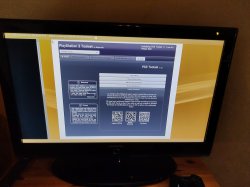
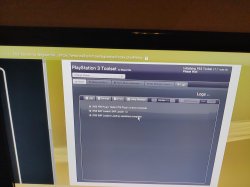
I have attached screenshots of the main site and the logs when my console freezes.

The only 'special' thing I remember about my PS3 is that it's a model that was replaced by Sony once as the BD drive broke some years ago.

Is my model incompatible with the toolset? I though all fat models were compatible.

Greeting from Germany,
sacnoth
 

Attachments

  • IMG_20210201_111610.jpg
    IMG_20210201_111610.jpg
    5.9 MB · Views: 89
  • IMG_20210130_173635.jpg
    IMG_20210130_173635.jpg
    7.8 MB · Views: 103
This is still a problem right? I am unable to install Rebug and ive done it on a few before this so not sure what I am doing wrong.

Hopefully this form is filled out correctly?


Thanks in advance for any help


PS3 Model: CECH-A01
Firmware Version: 4.87
Firmware Type: OFW CEX
IDPS Is Masked: Yes
Have Original Dump: Yes
Dump 1 URL: https://ufile.io/01axydug
Have Patched Dump: Yes
Dump 2 URL: https://ufile.io/7xlovjfu
System Boots To XMB: Yes
System Boots To Recovery: Yes
Firmware Version Displayed In Recovery: 4.87
Minimum Firmware Version Displayed In Toolset: 1.0
Disc In Drive: No


I updated to 4.87 before running the xploit, then rebooted and tried to install three different versions of CFW and none would install. I also tried to install from recovery mode but the update wasn't even found.
 
This is still a problem right? I am unable to install Rebug and ive done it on a few before this so not sure what I am doing wrong.

Hopefully this form is filled out correctly?


Thanks in advance for any help


PS3 Model: CECH-A01
Firmware Version: 4.87
Firmware Type: OFW CEX
IDPS Is Masked: Yes
Have Original Dump: Yes
Dump 1 URL: https://ufile.io/01axydug
Have Patched Dump: Yes
Dump 2 URL: https://ufile.io/7xlovjfu
System Boots To XMB: Yes
System Boots To Recovery: Yes
Firmware Version Displayed In Recovery: 4.87
Minimum Firmware Version Displayed In Toolset: 1.0
Disc In Drive: No


I updated to 4.87 before running the xploit, then rebooted and tried to install three different versions of CFW and none would install. I also tried to install from recovery mode but the update wasn't even found.
No, the NAND bug mentioned in OP is no longer a problem, the bug was corrected within days of the initial release last year so unless you used the Flash Manager a year ago & never installed a firmware since, it would be a different problem.
That nand bug made the minimum installable version calculated in recovery mode wrong so if you got 4.87 there, you must be having another problem.
1. What error do you get when trying to update?
2. Have you validated your dumps (before & after flashing) with the latest pyps3checker? Can you post the outcome?
 
Last edited:
PS3 Model: CECH-C04
Firmware Version: OFW 4.87
IDPS Is Masked: Unapplicable
Have Original Dump: No
Dump 1 URL: -
Have Patched Dump: No
Dump 2 URL: -
System Boots To XMB: Yes
System Boots To Recovery: Yes
Firmware Version Displayed In Recovery: 4.87
Minimum Firmware Version Displayed In Toolset: ?
Disc In Drive: No


I cant' execute the toolset as my whole PS3 freezes shortly after opening the site for the BG toolset.
The longest I've waited was 15 minutes. But the system remained frozen.
I've tried to access the site on a new user profile (fresh browser) and on an existing user.
I've tried it with the language of my system set to German or English (US).
All USB devices were disconnected.

After a forced reboot the PS3 wants to check the filesystem for errors.

I have attached screenshots of the main site and the logs when my console freezes.

The only 'special' thing I remember about my PS3 is that it's a model that was replaced by Sony once as the BD drive broke some years ago.

Is my model incompatible with the toolset? I though all fat models were compatible.

Greeting from Germany,
sacnoth
All ps3 models are compatible. Refurbished models should not be a problem in theory but there is always the possibility that the system appears "unusual" to one of the Toolset algorithms.

I have had a few reports over the past year about a freeze situation on Toolset loading. It looks like it's happening on early phat models but I dunno why or how.
I have never been able to reproduce the situation & therefore could not fix it, esc0rtd3w also tried to reproduce the problem on multiple consoles & never managed to get any console to freeze.

So at this stage, there are 2 ways to go.
1. Leave everything as is, the next update might sort it out as it will include a number of improvements in the actionscript code most likely responsible for the crash.
2. Investigate the bug but for that I need someone experiencing the freeze to volunteer to test stuff for me & report results. The job could take hours & would preferably need to be done by an advanced user, well versed with the ps3 system & debugging.
 
No, the NAND bug mentioned in OP is no longer a problem, the bug was corrected within days of the initial release last year so unless you used the Flash Manager a year ago & never installed a firmware since, it would be a different problem.
That nand bug made the minimum installable version calculated in recovery mode wrong so if you got 4.87 there, you must be having another problem.
1. What error do you get when trying to update?
2. Have you validated your dumps (before & after flashing) with the latest pyps3checker? Can you post the outcome?


1. I get error 8002f169 "the data is corrupted"
2. I validated the first dump before flashing and it said no errors detected.

History is that this customers disc drive is making some strange noises when the disc is inserted (basically has a seizure) I've swapped the entire assembly out 3 times (while preserving original daughter board) with no change. So I was recommended by someone to softmod/remarry to a new bluray drive board (which I didn't even know I could do) So this is where I am now.

I updated the console to 4.87 with no problems and then ran the flash from ps3xlpoit and it was successful, but it will not take any cfw install, instead shows that error 8002f169 I will verify that second dump now, you say you want the results posted?

FIRST DUMP PRE FLASH

PyPS3checker v0.10.x. Check log.
Checked file : H:\BC PS3 Tools & BC Dumps\PS3 BC Dump\Angel Rodriguez\dump.hex
******* Getting flash type *******
Flash type : NAND (partial dump, 239MB)
******* Getting SKU identification datas *******
idps = 0x03
metldr0 = 0xEDE0
metldr1 = 0x0EDA
Matching SKU : OK
CECHCxx (COK-002)
Minimum version 1.00
******* Getting SDK versions *******
ROS0 : 455.000
ROS1 : 487.000
******* Checking Header_Magic *******
002.01 Header Magic 0x00 Filled Area 0 : OK
002.02 Header Magic : OK
002.03 Header Magic 0x00 Filled Area 1 : OK
******* Checking flash_region_table *******
003.01 Flash Region Table Header : OK
003.02 asecure_loader Offset - Length : OK
003.03 asecure_loader Name : OK
003.04 eEID Offset - Length : OK
003.05 eEID Name : OK
003.06 cISD Offset - Length : OK
003.07 cISD Name : OK
003.08 cCSD Offset - Length : OK
003.09 cCSD Name : OK
003.10 trvk_prg Offset - Length : OK
003.11 trvk_prg Name : OK
003.12 trvk_pkg Offset - Length : OK
003.13 trvk_pkg Name : OK
003.14 creserved_0 Offset - Length : OK
003.15 creserved_0 Name : OK
003.16 ros Offset - Length : OK
003.17 ros Name : OK
003.18 cvtrm Offset - Length : OK
003.19 cvtrm Name : OK
003.20 Flash Region Table 0x00 Filled Area : OK
******* Checking asure_loader_region *******
004.01 asecure_loader Header : OK
004.02 metldr Offset : OK
004.03 metldr Length : OK
004.04 metldr Name : OK
004.05 metldr RevKey : OK
004.06 metldr Binary Size : OK
004.07 metldr Statistics : OK
004.08 asecure_loader 0x00 Filled Area : OK
******* Checking eEID_region *******
005.01 eEID Header : OK
005.02 EID0 Offset - Length : OK
005.03 EID1 Offset - Length : OK
005.04 EID2 Offset - Length : OK
005.05 EID3 Offset - Length : OK
005.06 EID4 Offset - Length : OK
005.07 EID5 Offset - Length : OK
005.08 EID0 IDPS0 : OK
005.09 EID0 IDPS1 : OK
005.10 EID0 Static : OK
005.11 EID2 BlockSize/Padding : OK
005.12 EID3 Static0 : OK
005.13 EID3 Static1 : OK
005.14 EID3 Static2 : OK
005.15 EID5 IDPS0 : OK
005.16 EID5 IDPS1 : OK
005.17 EID5 Static : OK
005.18 eEID Region 0xFF Filled Area : OK
005.19 eEID Statistics0 : OK
005.20 eEID Statistics1 : OK
******* Checking cISD_region *******
006.01 cISD Header : OK
006.02 cISD0 Offset - Length : OK
006.03 cISD1 Offset - Length : OK
006.04 cISD2 Offset - Length : OK
006.05 cISD0 0xFF Filled Area : OK
006.06 cISD1 IDLog Header : OK
006.07 cISD1 Semistatic 1 : OK
006.08 cISD1 Semistatic 2 : OK
006.09 cISD1 0xFF Filled Area 0 : OK
006.10 cISD1 Static : OK
006.11 cISD1 Semistatic 3 : OK
006.12 cISD1 0xFF Filled Area 1 : OK
006.13 cISD1 Statistics : OK
006.14 cISD2 : OK
006.15 cISD 0xFF Filled Area : OK
******* Checking cCSD_region *******
007.01 cCSD Header : OK
007.02 cCSD Entry Table : OK
007.03 cCSD 0xFF Filled Area : OK
******* Checking Revokation_region *******
008.00 trvk_prg Region Header : OK
008.01 trvk_prg0 SCE : OK
008.02 trvk_prg0 Hash : OK
Size = 0x2E0
MD5 = E537DE954DCF25D4DE961DF44549BAF7
Version = 3.50 (from PUP)
008.03 trvk_prg1 SCE : OK
008.04 trvk_prg1 Hash : OK
Size = 0x2E0
MD5 = 78629D24BD721488F3A1E846938F87DF
Version = 3.55 (from PUP)
008.00 trvk_pkg Region Header : OK
008.05 trvk_pkg0 SCE : OK
008.07 trvk_pkg1 SCE : OK
******* Checking Unreferenced_Area *******
008.08 unreferenced area 0xFF filled : OK
******* Checking CoreOS_region *******
009.00 ROS Header : OK
009.01 ROS0 Header : OK
009.02 ROS0 Hash : OK
Size = 0x6FFFE0
MD5 = 8845D70EAB7B28BB829C378A37121DDF
Version = 4.55 CEX/SEX OFW
009.03 ROS1 Header : OK
009.04 ROS1 Hash : OK
Size = 0x6FFFE0
MD5 = 8F4A63DC20F1EB54168478C814DF80C1
Version = 4.87 CEX/SEX OFW/HFW
******* Checking cvtrm_region *******
010.01 cvtrm Header : OK
010.02 cvtrm Header Static 1 : OK
010.03 vtrm Magic 1 : OK
010.05 vtrm Magic 2 : OK
010.07 cvtrm 0x00 Filled Area : OK
******* Checking cell_ext_os_area *******
011.01 cell_ext_os_area Header : OK
011.02 cell_ext_os_area 0xFF Filled Area 0 : OK
011.03 cell_ext_os_area Break Section : OK
011.04 cell_ext_os_area 0xFF Filled Area 1 : OK
******* Checking datamatches *******
per console nonce : OK
metldr size : OK
vtrm header datas : OK
vtrm : OK
******* Checking repetitions *******
Header Magic Repetition : OK
asecure_loader Repetition : OK
eEID Repetition : OK
cISD Repetition : OK
cCSD Repetition : OK
trvk_prg Repetition : OK
trvk_pkg Repetition : OK
ros Repetition : OK
cvtrm Repetition : OK
******* Additional information *******
MAC address : 00:19:C5:9D:C7:7C
CID : 0x000200560DD2
eCID : 01C51850950DA70E050F2B4000000000
board_id (part of console S/N) : 27430505
kiban_id (board barcode) : 3HB00558960E
******* Checks completed *******
Total number of checks = 113
Number of dangers = 0
Number of warnings = 0
All checks done in 6.61 seconds.

SECOND DUMP AFTER FLASH

PyPS3checker v0.10.x. Check log.
Checked file : H:\BC PS3 Tools & BC Dumps\PS3 BC Dump\Angel Rodriguez\dump2.hex
******* Getting flash type *******
Flash type : NAND (partial dump, 239MB)
******* Getting SKU identification datas *******
idps = 0x03
metldr0 = 0xEDE0
metldr1 = 0x0EDA
Matching SKU : OK
CECHCxx (COK-002)
Minimum version 1.00
******* Getting SDK versions *******
ROS0 : 487.000
ROS1 : 487.000
******* Checking Header_Magic *******
002.01 Header Magic 0x00 Filled Area 0 : OK
002.02 Header Magic : OK
002.03 Header Magic 0x00 Filled Area 1 : OK
******* Checking flash_region_table *******
003.01 Flash Region Table Header : OK
003.02 asecure_loader Offset - Length : OK
003.03 asecure_loader Name : OK
003.04 eEID Offset - Length : OK
003.05 eEID Name : OK
003.06 cISD Offset - Length : OK
003.07 cISD Name : OK
003.08 cCSD Offset - Length : OK
003.09 cCSD Name : OK
003.10 trvk_prg Offset - Length : OK
003.11 trvk_prg Name : OK
003.12 trvk_pkg Offset - Length : OK
003.13 trvk_pkg Name : OK
003.14 creserved_0 Offset - Length : OK
003.15 creserved_0 Name : OK
003.16 ros Offset - Length : OK
003.17 ros Name : OK
003.18 cvtrm Offset - Length : OK
003.19 cvtrm Name : OK
003.20 Flash Region Table 0x00 Filled Area : OK
******* Checking asure_loader_region *******
004.01 asecure_loader Header : OK
004.02 metldr Offset : OK
004.03 metldr Length : OK
004.04 metldr Name : OK
004.05 metldr RevKey : OK
004.06 metldr Binary Size : OK
004.07 metldr Statistics : OK
004.08 asecure_loader 0x00 Filled Area : OK
******* Checking eEID_region *******
005.01 eEID Header : OK
005.02 EID0 Offset - Length : OK
005.03 EID1 Offset - Length : OK
005.04 EID2 Offset - Length : OK
005.05 EID3 Offset - Length : OK
005.06 EID4 Offset - Length : OK
005.07 EID5 Offset - Length : OK
005.08 EID0 IDPS0 : OK
005.09 EID0 IDPS1 : OK
005.10 EID0 Static : OK
005.11 EID2 BlockSize/Padding : OK
005.12 EID3 Static0 : OK
005.13 EID3 Static1 : OK
005.14 EID3 Static2 : OK
005.15 EID5 IDPS0 : OK
005.16 EID5 IDPS1 : OK
005.17 EID5 Static : OK
005.18 eEID Region 0xFF Filled Area : OK
005.19 eEID Statistics0 : OK
005.20 eEID Statistics1 : OK
******* Checking cISD_region *******
006.01 cISD Header : OK
006.02 cISD0 Offset - Length : OK
006.03 cISD1 Offset - Length : OK
006.04 cISD2 Offset - Length : OK
006.05 cISD0 0xFF Filled Area : OK
006.06 cISD1 IDLog Header : OK
006.07 cISD1 Semistatic 1 : OK
006.08 cISD1 Semistatic 2 : OK
006.09 cISD1 0xFF Filled Area 0 : OK
006.10 cISD1 Static : OK
006.11 cISD1 Semistatic 3 : OK
006.12 cISD1 0xFF Filled Area 1 : OK
006.13 cISD1 Statistics : OK
006.14 cISD2 : OK
006.15 cISD 0xFF Filled Area : OK
******* Checking cCSD_region *******
007.01 cCSD Header : OK
007.02 cCSD Entry Table : OK
007.03 cCSD 0xFF Filled Area : OK
******* Checking Revokation_region *******
008.00 trvk_prg Region Header : OK
008.01 trvk_prg0 SCE : OK
008.02 trvk_prg0 Hash : OK
Size = 0x2E0
MD5 = E537DE954DCF25D4DE961DF44549BAF7
Version = 3.50 (from PUP)
008.03 trvk_prg1 SCE : OK
008.04 trvk_prg1 Hash : OK
Size = 0x2E0
MD5 = 78629D24BD721488F3A1E846938F87DF
Version = 3.55 (from PUP)
008.00 trvk_pkg Region Header : OK
008.05 trvk_pkg0 SCE : OK
008.07 trvk_pkg1 SCE : OK
******* Checking Unreferenced_Area *******
008.08 unreferenced area 0xFF filled : OK
******* Checking CoreOS_region *******
009.00 ROS Header : OK
009.01 ROS0 Header : OK
009.02 ROS0 Hash : OK
Size = 0x6FFFE0
MD5 = 1EFB54B005B09A10E436F9C76E51D870
Version = 4.87 CEX Patched (Evilnat based)
009.03 ROS1 Header : OK
009.04 ROS1 Hash : OK
Size = 0x6FFFE0
MD5 = 1EFB54B005B09A10E436F9C76E51D870
Version = 4.87 CEX Patched (Evilnat based)
******* Checking cvtrm_region *******
010.01 cvtrm Header : OK
010.02 cvtrm Header Static 1 : OK
010.03 vtrm Magic 1 : OK
010.05 vtrm Magic 2 : OK
010.07 cvtrm 0x00 Filled Area : OK
******* Checking cell_ext_os_area *******
011.01 cell_ext_os_area Header : OK
011.02 cell_ext_os_area 0xFF Filled Area 0 : OK
011.03 cell_ext_os_area Break Section : OK
011.04 cell_ext_os_area 0xFF Filled Area 1 : OK
******* Checking datamatches *******
per console nonce : OK
metldr size : OK
vtrm header datas : OK
vtrm : OK
******* Checking repetitions *******
Header Magic Repetition : OK
asecure_loader Repetition : OK
eEID Repetition : OK
cISD Repetition : OK
cCSD Repetition : OK
trvk_prg Repetition : OK
trvk_pkg Repetition : OK
ros Repetition : OK
cvtrm Repetition : OK
******* Additional information *******
MAC address : 00:19:C5:9D:C7:7C
CID : 0x000200560DD2
eCID : 01C51850950DA70E050F2B4000000000
board_id (part of console S/N) : 27430505
kiban_id (board barcode) : 3HB00558960E
******* Checks completed *******
Total number of checks = 113
Number of dangers = 0
Number of warnings = 0
All checks done in 27.83 seconds.

 
The flashing procedure appears to have been successful, at least from what I see so far & I doubt that your issue is caused by a FMM flashing error.
FMM only patches the ROS regions & both ROS regions in dump 2 are perfectly valid, the hashes are recognised by pyps3checker.
It cannot be an issue with the ROS header like in last year's bug either otherwise you would get a message with minimum firmware requirement equal to FFFF.FFFF when trying to install a firmware from recovery mode. I will have a look at your dump when I have a minute to confirm that the ros header is sound.

You might want to ask for confirmation by @littlebalup that your dump 2 is good overall despite the successful validation.
 
Last edited:
The flashing procedure appears to have been successful, at least from what I see so far & I doubt that your issue is caused by a FMM flashing error.
FMM only patches the ROS regions & both ROS regions in dump 2 are perfectly valid, the hashes are recognised by pyps3checker.
It cannot be an issue with the ROS header like in last year's bug either otherwise you would get a message with minimum firmware requirement equal to FFFF.FFFF when trying to install a firmware from recovery mode. I will have a look at your dump when I have a minute to confirm that the ros header is sound.

You might want to ask for confirmation by @littlebalup that your dump 2 is good overall despite the successful validation.
Yeah I'm wondering if it has something to do with his original Blu-ray daughter board being faulty, still wouldn't make sense that it could update to 4.87 ofw and not rebug, as it was on 4.55. I'll keep tinkering and see what if I can figure something out. Really appreciate the time.
 
Yeah I'm wondering if it has something to do with his original Blu-ray daughter board being faulty, still wouldn't make sense that it could update to 4.87 ofw and not rebug, as it was on 4.55. I'll keep tinkering and see what if I can figure something out. Really appreciate the time.

You should try to install 4.87 CFW first and ensure QA is enabled before to install rebug.
 
You should try to install 4.87 CFW first and ensure QA is enabled before to install rebug.

stupid question here, but what is just "4.87 CFW" is there a base CFW and not rebug? I thought REBUG WAS the CFW? I am finding HFW 4.87 and Evilnats and Ferrox CFW's but a bit confused about which one you are talking about. TIA

EDIT: Oh I see your "dualboot" 4.87 littlebalup, is that what I should try? Trying now anyways lol, derp looks like I need to be on 4.87 CEX.. I need to learn more terminology

EDIT EDIT: Ok so it is now currently installing Evilnats [NOBD] 4.87.2 so at least that is working, now ill get onto learning how to remarry the bd board if thats possible like it sounds like it is. Thanks for your patience :-)
 
Last edited:
stupid question here, but what is just "4.87 CFW" is there a base CFW and not rebug? I thought REBUG WAS the CFW? I am finding HFW 4.87 and Evilnats and Ferrox CFW's but a bit confused about which one you are talking about. TIA

EDIT: Oh I see your "dualboot" 4.87 littlebalup, is that what I should try? Trying now anyways lol, derp looks like I need to be on 4.87 CEX.. I need to learn more terminology

EDIT EDIT: Ok so it is now currently installing Evilnats [NOBD] 4.87.2 so at least that is working, now ill get onto learning how to remarry the bd board if thats possible like it sounds like it is. Thanks for your patience :-)
You can install any existing 4.87 CFW like Evilnat's or Ferrox but you cannot install a Rebug CFW (which are all older than 4.87) unless QA is enabled on your console. QA enabled is a requirement to downgrade the firmware of a console.
 
You can install any existing 4.87 CFW like Evilnat's or Ferrox but you cannot install a Rebug CFW (which are all older than 4.87) unless QA is enabled on your console. QA enabled is a requirement to downgrade the firmware of a console.

ok so I now have evilnat 4.87 installed and I also downloaded toggleQA pkg but it doesnt seem to work properly. I still cannot install any rebug 4.87 as you said because I am guessing my QA is not enabled. When I run toggleQA it does not "beep" at all, it just resets and I do not see anything popup on the network config with the button combo... I'll keep trying maybe its me
 
Once a 4.87 CFW is installed, use a QA toggler (the feature is included in Rebug Toolbox or you can use a standalone QA toggler from store.brewology.com).

Install the QA toggler pkg.
Run the QA toggler only once.
It's a toggler so if you run it again, it will disable QA etc..
Reboot the console, QA change will only be taken into account by the system after the reboot.
That's all there is to it.
You can uninstall the QA toggler once it's done as QA should be left enabled at all times.

To verify that QA is enabled after console reboot, you can use the specific gamepad combo that will make a new menu item appear in the Settings column of the XMB.
I don't recall the combo exactly, you can find it easily, search the psdevwiki for "QA flag pad combo".

Btw, you should never use a noBD CFW unless you have no other option.
 
I still cannot install any rebug 4.87 as you said because I am guessing my QA is not enabled
The real reason why nobody can install a 4.87 rebug is because doesnt exists :D
Rebug is a team, his CFW (custom firmwares) are not the only ones, but are the most popular. The problem is they have not released any CFW based on 4.87

When bguerville mentioned to "install a 4.87 CFW" he meant one of the CFW based on 4.87 availables
The evilnat 4.87 CFW is fine, i suggest to stay in it while getting used to all the features of the CFW itself, and also the available homebrew programs you can use, is going to take you some time because are a lot
In my oppinion the worst thing you can do at this point is to start installing different CFW's, is safer to stay in one of them for a time and dont take risks

The OFW's (official firmwares) doesnt allows to install a previous version of the firmware, but the PS3 software have a "QA flag" that allows it (is a feature used in factories and repair services)
The QA flag is like a switch with only 2 positions, ON or OFF
When we enable it stays enabled forever (unless you "toggle" it again to the OFF position), is recommended to enable it either because:
-For repair purposes, incase you have a big software problem at some point, it gives you more freedom in the kind of repair procedures you can do, because we are removing a restriction
-To install CFW's older than your current version installed

I suggest to enable the QA and stay in evilnat 4.87 CFW... i like rebug, but imo is not worthy for a newcomer to install a CFW older than 4.87
If you start installing CFW's back and forth you are buying tickets for a lottery where the prize is a brick, better dont play that game :P
 
Hi,

I have a warning when checking thw dump with PyPS3Checker. Should i go ahead with the patching?

Model is CECH-2004A on 4.87 OFW.


******* Getting flash type *******
Flash type : NOR
Reversed : NO


******* Getting SKU identification datas *******
idps = 0x09
metldr0 = 0xE890
metldr1 = 0x0E85
metldrkey = 0xBC78B8F02879A81184A0DA74
bootldr0 = 0x2F13
bootldr1 = 0x2F13
bootldrsize = 0x2F170

Matching SKU : OK
CECH-20xxx (DYN-001)
Minimum version 2.70


******* Getting SDK versions *******
ROS0 : 487.000
ROS1 : 487.000


******* Checking first_region_header *******
001.01 First Region Header 0x00 Filled Area 0 : OK
001.02 First Region Header Magic : OK
001.03 First Region Header 0x00 Filled Area 1 : OK


******* Checking flash_format *******
002.01 Flash Format String : OK
002.02 Flash Format Version : OK
002.03 Flash Format 0xFF Filled Area : OK


******* Checking flash_region_table *******
003.01 Flash Region Table Header : OK
003.02 asecure_loader Offset - Length : OK
003.03 asecure_loader Name : OK
003.04 eEID Offset - Length : OK
003.05 eEID Name : OK
003.06 cISD Offset - Length : OK
003.07 cISD Name : OK
003.08 cCSD Offset - Length : OK
003.09 cCSD Name : OK
003.10 trvk_prg0 Offset - Length : OK
003.11 trvk_prg0 Name : OK
003.12 trvk_prg1 Offset - Length : OK
003.13 trvk_prg1 Name : OK
003.14 trvk_pkg0 Offset - Length : OK
003.15 trvk_pkg0 Name : OK
003.16 trvk_pkg1 Offset - Length : OK
003.17 trvk_pkg1 Name : OK
003.18 ros0 Offset - Length : OK
003.19 ros0 Name : OK
003.20 ros1 Offset - Length : OK
003.21 ros1 Name : OK
003.22 cvtrm Offset - Length : OK
003.23 cvtrm Name : OK
003.24 Flash Region Table 0x00 Filled Area : OK


******* Checking asure_loader_region *******
004.01 asecure_loader Header : OK
004.02 metldr Offset : OK
004.03 metldr Length : OK
004.04 metldr Name : OK
004.05 metldr RevKey : OK
004.06 metldr Binary Size : OK
004.07 metldr Statistics : OK
004.08 asecure_loader 0x00 Filled Area : WARNING!
All bytes from offset 0xF0D0 to offset 0x2F000 should be 0x00.
Byte at offset 0x2E514 has value : 0x20
Subsequent bytes in the range may be wrong as well.


******* Checking eEID_region *******
005.01 eEID Header : OK
005.02 EID0 Offset - Length : OK
005.03 EID1 Offset - Length : OK
005.04 EID2 Offset - Length : OK
005.05 EID3 Offset - Length : OK
005.06 EID4 Offset - Length : OK
005.07 EID5 Offset - Length : OK
005.08 EID0 IDPS0 : OK
005.09 EID0 IDPS1 : OK
005.10 EID0 Static : OK
005.11 EID2 BlockSize/Padding : OK
005.12 EID3 Static0 : OK
005.13 EID3 Static1 : OK
005.14 EID3 Static2 : OK
005.15 EID5 IDPS0 : OK
005.16 EID5 IDPS1 : OK
005.17 EID5 Static : OK
005.18 eEID Region 0xFF Filled Area : OK
005.19 eEID Statistics0 : OK
005.20 eEID Statistics1 : OK


******* Checking cISD_region *******
006.01 cISD Header : OK
006.02 cISD0 Offset - Length : OK
006.03 cISD1 Offset - Length : OK
006.04 cISD2 Offset - Length : OK
006.05 cISD0 0xFF Filled Area : OK
006.06 cISD1 IDLog Header : OK
006.07 cISD1 Semistatic 1 : OK
006.08 cISD1 Semistatic 2 : OK
006.09 cISD1 0xFF Filled Area 0 : OK
006.10 cISD1 Static : OK
006.11 cISD1 Semistatic 3 : OK
006.12 cISD1 0xFF Filled Area 1 : OK
006.13 cISD1 Statistics : OK
006.14 cISD2 : OK
006.15 cISD 0xFF Filled Area : OK


******* Checking cCSD_region *******
007.01 cCSD Header : OK
007.02 cCSD Entry Table : OK
007.03 cCSD 0xFF Filled Area : OK


******* Checking Revokation_region *******
008.01 trvk_prg0 SCE : OK
008.02 trvk_prg0 Hash : OK
Size = 0x2C0
MD5 = F95C7FDE2917EDAB626F9D8906E8F4C1
Version = 3.01 (from PUP)

008.02 trvk_prg0 0xFF filled area : OK
008.03 trvk_prg1 SCE : OK
008.04 trvk_prg1 Hash : OK
Size = 0x2E0
MD5 = 78629D24BD721488F3A1E846938F87DF
Version = 3.55 (from PUP)

008.04 trvk_prg1 0xFF filled area : OK
008.05 trvk_pkg0 SCE : OK
008.06 trvk_pkg0 0xFF filled area : OK
008.07 trvk_pkg1 SCE : OK
008.08 trvk_pkg1 0xFF filled area : OK


******* Checking CoreOS_region *******
009.01 ROS0 Header : OK
009.02 ROS0 Hash : OK
Size = 0x6FFFE0
MD5 = 8F4A63DC20F1EB54168478C814DF80C1
Version = 4.87 CEX/SEX OFW/HFW

009.03 ROS0 unused 0xFF Filled Area : OK
009.04 ROS1 Header : OK
009.05 ROS1 Hash : OK
Size = 0x6FFFE0
MD5 = 8F4A63DC20F1EB54168478C814DF80C1
Version = 4.87 CEX/SEX OFW/HFW

009.06 ROS1 unused 0xFF Filled Area : OK


******* Checking cvtrm_region *******
010.01 Pre cvtrm 0xFF Filled Area : OK
010.02 cvtrm0 Header : OK
010.03 cvtrm0 0xFF Filled Area : OK
010.04 vtrm0 Magic : OK
010.05 vtrm0 Reserved Entries : OK
010.07 cvtrm1 Header : OK
010.08 cvtrm1 0xFF Filled Area : OK
010.09 vtrm1 Magic : OK
010.10 vtrm1 Reserved Entries : OK


******* Checking Second_Region_Header *******
011.01 Second Region Header 0x00 Filled Area 0 : OK
011.02 Second Region Header Magic : OK
011.03 Second Region Header Count : OK
011.04 Second Region Header 0x00 Filled Area 1 : OK
011.05 Second Region Unknown Block 0 : OK
011.06 Second Region Header 0x00 Filled Area 2 : OK
011.07 Second Region Unknown Block 1 : OK
011.08 Second Region Header 0x00 Filled Area 3 : OK


******* Checking Unreferenced_Area *******
012.01 unreferenced area 0xFF Filled : OK


******* Checking CELL_EXTNOR_AREA_Region *******
013.01 CELL_EXTNOR_AREA Header : OK
013.02 CELL_EXTNOR_AREA 0x00 Filled Area 0 : OK
013.03 CELL_EXTNOR_AREA 0x00 Filled Area 1 : OK
013.04 CELL_EXTNOR_AREA 0x00 Filled Area 2 : OK
013.05 CELL_EXTNOR_AREA 0x00 Filled Area 3 : OK
013.06 CELL_EXTNOR_AREA 0xFF Filled Area 0 : OK
013.07 CELL_EXTNOR_AREA 0x00 Filled Area 5 : OK
013.08 CELL_EXTNOR_AREA 0x00 Filled Area 6 : OK
013.09 CELL_EXTNOR_AREA 0xFF Filled Area 1 : OK


******* Checking bootldr_region *******
014.01 bootldr0 : OK
014.02 bootldr1 : OK
014.03 bootldr Rev key : OK
014.04 bootldr Statistics : OK
014.05 bootldr 0xFF Filled Area : OK


******* Checking datamatches *******
bootldr size : OK
per console nonce : OK
CELL_EXTNOR_AREA Hash1 : OK
CELL_EXTNOR_AREA Hash2 : OK
metldr size : OK
vtrm0 : OK
vtrm1 : OK


******* Checking repetitions *******
Header Magic0 Repetitions : OK
asecure_loader Repetitions : OK
eEID Repetitions : OK
cISD Repetitions : OK
cCSD Repetitions : OK
trvk_prg0 Repetitions : OK
trvk_prg1 Repetitions : OK
trvk_pkg0 Repetitions : OK
trvk_pkg1 Repetitions : OK
ros0 Repetitions : OK
ros1 Repetitions : OK
cvtrm Repetitions : OK


******* Additional information *******
HDD : TOSHIBA MK1255GSX H 59R3PDXJT
MAC address : 00:24:8D:1F:65:C4
CID : 0x0002016013CA
eCID : 01C520014E09A70E1314664000000000
board_id (part of console S/N) : 27453072
kiban_id (board barcode) : 401301165155


******* Checks completed *******

Total number of checks = 155
Number of dangers = 0
Number of warnings = 1

Following check(s) returned a WARNING!
004.08 asecure_loader 0x00 Filled Area

All checks done in 7.95 seconds.


----------------------------------------------------------------------------
| IMPORTANT NOTICE ! |
| Checks of late CECH-25xxx, CECH-3xxxx and CECH-4xxxx consoles dumps still |
| under development and may return false results. If you feel it's the case, |
| please post your *.checklog.txt in a new issue on my github repository: |
| https://github.com/littlebalup/PyPS3tools/issues |
| Thanks! It will help me a lot to improve that tool ;) |
 
@littlebalup is the person to ask about dump validations.
Having said that if you can install official firmwares & use the console without problems despite the dump validation warning, patching & installing a CFW should work out just fine.
 
Hi,

I have a warning when checking thw dump with PyPS3Checker. Should i go ahead with the patching?

Model is CECH-2004A on 4.87 OFW.

...
It seems there is at least one byte with exotic value in an unused area where all bytes are supposed to be 0x00. It happens sometimes. It shouldn't be a problem.
 
The real reason why nobody can install a 4.87 rebug is because doesnt exists :D
Rebug is a team, his CFW (custom firmwares) are not the only ones, but are the most popular. The problem is they have not released any CFW based on 4.87

When bguerville mentioned to "install a 4.87 CFW" he meant one of the CFW based on 4.87 availables
The evilnat 4.87 CFW is fine, i suggest to stay in it while getting used to all the features of the CFW itself, and also the available homebrew programs you can use, is going to take you some time because are a lot
In my oppinion the worst thing you can do at this point is to start installing different CFW's, is safer to stay in one of them for a time and dont take risks

The OFW's (official firmwares) doesnt allows to install a previous version of the firmware, but the PS3 software have a "QA flag" that allows it (is a feature used in factories and repair services)
The QA flag is like a switch with only 2 positions, ON or OFF
When we enable it stays enabled forever (unless you "toggle" it again to the OFF position), is recommended to enable it either because:
-For repair purposes, incase you have a big software problem at some point, it gives you more freedom in the kind of repair procedures you can do, because we are removing a restriction
-To install CFW's older than your current version installed

I suggest to enable the QA and stay in evilnat 4.87 CFW... i like rebug, but imo is not worthy for a newcomer to install a CFW older than 4.87
If you start installing CFW's back and forth you are buying tickets for a lottery where the prize is a brick, better dont play that game :P

found out what I was doing wrong, I had the wrong QA toggler installed, installed the correct one and QA is now ON, and I am on Evilnat 4.87 [NOBD] what I am trying to do is remarry a new BD daughter board since I believe the original one is faulty but I only see a guide to do that using REBUG Toolbox which I cannot use on Evilnat 4.87. The system will STILL not let me install any REBUG firmware it always gives me error 8002f169 "data corrupted"

Maybe its something wrong with the MOBO as I haven't taken a look at fuses or anything... no idea why I would be able to install 4.87 OFW and then Evilnat 4.87 without a problem tho

EDIT: Ok so I am just impatient, started in recovery mode and the REBUG I need to remarry is finally installing, lets try to get this BD working now :-)
 
Last edited:
I am having the crashing issue with the website:

Model: CECH-2001A
IDPS Is Masked: Unapplicable
Have Original Dump: No
Dump 1 URL: -
Have Patched Dump: No
Dump 2 URL: -
System Boots To XMB: Yes
System Boots To Recovery: Yes
Firmware Version Displayed In Recovery: 4.84
Minimum Firmware Version Displayed In Toolset: ?
Disc In Drive: No

mixK4iy

https://imgur.com/mixK4iy

Furthest I have gotten before it crashes using the logging URL. Crashes in 5 seconds. All is enabled including Java.

I also can confirm flash is working by testing another site.
 
Last edited:
Hi my fellas, i've the following trouble with Bgtoolset

PS3 Model: CECH-2011A
Firmware Version: 4.87.1
Firmware Type: HFW CEX
IDPS Is Masked: Yes (original)

I can't execute the main page of bgtoolset, it is stuck in "initializating PS3 toolset". I've tried 10 times with Hen enablen and disabled, in both the web stucks in 5-6 seconds. I've the logs here:

https://ibb.co/gSGVyML

I've the latest version of Hen (installed from ps3xploit directly)

Sorry for my poor english, i'm writting from Chile.
gSGVyML
 
Hello @bguerville! I have the same freezing problem with bgtoolset, I have tried accessing the website in many ways, in my profile, in a new profile, and it freezes every single time. I have PS3 Slim, so it seems the issue is not restricted to Phat models. I'm not well versed in PS3 hacking as I'm just starting, but if you need, I can perform tests to help solving this issue.

Bgtoolset Log: https://imgur.com/a/pv4Iiub

PS3 Model: CECH-2501A
Firmware Version: 4.87
Firmware Type: OFW
IDPS Is Masked: ?
Have Original Dump: No
Dump 1 URL: -
Have Patched Dump: No
Dump 2 URL: -
System Boots To XMB: Yes
System Boots To Recovery: Yes
Firmware Version Displayed In Recovery: 4.87
Minimum Firmware Version Displayed In Toolset: ?
Disc In Drive: No
 
Back
Top