PS2 Cannot get themes or artwork to work in OPL

mantron

Forum Noob
Yesterday morning I updated OPL (to the latest beta build as of writing, 1.2.0 Beta 2173) and now I can no longer see any kind of art for any games; never had any issues with this before, as all art showed properly.
Additionally, I cannot get any themes to show up in the menu at all and saving settings to the HDD does not work. (write permissions are turned on in settings, saving settings to mc0 or 1 does work).

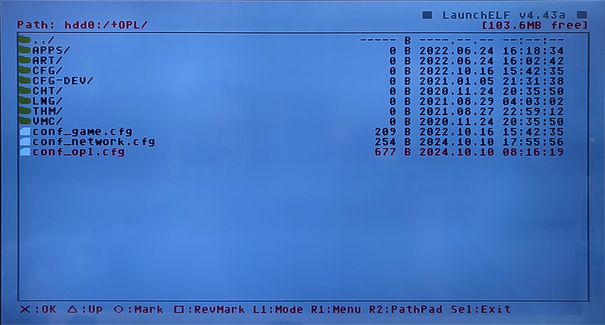
I added the art (obtained in OPL Manager, PNG, 8bit format) to the HDD (transferred using uLaunchElf, placed in both the _common/OPL/ART and also +OPL/ART to be safe), but still nothing.

After this didn't work, I re-formatted the entire HDD (512 gig) and I updated FHBD to the newest version (1966). I have added and removed my games with both HDL Batch Installer and PFS Batchkit Manager. I have run HDD checker and no errors have displayed, SMART is passed.

I came across some people reporting issues with the newest OPL beta and HDDs, so I've tried the following OPL versions to no avail;

1.1.0 Release

1.2.0 Beta 2165

1.2.0 Beta 2173

1.2.0 Beta 2133

1.2.0 Beta 2127

Feel like I'm losing my mind at this point, any help is appreciated.
 
That OPL build is broken, try older. However, 1.1.0 should works fine in above matters.

Unfortunately, 1.1.0 exhibits the same issues. No artwork, no themes will even show in the list. Still cannot save config to HDD.

Apologies for the bad picture quality (phone camera doesn't like CRT I guess), but I wanted to include anything that could possibly be relevant.
lI6VHo2.jpeg
L0ukqxF.jpeg
cW7I5wX.jpeg
igYNtBD.jpeg
R2Dzz3p.jpeg
skbuoGW.jpeg
4pJ5KXf.jpeg
fjMFwys.jpeg
 
Insert a memory card.
Launch OPL.
Save settings to a memory card.
Exit OPL.
Move settings from a memory card (mc0:/OPL) to HDD (hdd0:/+OPL).
Delete OPL folder in a memory card (mc0:/OPL).
Launch OPL.
 
Insert a memory card.
Launch OPL.
Save settings to a memory card.
Exit OPL.
Move settings from a memory card (mc0:/OPL) to HDD (hdd0:/+OPL).
Delete OPL folder in a memory card (mc0:/OPL).
Launch OPL.

No luck, unfortunately. Moved said files to the HDD (as pictured here), however within OPL (1.1.0), Artwork still does not show up, themes do not show up.
Opening OPL after deleting the OPL folder in memory card recreates the config file on the memory card, so I additionally tried simply removing the memory cards, but OPL still presents an error when attempting to save the settings to HDD.
QOVy74X.jpeg
 
Can you try OPL v1.0.0:
https://github.com/ps2homebrew/Open-PS2-Loader/releases/tag/v1.0.0.

Edit: Did you create +OPL partition by yourself (e.g. with wLe) or OPL created it (at the 1st launch)?
Did you extend\change size of +OPL partition (e.g. with wLe)?

EDIT 2: Here is my +OPL patition:
redo.png


It was created (128 MB) automatically by OPL.
Your size is different...

Alright! Looks like 1.0.0 will show my artwork, show themes and has no problems saving config to hard drive, even with my larger +OPL partition.

I created the +OPL partition myself because OPL 1.1.0 and newer will not create that partition and I chose the size as it was suggested in the guide I was following.
OPL version 1.1.0 and onward create an OPL folder structure under _common instead. To clarify, I had also been placing artwork/themes/etc in _common/OPL, which did not work either.

I just tried removing the +OPL partition and letting 1.0.0 create it for me, and 1.0.0 seems to behave the same as it did on my self-created partition. 1.1.0 and newer still will seemingly not interact with the +OPL partition at all, as it won't even pull my settings from the 1.0.0 save, and still cannot write settings to hard drive, will not show art, etc.
 
The most important thing is not to extend\enlarge once created partition because it causes issues.

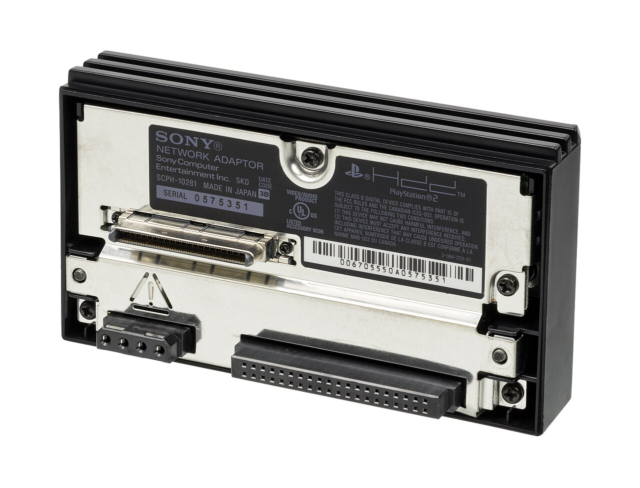
Do you have a genuine NA (Network Adaptor):
Sony-Play-Station-2-Network-Adaptor-Back.png

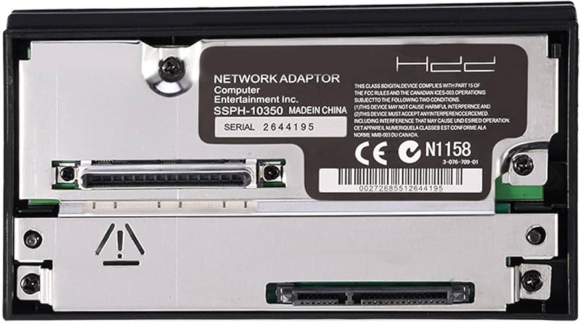
Or a 3rd party:
61-T211-CYEL-AC-UF894-1000-QL80.png
 
The most important thing is not to extend\enlarge once created partition because it causes issues.

Do you have a genuine NA (Network Adaptor):
Sony-Play-Station-2-Network-Adaptor-Back.png

Or a 3rd party:
61-T211-CYEL-AC-UF894-1000-QL80.png

I see, so the larger partition is okay, as long as I don't change it once it's created?
And I am using a third party network adapter. Is it possible that this is related to not being able to use >1.0.0 for artwork/themes/hdd config?
 
I see, so the larger partition is okay, as long as I don't change it once it's created?

Yes. That is correct.

And I am using a third party network adapter. Is it possible that this is related to not being able to use >1.0.0 for artwork/themes/hdd config?

To be honest I do no have any issues even with OPL v.1.1.0 with a genuine NA.
However some recent betas may cause problems.
 
Yes. That is correct.


To be honest I do no have any issues even with OPL v.1.1.0 with a genuine NA.
However some recent betas may cause problems.
I see, thank you for the help and explanations. I suppose I'll just have to stick with 1.0.0 for the time being if I want to use artwork.
 
I see, so the larger partition is okay, as long as I don't change it once it's created?
Old OPL (1.1.0 including) have bug with +OPL larger than 2,5GiB.
But yes, expanding APA partition (resizing) in uLE means drive ready for formatting due to damaged chain after that.
 
  • Like
Reactions: TnA
Back
Top