CECHA with Error 8002F147!

Revak3115

Member
Hello Everyone!

i currently have a CECHA00 (COK-001) with Sony Serviced 40nm RSX, it worked when i tested it out, except when i put a game in the drive it would lag badly and freeze the console, it was on firmware 4.46 so i updated to 4.89 via the internet on the PS3, the download seemed to be kinda slow, well, it got to the install screen and gets to around 60% sometimes 80% before giving me error "8002F147" i have tried everything you can think of, i swapped HDD, swapped Bluray drives, wifi cards, even different firmware via safe mode, etc to no avail. i also checked some of the components around the motherboard for shorts or open lines, everything seemed to read fine, and since it was working before i updated the console, like the disc drive was getting power, wifi worked, i dont think it would be that, i didnt test to see if the game would read though. im very lost here, any help would be great:)
Thanks!

i posted this in a thread too, but i wanted to give it a dedicated post just incase it can be fixed!
 

Attachments
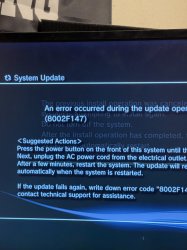
  • IMG_5666.jpg
    IMG_5666.jpg
    1.3 MB · Views: 150
Last edited:
It's a good idea to check syscon log & sb log. Do you have uart adapter ?

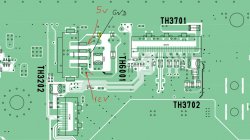
Another thing to check is 5v and 12 v on the bd drive connnector. I would recommend connecting a multimeter probe to 5v especially and see if it drops during the update procedure. I had a board where 5v was not constant and would cause random issues/freezes. Since you said the game would freeze and lag, it could be that... Here is the picture where to check.

Bd drive possibility.JPG


But I would recommend getting uart, post error log and then also connect it to SB to read the output during the update.

For your case, you will need to do the following:

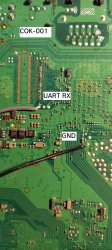
  • Connect with UART to syscon and enter "W 4202 2 " It should say that the write was a success. Turn off the machine and then solder UART wires according to the images below. Remember, you cannot send anything so you only need to connect an RX wire for receiving data and ground.
  • Then connect with Putty or any other terminal reading tool using Serial setting, specify the port of your UART , speed is 115200 baud. It should print the output of the system booting, etc. Keep it connected and try to update it , then post here what kind of messages it's giving...

SB_LOG_wires.jpg
 
You can try the following to get more messages from the Hypervisor environment (for CXR714):
Run these Syscon UART commands in standby:
Code:
w 42CF 03
w 42F0 03
w 42F1 03
After that, boot the system and attempt the install again.
The SB UART log will now be longer and include some information from the PME and SS.
The PS3 will be slower because of all the log output.

To disable the additional log(s), use:
Code:
w 42CF FF
w 42F0 FF
w 42F1 FF
 
Last edited:
You can try the following to get more messages from the Hypervisor:
Run these Syscon UART commands in standby:
Code:
w 42CF 03
w 42F0 03
w 42F1 03
After that, boot the system and attempt the install again.
The SB UART log will now be longer and include some information from various Hypervisor services.
The PS3 will be slower because of all the log output.

To disable the Hypervisor log, use:
Code:
w 42CF FF
w 42F0 FF
w 42F1 FF
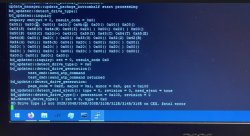
here is the error log, im unsure what this means?
 

Attachments

  • 5164E0A3-568E-439A-9A50-18746B902506.jpeg
    5164E0A3-568E-439A-9A50-18746B902506.jpeg
    886.4 KB · Views: 188
The PS3 can't detect the drive right.
The inquiry answer is somehow messed up: It starts with "SONI PC-CYCTEM" instead of "SONY PS-SYSTEM".
Maybe bad cable, connection, voltage, ....
i tried and diagnosed everything related to the bluray drive, different drives, connectors, etc. no luck
 
You can try the following to get more messages from the Hypervisor:
Run these Syscon UART commands in standby:
Code:
w 42CF 03
w 42F0 03
w 42F1 03
After that, boot the system and attempt the install again.
The SB UART log will now be longer and include some information from various Hypervisor services.
The PS3 will be slower because of all the log output.

To disable the Hypervisor log, use:
Code:
w 42CF FF
w 42F0 FF
w 42F1 FF
Mana from heaven! Thank the PS3 gods!
 
I was receiving this error when trying to update to evilnat 4.90 on a cecha01. In my case, it turned out to be a bad connection on the optical drive ribbon cable into the mainboard. It was already damaged (missing clip), but jamming cardboard into the slot worked well enough to get hfw to install. evilnat was erroring out at 74% every time, though. Reseating the cable/cardboard a bit more carefully cleared the issue up. Thanks for posting your info, and to m4j0r's guidance, as the "bad connection" turned out to be the fix for me. Hopefully my experience will help someone else.
 
You can try the following to get more messages from the Hypervisor environment (for CXR714):
Run these Syscon UART commands in standby:
Code:
w 42CF 03
w 42F0 03
w 42F1 03
After that, boot the system and attempt the install again.
The SB UART log will now be longer and include some information from the PME and SS.
The PS3 will be slower because of all the log output.

To disable the additional log(s), use:
Code:
w 42CF FF
w 42F0 FF
w 42F1 FF
How can I enable the additional log on ps3 slim Syscon SW2-303 model? I can see the sb log but when the error occur there is no information about then.

I enabled the SB log using the w 1202 02 not w 4202 02. Maybe should I need to write 12CF 03, 12F0 03 and 12F1 03 too?
 
The PS3 can't detect the drive right.
The inquiry answer is somehow messed up: It starts with "SONI PC-CYCTEM" instead of "SONY PS-SYSTEM".
Maybe bad cable, connection, voltage, ....
I have been getting this error too. I would appreciate any help, maybe it can help other people too!
I checked and pasted the log correctly. It just stopped without a specific error.

 
Last edited:

Similar threads

Back
Top