
Taynan Sombra
Forum Noob
Hello, I installed cfw evilnat cex on my device, everything seems to run ok, but it doesntshow my pkg files anymore (i was using hen before), I can see the files at evilnat settings, but not at that standard folder



Try installing it again from Recovery Menu and check if there is something that modifies game tab in bootHello, I installed cfw evilnat cex on my device, everything seems to run ok, but it doesntshow my pkg files anymore (i was using hen before), I can see the files at evilnat settings, but not at that standard folder
Unfortunetly I had a semibrick (it seems) after converting dex to cex (I installed dex following the video, I thought it was cex). The ps3 beeps a song for about 5 and then turn off. (i'm crying). I saw that there is a way to revive him with a e3 card reader (trying to find one at some store), but it needs some files I guess, can you or anyone help me, please?? I dont have money to buy a new one now and I'm still hoping that it can come back (sorry for my english I'm from Brazil)Try installing it again from Recovery Menu and check if there is something that modifies game tab in boot

But Ultimate Toolbox is clearly marked as being not compatible with 4.89 firmware?In Ultimate Toolbox you can find all the variations of ps2_netemu (with/without temperature, debug, hdd, etc)

But Ultimate Toolbox is clearly marked as being not compatible with 4.89 firmware?
As @aldostools said ps2_netemu is the same since 4.78 and you can use it without problemBut Ultimate Toolbox is clearly marked as being not compatible with 4.89 firmware?
What steps did you take to get that happen? Can you tell me which video did you see?Unfortunetly I had a semibrick (it seems) after converting dex to cex (I installed dex following the video, I thought it was cex). The ps3 beeps a song for about 5 and then turn off. (i'm crying). I saw that there is a way to revive him with a e3 card reader (trying to find one at some store), but it needs some files I guess, can you or anyone help me, please?? I dont have money to buy a new one now and I'm still hoping that it can come back (sorry for my english I'm from Brazil)
As @aldostools said ps2_netemu is the same since 4.78 and you can use it without problem
What steps did you take to get that happen? Can you tell me which video did you see?
From what you say your PS3 is using DEX kernel with CEX TargetID, that causes ambulance beeps. You can use E3 to fix it, you need to dump the PS3 flash and patch it with CEX CoreOS, I can patch it for you if you canAt 16:30. I was following the tutorial to install cfw for the first time. I kept following and converted to dex thinking it should be done, after reading that the correct was cex, I made dump to ERK and converted to cex, and it was ok. After going at kernel it showed some failure, I rebooted the console and that weird beep happens, I have a vídeo of the beep, I searched a lot and saw that a e3 card reader and some files can revive the console, sorry for inconvenience
Oh, thank you very much, I gladly accept your help when the E3 arrives here, I bought it from China, it may take up to two months. Please, dont forget me until there! XDFrom what you say your PS3 is using DEX kernel with CEX TargetID, that causes ambulance beeps. You can use E3 to fix it, you need to dump the PS3 flash and patch it with CEX CoreOS, I can patch it for you if you can
Installing the E3 flasher is relatively easy, what you have to be sure is to make several dumps and compare that they are all the same, in addition to passing it through a dump checker, like PS3DumpChecker
After checking that everything is ok, you should save the patched dump in case you need to use it in the future, and then patch it with E3 Flasher

I will help you my friend do not worryOh, thank you very much, I gladly accept your help when the E3 arrives here, I bought it from China, it may take up to two months. Please, dont forget me until there! XD

xai_plugin disables DEX kernel too if TargetID is CEX, basically CEX2DEX code is the same as Rebug Toolbox with a small modification. If I convert the PS3 to CEX, xai checks if current TargetID is CEX and check current kernel, if it is DEX it will be swapped to CEXthis brick only occurs, if QA flag is not active.Rebug took care to not let this happen, by disabling Debug kernel with CEX targetID. thus I have added token calculation to idps change and a check to kernel switching on CEX
btw, this happened to my Slim, when I have done my tests with it
edit
I know for myself you can save the DEX brick with FSM dongle, but it seems this only works on <3.55, as I have tried on 4.21 with my Slim
I didn't want to offend you, just wondering what the user has done to get into this situation (almost impossible). I haven't looked at your code so far, but have you made sure, QA is active if you switch to CEX? this wasn't done in toolboxI don't know what happen, no one has bricked as far I know, xai has a lot of checks to avoid this. I will take a look
I have not felt offended my friend do not worryI didn't want to offend you, just wondering what the user has done to get into this situation (almost impossible). I haven't looked at your code so far, but have you made sure, QA is active if you switch to CEX? this wasn't done in toolbox


@Evilnat I was also helping @Taynan Sombra He already ordered an E3 Card Reader, because there's a video of a guy who had the same problem when converting from DEX to CEX, and from what I saw on one of the forums he himself said that it would be possible to recover a PS3 with Semi Brick, but no I understood which file he put in an E3 Card Reader, but in the video he got two different LV2Diag.self. I'll be leaving a video of him explaining, if I'm giving the wrong explanation you can correct me.I will help you my friend do not worry
xai_plugin disables DEX kernel too if TargetID is CEX, basically CEX2DEX code is the same as Rebug Toolbox with a small modification. If I convert the PS3 to CEX, xai checks if current TargetID is CEX and check current kernel, if it is DEX it will be swapped to CEX
I don't know what happen, no one has bricked as far I know, xai has a lot of checks to avoid this. I will take a look

I re-enabled QA for DEX and the PS3 boots up with blackscreen, I don't know why yet, I need to reinstall the CFW from Recovery Menu and then QA flag is working fine on DEX (tested button combo)...or do it just like me, and add QA for both sides and let DEX kernel work on CEX
my safe workaround is, I (re)activate automatically QA if I switch to each side
edit
this makes DEX qa'ed, so the secret button combo will unlock Debug settings (you can test this with retail vsh) <- another patch?
I think the JFW had Debug settings unlocked, not sure anymore
I think this method won't work for @Taynan Sombra because it is for 3.55, he needs to install E3 Flasher, dump flash a few times, compare all and check that they are the same, patch with CEX CoreOS and flash it again on the PS3@Evilnat I was also helping @Taynan Sombra He already ordered an E3 Card Reader, because there's a video of a guy who had the same problem when converting from DEX to CEX, and from what I saw on one of the forums he himself said that it would be possible to recover a PS3 with Semi Brick, but no I understood which file he put in an E3 Card Reader, but in the video he got two different LV2Diag.self. I'll be leaving a video of him explaining, if I'm giving the wrong explanation you can correct me.
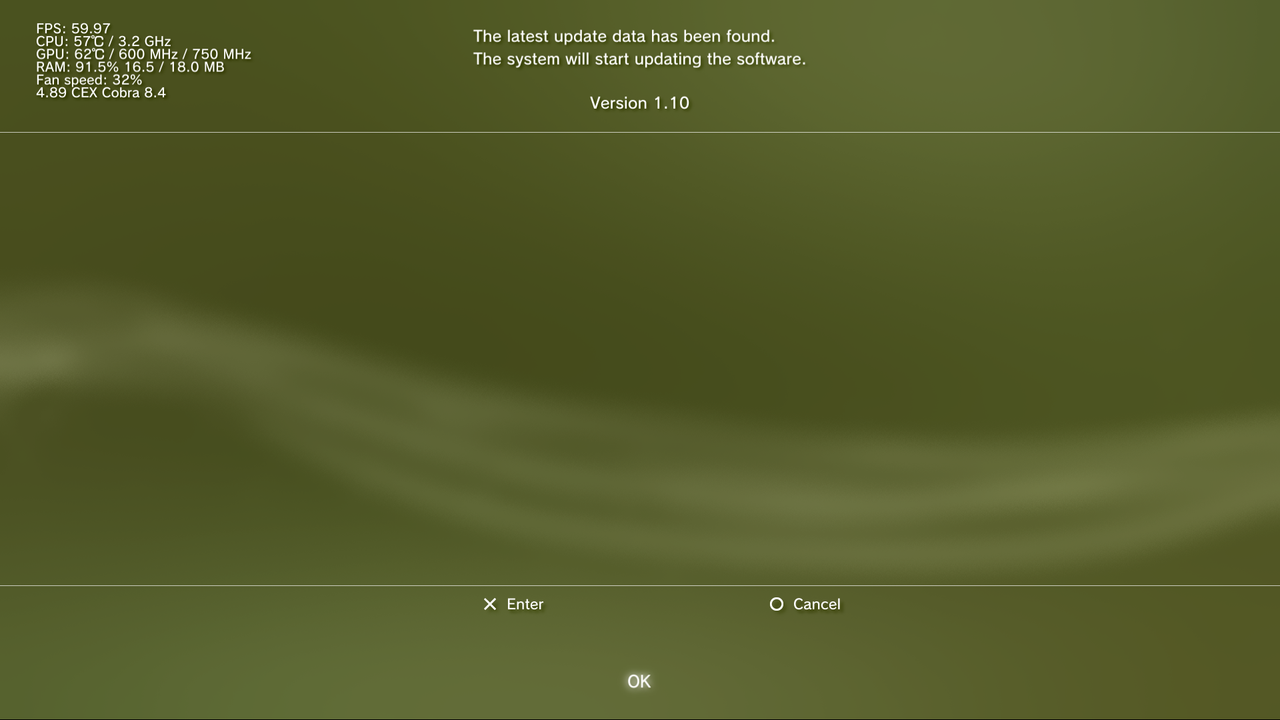
Can you tell me if you have installed something so I can install it and check it? If so, it is very possible that it is an SPRX or RCO, SPRX need to be patched for 4.89, original values will not work fine with layouts@Evilnat do you have a modded coldboot.raf for the classic coldboot look used on older FAT PS3s as the ones you can get online look break the game update screen position. Instead of being in the middle of the screen, it's on the top and bottom.
custom_render_plugin.rco var. looks to work fine but I'm not sure how to remove the old coldboot as they run at the same time.
UPDATE: Maybe it's not the coldboot that's doing this, not sure what's doing it as 100% new setup of 4.89.3 does not do this.


