
PS4 CFW PS4 doesn't reconize internal hard disk

with the intention of cloning the hard disk to another bigger one.
Besides that it is not possible to clone it, cloning application has modified GPT on target disk. Source disk must stayed intact so still it is not clear why PS4 reject it (which means: why and by what it was modified in Windows).

I used a program to clone all the hard disk, and when the operation was finished I just reinserted the hard disk on the playstation4 and this happened.
So have You put old HDD or new HDD? If You have put new HDD, it is possible that old stop to be recognized. On PS3 it works that way, but only if user agree to use it (by formatting). Maybe PS4 doing it without ask and without any additional actions, but just after detection of new one? I dunno.

So You have ended with both disk not recognized by this PS4, right?

This sounds good?
No. You didn't read my post carefully.

then I dump the EAP on the old HDD
EAP key is not related to HDD unit. The same console (which using the same EAP) will decrypt any HDD encrypted on this specific PS4 unit.

So, how I dump the EAP?
It is in link in earlier post.

And what process have I to follow to take back all my games, saves and account to ork back on the ps4?
Also in link from earlier post.

So basically I will buy a new hard disk, I wil use the 9.0.0 recovery firmware
Why do You want buying 3rd disk? You already have two, right? The original smaller and second on which You wanted to clone data. I don't understand now Your motives and goals.
 
Besides that it is not possible to clone it, cloning application has modified GPT on target disk. Source disk must stayed intact so still it is not clear why PS4 reject it (which means: why and by what it was modified in Windows).


So have You put old HDD or new HDD? If You have put new HDD, it is possible that old stop to be recognized. On PS3 it works that way, but only if user agree to use it (by formatting). Maybe PS4 doing it without ask and without any additional actions, but just after detection of new one? I dunno.

So You have ended with both disk not recognized by this PS4, right?


No. You didn't read my post carefully.


EAP key is not related to HDD unit. The same console (which using the same EAP) will decrypt any HDD encrypted on this specific PS4 unit.


It is in link in earlier post.


Also in link from earlier post.


Why do You want buying 3rd disk? You already have two, right? The original smaller and second on which You wanted to clone data. I don't understand now Your motives and goals.

I didn't insert any new hard disk inside the ps4, I just reinserted the old one.
I am not using the cloned one because it was a toshiba external hard drive, and once I cloned the ps4 hdd on it, after opened the toshiba case I discovered that it is not a sata hard disk, and so I can't insert in the ps4. So this is why I want to buy a new bigger hard disk.

So if the old hard disk should be ok, is maybe the sata hole on my ps4 that is damaged maybe?
 
@Tackskull If HDD is ok, then yeah, possible that something is wrong with the connector on console side or HDD port. However, that could be quite a big unfortunate coincidence. I would bet that it is user error (like e.g You could mislead source drive with target drive in clone program, and empty drive overwrite PS4 stuff).

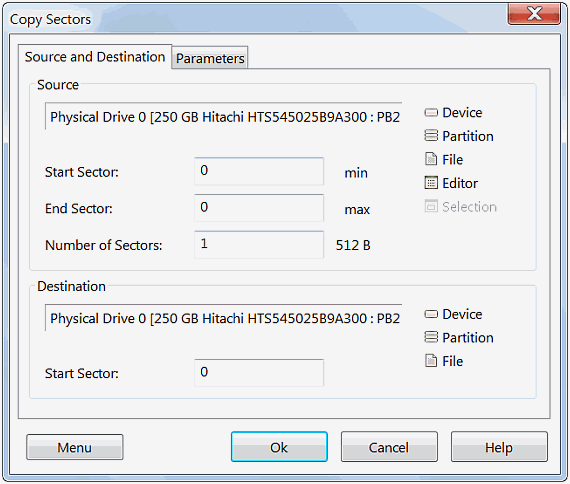
But this can be checked if You have some time. You could clone first 2MB of drive to file and attach it on forum or upload e.g on MediaFire. PS4 GPT is not encrypted, also doesn't contains any user fragile data, yet can be easily identified if came from PS4 or any other environment. For this task, run DMDE, ignore/close popups, go to options menu and choose "Copy Sectors". You should see menu similar to this:

dmde-copysectors1-480.png

  • For "Source" choose "Device" and Your PS4 HDD.
  • For "Destination" choose "File" (filename and extension doesn't matter, can be any).
  • "Start sector" set to "0"
  • "Number of Sectors" set to "4096" (because 4096*512KB is 2MB), and End Sector will adjust automatically
Confirm by clicking ok, on next windows he ask about report but it is not necessary. And that's it, raw image from first 2MB should be made in few seconds.
 
Last edited:
@Tackskull If HDD is ok, then yeah, possible that something is wrong with the connector on console side or HDD port. However, that could be quite a big unfortunate coincidence. I would bet that it is user error (like e.g You could mislead source drive with target drive in clone program, and empty drive overwrite PS4 stuff).

But this can be checked if You have some time. You could clone first 2MB of drive to file and attach it on forum or upload e.g on MediaFire. PS4 GPT is not encrypted, also doesn't contains any user fragile data, yet can be easily identified if came from PS4 or any other environment. For this task, run DMDE, ignore/close popups, go to options menu and choose "Copy Sectors". You should see menu similar to this:

dmde-copysectors1-480.png

  • For "Source" choose "Device" and Your PS4 HDD.
  • For "Destination" choose "File" (filename and extension doesn't matter, can be any).
  • "Start sector" set to "0"
  • "Number of Sectors" set to "4096" (because 4096*512KB is 2MB), and End Sector will adjust automatically
Confirm by clicking ok, on next windows he ask about report but it is not necessary. And that's it, raw image from first 2MB should be made in few seconds.

The hard disk works, in the end I just reinstalled the 9.0.0 firmware on the old hdd, I lost saves and games but I will download them again. Thanks for everything guys
 

Similar threads

Back
Top