PS3 COBRA 7.52 (Homebrew Blocker for PSN & more) + REBUG TOOLBOX 02.02.13 (NEW Cobra Payload Updater)

It has been quite impressive seeing the progression of the COBRA payload over time, COBRA originally debut on the PS3 way back in 2011 as the CobraUSB (by Team Cobra) this refers to version 1.0 - 6.0 of the payload. This is the period that the device was closed sourced and locked down to Cobra's USB dongle. After the device was put aside and shelved by Team Cobra, it laid dormant for sometime, not keeping up with firmware updates and leaving user with many bugs for the early 4.2x CFWs. There was some public pressure for the team to release the source code and with Team Cobra at the time launching a new product in the ODE, the team folded to public pressure and we seen the source code release(s) and the Open Source Cobra (usb-less version) refers to v7.0+ (which currently we stand at version 7.52)

Since that source code release we have seen the likes of @Joonie, @habib, @KW, @deank, @_NzV_ & @aldostools. make various improvements to COBRA and the evolution continues with release and progression of version 7.52 by Joonie that has added various new elements to the payload like the new Homebrew Blocker (by KW & aldostools) that blocks various homebrew when CFW syscalls are disabled from being executed when connecting to PSN, user' have the ability to create custom cfg list to add any additional homebrew then the defaults offer (details listed in the release quote below). Also in v7.52 a fix was provided by Habib that repairs lv1 peek support within multiMAN.

Joonie, has an additional surprise as updating COBRA just got alot easier for REBUG user's as an update has been released for REBUG Toolbox with a new feature: that will allow you to download/update the payload directly from the toolbox, see the easy tutorial (w/ pics) that Joonie has provided. Please take note that this is ONLY for REBUG 4.81.XX CFW user's you should not use this on lower version or other COBRA CFW such as Habib's.


  • cobra_7.51.png

    COBRA 7.52
    I updated the COBRA revision to 7.52 from 7.51 the source is available in this commit: https://github.com/Joonie86/COBRA-7......

    The Following Changes have been added:


    Homebrew Blocker
    By default, COBRA can block following apps from being launched "ONLY AFTER" Syscalls are disabled by stealth plugins and homebrews​
    • BLES806XX Multiman and assorted tools are in the format BLES806**
    • BLJS10018 PSNPatch Stealth (older versions were already detected as non-NP/BC/BL)
    • BLES08890 PSNope by user
    • BLES13408 FCEU NES Emulator
    • BLES01337 Awesome File Manager
    • BLND00001 dev_blind
    • NPEA90124 SEN Enabler
    And custom config files can be used for white/black listing apps/homebrews/games as you need​

    Here's the original quote by @kokotonix about this feature:
    The code bellow adds the ability to read a custom blacklist (/dev_hdd0/tmp/blacklist.cfg) and a custom whitelist (/dev_hdd0/tmp/whitelist.cfg) – this is nice for advanced users wanting to do some extra tests.

    Priorities:
    • Custom blacklist has the higher priority over all the other tests.
    • Custom whitelist has the second priority.
    • The fixed tests has the lowest priority.

    So after disabling syscalls, launching homebrews will result following
    6.PNG

    and also, I realized many people having hard time updating their COBRA binaries, I decided to add a new feature to REBUG TOOLBOX


    COBRA Payload Updater
    Currently the toolbox has a detection for lower revisions of COBRA.

    So any version "below 7.52 and 4.81.X" will be supported [REBUG REX / D-REX 4.81.1 and 4.81.2] REBUG 4.80 and below are NOT supported, neither NON-REBUG (Meaning CFWs like HABIB,FERROX and such). AGAIN NOT DECR!!​


    Here's a little tutorial that can help you understand how it works:

    REQUIREMENTS!!

    • REBUG 4.81.1 or 4.81.2
    • COBRA 7.31~7.51


    1. Firstly make sure you're on REBUG 4.81.X [1 or 2] and COBRA must be active prior to the update, otherwise the option will NOT be shown
    1.jpg


    2. Locate the option COBRA Payload Updater
    2.png

    3. Select "UPDATE"
    3.png

    4. "COBRA payload updated!" will be shown when finished
    4.jpg

    5. Exiting the toolbox will restart the system to apply the change
    Screenshot_3.png

    6. Enjoy the new COBRA 7.52
    555.JPG

    Here's the quick summary and the download link for the new toolbox 2.02.13​

    1. COBRA Payload 7.52 including

    • @habib's bug fix for lv1 peek support for multiMAN,
    • @deank's backup disc support for PS3 games
    • KW and @aldostools's homebrew blocker thanks to @kokotonix for informing

    2. COBRA Updater for REBUG 4.81.X


    IMPORTANT NOTE:
    REBUG 4.80 and below are NOT supported, neither NON-REBUG (Meaning CFWs like HABIB,FERROX and such) AGAIN NOT DECR!!
    .

 
Last edited:
What is your burned media? did you use BD-RE ?


info imgburn
not BD-RE , yes bd-r

info imgburn


PIONEER BD-RW BDR-209D 1.34 (SATA)
Current Profile: BD-R

Disc Information:
Status: Empty
State of Last Session: Empty
Erasable: No
Free Sectors: 12.219.392
Free Space: 25.025.314.816 bytes
Free Time: 2715:27:17 (MM:SS:FF)
Next Writable Address: 0
MID: MBI-R06-000
Supported Write Speeds: 2x; 4x; 6x; 8x; 10x

BD Disc Information:
Disc ID: MBI-R06-000
Disc Type: BD-R
Disc Size: 120 mm
Disc Class: 0
Disc Version: 1
Number of Layers: 1
Layer Type: Writable
DVD Layer Present: No
CD Layer Present: No
Channel Bit Length: 74.50 nm (25 GB Per Layer)
Push-Pull Polarity: Positive
Recorded Mark Polarity: HTL
BCA Present: Yes
Maximum Transfer Rate: Not Specified
First PAA of Data Zone: 131.072
Last PAA of Data Zone: 1.658.494
 
info imgburn
not BD-RE , yes bd-r

info imgburn


PIONEER BD-RW BDR-209D 1.34 (SATA)
Current Profile: BD-R

Disc Information:
Status: Empty
State of Last Session: Empty
Erasable: No
Free Sectors: 12.219.392
Free Space: 25.025.314.816 bytes
Free Time: 2715:27:17 (MM:SS:FF)
Next Writable Address: 0
MID: MBI-R06-000
Supported Write Speeds: 2x; 4x; 6x; 8x; 10x

BD Disc Information:
Disc ID: MBI-R06-000
Disc Type: BD-R
Disc Size: 120 mm
Disc Class: 0
Disc Version: 1
Number of Layers: 1
Layer Type: Writable
DVD Layer Present: No
CD Layer Present: No
Channel Bit Length: 74.50 nm (25 GB Per Layer)
Push-Pull Polarity: Positive
Recorded Mark Polarity: HTL
BCA Present: Yes
Maximum Transfer Rate: Not Specified
First PAA of Data Zone: 131.072
Last PAA of Data Zone: 1.658.494

I also noticed that kind of behavior too, if the disc was inserted before the first cold boot, then it works immediately, @deank do you have any clue about this?
 
I have a tutorial on writing files to the flash using a zip file thanks to @deank , if anyone is afraid to mess with the flash. this makes it easier though. thanks @Joonie .
 
I can't test on Rebug but when I was testing this feature last month the game would load just fine no matter if the disc was inserted before the boot or after - it worked anytime just like an original PS3 disc. I'll test later when I get back from work (on 4.81 Habib).
 
@alimao Can you try DVD and CD?, from my test result, CD-R seemed to be worked the best,


@deank I'll switch to HABIB 4.81 with your payload see if this works better

dvd or cd Are small for some ps3 games

BD-r best quality safer for the reader

I just put rebug now after the new tool box came out. More had the same error in habib 4.81. I can go back and take the test again
 
hey @Joonie , I know this may sound totally silly , but I noticed this toolbox size is much smaller than the full version/s I usually install, I know it will download some files , but do I need to do anything different to install this, normally I just turn everything off in my toolbox , reboot , then delete it from the xmb and install the new one. But this one is much smaller in size than the one im about to delete...so i just want to make sure

thanks again!
 
hey @Joonie , I know this may sound totally silly , but I noticed this toolbox size is much smaller than the full version/s I usually install, I know it will download some files , but do I need to do anything different to install this, normally I just turn everything off in my toolbox , reboot , then delete it from the xmb and install the new one. But this one is much smaller in size than the one im about to delete...so i just want to make sure

thanks again!

Unless you own a backward compatible ps3 and do NOT want COBRA, you don't need full edition, I will remove full edition from future releases as well.

Besides new toolbox doesn't download any new file because it already includes them itself.
The reason why I chose this root is because of wrong files can cause semibrick.

By the way, I saw one brick report caused by an incomplete/corrupted toolbox pkg,

Make sure to verify the md5 hash of the pkg

MD5: 0949a6e2afd262758d3c622255e1a8b6
SHA1: 635c0ff54dd824eca874c232009bedebf6a24ab8
CRC32 : EED92A20
PKG-SHA1: df2e7965303aa1579e82f3eb98bca69c08bb1154
Size : 1.1MB (1,146,352)

FYI @STLcardsWS

And

To
@bguerville and @Underball

Cash-Me-Outside-3.jpg
 
Last edited:
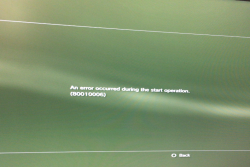
http://www.psx-place.com/attachments/6-png.8444/ error .I did this procedure not work
, it only works restarting the disc inside the ps3. Which game is this?
deank
I will simulate here the same test

Hey what's your ps3 model? And what did you use to build the iso?

I burned the same game (ni no ku ni) reproduced the same issue on rebug 4.81.2,

And tested on CECH-A01,

I have a feeling the compatibility could vary depending on the media and the bd drive model

Ironically, on Habib 4.81 1.02 The media doesn't even get recognized at least on my ps3.

By the way, I built the iso with 3k3y's isotool 1.34.9 and ird was used

EDIT*

I came back home and tried it again, now it detects the burned BD-R on HABIB 4.81 1.02

but the result is the same as what you and I had on REBUG 4.81.2


Sent from my iPhone using Tapatalk
 
Last edited:
Hey what's your ps3 model? And what did you use to build the iso?

I burned the same game (ni no ku ni) reproduced the same issue on rebug 4.81.2,

And tested on CECH-A01,

I have a feeling the compatibility could vary depending on the media and the bd drive model

Ironically, on Habib 4.81 1.02 The media doesn't even get recognized at least on my ps3.

By the way, I built the iso with 3k3y's isotool 1.34.9 and ird was used

EDIT*

I came back home and tried it again, now it detects the burned BD-R on HABIB 4.81 1.02

but the result is the same as what you and I had on REBUG 4.81.2


Sent from my iPhone using Tapatalk

used tool Cobra_ODE_GenPS3iso_v2.3

Habib 4.81 1.02 or
rebug 4.81.2 Results are the same tested in three slim ps3
model ps3 cech 2511a
 
used tool Cobra_ODE_GenPS3iso_v2.3

Habib 4.81 1.02 or
rebug 4.81.2 Results are the same tested in three slim ps3
model ps3 cech 2511a

@deank suggested GenPS3iso v2.0, because 2.1~2.5 are designed for ODE due to encryption layer. Maybe I had the same problem due to encrypted layer made by 3k3y's isotool

Can you try GenPS3ISO v2.0 instead?
 
@deank suggested GenPS3iso v2.0, because 2.1~2.5 are designed for ODE due to encryption layer. Maybe I had the same problem due to encrypted layer made by 3k3y's isotool

Can you try GenPS3ISO v2.0 instead?

Yes I can test. I can not find this version for download.

EDIT 1
found it
http://www.psx-place.com/resources/genps3iso-burned-ps3-b-c-dvd-media-compatible.538/
I'll try

EDIT 2

GenPS3ISO v2.0 working perferct


tested two games
Ni no Kuni Wrath of the White Witch

Puppeteer

BD-R
 
Last edited:
It was discussed numerous times: for burned PS3 discs (CD/DVD/BD) use ONLY genps3iso_2.0. The reason is that it doesn't add anything related to protection/encryption or other things that break the current burned disc support. Other tools/version may add encryption flags for eboot.bin/*self/*sprx files leading to 80000017 error.
 

Featured content

Trending content

Back
Top