
mrjaredbeta
Developer
Nothing out of the ordinary. I just downloaded the newest build with no change to any setting and still unplayable.Are you using any unusual settings? Different clamping/rounding? Maybe some FPU hacks? Old PCSX2 version?

Nothing out of the ordinary. I just downloaded the newest build with no change to any setting and still unplayable.Are you using any unusual settings? Different clamping/rounding? Maybe some FPU hacks? Old PCSX2 version?

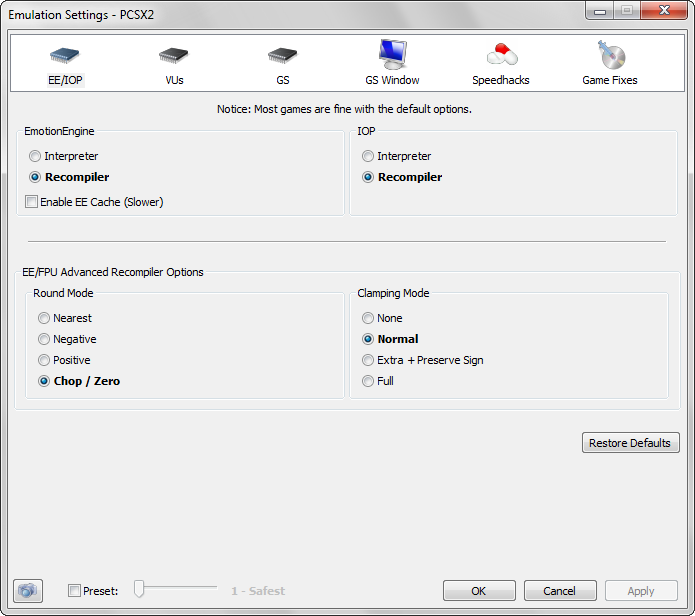
So thats what the netemu 0x0F command does ?FPU rounding to nearest

Just incase there was some doubt about it, now is confirmed is related with FPU, and maybe what is doing is exactly a "rounding to nearest" with the values in the rangeMore accurate memory range (FPU mul/div/sub/add accuracy related)


I'm tested too. Acept that Ladder problem and Freezes fixed but yes flicking issue stiil! Also in moment when u shoot Largest bell (Cutscene start) its very very low and better just skip cutscene. Im bet some more cutscenes have that problems too. But that config better then old, becouse fix freeze problems for us version. And now eur. version looks better im thinkTested.
1st 2nd level ladder issue fixed.
2nd level kill two-saw-big-guys issue fixed.
but frame seems not very stable.and 2nd level around cutsence house flicking issue worse than old configs.
Ok, so you found the exact problematic opcode with the test-error method, niceI usually set 0x0F from 0x100000 to 0x1FFFFFFF to start and see if it fixes the problem. Since it did, I just narrowed it down to the exact value that was having the problem. I did the same with Silent Hill 2 and 3's camera issues.
And I know the command 0x0F is a range, but for mul/div accuracy it seems like there's no command for a single address (like there is for add/sub accuracy). I think it is starting from that address and ending at that address.

I just realized i had set FPU rounding to nearest as i was playing with Stuntman. Probably that's way to solve it for pcsx2.
Wait, i have a theory... in the PS3 configs we have 2 commands located consecutivelly related with the accuracy of a range (0x0F and 0x10), this means that was implemented at the same time because are very related to each otherSo thats what the netemu 0x0F command does ?

SLUS_207.73 mipmap removing/fix textures
SLUS_215.55 mipmap removing/fix texturesCode:3d 00 00 00 11 11 00 00 0a 00 00 00 01 00 00 00 50 8f 18 00 20 00 60 10 20 00 00 10 00 00 00 00
SLUS_212.03 mipmap removing/fix texturesCode:3d 00 00 00 11 11 00 00 0a 00 00 00 01 00 00 00 c0 97 12 00 22 00 60 10 22 00 00 10 00 00 00 00
Code:3d 00 00 00 11 11 00 00 0a 00 00 00 01 00 00 00 90 73 12 00 22 00 60 10 22 00 00 10 00 00 00 00
Will be nice if someone can test that.
3D 00 00 00 11 11 00 00 0A 00 00 00 01 00 00 00
E8 73 12 00 22 00 60 10 22 00 00 10 00 00 00 00
No, no. Is not so easyNow we know the 0x0F matches with the setting [FPU]>[Round Mode]>[Nearest]
0x0F is accurate math for some floating points operations. While PCSX2 going different way by rounding floats based on that setting. I reversed that on PS4, and using config from ps3 on ps4 will give you EXACT name of function. So i know that's Accurate Math is correct name for them. Just difference is COP2 or FPU, and ADD/SUB or MUL/DIV.
Never looked into that. Maybe command 15 with value 4, or 7 with value 8 can help.
Are you really sure that you have a correct version of the game?
Check your game's ISO it should match to Redump one
Also check your game's executable (SLUS_206.85), it's MD5 should be 41a7197582cdf79f01019386797e662f.
I am hundred percent sure about correctness of this CONFIG. The only thing I did was find the correct memory address - 0034CE88. This address was tested in PCSX2 and it works like a charm, there is no more texture flickering (GSDX software mode, unchecked Mipmap emulation). Bytes are flipped In the CONFIG, so address must be 88CE3400, check my post with the CONFIG and you will see the same bytes.
@kozarovv CONFIG should be the most complete. It includes ladder fix, my ported config by Prafull which should fix slowdowns in some places of the game (https://forums.pcsx2.net/Thread-Bug-Report-Ghosthunter-PAL) + patch from GX_EMU
Nope, config has only one memory address and I ported it.did u forget sth?
Can you post video showing issue? Maybe it is something else.sorry bro,i tested again,gameplay perfect,but opening cg still flicking.
i tested EU vesion before,opening cg not flick.
did u forget sth?
Ok, is nice you found the official codenames for it, is just the names for that commands (the ones i colored in orange in the table in wiki talk page) are a bit abstract, like the "improved accuracy range" or "improved accuracy maths"... are not telling exactly how are improving itNo, no. Is not so easy
Only thing that relate is 0x0F = rounding issue on pcsx2. But that not always gonna be nearest setting. 0x10 is not round to positive
Yeah, the sony "way of doing it" is better, and i guess there must be some comands in ps2_netemu.self related with the roundings,, just because rounding values is something that could come in handy, they was aware of itCons of their (pcsx2) solution is that some rare games require negative rounding here, and positive there, and for rest of games chop/zero is fine. For example that Kuon fix on pcsx2 can potentially break other things in game.
On PS3/PS4 we have no issue with that. But.. We need to know correct offsets for those calculations. So is harder to find patch, but it is better patch as it won't brake other stuff. Good example of game having issue like that on pcsx2 is GT4, they need to CLAMP calculation of floats to make game work, but license require different mode where they also clamp operands. That break game, and you need to change it by yourself. While on ps3, or ps4 we just patch correct offsets with accurate math, done.
Also command 0x08 sometimes relate to VU rounding or clamping on pcsx2, good example is Tony Hawk 4+ , and Castlevania COD. But 0x08 is overall VU patch, and fact that sony used it to correct some values is why sometimes it fit for this theory.

3D 00 00 00 57 44 00 00 0E 00 00 00 24 41 10 00
00 00 00 00vsubx.w vf7, vf0, vf7x so VU macrocode (COP2) substrat. So is most likely not only FPU related, or... Which we never take in count. It is FPU only related, but produce good result also for COP2. Can be also overal ADD/SUB accuracy, since next command 0x10 is overall MUL/DIV.Btw, did you try this ?
This is supposed to increase the ADDSUB accuracy of a single value (32 bits lenght) located at 0x104124 (of unkown area)
We dont know if that area is FPU memory... but incase it works it means is FPU
Kuon (NTSC-U)
Code:3D 00 00 00 57 44 00 00 0E 00 00 00 24 41 10 00 00 00 00 00
