PS3 Compatibility List - PS2 on PS3

@lex3a any chance u can port it on pal version?
The offsets match up, so the NTSC-U config should work fine on PAL. No need to port. :)

Witch config i restart on boot but still black screen after ps2 logo but ps3 not freez
I was saying that even without any config it will do that. Booting the game with or without config could possibly black screen after PS2 logo. Just reset the game or relaunch the game from XMB...it should boot after a couple tries. Anyways, the config doesn't really fix the mission select freeze most of the time, and game doesn't play nicely with netemu.
 
Harry Potter and the Prisoner of Azkaban (SLUS-20926)
Remove mipmaping, should eliminate all graphical issues. Untested.

Harry Potter to Azkaban no Shuujin (SLPM-65612)
Code:
3D 00 00 00 11 11 00 00 07 00 00 00 08 00 00 00
0A 00 00 00 02 00 00 00 78 8F 15 00 90 91 62 A4
90 91 64 A4 A0 8F 15 00 92 91 A2 A4 92 91 A4 A4
00 00 00 00

The offsets match up, so the NTSC-U config should work fine on PAL. No need to port. :)

I confirm the offsets do match in the Scandinavian SLES-52527 version at least.
 
I'm looking for tester for Urban Reign SLUS config. You need to know how to use ps2 patch engine. Because for now config is in pnach form. I don't want to manually rewrite it if game still hang..

Edit: Here is pnach file to apply to iso. Unzip..
Edit2: I replaced file, previously i missed 2 mbits. Sorry :/
 

Attachments

Last edited:
I'm looking for tester for Urban Reign SLUS config. You need to know how to use ps2 patch engine. Because for now config is in pnach form. I don't want to manually rewrite it if game still hang..

Edit: Here is pnach file to apply to iso. Unzip..
error while download zip file
 
Harry Potter to Azkaban no Shuujin (SLPM-65612)
Code:
3D 00 00 00 11 11 00 00 07 00 00 00 08 00 00 00
0A 00 00 00 02 00 00 00 78 8F 15 00 90 91 62 A4
90 91 64 A4 A0 8F 15 00 92 91 A2 A4 92 91 A4 A4
00 00 00 00


I confirm the offsets do match in the Scandinavian SLES-52527 version at least.

Later i try test SLES-52440 version
 
I'm looking for tester for Urban Reign SLUS config. You need to know how to use ps2 patch engine. Because for now config is in pnach form. I don't want to manually rewrite it if game still hang..

Edit: Here is pnach file to apply to iso. Unzip..
Edit2: I replaced file, previously i missed 2 mbits. Sorry :/
The hang after PS2 logo still happens about half of the time, and mission info screen still hangs as soon as FMV is loaded in. :(
 
The hang after PS2 logo still happens about half of the time, and mission info screen still hangs as soon as FMV is loaded in. :(
Ah, ok. Thanks for testing. My idea was that emu won't handle Mbit correctly, and that game load VU0 programs with mbit very early after ps2 logo, and later in cutscenes. So issues kinda fit to what i expected to be cause of hang (many 0x12 games hang on that). Well, its something different then. Good luck then, my job is over for that game. :P
 
Urban Reign (SLUS-21209)
Code:
3D 00 00 00 57 44 00 00 0A 00 00 00 02 00 00 00
B8 40 1F 00 C0 FF BD 27 08 00 E0 03 BC 40 1F 00
46 00 05 3C 00 00 00 00 47 00 00 00 00 00 00 00
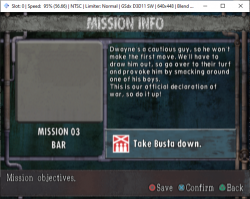
Here's a hacky fix that disables the FMV on "mission info" screen. No FMV = no freeze.

Here's a screenshot (it looks stupid, but completely fixes the issue):
Capture.PNG

Game still has problems booting, but when it does it works fine. I'll mark it as minor issues on the compatibility list.
 
Urban Reign (SLUS-21209)
Code:
3D 00 00 00 57 44 00 00 0A 00 00 00 02 00 00 00
B8 40 1F 00 C0 FF BD 27 08 00 E0 03 BC 40 1F 00
46 00 05 3C 00 00 00 00 47 00 00 00 00 00 00 00
Here's a hacky fix that disables the FMV on "mission info" screen. No FMV = no freeze.

Here's a screenshot (it looks stupid, but completely fixes the issue):
View attachment 33148

Game still has problems booting, but when it does it works fine. I'll mark it as minor issues on the compatibility list.
you mean u disable video inside grey box?
 
Urban Reign (SLUS-21209)
Code:
3D 00 00 00 57 44 00 00 0A 00 00 00 02 00 00 00
B8 40 1F 00 C0 FF BD 27 08 00 E0 03 BC 40 1F 00
46 00 05 3C 00 00 00 00 47 00 00 00 00 00 00 00
Here's a hacky fix that disables the FMV on "mission info" screen. No FMV = no freeze.

Here's a screenshot (it looks stupid, but completely fixes the issue):
View attachment 33148

Game still has problems booting, but when it does it works fine. I'll mark it as minor issues on the compatibility list.
Ahh. So it freeze earlier than i though. 3E 00 00 00 or 0D 00 00 00 00 00 00 00 won't help here?
 
Ahh. So it freeze earlier than i though. 3E 00 00 00 or 0D 00 00 00 00 00 00 00 won't help here?
Unfortunately, neither help this situation.

Additionally, I found another black screen/soft lock that can happen when completing a mission...this emulator is hilarious. Right when you think a problem is solved another one shows up. o_O

EDIT: Seems to be pretty rare though...only got it once after a decent amount of mission completions.
 
Last edited:

Similar threads

Back
Top