PS3 Compatibility List - PS2 on PS3

Baldur's Gate: Dark Alliance (SLES-50672) TEST
Code:
3D 00 00 00 57 44 00 00 01 00 00 00 F0 90 13 00
13 00 00 00 01 00 00 00 F0 95 13 00 14 00 00 00
23 00 00 00 0A 00 00 00 05 00 00 00 A4 D4 13 00
03 00 40 14 00 00 00 00 58 BA 1E 00 C0 FF BD 27
08 00 E0 03 5C BA 1E 00 19 00 02 3C 00 00 00 00
68 DE 1E 00 E0 FF BD 27 08 00 E0 03 6C DE 1E 00
00 00 B0 FF 00 00 00 00 00 00 00 00

Disables the rendering of shadows and light sources. It still does not give a full frame rate, but reduces the slowdown a little bit during the first quest. Not sure for how long though. No config for the NTSC version, because the 10 fps difference is enough to diminish the improvement.

The GX config works for this game (and other Snowblind Engine games) better, because the 0x4A command alone does produce rendering glitches when the frame rate does drop.
 
Baldur's Gate: Dark Alliance (SLES-50672) TEST
Code:
3D 00 00 00 57 44 00 00 01 00 00 00 F0 90 13 00
13 00 00 00 01 00 00 00 F0 95 13 00 14 00 00 00
23 00 00 00 0A 00 00 00 05 00 00 00 A4 D4 13 00
03 00 40 14 00 00 00 00 58 BA 1E 00 C0 FF BD 27
08 00 E0 03 5C BA 1E 00 19 00 02 3C 00 00 00 00
68 DE 1E 00 E0 FF BD 27 08 00 E0 03 6C DE 1E 00
00 00 B0 FF 00 00 00 00 00 00 00 00

Disables the rendering of shadows and light sources. It still does not give a full frame rate, but reduces the slowdown a little bit during the first quest. Not sure for how long though. No config for the NTSC version, because the 10 fps difference is enough to diminish the improvement.

The GX config works for this game (and other Snowblind Engine games) better, because the 0x4A command alone does produce rendering glitches when the frame rate does drop.
i was test. I think yes first quest have not much slowdowns as before, but will u able off Interlace? Becouse im notice text sometime is flicker!
 
Noping the interlacing function would make the resolution drop by a half. It would make everything less clear therefore, text especially. To be honest it does not matter at all as long as the slowdown is still there.
 
Noping the interlacing function would make the resolution drop by a half. It would make everything less clear therefore, text especially. To be honest it does not matter at all as long as the slowdown is still there.
its ok, i just talk about interlacing becouse have some config for ps4 and it says - "Enabling the no interlace code messes with the text"!
Just was guess that will help with text flicker!
 
You can test yourself. If we add the deinterlace patch it would always make the text look like a shit. Without the patch - only when the frame drops are present:

Code:
3D 00 00 00 57 44 00 00 01 00 00 00 F0 90 13 00
13 00 00 00 01 00 00 00 F0 95 13 00 14 00 00 00
23 00 00 00 0A 00 00 00 06 00 00 00 A4 D4 13 00
03 00 40 14 00 00 00 00 58 BA 1E 00 C0 FF BD 27
08 00 E0 03 5C BA 1E 00 19 00 02 3C 00 00 00 00
68 DE 1E 00 E0 FF BD 27 08 00 E0 03 6C DE 1E 00
00 00 B0 FF 00 00 00 00 58 4C 20 00 01 00 42 30
00 00 42 30 00 00 00 00
 
CFW 4.88.2 Evilnat (Cobra).
Valkyrie Profile 2 SLUS-21452.
Doesnt work config, game crash off screen, when i playing 1-2 hour.
Console still green light and pad red light P1, but screen is off.
 
You can test yourself. If we add the deinterlace patch it would always make the text look like a shit. Without the patch - only when the frame drops are present:

Code:
3D 00 00 00 57 44 00 00 01 00 00 00 F0 90 13 00
13 00 00 00 01 00 00 00 F0 95 13 00 14 00 00 00
23 00 00 00 0A 00 00 00 06 00 00 00 A4 D4 13 00
03 00 40 14 00 00 00 00 58 BA 1E 00 C0 FF BD 27
08 00 E0 03 5C BA 1E 00 19 00 02 3C 00 00 00 00
68 DE 1E 00 E0 FF BD 27 08 00 E0 03 6C DE 1E 00
00 00 B0 FF 00 00 00 00 58 4C 20 00 01 00 42 30
00 00 42 30 00 00 00 00
you know what, text not flicker anymore with that config! maybe its about fonts (im use my regional languge version) but i like it more! Probably in cutsecences text looks not good, but dialogs and text in game reads ok but yes slowdowns still noticeble well!
 
CFW 4.88.2 Evilnat (Cobra).
Valkyrie Profile 2 SLUS-21452.
Doesnt work config, game crash off screen, when i playing 1-2 hour.
Console still green light and pad red light P1, but screen is off.
well same issue with FIFA games, im test FIFA 07 play some matchs and when screen turn off with green light on console! So probable some games have same crash too
 
CFW 4.88.2 Evilnat (Cobra).
Valkyrie Profile 2 SLUS-21452.
Doesnt work config, game crash off screen, when i playing 1-2 hour.
Console still green light and pad red light P1, but screen is off.
When did it crash? Was it in battle, out of battle, in a cutscene, etc.?
 
So it crashed 3+ times? Are you using the most current config from the database? I have played through the game up until chapter 5 with no issues.
 
Random:
Walk to next stage -> crash.
Load save game then screen loading -> crash.
Battle finish after -> crash.
And more crash.

Could you test this config?

Code:
3D 00 00 00 57 44 00 00 0A 00 00 00 20 00 00 00
B8 D1 10 00 09 00 02 24 00 00 02 24
38 FA 35 00 34 10 00 46 30 10 00 46 7C 0A 10 00
FA FF 00 10 FA FF 00 14 B4 0B 10 00 FA FF 00 10
FA FF 00 14 64 0C 10 00 FA FF 00 10 FA FF 00 14
14 36 14 00 FA FF 00 10 FA FF 00 14 3C 53 14 00
FA FF 00 10 FA FF 00 14 24 6C 24 00 36 00 01 46
30 00 01 46 68 7C 2B 00 2A 08 83 02 00 00 01 64
64 39 42 00 00 00 64 AC 00 00 60 AC 44 33 42 00
00 00 56 8C 00 00 16 24 F8 34 42 00 00 00 56 8C
00 00 16 24 B0 36 42 00 00 00 56 8C 00 00 16 24
CC A2 49 00 2C 6F 12 0C 00 00 00 00 94 0B 43 00
FA FF 00 10 00 00 00 00 FC 0B 43 00 FA FF 00 10
00 00 00 00 54 1C 43 00 00 00 43 AC 00 00 40 AC
B0 7C 39 00 F9 FF 40 14 00 00 00 00 60 BF 3A 00
17 00 60 1C 17 00 00 10 0C F2 3A 00 FA FF 00 10
00 00 00 00 A4 F3 3A 00 FA FF 00 10 00 00 00 00
64 F4 3A 00 FA FF 00 10 00 00 00 00 14 5A 3C 00
FA FF 00 10 00 00 00 00 0C 00 3D 00 FA FF 00 10
00 00 00 00 FC 27 3D 00 20 00 20 14 20 00 00 10
E4 4A 3D 00 FA FF 00 10 00 00 00 00 A4 D0 3A 00
2E 00 20 10 2E 00 00 10 54 D5 3A 00 2E 00 20 10
2E 00 00 10 8C D1 3A 00 50 00 20 10 50 00 00 10
2C D3 3A 00 50 00 20 10 50 00 00 10 2C D6 3A 00
02 00 03 64 00 00 03 64 A4 1C 43 00 02 00 03 64
00 00 03 64 07 00 00 00 08 00 00 00 01 00 00 00
48 98 2B 00 0B 00 00 00 01 00 00 00 28 09 10 00
0A 00 00 00 44 00 00 00 00 00 00 00
 
Could you test this config?

Code:
3D 00 00 00 57 44 00 00 0A 00 00 00 20 00 00 00
B8 D1 10 00 09 00 02 24 00 00 02 24
38 FA 35 00 34 10 00 46 30 10 00 46 7C 0A 10 00
FA FF 00 10 FA FF 00 14 B4 0B 10 00 FA FF 00 10
FA FF 00 14 64 0C 10 00 FA FF 00 10 FA FF 00 14
14 36 14 00 FA FF 00 10 FA FF 00 14 3C 53 14 00
FA FF 00 10 FA FF 00 14 24 6C 24 00 36 00 01 46
30 00 01 46 68 7C 2B 00 2A 08 83 02 00 00 01 64
64 39 42 00 00 00 64 AC 00 00 60 AC 44 33 42 00
00 00 56 8C 00 00 16 24 F8 34 42 00 00 00 56 8C
00 00 16 24 B0 36 42 00 00 00 56 8C 00 00 16 24
CC A2 49 00 2C 6F 12 0C 00 00 00 00 94 0B 43 00
FA FF 00 10 00 00 00 00 FC 0B 43 00 FA FF 00 10
00 00 00 00 54 1C 43 00 00 00 43 AC 00 00 40 AC
B0 7C 39 00 F9 FF 40 14 00 00 00 00 60 BF 3A 00
17 00 60 1C 17 00 00 10 0C F2 3A 00 FA FF 00 10
00 00 00 00 A4 F3 3A 00 FA FF 00 10 00 00 00 00
64 F4 3A 00 FA FF 00 10 00 00 00 00 14 5A 3C 00
FA FF 00 10 00 00 00 00 0C 00 3D 00 FA FF 00 10
00 00 00 00 FC 27 3D 00 20 00 20 14 20 00 00 10
E4 4A 3D 00 FA FF 00 10 00 00 00 00 A4 D0 3A 00
2E 00 20 10 2E 00 00 10 54 D5 3A 00 2E 00 20 10
2E 00 00 10 8C D1 3A 00 50 00 20 10 50 00 00 10
2C D3 3A 00 50 00 20 10 50 00 00 10 2C D6 3A 00
02 00 03 64 00 00 03 64 A4 1C 43 00 02 00 03 64
00 00 03 64 07 00 00 00 08 00 00 00 01 00 00 00
48 98 2B 00 0B 00 00 00 01 00 00 00 28 09 10 00
0A 00 00 00 44 00 00 00 00 00 00 00

Where can find test config?
 
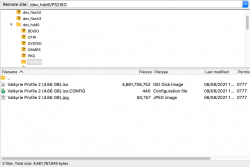
1. Transfer the CONFIG file from the PS3 to PC.
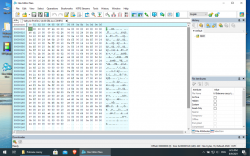
2. Open the file in any hex editor.
3. Replace everything inside with the hexadecimal numbers I posted.
4. Transfer the CONFIG file back to the PS3.
5. Test it.
 
Interesting, soemone ever try test largo winch empire under threat? It have freeze after all cutscenes in start game, just before gameplay!
Freeze remind same thing like Ghosthunter game, freeze at swamp stage (music still play but game freeze and u need push power button for reboot it)
 
1. Transfer the CONFIG file from the PS3 to PC.
2. Open the file in any hex editor.
3. Replace everything inside with the hexadecimal numbers I posted.
4. Transfer the CONFIG file back to the PS3.
5. Test it.

Already i replaced config.

I playing 2-3 hour after crash.

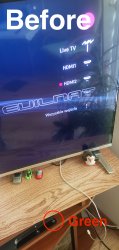
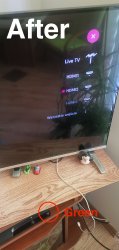
I upload screenshot.

Before: Turn on PS3 and i play to PS2.
After: I play on PS2 then crash off screen, but PS3 on green light.
 

Attachments

  • Screenshot 2021-08-09 at 18.16.51.png
    Screenshot 2021-08-09 at 18.16.51.png
    671.2 KB · Views: 35
  • IMG_20210809_180820.jpg
    IMG_20210809_180820.jpg
    1.5 MB · Views: 37
  • IMG_20210809_180753.jpg
    IMG_20210809_180753.jpg
    1.6 MB · Views: 35

Similar threads

Back
Top