Maeda A.

Forum Noob
Title = Bust a Move: Dance Summit 2001 (Japan)
ID = SLPM_620.29
MD5 = a5a02c79c4cca8715f71fee7733d9eb4
Media = CD (converted to DVD-R)
OPL version = OPNPS2LD-v.1.0 (the most recent version as of 8/15/2021)
Device = Flashdrive
Mode = Mode 1-6
Compatible = Not yet listed in the compatibility list
PS2 = Slim (SCPH-70012)
Fragmented = No
MODS= No mods to my hardware, but I have FreeMcboot, ESR, and OPL saved to my memory card

**Please note: I'm brand new to the console softmodding community and this forum, sorry if I forget to include any important info**

Hi everyone, I recently imported a copy of Dance Summit 2001. It is a "blue bottom" ps2 game that was released exclusively in Japan. As usual when putting CD ps2 games onto OPL, I performed all the standard steps in order to convert the game to an iso and put it into OPL's CD folder. My process and software I used to perform the tasks are identical to what MrMario2011 used in his video:

While the game does appear in the OPL manager and OPL game list, playing the game (no matter the mode settings) always results in a black screen. I also tried to get the game to run via ESR, and I got a black screen. I also tried the FreeDVDBoot patch method, but got the same black screen. I'm 99% sure nothing is wrong with the disc since my copy is in near mint condition.

If anyone would be so kind to reach out and attempt to help me with my predicament, I thank you from the very bottom of my heart. I've wanted to play this game for years, and I'm getting pretty desperate.

If there is anymore info I can supply to help come to a resolution, please ask me for the info.

Ciao!
 
How did You convert CD game to DVD (sorry but I do not want watching 30min of film, while You could write it in one sentence :P)? Most of them if not all, have security layer to prevent that (checking LBA of some files, media flag in executables etc).

If games is properly converted to DVD, You cannot put it to CD. Disc games using mode2 (blocks by 2356), while DVD mode1 (2048). Probably also 2048 but cut on the fly from 235 to 2048. If this is true (it was my blind shot), OPL cutting Yours 2048 sectors to 1744.
 
Last edited:
Check the md5sum of your ripped game (BIN):
http://redump.org/disc/19258/: 5e44792e7fc853acca8a1157afe6e134
Here is how to check md5sum:
https://www.psx-place.com/threads/how-to-check-game-md5-checksum.19277/.

To convert BIN to ISO use:
https://www.psx-place.com/resources/winbin2iso-by-nenad-hrg.671/.
Copy game into CD folder.

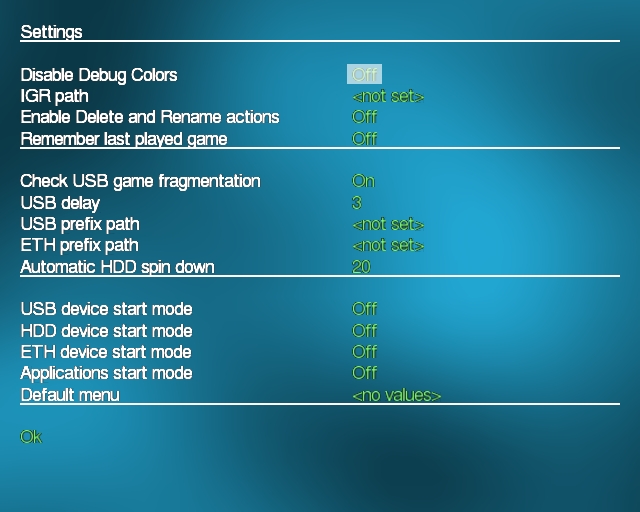
If you are using a USB device do not forget to enable Check USB game fragmentation in OPL's settings:
vigimagesnyddd6ee.jpg
 
Check the md5sum of your ripped game (BIN):
http://redump.org/disc/19258/: 5e44792e7fc853acca8a1157afe6e134
Here is how to check md5sum:
https://www.psx-place.com/threads/how-to-check-game-md5-checksum.19277/.

To convert BIN to ISO use:
https://www.psx-place.com/resources/winbin2iso-by-nenad-hrg.671/.
Copy game into CD folder.

If you are using a USB device do not forget to enable Check USB game fragmentation in OPL's settings:
vigimagesnyddd6ee.jpg
[/
How did You convert CD game to DVD (sorry but I do not want watching 30min of film, while You could write it in one sentence :P)? Most of them if not all, have security layer to prevent that (checking LBA of some files, media flag in executables etc).

If games is properly converted to DVD, You cannot put it to CD. Disc games using mode2 (blocks by 2532), while DVD mode1 (2048). Probably also 2048 but cut on the fly from 2352 to 2048. If this is true (it was my blind shot), OPL cutting Yours 2048 sectors to 1744.

My process was:

1.) Rip the .bin and .cue file from my copy of the game with IMGburn.

2) Use the OPL manager to convert the .bin file to an iso using the "bin/rng/mdf -> Iso" option.

3.) Put the newly created iso in my cd folder.

4.) Access OPL on my ps2, select the game, and I get a black screen.

P.S. Thank you for reaching out to help me. Also, I sent this reply yesterday, but my message appears to have been removed by a moderator for some reason.

Check the md5sum of your ripped game (BIN):
http://redump.org/disc/19258/: 5e44792e7fc853acca8a1157afe6e134
Here is how to check md5sum:
https://www.psx-place.com/threads/how-to-check-game-md5-checksum.19277/.

To convert BIN to ISO use:
https://www.psx-place.com/resources/winbin2iso-by-nenad-hrg.671/.
Copy game into CD folder.

If you are using a USB device do not forget to enable Check USB game fragmentation in OPL's settings:
vigimagesnyddd6ee.jpg
My MD5 checksum matches the value you showed, nothing appears to be fragmented (according to OPL when I run the check), and I used OPL Manager to make the ISO conversion. I assume OPL Manager and Winbin2Iso do the same job, right? Thanks for the response regardless!

PS Sorry that I listed the incorrect MD5 checksum on the post that created this thread, I found the correct checksum by running WinMD5
 
Last edited by a moderator:
2) Use the OPL manager to convert the .bin file to an iso using the "bin/rng/mdf -> Iso" option.

I am not sure if OPL Manager and Winbin2Iso do the exactly same job...
So try to check Winbin2Iso?
After conversation copy its ISO to CD folder.

Additionally can you try another flash-drive?
 
Holy cow! The game works now! I've been playing it and it runs amazingly! I'm not 100% sure what I did special to get the game working. I used a different flash drive and re-extracted the the data from the disc via IMGburn (this time as an ISO instead of a bin/cue that I had to convert with other software). So one of the 2 methods did the trick (probably the second one). Thank you both for your support, and I'm sorry I didn't try this method earlier.

Both of you, please take care!
 
Holy cow! The game works now! I've been playing it and it runs amazingly! I'm not 100% sure what I did special to get the game working. I used a different flash drive and re-extracted the the data from the disc via IMGburn (this time as an ISO instead of a bin/cue that I had to convert with other software). So one of the 2 methods did the trick (probably the second one). Thank you both for your support, and I'm sorry I didn't try this method earlier.

I am not fully sure if this is the proper way though...
I mean this conversion with ImgBurn.
Some games (e.g. Quake III - Revolution) will not work that way, because they are checking for LBA.
The tools for a conversation that we advised keep LBA intact.
Also md5sum will be different (i.e. compare to the one converted with Winbin2Iso)...

Maybe changing a USB device did the trick...
 
Why it is not? What is the difference between dumping the game directly to the MODE1 (ISO) and to the MODE2 + conversion apart from the wasted time? The initial LBA would be kept either way.
 
@jolek Reading image as mode1 instead of mode2 doesn't touch LBA. It just stripping every block from area where can additional data can be stored (i.e PSX some games using them for LibCrypt, all for intentionally bad sector checksums). We cannot even name it a conversion. ;)

What You talking about is a conversion by moving data from CD to DVD. And since on DVD we cannot keeps exactly the same LBA because user data starts far than on CD, some games which using LBA check security needs extra steps to deal with that (+ deal with media check security).
 
Libcrypt protection was hidden in the subchannel data, not the sector data. That is why a .SUB (or a .MDF full dump) file is needed to play these protected games in the emulators.
 
Why it is not? What is the difference between dumping the game directly to the MODE1 (ISO) and to the MODE2 + conversion apart from the wasted time? The initial LBA would be kept either way.

@jolek Reading image as mode1 instead of mode2 doesn't touch LBA. It just stripping every block from area where can additional data can be stored (i.e PSX some games using them for LibCrypt, all for intentionally bad sector checksums). We cannot even name it a conversion. ;)

What You talking about is a conversion by moving data from CD to DVD. And since on DVD we cannot keeps exactly the same LBA because user data starts far than on CD, some games which using LBA check security needs extra steps to deal with that (+ deal with media check security).

My bad.
I was thinking about a conversation from CD to DVD as @Berion wrote.

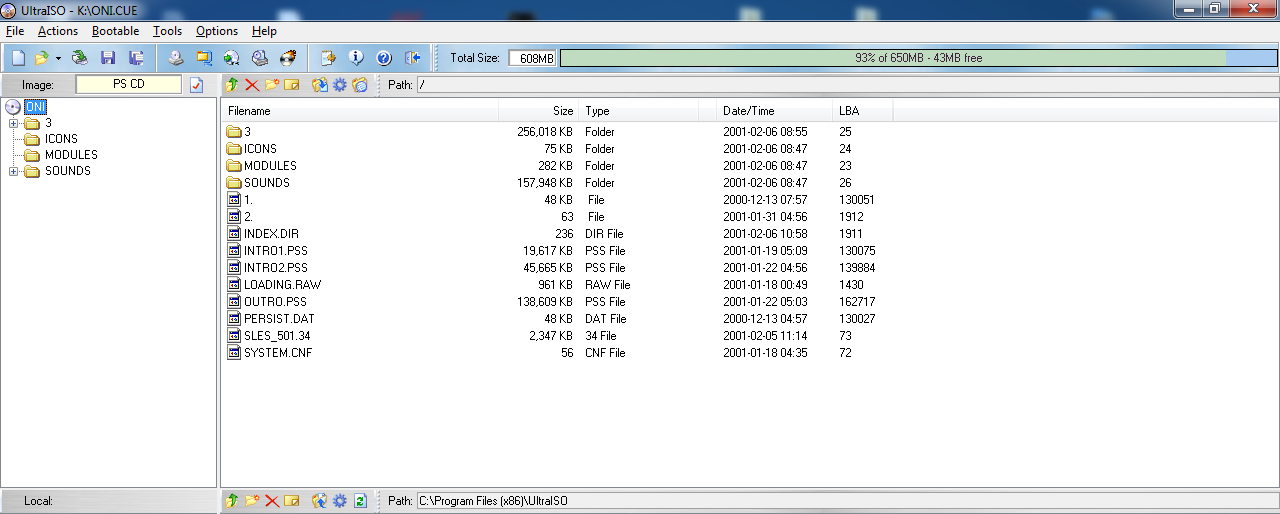
Here is how it looks like for BIN (ONI):
PS-CD-BIN.png


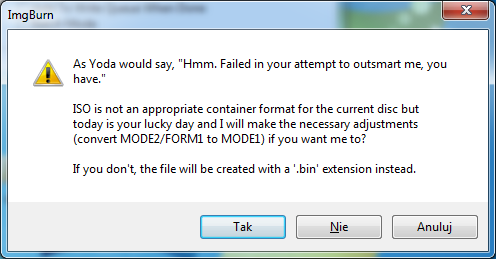
If you decide to rip a game directly to ISO you will get this "warning":
IMG-cd.png

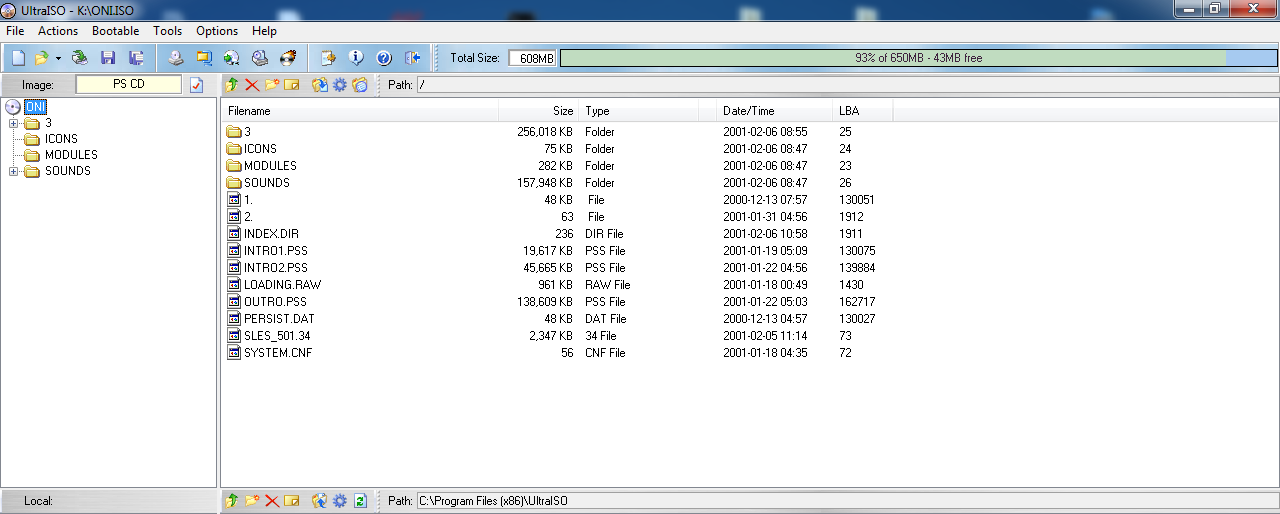
However all LBA will be the same for ISO:
PS-CD-ISO.png
 
Libcrypt protection was hidden in the sub-channel data, not the sector data. That is why a .SUB (or a .MDF full dump) file is needed to play these protected games in the emulators.
AFAIK sub-channel data is part of a sector but depend how much data the sector covering. 2048 or 2352 doesn't covering it and that's why CloneCD didn't include it, they just use *.img (which is standard mode2 image, You can rename it to *.bin or *.iso, it doesn't matter), *.ccd (their replacement for *.cue), *.cue (to keeps compatibility with other programs) and *.sub which contains missing data (but I rather preffer *.lsd or *.sbi). But if You create image in mode2 with sector size 2368, You will cover up all sub-channels including W.
 
I have never come across with a .bin file consisting of other than 2048 or 2352 bytes per sector. 2368 would definitely not cover all the sub-channels (maybe the most used P and Q only). A size of 2448 bytes per sector is needed to include all the P-W sub-channels.

I am more familiar with the LSD as a drug, rather than a disc format. But Alcohol 120% format does include the sub-channels too in its .MDF file.
 

Similar threads

Back
Top