Delid, repaste, 3 beeps red light blinking - don't do what I did...

manples

Member
Well, I think I completely deserve it.

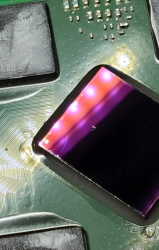
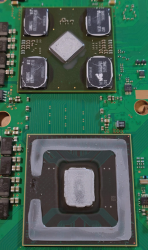
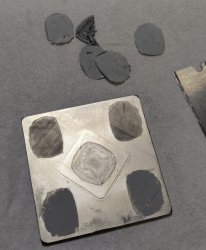
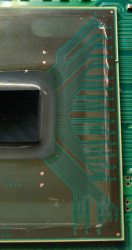
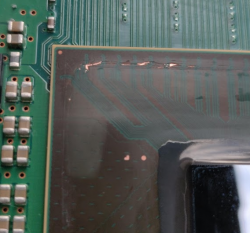
I did not use a painter's knife but a badly sharpened nail file because I was too impatient. And for the exact same reason, I popped the RSX lid after unsuccessfully attempting to cut the old paste between the ram chips and the lid... maybe not obvious in the picture but there's a spot on the RSX die, and a crack as well (that little curvy thing is unfortunately not a speck of dust...).

I hate myself. I had that PS3 for 12+ years and recently put a 1TB SSD in. It was fully loaded with everything up-to-date and working, all was great except for that damn fan that I wanted to shush down.

Lesson learned.

(in a desperate last move, I tried the heat gun trick hoping that would change something, but of course, no)
 

Attachments

  • CPU1.PNG
    CPU1.PNG
    728.2 KB · Views: 402
  • CPU2.PNG
    CPU2.PNG
    611.6 KB · Views: 377
  • GPU.PNG
    GPU.PNG
    1.1 MB · Views: 398
Hey Manpels sory for yours ps3 RIP ..... :) i face same (random) "flashing red light 3 beep" Fan problem .. but ... i have successfully delid both CPU & RSX seems problem persists & get randomly "false" overheat protection .. i have no clue about my before delid temps .. but now thy are low : Fan 30% CPU 50 RSX 53 after 1 hour game play
After weird yellow-green flashing i get suspicious about that bad reputation Nec caps next to CPU-RSX .... maybe i give it a try and replace them if cost is not to high !
 
Hey Manpels sory for yours ps3 RIP ..... :) i face same (random) "flashing red light 3 beep" Fan problem .. but ... i have successfully delid both CPU & RSX seems problem persists & get randomly "false" overheat protection .. i have no clue about my before delid temps .. but now thy are low : Fan 30% CPU 50 RSX 53 after 1 hour game play
After weird yellow-green flashing i get suspicious about that bad reputation Nec caps next to CPU-RSX .... maybe i give it a try and replace them if cost is not to high !
That's a NEC problem, you should be fine replacing only half of the RSX's. Remember, 4 tantalums per NEC.
 
Well, I think I completely deserve it.

I did not use a painter's knife but a badly sharpened nail file because I was too impatient. And for the exact same reason, I popped the RSX lid after unsuccessfully attempting to cut the old paste between the ram chips and the lid... maybe not obvious in the picture but there's a spot on the RSX die, and a crack as well (that little curvy thing is unfortunately not a speck of dust...).

I hate myself. I had that PS3 for 12+ years and recently put a 1TB SSD in. It was fully loaded with everything up-to-date and working, all was great except for that damn fan that I wanted to shush down.

Lesson learned.

(in a desperate last move, I tried the heat gun trick hoping that would change something, but of course, no)
You are having bad luck latelly, but i dont think you have "bad hands", what im going to say is very tricky and depends a lot of the luck... but worths a try

The "mark" on the RSX DIE doesnt looks so bad in the photo, keep in mind the DIE is like a rock and the circuits are "printed" in a external side of the rock
The "mark" is in the other side, but we dont know is the fracture reached the opposite side with the circuits, maybe the circuits side is fine

For the "cutted" copper traces on the border you can try this, is a photo made by @ElGris ... is a bit confusing because this is not exactly what you should try to achieve, but is a nice example of the difficulty level and what is going to hapen most probably
p6RkjHe.jpg


You need to sandpaper the green varnish to expose the copper lines (very carefully to dont "cut" more traces), after that you need to count how many traces are "cutted", if there are too much (and if they are close to each other), then is going to be almost imposible to fix it, but incase there is only 1 or 2 it worths a try

You can try reconnecting them by dropping a solder ball on top of them (without wire)... then move the solder ball around (in melted state), and eventually the solder could make a bridge reconnecting the trace
The other way is using a wire like in the photo... is a bit more tricky because the wire needs to be kept in place while you are moving the solder ball
Is a matter of repeating it many times... and for every attempt take a look with a magnifyer glass to see how good it looks visually

*And of course... use a multimeter to verify the resistance in between the "cutted" trace... if the multimeter tells resistance = 0 then is ok electrically (and doesnt matters if it looks very bad visually)

--------------
I said the photo is confusing because it doesnt looks like a good repair (the wire is not completly covered with solder in the tips), but is the kind of extreme microsoldering where you need to lower your exigence level
I mean... maybe it looks bad visually, but if it works electrically the best thing you can do is to stop soldering and acept the fact that this was the best you could do

You know... at the point @ElGris made the photo he could have said "meh i want it better", and he could be repeating it a hundred of times... but the end result could be the same, and he could be like... "meh im bored about this i should have stopped before, that one i made 20 minutes ago was looking good enought"
 
Last edited:
@sandugas thanks for the tip, I kept the console so I'll give that technique a shot.

But guess what, in the meantime I got lucky ! Just posted this morning in my other post where I destroyed a 2501A Cell (...), that I actually found a 2101A yesterday and manage to delid it properly !! This time with the right tools, the right angles, the right counter-force to avoid slipping knife etc. etc. Perfect result !

upload_2020-5-2_11-23-0.png


Oh and since I'm here, let me share with you guys a little trick.

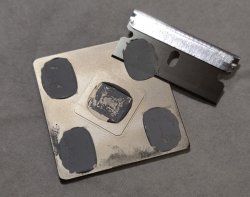
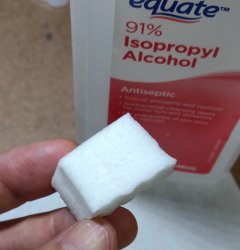
I'm a pinball-fan and restored several ones. We use Magic Eraser + isopropyl alcohol quite often to remove the playfield gunk. It's abrasive but soft at the same time. And guess what, to clean both IHS free of any residue, this is absolutely perfect.

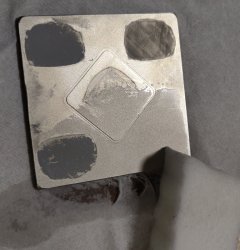
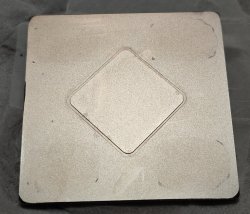
Forget the Qtip and the razor blade scrapping, just dip a small piece of magic eraser in alcohol and after 5 or 6 strokes boom everything is gone. Same thing to clean the radiator (after you've marked the IHS positions of course).

Although don't use it on the dies, magic eraser is still abrasive so don't risk it !
 

Attachments

  • upload_2020-5-2_11-21-0.png
    upload_2020-5-2_11-21-0.png
    1.3 MB · Views: 77
I mean, I scrapped first with a blade but then I did not insist. 15sec of magic eraser + alcohol and it's clean.
 

Attachments

  • IMG_20200502_113359__01.jpg
    IMG_20200502_113359__01.jpg
    1.5 MB · Views: 67
  • IMG_20200502_113258__01.jpg
    IMG_20200502_113258__01.jpg
    926.3 KB · Views: 78
  • IMG_20200502_113419__01.jpg
    IMG_20200502_113419__01.jpg
    815.5 KB · Views: 83
  • IMG_20200502_113434__01.jpg
    IMG_20200502_113434__01.jpg
    1.3 MB · Views: 75
  • IMG_20200502_113639__01.jpg
    IMG_20200502_113639__01.jpg
    1.2 MB · Views: 76
Im not used to see that magic eraser in my country, but looks perfect for the task :)

Btw, you could do a lapping at both surfaces of the IHS, when the IHS is sticked to the PS3 motherboard is imposible to do it, but if you unstick it is relativelly easy and can be made with good precission

In the IHS side that touches the heatsink is needed to do a serious lapping, with sandpapers on top of a glass and removing a good amount of metal particles, the results depends a lot of the other surface in the heatsink though

But the other side that touches the DIE is important too, because the flatness of the DIE is almost perfect (probably is very close to perfect even under a microscope), so you have one surface that is already perfect (the DIE)
Is also smaller, so easyer to do the lapping, also is going to be more flat than the other IHS side so is not going to be needed to remove much metal particles
Actually... you could "polish" it (instead of lapping it) by rubbing the IHS on a cloth on top of a glass using an abrasive liquid (toothpaste with fluor, or some metal polisher for silver, etc...)

Anyway... use a very thin layer of thermal paste in the DIE's because that surface contact in between the DIE's and the IHS is very flat, even from factory, im suggesting lapping it just because is easy now you unsticked the IHS's
The improvement you can achieve by lapping the IHS side that touches the DIE is small... but lapping the other IHS side that touches the heatsink could give a very good improvement
 
Last edited:
@sandungas likes to make fun of my soldering skills :( :D

I used this lol, is a pretty old (10 years old or more) soldering iron but it's the best thing I can have right now 'cause any other one on stores are just chinese crap.

https://i.imgur.com/XNwj8pf.jpg

Instead of having a JBC soldering station with a really thin tip and really thin wire, some nice resine for the protection of the soldering, and a better microscope, maybe I could do something else, or maybe not haha. Those giant wires on the pic are like 1.5 or 2mm long. And yeap, it's very difficult to leave that like a clean job, at least for me. If people want to make a fix like this, they only would need a regular microsope, and skills, that's all.

For the problem of the OP, I don't see it well, but those are a lot of jumpers, might be impossible, at best. And he needs a RSX change too, sad ending.
 
@sandungas likes to make fun of my soldering skills :( :D
Nah, not really, i been in that situation before :D

Is the kind of thing where you need to solder it many times, lets say.... for every 15 attempts there is going to be only 1 that looks aceptable to the bare eye... but then you take a look at it with the magnifyer glass (and a multimeter) you realize is bad.... so you need to start trying it another 15 times
And so on...
And so on...
And so on...

After lot of time you are going to be frustrated because you are at your limit (you are not sure if is going to be posible to do it with your equipment), and it looks the adventure is going to have a bad ending
But eventually could happen what can be seen in your photo, looks bad but electrically is ok

Btw, to do this is needed to use lot of flux, the flux has an special chemical composition that helps the solder to atttach better to the metals, is magic
Also, there are some wires that are specially good named "kynar" (or wrapping wire, but the kynar is better) that have the same effect, the solder attachs to it naturally, way better than a standard wire

That kynar wire are made with a single core, and the core have a bath of silver, is a bit expensive (because the silver) but is nice stuff, it simplifyes a lot the solder jobs


-------------------
For this specific job the fact the wire is cilindrical is a bad feature btw... what you can do is to place the wire on top of a piece of metal and... hammer it !!!
This way the wire becomes plane, lol

Also, if you dont have a good wire, keep in mind we dont really need a wire, what we need is a small piece of metal, i just had an idea that im sure is going to work
You can use a razon blade to get a "shard" of silver from something made of silver... it could be something you have at home, a jewell, a coin or whatever
Is just a very tiny amount of silver, way smaller than a grain of rice

*also, if you find some way to create imperfections in the wire surface (scratching it with a razor blade, or sandpapering it) this is another thing that is going to help the solder to attach better to the wire
 

Similar threads

Back
Top