PS2 Difference FMCB 1.966 vs 1.953 ?

Just download and clone it " HDDOSD_100J_ATADP_DTL-H_FIX_48BIT_APPS.IMG " in any HDD that you want through PC using
HDDRawCopy and plug it into PS2 with a Network Adapter
from here https://archive.org/details/PS2_HDDOSD_100J_48BIT

And read this thread to update your OPL
https://www.psx-place.com/threads/how-to-boot-opl-gui-through-hddosd-with-opl-launcher.35547

You could also pop over to https://ps2apps.com/?dir=PS2/HDD and choose one of these builds.

I'm not the most indicated person for answering this, I always used FMCB, never tried any alternative. Anyway you can find a description in funtuna page: PS2 - FunTuna (Free McBoot for Fortuna) | PSX-Place

In short it is based on fortuna that's a explot that was made for Ps2 models not compatible with FMCB (some 9000X versions).

Finally, I got my FMCB but I don't know where is the problem because when I want any homebrew file there is a red-yellow-green screen then it turns to white and keeps a white screen. Maybe I need to check configuration settings, I'm not sure. Btw is there any way to update FMCB to 1.966?

edit: my boot screen is different than yours. I have FMCB menu like this.
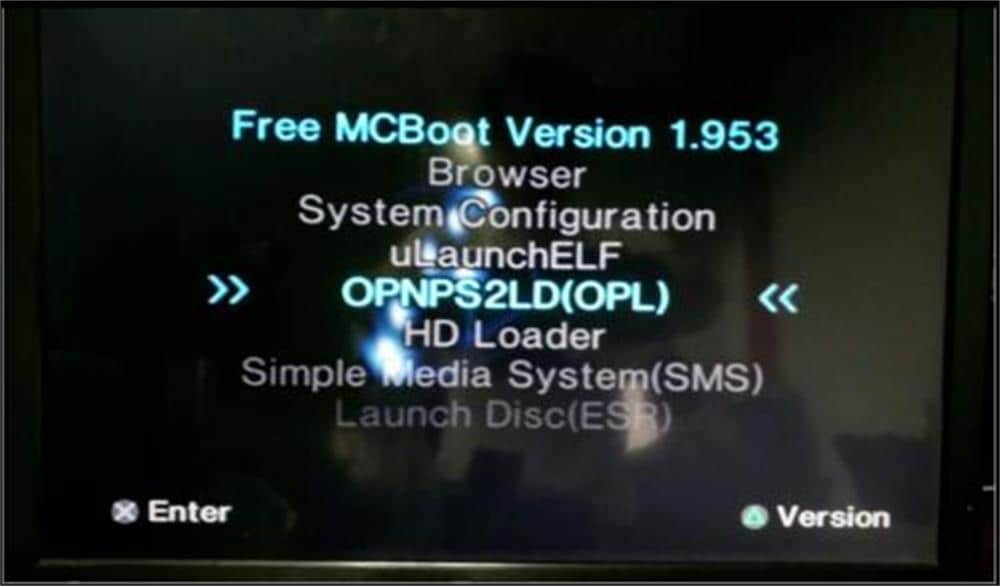
5b7e112c5bafe3113a1df1f2


But users in the forum has a menu like this

images
 
I haven't used this since 2018, but i installed fmcb on my mc using a friend's modchip ps2. Then on my ps2 i could update and experiment with many different versions. I recommend you do a heavy research and watch a lot of video and written tutorials several times. If you do a mistake, you risk not installing fmcb correctly or deleting it unintentionally and you won't be able to boot it again if you don't have a modchip console or any method to write on the mc. It's easy, it only took putting the correct files on a usb stick, there was some sort of file explorer which used to manage files and do your stuff like installing OPL which used to play ps2 games. Also there's popstarter which i used more than actual ps2 to play ps1 games. I only used ps2 so i could play on a crt at 240p.
 
Finally, I got my FMCB but I don't know where is the problem because when I want any homebrew file there is a red-yellow-green screen then it turns to white and keeps a white screen. Maybe I need to check configuration settings, I'm not sure. Btw is there any way to update FMCB to 1.966?

edit: my boot screen is different than yours. I have FMCB menu like this.
5b7e112c5bafe3113a1df1f2


But users in the forum has a menu like this

images

FMCB allows a good amount of customization for the OSDSYS (ps2 main screen). It seems the version you got has a edited configuration file.

Download and install this: https://www.ps2-home.com/forum/download/file.php?id=14783&sid=633008be4c90d201a57078002aec6974

However if you don't have a modchip, use the last version: [190413]FMCB-1966-bin (mediafire.com)
 
Thanks for all your reply. I already had an original Sony Card. I downloaded and copy-paste the files in this link to the USB stick.

https://www.psx-place.com/resources/fmcb-fhdb-noobie-package.721/

First, I install the FMCB files in the USB to the Sony Card and convert that card to FMCB 1.966, then I updated the FMCB card which was purchased from 1.953 to 1.966, and uninstalled the FMCB from the Sony Card. Now I have updated 1,966 FMCB card and I can play homebrew games. I was getting a white screen error in version 1.953. But version 1.966 works flawlessly. I'm very happy. I also purchased an HDMI converter because AV Component resolution quality is not good enough on a 4K TV.

Btw I have a question. Games always want to create a save file to MC1. But MC1 is FMCB. Is there a way to change it to MC2? While playing the game, I want to use by default MC2 to create save files.

Thanks
 
Btw I have a question. Games always want to create a save file to MC1. But MC1 is FMCB. Is there a way to change it to MC2? While playing the game, I want to use by default MC2 to create save files.

Thanks

That's easy, just use the FMCB card in slot 2. It will work fine there and you can use a different card in slot 1 for saves. That's what I do for my PS2.
 
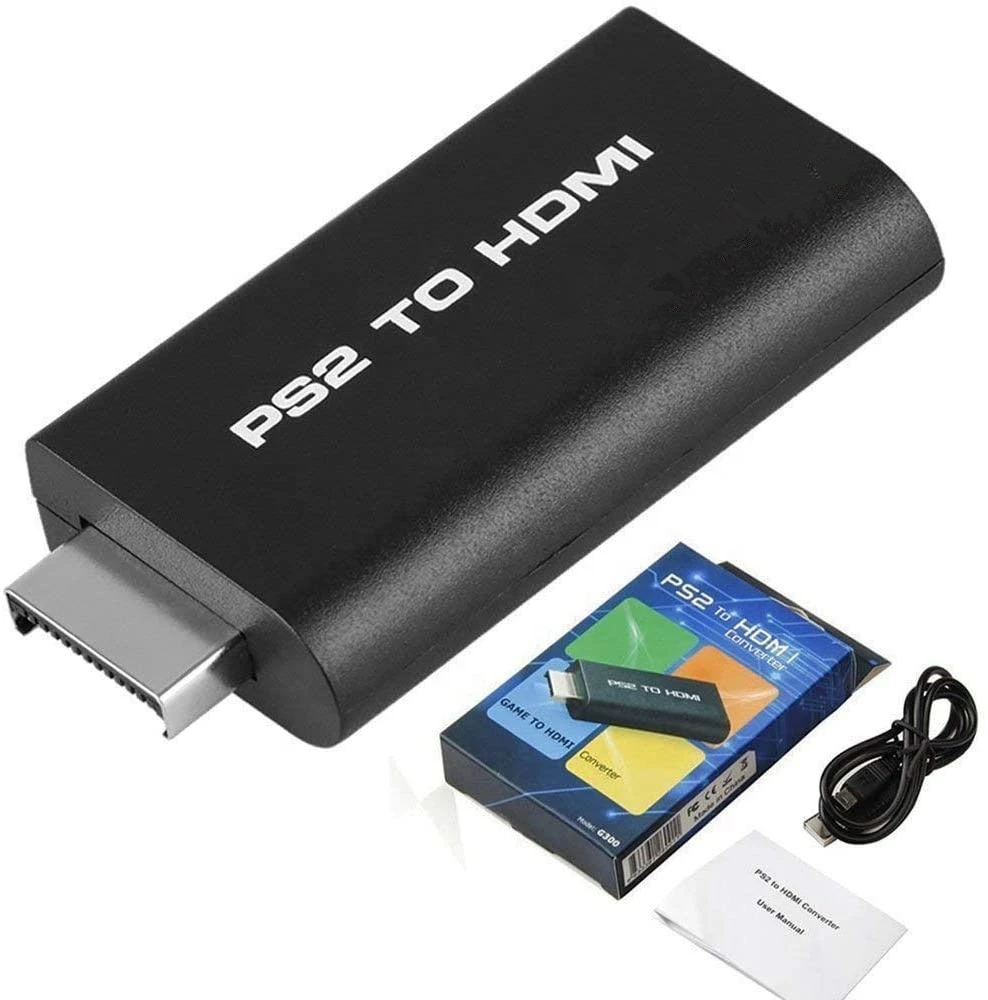
I also purchased an HDMI converter because AV Component resolution quality is not good enough on a 4K TV.

You meant the composite cable, right? Component cable (red, green, blue + white and red) is the best output from Ps2 on a consumer digital TV.
HDMI adapters give worse results most of the times (unless you go for very expensive converters).
 
Last edited:
That's easy, just use the FMCB card in slot 2. It will work fine there and you can use a different card in slot 1 for saves. That's what I do for my PS2.

DimGraciousGrub-max-1mb.gif


Dayummmm bro. It's working :D Then slot is no matter for FMCB. Cool cool :afro:


You meant the composite cable, right? Component cable (red, green, blue + white and red) is the best output from Ps2 on a consumer digital TV.
HDMI adapters give worse results most of the times (unless you go for very expensive converters).

My bad. Yes composite cable (Red-Yellow-White) potato quality on 4K TV. I purchased HDMI adapters because dear Samsung didn't put a component input on 800$ TV. The adapter is not expensive something around 10 bucks on Amazon. I'll try when I get my parcel I hope the image quality gets a little better.
 
DimGraciousGrub-max-1mb.gif


Dayummmm bro. It's working :D Then slot is no matter for FMCB. Cool cool :afro:

You can set FMCB paths (of the exploit itself as also any other homebrew) to either mc0 (memory card on slot 1), mc1 (slot 2) and mc? (any slot. Means it will check slot 1 first, then if the program isn't found will check on slot 2. This is the default setting).


My bad. Yes composite cable (Red-Yellow-White) potato quality on 4K TV. I purchased HDMI adapters because dear Samsung didn't put a component input on 800$ TV. The adapter is not expensive something around 10 bucks on Amazon. I'll try when I get my parcel I hope the image quality gets a little better.

New TVs don't have the usual analog inputs. However many of them have a single jack analog input with a set of adaptors (for composite, SCART and component) included in the package. For example this is the component one on some samsung tvs:

s-l300.jpg


Anyway, your HDMI adapter is "component to HDMI" (so you have a component cable connected to the Ps2), right?
 
Last edited:
You can set FMCB paths (of the exploit itself as also any other homebrew) to either mc0 (memory card on slot 1), mc1 (slot 2) and mc? (any slot. Means it will check slot 1 first, then if the program isn't found will check on slot 2. This is the default setting).


New TVs don't have the usual analog inputs. However many of them have a single jack analog input with a set adaptors (for composite, SCART and component) included in the package. For example this is the component one on some samsung tvs:

s-l300.jpg


Anyway, your HDMI adapter is "component to HDMI" (so you have a component cable connected to the Ps2), right?

EDIT: "question" Console was reading game disks without problems until FMCB. Now when I insert a DVD, I get a disc read error. Is this related to FMCB ??

Yes, I did it. I recognize when I changed the memory slot and GSM disappear on the menu then I see the memory path was (mc1) and I changed to (mc?) FMCB menu is so good desiged. Easy to use and understanble.
I also get my parcel today and try the HDMI adapter. Still, it is not good as PS3 but the picture quality is better than AV out. My TV is very poor about input. There is no AV adapter.
here is all input
Ekran-Resmi-2021-12-08-03-13-23.png


this is the adapter that I purchased.
Heb099ba93f8e417bbf78a4cbefc229b6x.jpg
 
Last edited:
It's confusing to me which versions I should purchase
You shouldn't purchase any. :P

I know, 1.966 is the latest version, but everyone says 1.953 is the most stable version.
There is nothing unstable here... FMCB from 1.9 line is incompatible with modchips because conflicting with their patches. Let's say that the newest version, the less compatibility.

Many people still have modchips and for some of them, 1.953 is the last which works. For others is some older. For now, modchips are almost useless and their firmwares extremely outdated. Modchip users should just desolder them. ;)

But users in the forum has a menu like this
You decide what menu looks like and what contains. Since You have used dirty image, You have pre-configurated by someone else taste. I.e, my menu looks exactly like original (I'm not a fan of all this fancy delimeters and strings around the screen :P), but with few homebrew on list.

Just download and clone it
That's is bad advice. As an entry point is ok, but not for daily using... Instead, someone who want use HDD as entry point, should just write mini image of HDD with ule kHn (it contains only part of __mbr) and boots automatically uLE during console start (let's call it "MBRBoot" ;)). After that, user should going to HDD Manager, format drive, going to mass:/ and install from there FHDB.
 
Last edited:
Honestly, I made a big mistake and disassembled the console, since I have had the original console and disk for over 20 years without issue. But it's stopped reading disk I was thinking it happened because of FMCB. (I can hear your laugh) I dissemble optical disk drive. Motor try spin millisecond then stop. I don't know how I did it but the console is not booting now. I can hear fan noise but there is only green light on the button. Blue light completely disappeared. No signal on the TV. --- End of the game --- I think my lovely PS2 is dead. R.I.P

If I can find any PS2 Fat model on eBay at a reasonable price I'll purchase it.
Retro console forever :)
 
No, there is nothing to laugh. I also 'have two left hands' for manual stuff. However, by desoldering modchip and changing battery I didn't killed her. ;p

When PS2 stop reading discs is in most cases because of dirty lens, mirrors and/or dirty slides. But of course You must hear the spinning, if it doesn't spin, then it means ODD is disconnected somehow (from power, or data transmission).
 
Honestly, I made a big mistake and disassembled the console, since I have had the original console and disk for over 20 years without issue. But it's stopped reading disk I was thinking it happened because of FMCB. (I can hear your laugh) I dissemble optical disk drive. Motor try spin millisecond then stop. I don't know how I did it but the console is not booting now. I can hear fan noise but there is only green light on the button. Blue light completely disappeared. No signal on the TV. --- End of the game --- I think my lovely PS2 is dead. R.I.P

If I can find any PS2 Fat model on eBay at a reasonable price I'll purchase it.
Retro console forever :)

When the motor spins, then immediately stops, it could also be that the laser trimmers need an adjustment.

But I'd firstly check for the missing blue light issue. Have you checked the flat cable? Disarm and rearm it (the easy end first, where eject and power buttons are.
Then if it doesn't solve, you could disassemble the console for checking the other end. If still it won't work, you could have damaged the flat cable. Maybe, I'm not sure, usually when you damage it, you lose both lights and cannot power on the Ps2. But to try is cheap.
 
Last edited:
When the motor spins, then immediately stops, it could also be that the laser trimmers need an adjustment.

But I'd firstly check for the missing blue light issue. Have you checked the flat cable? Disarm and rearm it (the easy end first, where eject and power buttons are.
Then if it doesn't solve, you could disassemble the console for checking the other end. If still it won't wpork, you could have damaged the flat cable. Maybe, I'm not sure, usually when you damage it, you lose both lights and cannot power on the Ps2. But to try is cheap.

No, there is nothing to laugh. I also 'have two left hands' for manual stuff. However, by desoldering modchip and changing battery I didn't killed her. ;p

When PS2 stop reading discs is in most cases because of dirty lens, mirrors and/or dirty slides. But of course You must hear the spinning, if it doesn't spin, then it means ODD is disconnected somehow (from power, or data transmission).

@Berion I tried every combination. Clean lens, clean disk tray, use lube laser bridge and motor but no chance.

@Peppe90 Flex cable is working. I think something happened during power on power off the console. The fan is spinning. The disk drive light (blue light) not working. I mean no blue light. No signal output. I can't reset the console with one time push to power button. Normally 3 sec hold down to power then the console should turn off but my console is not turning off. I searched all forums and Google but there isn't any clue what's wrong.
 
It seems something happened the second time you disassembled the Ps2, or it can be a coincidence.

I think you need another Ps2. But also you can try something on this, I'd open it again and look for something that's not right.
 
If drive and/or console is dead, it is possible that You wrongly wrap pwr/eject tapes and been "crucified" by screw during assembling. That's very common mistake. To avoid that, before I use screwdriver, I looked into hole with lamp to see if there is not tape on the screw road.
 
It seems something happened the second time you disassembled the Ps2, or it can be a coincidence.

I think you need another Ps2. But also you can try something on this, I'd open it again and look for something that's not right.
If drive and/or console is dead, it is possible that You wrongly wrap pwr/eject tapes and been "crucified" by screw during assembling. That's very common mistake. To avoid that, before I use screwdriver, I looked into hole with lamp to see if there is not tape on the screw road.

I purchased some used ps2 fat and solve my problem :) today I dissembled a 3rd-time console which is broken. Checked the flex cable with a multimeter and it work. Checked the PS11 fuse which is a control IC but it's also working. I don't know still where is the problem but it seems like I'll keep that console as spare parts.
 
Welcome back, that's me, again:) I got my network adapter (not genuine) and I installed FHDB 1.966 but there is only Sony logo and fmcb logo and black screen. I researched a few and solved the problem by installing version 1.953 (working well on HD) but my question is why I have this problem? Why my HDD and network adapter is not working on 1.966? Thanks for advice

@Berion @Peppe90 @60fpshacksrock
 

Similar threads

Back
Top