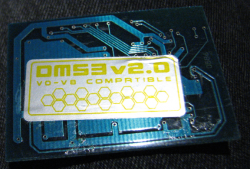
DMS3 modchip, now irrelevant?

RaptorZX4

Member
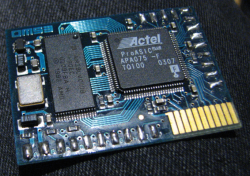
I took out my DMS3 modchip out of my now broken fat PS2.

But i guess it's now irrelevant because you can pretty do everything that modchip is able to do, but with FreeMcBoot + OPL + MX4SIO.

Back in mid-2000's, i got that installed in my fat PS2 to be able to play with Japanese games.

The only thing i can think of, that FreeMcBoot and OPL can't do, is booting Japanese discs on a US console. But at this point i would just install the ISO on the MicroSD for the MX4SIO.
 

Attachments

  • IMG_1156.png
    IMG_1156.png
    480.7 KB · Views: 199
  • IMG_1157.png
    IMG_1157.png
    420 KB · Views: 191
I hope I'm wrong, but as far as I know, you can't play copies of home-saved games with just FreeMcBoot, a modchip is required if you want to use home-saved games on the device.
 
I hope I'm wrong, but as far as I know, you can't play copies of home-saved games with just FreeMcBoot, a modchip is required if you want to use home-saved games on the device.
True. Same with genuine Japanese PS2 games.

But by irrelevant, i mean that you can bypass the disc drive entirely by using FMCB and then using OPL and a MX4SIO, and playing Japanese games from the MX4SIO since the only region-locked thing on the console are the discs themselves. Once you create an ISO of your game to be used on your MX4SIO, it then entirely bypass the region check that way.
 
Basically FMCB/FHDB + OPL -> play backups from USB, MX4SIO, HDD + region free
Modchip -> play disks and their copies + region free

There is also another thing to consider regarding your DMS3. It is pretty valuable as a collectible today :D

Edit: modchip and FMCB is usually not a good idea, as both seem to be sometimes conflicting
 
Edit: modchip and FMCB is usually not a good idea, as both seem to be sometimes conflicting
Ok i'll tell you what happened. When i opened my fat PS2 for the first time in 15+ years, for some reasons it stopped booting games from the DVD drive, even though it was still able to detect the games. But after installing FMCB on the memory card, both got in conflict. But i thought to remove the DMS3 because it's a damn drag to have to hold the Eject button everytime i want to use the console with FMCB (holding Eject button when booting the console disables the DMS3).

But anyway, i took the console apart, and i discovered the one that installed my DMS3 chip inside, broke the latch for the controllers port on the main board, so he used a tape to keep it closed on the ribbon connector to "fix it". But then i tried to close it back, but it won't work at all. But anyway, yeah. the DMS3 is going in an antistatic bag now.

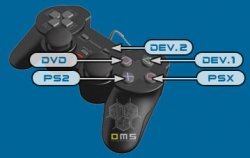
But the DMS' "dev" button, holding triangle, you could boot up a software, so back then i installed HDLoader on the memory card so i would only have to hold Triangle to launch it at console power-on.

But yeah, i have no ides what to do with that modchip now.
 
@RaptorZX4 On modchip You have autoboot all kind of discs (on older, needs special tricks for PSX and DVD-Video formats but I don't remember if DMS3 isn't from first generation which autoboot everything).

If You don't have plans to use MechaPwn (You didn't wrote the model) and/or if FMCB 1.966 works fine with it (it isn't based on Your description), and if it boots everything from discs, I would not removing it been on Your place. Original DMS3 was quite good stuff (like Matrix Infinity, DSM4, CrystalChip, Ghost 2).

However, mostly new FMCB line (after 1.8b/c) doesn't work properly with all modchips (freeze on boot or black screen after application launch from OSDSYS), so general rule is good to remove them as current exploits offer almost the same but with some extra steps (like patching discs images before burn).

@_XBrD4shDOE_808_ What do You mean by "home-saved games"?
 
@RaptorZX4 On modchip You have autoboot all kind of discs (on older, needs special tricks for PSX and DVD-Video formats but I don't remember if DMS3 isn't from first generation which autoboot everything).
you had to hold on a button to be able to boot PS1 games or DVDs. PS2 games is the default mode, but there's still a button assigned to the PS2 mode.

But back then, the most popular modchip was the Messiah2 Pro, but i didn't wanted that one, i wanted more options, like being able to install a software like HDLoader on the memory card to boot directly to it and install my games and play them directly without inserting my PS2 games again in the console. That was back in early-mid 2000's though. Also the DMS3 also support Auto patcher so you can use any HDD size in the console (as long as it's IDE, and the power and IDE connectors align, which is what the official network adapter use).

But yeah, nowadays FreeMcBoot, OPL and a MX4SIO can pretty much replace the physical modchip and a mid-size IDE HDD now, i had a 160gb HDD in my fat PS2, but a 128gb MicroSD in my MX4SIO is doing the job pretty well, and inexpensive too.

my DMS3 may be somehow valuable as a collectable item, or maybe even reused in a fat PS2, but i have no soldering skill nor the tools to do so (i paid somebody to buy the modchip and the installation), so maybe if someone really want it for some reasons, i may sell it, i don't know...
 

Attachments

  • dms3_modes.jpg
    dms3_modes.jpg
    14.6 KB · Views: 108
HDD patches for ATAD are buggy, rather problematic. You don't need modchip to have support larger HDDs (up to 2TiB).
You can have modchip and FMCB and its benefits. ;]

But anyway, if DMS3 works as You described it is not worth to keep it soldered.

@_XBrD4shDOE_808_ Then You are wrong in case of DVD discs. Read about ESR and FreeDVDBoot.
 
I would be interested in buying it, if you would like to sell it. It's an old chip and a bit challenging to install correctly. I have installed various chips since the mid 2000's. Let me know and I'll send a PM if my new account allows it.
 
Basically FMCB/FHDB + OPL -> play backups from USB, MX4SIO, HDD + region free
Modchip -> play disks and their copies + region free

There is also another thing to consider regarding your DMS3. It is pretty valuable as a collectible today :D

Edit: modchip and FMCB is usually not a good idea, as both seem to be sometimes conflicting
For FMCB with Modchip you need a Modchip friendly version of FMCB.
 

Similar threads

Back
Top