
Error loading iso with mmCM or webMan

Hi all


I have been trying to run ps3netsrvr on virtual machine from which I want to share my games to my PS3 console.

So far I have been able to see the games in mmCm from my ps3netsrv but every time when I try to mount an ISO or a normal JB game I get the following error
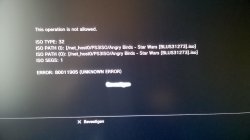
WP_20150510_002.jpg

I run the following system:
  • PS3 with CFW 4.70 Rebug + 7.10 cobra
  • Debian (Linux) server with ps3netserv 1.3 as virtual machine on a Windows 7 host

I can see every shared media on the PS3 incl games/photo's and music but I just cant seem to mount/play a game.
I tried mounting the iso via webman from XMB but I also get error there so it aint working either.
Does anyone have any idea how to help?

Thx in advance!

Simular post here: Error loading iso with mmCM or webMan - Page 2
 
Last edited:
Not sure this gonna work on virtual machine (maybe yes, i never tested). Did you try to use native linux version?
 
No but I tried running the server on my Windows 7 host itself.
So same executable as the one I run in Debian guest (since I use wine there to run it)
And on native Windows it also gives same error.

Also because I can see the games on PS3 itself, it seems to me the problem isnt my virtual ps3netsrvr
 
Ok i checked our forum and we had problem like this one time. Changing CFW to habib help in that situation. But this is only temporary solution, anyway if you have possibility then you can check different CFW than Rebug. This help exclude some options. Also you are on CEX or DEX?

If you don't have time/possibility to change cfw then try in rebug toolbox set:

SYSTEM MODE to Rebug and XMB OPERATION MODE to Retail. Hope this help.
 
Ok i checked our forum and we had problem like this one time. Changing CFW to habib help in that situation. But this is only temporary solution, anyway if you have possibility then you can check different CFW than Rebug. This help exclude some options. Also you are on CEX or DEX?

If you don't have time/possibility to change cfw then try in rebug toolbox set:

SYSTEM MODE to Rebug and XMB OPERATION MODE to Retail. Hope this help.


I tried the settings in toolbos, but they didnt resolve the problem.
I will try to change CFW tomorrow if I find time.

Oh and i am on REX/CEW btw.
 
as stated over at psx scene, please swap to wired connection. wireless will be sketchy at best and is very much recommended to use wired connection.
 
A few things.

Every time you make a change, you have to refresh the HTML & XML and restart the ps3 for XML changes to take effect.
This part could be causing error, because it's trying to find a game that isn't really there. :)
Wired is SO MUCH better than wireless. Wireless works, but i've found issues even during gameplay at points (one in dantes inferno really upset my roomate, where enemies kept spawning, but it didnt' register the kills so you couldn't progress. lol)
Also, as many firewalls down as possible helps as well. or whitelist the ports that netserv uses (netstat -ano should answer that in windows)

In the scenarios, i'm assuming that the windows side isn't giving error, but the ps3 side of it. You could also try changing the port that netserv connects on/listens to and see if its a port issue as well.

Just some thoughts as I looked through :)
 
A few things.

Every time you make a change, you have to refresh the HTML & XML and restart the ps3 for XML changes to take effect.
This part could be causing error, because it's trying to find a game that isn't really there. :)
Wired is SO MUCH better than wireless. Wireless works, but i've found issues even during gameplay at points (one in dantes inferno really upset my roomate, where enemies kept spawning, but it didnt' register the kills so you couldn't progress. lol)
Also, as many firewalls down as possible helps as well. or whitelist the ports that netserv uses (netstat -ano should answer that in windows)

In the scenarios, i'm assuming that the windows side isn't giving error, but the ps3 side of it. You could also try changing the port that netserv connects on/listens to and see if its a port issue as well.

Just some thoughts as I looked through :)


It is working now (even via WIFI), I just tested some other ISO's and they work. I can play perfect. Off all the games i have it seems I just picked the one that was a faulty ISO, lol :)
I fixed the faulty ISO by reripping the disc and it workes now.

The thing is though, loading the iso via mmCM still gives the error. Using webman gives no trouble at all, they load fine. Guess ill stick with webman then :)

Thx for all the help!
 
Last edited:
multiman will be updated shortly, also when you are jumping to multiple forums, it is polite to link to the other forum as well so people can see what all was tried. that way people do not repeat themselves. thanks
 

Similar threads

Back
Top