cha0shacker
Member
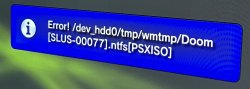
I have the problem that i cant mount PSX images from an external HDD anymore. i get an error message. Sadly nothing more informative


I have the problem that i cant mount PSX images from an external HDD anymore. i get an error message. Sadly nothing more informative
The error message sadly just says "Error!" and then the path."an error message"... now I must be a diviner. Is too hard to be more specific? Like provide a screen capture of the error.
What is the specific setup of the game ?
- CFW or HEN version
- If CFW, is Cobra enabled?
- Storage device type: internal HDD, FAT32, exFAT, NTFS, remote ps3netsrv
- Exact path and file name of the game
Does the game work with multiMAN, IRISMAN or ManaGunZ?
Does a previous version of webMAN MOD work?
AFAIK There have been no recent changes related to NTFS and game mounting.
I recommend you that do the following:
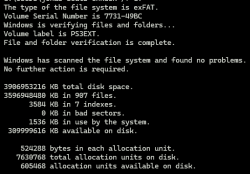
1- Perform a chkdsk /f to the external disk to verify if there are bad sectors or cross-linked files
2- Execute prepISO again to re-scan the content of the external HDD to re-generate the .ntfs[PSXISO] cache file in the internal HDD.
3- Test if the game works with other backup managers to verify that the game is working and the file is not corrupted..
4- Also test if a different PSX game work from the same external disk.

I already did 2 and 4 (all PSX games produce the same error) and files itself are fine since they work from the internal hard drive.
Additionally to point 2 i also completely emptied the folder via FTP before running PrepISO again. Didn't change anything though
i can check 1, but i doubt it will help since it affects all PSX games and i already recopied all of them yesterday
The same file works when copied to the internal drive and i seriously doubt that suddenly all my PS1 games are corrupted everywhere.How about the #3?
The same file works when copied to the internal drive and i seriously doubt that suddenly all my PS1 games are corrupted everywhere.
I already deleted and recopied them to the HDD yesterday.
Thats why i find it so weird. I haven't changed anything compared to before apart from updating to 4.91 and the most recent webMan mod before it stopped working yesterday.
does webman mod write a log that i can take a look at?
Drive looks good, currently trying to find an older version that works with the current firmware correctly.1-Games are mounted in a different manner from NTFS and from internal HDD.
2-NTFS file system tend to get corrupted on PS3 causing cross-linked files
3-/dev_hdd0/tmp/wmtmp can get cleaned or corrupted if you used an old version of multiMAN different to multiMAN MOD
If it worked before, first test with multiMAN or IRISMAN to confirm that the game is working.
Then try installing an older version of webMAN MOD to verify if it's a bug in a recent version.
As I commented earlier, the modules that mount games from NTFS haven't been updated since Oct 22, 2024.
There where recent changes only related to overclocking.

Yes, i said so above. It works for all other PS3 and PS2 games just fine.

Yes, i said so above. It works for all other PS3 and PS2 games just fine.
Where does it say that?exFAT is not the same as NTFS. It will never work.
Where does it say that?
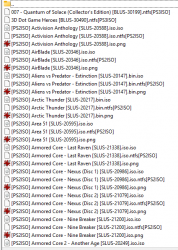
What do you mean "NTFS" files? The entire drive is formatted in exFAT, always has been. The hard link files webMan Mod creates with PrepISO always end in NTFS, regardless of the actual file system. I guess thats just how its coded. It says right there in the picture you linked that it supports external HDDs formatted in exFAT, which is what i use.Read WebMAN MOD's readme file.
View attachment 45919
About the difference between filesystems, just Google: https://www.howtogeek.com/235596/whats-the-difference-between-fat32-exfat-and-ntfs/
In order to handle files, file systems were designed to manage file storage, seeking and reading operations. Each OS understands some file systems.
Windows knows FAT16, FAT32, exFAT and NTFS. Linux knows FAT16, FAT32, ext3, ext4, among many others. PS3 GameOS knows UFS2 and FAT32.
But you can't read NTFS files if your drive's filesystem is exFAT.
What do you mean "NTFS" files? The entire drive is formatted in exFAT, always has been. The hard link files webMan Mod creates with PrepISO always end in NTFS, regardless of the actual file system. I guess thats just how its coded. It says right there in the picture you linked that it supports external HDDs formatted in exFAT, which is what i use.
And it used to work. I haven't really changed that HDD since 2021 or so.
Can we just have native exfat support in webman without need of prep iso? Its 2025 not 2006. Kinda insane it don't support natively. Would help alot of people to stop asking. Split drive support as well. Especially if set as primary on split. Makes no sense no matter how its diced. If it can "never" be done then clarify so we all can move on. Ps3 native doesn't justify in this situation. We are jailbroken to allow more, not to be tied down still.
Not my mod so not my place to add. Just stating facts and thanks for comfirming year again.Read again. Your drive is formatted as exFAT, your WebMAN MOD temp folder contains files for NTFS. That will never work. It's either NTFS OR exFAT, not both.

Go ahead then, do that awesome feature. It's 2025, not 2006.
Not my mod so not my place to add. Just stating facts and thanks for comfirming year again.
Read again. Your drive is formatted as exFAT, your WebMAN MOD temp folder contains files for NTFS. That will never work. It's either NTFS OR exFAT, not both.
Go ahead then, do that awesome feature. It's 2025, not 2006.