PS3HEN Error signing an EBOOT.BIN Debug with SCETools

huola0111111

Forum Noob
Estuve tratando de firmar un eboot.bin debug con los típicos programas, (True Ansestor, ESSE Resigner, etc), pero a la hora de abrir el juego se queda la pantalla negra o tira un código de error.
Así que probé a firmarlo con SCETool usando el eboot.bin original firmado como platilla, el problema es que al intentar desencriptar el .bin a .elf me tira este error
Imagen%20Nro1.png
:

scetool.exe -d EBOOT.BIN EBOOT.ELF

Error: Could not find keyset for self.
Error: Could not decrypt header.

Entonces desencripte el eboo.bin con ESSE resigner, y consegui el .elf, pero al abrirlo el un editor hexadecimal no hay nada legible, y cuando trato de convertilo a eboot.bin con SCETool me da el siguiente error:

scetool.exe -t EBOOT.BIN -0 SELF -e EBOOT.ELF EBOOT_NEW.BIN

Error: Plase specify a lincense type
Linea%20033.png


English:
I was trying to sign an eboot.bin debug with the typical programs, (True Ansestor, ESSE Resigner, etc), but when opening the game the screen was black or threw an error code. So I tried to sign it with SCETool using the original signed eboot.bin as template, the problem is that when trying to decrypt the .bin to .elf it throws me this error So I decrypted the eboo.bin with ESSE resigner, and I got the .elf, but when I open it in a hex editor there is nothing readable, and when I try to convert it to eboot.bin with SCETool it gives me the following error
 
Last edited by a moderator:
Estuve tratando de firmar un eboot.bin debug con los típicos programas, (True Ansestor, ESSE Resigner, etc), pero a la hora de abrir el juego se queda la pantalla negra o tira un código de error.
Así que probé a firmarlo con SCETool usando el eboot.bin original firmado como platilla, el problema es que al intentar desencriptar el .bin a .elf me tira este error
Imagen%20Nro1.png
:

scetool.exe -d EBOOT.BIN EBOOT.ELF

Error: Could not find keyset for self.
Error: Could not decrypt header.

Entonces desencripte el eboo.bin con ESSE resigner, y consegui el .elf, pero al abrirlo el un editor hexadecimal no hay nada legible, y cuando trato de convertilo a eboot.bin con SCETool me da el siguiente error:

scetool.exe -t EBOOT.BIN -0 SELF -e EBOOT.ELF EBOOT_NEW.BIN

Error: Plase specify a lincense type
Linea%20033.png


English:
I was trying to sign an eboot.bin debug with the typical programs, (True Ansestor, ESSE Resigner, etc), but when opening the game the screen was black or threw an error code. So I tried to sign it with SCETool using the original signed eboot.bin as template, the problem is that when trying to decrypt the .bin to .elf it throws me this error So I decrypted the eboo.bin with ESSE resigner, and I got the .elf, but when I open it in a hex editor there is nothing readable, and when I try to convert it to eboot.bin with SCETool it gives me the following error
please remember to post in English or provide a translation. also your pictures are not showing because the links are pointng to your PC desktop.
 
Last edited:
Ok gracias por la aclaración, soy nuevo en el foro, igual las imágenes no hacen falta.

Las llaves las tengo junto a SCETool en una carpeta llamada data, quiero firmar el eboot.bin para HEN. El problema que este juego nunca salio a la venta, y no se si eso hace que no se pueda firmar.

English:
Ok thanks for the clarification, I am new to the forum, even the images are not necessary. I have the keys next to SCETool in a folder called data, I want to sign the eboot.bin for HEN. The problem is that this game never went on sale, and I do not know if that makes it impossible to sign.
 
Last edited by a moderator:
The problem is that this game never went on sale, and I do not know if that makes it impossible to sign.
i do not know if that would be the problem or not. we have strict rules against piracy related topics. if it is a leaked or unlicensed file, we may not be allowed to help because of the rules.
 
all I can say about that, since what you're doing might be piracy, is to see if the eboot can read with scetool gui. I forgot what it will show if the keys are not found, but it might be able to show some data. that's about all the help I can give you. the data folder iirc is correct, but the keys may not be listed for that eboot. reading the eboot.bin data might tell you what kind of eboot it is and whether or not is decryptable with your current keyset. iirc, the keys haven't changed since 4.21, so you may have to make another entry for say a 4.30 game, just with the same key.
 
sorry for the double post, but yep, that's probably the problem like this example for 4.80 (don't worry, I'm not displaying the key) ;)

upload_2021-6-19_16-3-25.png
 
I have a keys file from 4.89 how do I update it to 4.92?
I duplicated all the 4.89 keys but i'm still getting errors in ps3tools such as
unknown type
unknown keyfile property
I thought the keys hadn't changed since 4.20?
 
I have a keys file from 4.89 how do I update it to 4.92?
I duplicated all the 4.89 keys but i'm still getting errors in ps3tools such as
unknown type
unknown keyfile property
I thought the keys hadn't changed since 4.20?
you can use the .bat file from mfw. just input the three missing firmware versions, then they'll appear at the bottom of its keys' file. then, just copy and paste. scetool and mfw keys' files are different, so you just want to copy over the keys manually. all will be at the bottom of the mfw keys' file, so just copy them to the bottom of the one for scetool. they don't need to be in order, so you'll be fine.
 
you can use the .bat file from mfw. just input the three missing firmware versions, then they'll appear at the bottom of its keys' file. then, just copy and paste. scetool and mfw keys' files are different, so you just want to copy over the keys manually. all will be at the bottom of the mfw keys' file, so just copy them to the bottom of the one for scetool. they don't need to be in order, so you'll be fine.

Still getting the error message.
mfw created 117 new files in the ps3keys folder along with the keys file in the data folder.

I copied everything downwards from

[metldr]
type=SELF
revision=00
self_type=LDR
version=0004009000000000
 
Still getting the error message.
mfw created 117 new files in the ps3keys folder along with the keys file in the data folder.

I copied everything downwards from

[metldr]
type=SELF
revision=00
self_type=LDR
version=0004009000000000

is it decrypting the file at all? does it have a bunch of errors, then decrypts?
 
Last edited:
scetool in ps3tools is 0.2.9 private build
along with public 0.2.9,
one in mfw is 0.4.0 public,
I saw another 0.3.2 build somewhere too.

If I swap the scetool build from 0.2.9 to 0.4.0 ,
I don't get the error an the .self decrypts into a .elf .
Gives the same crc32 as one decrypted in rpcs3.
 
Last edited:
scetool in ps3tools is 0.2.9 private build
along with public 0.2.9,
one in mfw is 0.4.0 public,
I saw another 0.3.2 build somewhere too.

If I swap the scetool build from 0.2.9 to 0.4.0 ,
I don't get the error an the .self decrypts into a .elf .
Gives the same crc32 as one decrypted in rpcs3.
dunno. I didn't even know there was a version 0.4.0. I only knew of 0.2.9 and 0.3.2.
 
dunno. I didn't even know there was a version 0.4.0. I only knew of 0.2.9 and 0.3.2.

Yeah i'm not sure where it came from but it's included with a few other programs, maybe it's forked off the original github without the updated source ever being uploaded.
It's listed as 2013 where as the others where built 2012, I can't find a changelog for it either.

Somebody made their own updated arm Android builds though but none for x86, x64 windows.
https://www.psx-place.com/threads/p...cetool-the-new-hashcalc-on-android-arm.14248/

There's also
scetoolw: https://techbliss.org/index.php?threads/scetool-source-converted-for-windows.462/
https://github.com/BitEdits/ps3sce
https://github.com/spacemanspiff/oscetool
 
Yeah i'm not sure where it came from but it's included with a few other programs, maybe it's forked off the original github without the updated source ever being uploaded.
It's listed as 2013 where as the others where built 2012, I can't find a changelog for it either.

Somebody made their own updated arm Android builds though but none for x86, x64 windows.
https://www.psx-place.com/threads/p...cetool-the-new-hashcalc-on-android-arm.14248/

There's also
scetoolw: https://techbliss.org/index.php?threads/scetool-source-converted-for-windows.462/
https://github.com/BitEdits/ps3sce
https://github.com/spacemanspiff/oscetool

yeah, I have termux on my phone already, so I could test it out, but it's probably not worth it, since I'd have no real goal other than to test hashcalc for arm. as for scetool, I know that most ps3 tools that can be compiled with visual studio need an older one. I have visual studio 2022, and I'm pretty sure retargeting the solution wouldn't be enough to compile them. that's a large jump from 2010 or so to 2022 community edition. those visual studio versions can be quite large as well, depending on what you install. since I'm not technically in the ps3 scene anymore (no cfw or hen systems to test stuff on), it probably wouldn't be prudent to install it. plus, I could be wrong, but I think visual studio messed up windows explorer on my system. that's about the time I noticed the problem, but it could be a coincidence. I think it's a bug between that and my gpu driver or something. I still have it installed though, since I use it occasionally. sorry for going off on a tangent.
 
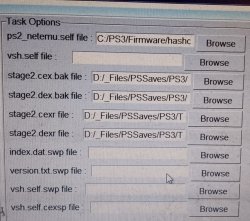
I'll try mfw sometime during this week, does it rebuild the stage2 files alone or as the complete firmware package?, idk know how to extract the complete firmware without reinstalling it in rpcs3, pup view leaves you with the compressed zlib .tar files.
 
I'll try mfw sometime during this week, does it rebuild the stage2 files alone or as the complete firmware package?, idk know how to extract the complete firmware without reinstalling it in rpcs3, pup view leaves you with the compressed zlib .tar files.

easiest way I know of to decrypt a firmware pkg is to use PUAD. it won't decompile cobra though.
 
It got as far as updating 16 or 17 rebug cobra hashes then errored out on basic_plugins.sprx.org , ps2_netemu.self was found in dev_flash.023.tar
 
It got as far as updating 16 or 17 rebug cobra hashes then errored out on basic_plugins.sprx.org , ps2_netemu.self was found in dev_flash.023.tar

about your other question, mfw will rebuild the entire pup from an existing pup. remember to enable administrative privileges with the main executable. iirc, it will error otherwise. you may need further privileges if you put the mfw builder folder in Program Files (x86).
 
about your other question, mfw will rebuild the entire pup from an existing pup. remember to enable administrative privileges with the main executable. iirc, it will error otherwise. you may need further privileges if you put the mfw builder folder in Program Files (x86).

Do I need to use vsh.self also?
or any other files?
templat/4.92_rebug/ doesn't exist & the hashes folder from C:/Users/user/AppData/Local/Temp/PS3MFW
seems to stay empty then just autodelete,
PS3MFW-MFW & PS3MFW-OFW are created along with ps3mfw.log with the listed used curves ERK & IV keys.

Edit: I added vsh.self an now it complains vsh.self.nrm is missing in the devflash.
 

Attachments

  • IMG_20250903_234713~2.jpg
    IMG_20250903_234713~2.jpg
    476.7 KB · Views: 27
Last edited:

Similar threads

Back
Top