PS3 Exclusive: ManaGunz v1.00 - A new PS3 Backup Manager by developer Zar

It's my pleasure to announce a new PlayStation 3 Homebrew Application by Zar, the developer has been working on a new backup manager that he has built from the ground up. ManaGunZ is a new manager but has seen many updates while in development and with v1.00 comes the first public release of this new manager,. This homebrew offers [break]dd[/break] no PS2/PS1/PSP support in this current version but the developer does have plans to support for those Retro Games as well as adding RetroArch support in the future. This manager has alot of great features built-in, some of these include: Clean Syscall, Change IDPS, Ext. Game Data Support, Make PKG , Re-sign Games, Patch Eboot, Extract / Create ISO and many additional features that you can view below and also via this forum link.


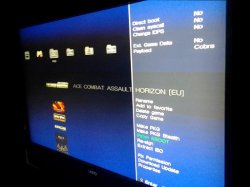
ManaGunZ-1.PNG

.
ManaGunZ
by :Zar
I. What is ManaGunZ?
This is another Backup Manager. It allow you to mount a backup stored in your USB device or in the internal hdd as a virtual Blue-Ray. I tryed to do a "AIO backup manager".

Supported CFW:
4.21 - 4.65
A.) Game Settings
Direct Boot

  • It allow you to launch the game directly after mounting it. There isn't lot of game which support it (every Lego games works with), with this you don't have to go back to the XMB to launch the game.
Clean Syscall:
  • It disable peek & poke syscall, especially syscall 6, 7, 8, 9, 10, 35, 36, this syscall doesn't exist in a OFW. So, this option prevent you to be banned from PSN (especially with Black Ops II) but this isn't guaranted, risk 0 with a CFW doesn't exist. Moreover there is soooo many way to detect a CFW...
Change IDPS:
  • It change your IDPS in the lv2
Ext. Game Data:
  • It allow you to install gamedata in your usb device instead of inside your system. Basically , it redirect the path : "/dev_hdd0/game" to "/dev_usb000/GAMEI"
Payload:
  • Here you can choose which payload it will use to mount your game. I don't really know if a payload is better than another... from my experience, I always saw same results with every payloads
  • For ISO games, if you are in cobra fw, it will use the cobra payload otherwise it will use the mamba.
  • For JB game, you can choose the payload extracted from :
    [*=1]Iris ("sky")

    [*=1]MM

    [*=1]Cobra (ofc, it's available only with a fw cobra)
  • (-I'll add the new mamba later)
Set primary USB
  • It set the USB device where the game is stored as the main USB device. This option allow to make some game working without any issue. It's available only with a fw cobra.
Emulation
  • Here you can choose which type of emulation it will use to mount you game. This option allow to make some game working without any issue. This option is available for JB games only. You have the choice between 3 possibilities :
    • None : There isn't any "special emulation", the path "/dev_bdvd" is just redirected to the path of the game.
    • BD-Mirroir : it patch the mount table in the lv2 to remplace the device dev_bdvd or dev_ps2disk for internal by the device where is stored the backup. This option works fine in extern only if there is only 1 device plugged.
    • BD-EMU : It redirect the path of the libfs.sprx to the path of a libfs patched.
Patched from:
  • This option is available for JB games and if you choose "Emulation : BD-EMU". It allow you to choose which patched libfs do you want to use. I found 3 way too patch it, one from MM, and one other from Iris and finally the last one from ReactPSN. I don't know if there is a patch better than an others.
Mount /app_home:

  • Basically, this is a redirection of the patch /app_home to the path "/dev_bdvd". This option allow to make some game working without any issue. This option is available for JB games
Use patched plugin :

  • This option is available for JB games and if you choose "Yes" to mount "/app_home". The path "/app_home" is remplaced by "/dev_bdvd" inside the plugin explore_plugin.sprx . Also, the icon of the "/app_home" in the XMB is changed to a disk. Basically, it redirect the path of the original plugin to patched plugin.
B.) Game Option
Rename:

  • Rename the title of your backup.
Add/Remove to/from favorites

  • Manage a list your favorite game. (for now, you can see your list of favorites only with the UI "XMB")
Delete game :

  • Delete your backup
Copy game :
  • Copy your backup to another device.
Make PKG :
  • Create a package stored to the path "/dev_hdd0/packages". This package once installed will be a "shortcut" of your backup in the XMB. You'll just have to launch it, few moment later, it'll return to XMB with your backup mounted. You can hold triangle once it launched to reconfigure the game settings of this "shortcut".
Make PKG stealth
  • same as the previous option but you can choose the TITLE_ID of the "shortcut"
Patch EBOOT
  • it change the fw version to 4.21 of your EBOOT (offset 0x400 or 0x40C) to prevent to have the error 0x80010009.
Re-sign
  • it re-sign every executable of your backup with the 4.21 keys
Extract/Convert to ISO
  • Convert your JB game to ISO or Convert your ISO to a JB game
Fix permission
  • Change permission value to 0777 of every folder and file of your backup
Download update
  • This will download all updated available of your backup. The update downloaded will be stored to the path "/dev_hdd0/packages".
Properties

  • Show the properties of your backup: Path, Format, Size, number of file, number of directory, system version.
C.) Global Settings
Adjust Screen

  • Calibrate your display to get the best display on your TV.
Dir. to scan

  • Configure the name of directories where ManaGunZ will find your backups. You can add or remove a directory.
UI


  • Choose which interface you prefere. Actually, there is 4 differents UI : "List", "Grid", "XMB" and "Flow"
For each UI, you can choose a theme. Also, you can create your own theme, you just need to add a directory (the name of the directory is the name of your theme) to the following path: "/dev_hdd0/game/MANAGUNZ0/USRDIR/GUI/name_of_the_UI/name_of_your_theme".
For example, if you want to add your theme named "Example" for the UI "List", then put your images inside the directory named "Example" and then move your folder to the path "/dev_hdd0/game/MANAGUNZ0/USRDIR/GUI/List".
But the name of the images of the theme can't be changed. For each theme you have a list of image :

  • "List" : BG.PNG ; BG_ICON0.PNG
  • "Grid" : TODO
  • "XMB" : BG.PNG ; OPTION.PNG ; FAV.PNG ; PS1.PNG ; PS2.PNG ; PS3.PNG ; PSP.PNG
  • "Flow" : BG.PNG ; BG_TITLE.PNG
II. TO-DO

  • Ftp
  • FileManager
  • Cobra without peek&poke
  • Theme for UI "Grid"
  • Mamba extern
  • Use lastest mamba
  • PS2/PSX (cobra)
  • Retro (RetroArch)
  • Network
  • Generate PKG batch
  • Auto Update
III. History
A.) Changelogs
v1.00
  • Added: confirmation to delete a game
  • Adding: "Fix permission"
  • Correction: Patch black screen
  • Added: "Set Primary USB"
  • Correction: rewrite mode AutoMount
  • Added: New interface of the "Settings" menu
v0.91
  • Added: New ICON0 and PIC1
  • Correction : freeze pour le GUI "Flow"
  • Correction : notification si download cancel
  • Correction: Keyboard
  • Correction: "Turn OFF" is active only if there is at least 1 update
  • Correction : "Get_ICON0()"
v0.90
  • Added: "Game Ext"
  • Added: "Rename"
  • Added: "Copy Game"
  • Added: "Make pkg Stealth"
  • Added: "Fix EBOOT"
  • Adding: "Re-Sign"
  • Added: "Convert/Extract ISO"
  • Adding: "Download Update"
  • Adding: "Properties"
  • Added: A "Game Menu" interface grouping "Game Settings" "Game Option"
  • Correction: Black screen with fw 4.60
v0.80
  • Added: the screen setting
  • Added: Option to configure the startup files scanned
  • Adding: "advanced" mounting options. We can now configure (1) the payload, (2) the type of emulation, (3) libfs.sprx, (4) the assembly / app_home or not, (5) explorer_plugin.sprx patched or not.
  • Fix: black screen with fw 4.60
v0.70
  • Added: GUI "Flow"
v0.60
  • Added: GUI "XMB"
  • Correction: New regex on the name of pkg: [a..z] [A..Z] [0..9] []
  • Fixed: bug for XMB shortcuts: freeze in an ISO montages cobra CFW
  • Added: Favourites list (for now visible only with the GUI "XMB")
  • Correction: Notification is beautiful
v0.50
  • Added: GUI "Grid"
  • Withdrawal: the header "ManaGunZ"
  • Fixed: bug when no games are detected
  • Added: Compatibility 4.65
v0.40
  • Added: Structure GUI/THEME
  • Added: GUI "List"
  • Added: Themes
v0.30
  • Added: creation of explore_plugin.sprx patched files
  • Correction: The EBOOT.BIN is only used to launch managunz.self
  • Correction: only 1 SELF with 2 types of uses, such as "manager" or Type "launcher"
  • Correction: Focusing own debug messages
  • Correction : mise au propre des messages debug
  • Correction: Focusing own offsets for all FW
  • Added: Patch "anti-error"
  • Added: Compatibility with fw 4.60
  • Added: Warning message if multiple ext hdd are connected to the BD-Mirror mountingFixed: minor
  • Fixed: minor
v0.23
  • Added: New ICON0
  • Added: Automatic refresh if you plug or unplug a USB device
  • Correction: the payload mamba is installed only if you start a game as iso with a non-fw cobra
v0.22
  • Added: ICON0 "Bullet"
  • Adding: "Bullet" loading screen
  • Adding USB icon and ISO
v0.21
  • Correction: The name of PKG in ASCII
  • Correction: control flag
v0.20
  • Added: notification
  • Adding: "Make PKG" achieves pkg like "lastman" for mounting the games via xmb
v0.14
  • Added: loading screen
  • Added: joystick information
v0.13
  • Fixed: bug mount iso mamba not split
v0.12
  • Added: NTFS HDD compatibility
v0.11
  • Added: UTF
v0.1
  • version initial


ScreenShots & Video
[video=youtube;UaaVV73GceE]https://www.youtube.com/watch?x-yt-ts=1422503916&feature=player_embedded&x-yt-cl=85027636&v=UaaVV73GceE[/video]
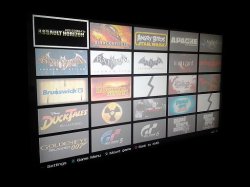
Grid.jpgXMB_mg.jpg

Download & Mirrors

Source: PSX-Place.com

Checkout Additional details via the official ManaGunz forum
 
[MENTION=28]franzes80[/MENTION] This homebrew do not support yet multilanguage. I'll add it to the "to-do" list.

[MENTION=6]bitsbubba[/MENTION] Ty for the feedbacks on NTFS issues. I'll fix it asap.

[MENTION=17]Orion[/MENTION] ty but not now. There isn't a smart reason to explain myself but right now I prefere working on it alone, it's just a feeling.

[MENTION=913]Metion[/MENTION] you can inverse button in UI setting. The movement direction depend on your point of view, are you moving the all block of images ? or are you browsing in a list of images ? Do you get what i mean ? So, there isn't a "good" direction. Also, I described every functiun in the first message. "Patch" mean It just change a value in the Eboot and "re-sign" mean, it re-write the eboot, so basically it decrypt the self to an elf then it re-write the elf to a self.
 
Last edited:
This homebrew do not support yet multilanguage. I'll add it to the "to-do" list.

Awesome job! Congratulations! The amount of features are very impressive for an initial release :cool:

IMO multilanguage support is a PITA :rolleyes:

Just curious... is it going to be open source? It has many pros... but also cons ;)


EDIT:
Some feedback. I like the buttons mapping... but I found a few inconsistencies:
- In XMB mode, the exit button is TRIANGLE when you edit a setting, but in the other modes the exit button is CIRCLE.
- Editing the settings, it would be nice that CROSS would accept the value and CIRCLE cancel the change.
- In some screens the exit button is CIRCLE, but if you press CIRCLE multiple times in a row you may end quiting the homebrew by mistake (returning to XMB).
Maybe a confirmation would be helpful.

BTW the grid 1x1 looks neat :)
 
Last edited:
So, little feedback for me:

I have tested it on 4.65.2 Rebug CEX and DEX system to launch backup on FAT32 HDD and ISO on NTFS HDD, it's work fine.

When Cobra Mode is enable, the homebrew choose this payload, it's cool. But when Cobra Mod is disabled, homebrew choose Multiman payload and I can't mount the games, I returne to XMB but no games (backup and ISO)

And when I go to games settings, I have try to change payload for use Irisman, but when I quit the games setting, my changes aren't saved.

But I like this homebrew, nice and good options. Hop to next updates :)
 
[MENTION=89]aldostools[/MENTION]
ofc, i share the sources, you can find the link here. I copied some function from open src project like webman, iris, scetools... so, it won't be correct to keep it private. But i warn you, it's really a mess up ;)

About button mapping, it's because i found weird to Show the sidebar with a button (triangle) and to Hide it with another (circle) so i changed it to triangle.

About homebrew exit, it's true, i'll add a confirmation before exiting the homebrew, morever i'll add the condition to hold Circle 2-3s. (like rebug toolbox ;) )

[MENTION=50]Tactik-knife[/MENTION] ty, i'll investigate on this issue
 
Very nice PIC1 :p
Thanks for this first public release [MENTION=34]Zar[/MENTION].

[MENTION=2]STLcardsWS[/MENTION], the bullet nose blue wind effect is missing on the PIC1.
Here the full icon (ICON0+PIC1):
bullet_by_aerik_khalid-d3ioh6q.png
 
Last edited:
So I know this tool can't do this ATM but I just grabbed some homebrew games, Tempest 2000 to be exact as well as a few from thatotherdev which are all signed with the older 3.55 keyset. Normally I would just resign the eboots and re-pkg but nowhere a PC ATM to do so. Once you have your file manager do you think you could implement a way to resign say a folder that is already installed like a 3.55 homebrew title?

It is capable of doing a JB folder and ISO I think I saw, haven't had time to test just yet as I haven't had a reason since getting Resident Evil ReBirth HD but that's besides the point. It would be a neat feature to have and handy since you are aiming for an AIO manager how awesome would it be to handle XMB installed items.


Also if not to much trouble a feature I wish IRISMAN did is the capability to install files to the dev_flash etc via clicking a zip file I have made to customize my XMB when I do different firmware swaps.

And one last thing which I think would be amazing is a text file editor. I can't count how many times I wish I could configure my boot_plugins.txt to disable different plugins from the PS3. Instead I keep multiple txt files and rename them to "enable" this set of designated plugins upon boot.

Sillly I know but neat none the less and see a TON of potential from this manager. It looks to take the best of both Iris forks and multiMAN while taking it a step further to make it stand out and not be just a clone by any means. Thanks for this and please keep it up as there is so much promise in this application. And look forward to seeing the improvements you already have planned because as an initial release it is already impressive none the less as it is already.
 
So I know this tool can't do this ATM but I just grabbed some homebrew games, Tempest 2000 to be exact as well as a few from thatotherdev which are all signed with the older 3.55 keyset. Normally I would just resign the eboots and re-pkg but nowhere a PC ATM to do so. Once you have your file manager do you think you could implement a way to resign say a folder that is already installed like a 3.55 homebrew title?

FYI [MENTION=7]atreyu187[/MENTION] checkout out download section all the homebrew games are signed for 4.xx
(We have the largest collection of homebrew games here, compared to anywhere else.)

And one last thing which I think would be amazing is a text file editor. I can't count how many times I wish I could configure my boot_plugins.txt to disable different plugins from the PS3. Instead I keep multiple txt files and rename them to "enable" this set of designated plugins upon boot.

useful for many things,
 
Also if not to much trouble a feature I wish IRISMAN did is the capability to install files to the dev_flash etc via clicking a zip file I have made to customize my XMB when I do different firmware swaps.

And one last thing which I think would be amazing is a text file editor. I can't count how many times I wish I could configure my boot_plugins.txt to disable different plugins from the PS3. Instead I keep multiple txt files and rename them to "enable" this set of designated plugins upon boot.
just to touch base with you, the last Cobra CFW Tools actually did a boot_plugins.txt swap to enable disable plugins of your choosing and as for the zips well that's the basis of the XMBM+ installer (give me some instructions and the files and we (me) can package it up fer you :p)

Edit: Dean never added a text editor out of respect for the dev that had that text editor/reader for the PS3 but the dev never updated at all so I think it just slipped Dean's mind
 
Last edited:
Oh I know I can do it with XMBM+ but I change my "theme" often then mix and match stuff. I find it easier to do that with my zip files. I literally have 20-30 different file sets for each firmware from 3.41 to 4.66. I do one each firmware update even useless ones like 4.31. Making a XMBM+ package would be huge and intensive. Maybe one day but I find it easier this way.

As for the Cobra tools txt swapping I saw that but forgot about that. Maybe I'll make an updated one that way I like it and build a XMBM+ package for my customization needs. I recall there was a text reader and it never progressed. What would be awesome is is be able to turn the plugins on/off ala PSP style from the VSH/Recovery menu.

So many cool apps were started when 3.41/3.55 came out but when Sony did that to geohot a lot of folks went dark, abandoned without releasing source code or simply left. Those were the good old days. I have been hoping to see the dynarec actually used to help emulation but that seems to be useless now that we can use the native PS1 emulator now instead of the one crappy emulator that took advantage of it. Now all I know it does is when enabled fusses up PSP games on the PS3.
 
I can't see the buttons, no idea where the settings or how to get there!
Guide me through it, a screenshot or steps!

Check out the video (its accessed there, but i believe it's start from the game list will get you there). not at my ps3 at the moment.
 
Check out the video (its accessed there, but i believe it's start from the game list will get you there). not at my ps3 at the moment.

Also wired bug i guess, started the manager, didnt understand anything so pressed O, exit fine but there was BD icon! had to restart the system for it to get back.
normal!
 
After some tests i can say... WOW! features of this first release are really impresive. And to-do list is also promising. There are few bugs but i dont found nothing critical. Good luck with this project :)
 

Trending content

Back
Top