PS3 Exclusive: ManaGunz v1.00 - A new PS3 Backup Manager by developer Zar

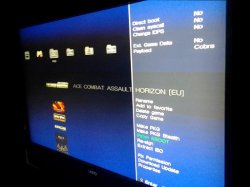
It's my pleasure to announce a new PlayStation 3 Homebrew Application by Zar, the developer has been working on a new backup manager that he has built from the ground up. ManaGunZ is a new manager but has seen many updates while in development and with v1.00 comes the first public release of this new manager,. This homebrew offers [break]dd[/break] no PS2/PS1/PSP support in this current version but the developer does have plans to support for those Retro Games as well as adding RetroArch support in the future. This manager has alot of great features built-in, some of these include: Clean Syscall, Change IDPS, Ext. Game Data Support, Make PKG , Re-sign Games, Patch Eboot, Extract / Create ISO and many additional features that you can view below and also via this forum link.


ManaGunZ-1.PNG

.
ManaGunZ
by :Zar
I. What is ManaGunZ?
This is another Backup Manager. It allow you to mount a backup stored in your USB device or in the internal hdd as a virtual Blue-Ray. I tryed to do a "AIO backup manager".

Supported CFW:
4.21 - 4.65
A.) Game Settings
Direct Boot

  • It allow you to launch the game directly after mounting it. There isn't lot of game which support it (every Lego games works with), with this you don't have to go back to the XMB to launch the game.
Clean Syscall:
  • It disable peek & poke syscall, especially syscall 6, 7, 8, 9, 10, 35, 36, this syscall doesn't exist in a OFW. So, this option prevent you to be banned from PSN (especially with Black Ops II) but this isn't guaranted, risk 0 with a CFW doesn't exist. Moreover there is soooo many way to detect a CFW...
Change IDPS:
  • It change your IDPS in the lv2
Ext. Game Data:
  • It allow you to install gamedata in your usb device instead of inside your system. Basically , it redirect the path : "/dev_hdd0/game" to "/dev_usb000/GAMEI"
Payload:
  • Here you can choose which payload it will use to mount your game. I don't really know if a payload is better than another... from my experience, I always saw same results with every payloads
  • For ISO games, if you are in cobra fw, it will use the cobra payload otherwise it will use the mamba.
  • For JB game, you can choose the payload extracted from :
    [*=1]Iris ("sky")

    [*=1]MM

    [*=1]Cobra (ofc, it's available only with a fw cobra)
  • (-I'll add the new mamba later)
Set primary USB
  • It set the USB device where the game is stored as the main USB device. This option allow to make some game working without any issue. It's available only with a fw cobra.
Emulation
  • Here you can choose which type of emulation it will use to mount you game. This option allow to make some game working without any issue. This option is available for JB games only. You have the choice between 3 possibilities :
    • None : There isn't any "special emulation", the path "/dev_bdvd" is just redirected to the path of the game.
    • BD-Mirroir : it patch the mount table in the lv2 to remplace the device dev_bdvd or dev_ps2disk for internal by the device where is stored the backup. This option works fine in extern only if there is only 1 device plugged.
    • BD-EMU : It redirect the path of the libfs.sprx to the path of a libfs patched.
Patched from:
  • This option is available for JB games and if you choose "Emulation : BD-EMU". It allow you to choose which patched libfs do you want to use. I found 3 way too patch it, one from MM, and one other from Iris and finally the last one from ReactPSN. I don't know if there is a patch better than an others.
Mount /app_home:

  • Basically, this is a redirection of the patch /app_home to the path "/dev_bdvd". This option allow to make some game working without any issue. This option is available for JB games
Use patched plugin :

  • This option is available for JB games and if you choose "Yes" to mount "/app_home". The path "/app_home" is remplaced by "/dev_bdvd" inside the plugin explore_plugin.sprx . Also, the icon of the "/app_home" in the XMB is changed to a disk. Basically, it redirect the path of the original plugin to patched plugin.
B.) Game Option
Rename:

  • Rename the title of your backup.
Add/Remove to/from favorites

  • Manage a list your favorite game. (for now, you can see your list of favorites only with the UI "XMB")
Delete game :

  • Delete your backup
Copy game :
  • Copy your backup to another device.
Make PKG :
  • Create a package stored to the path "/dev_hdd0/packages". This package once installed will be a "shortcut" of your backup in the XMB. You'll just have to launch it, few moment later, it'll return to XMB with your backup mounted. You can hold triangle once it launched to reconfigure the game settings of this "shortcut".
Make PKG stealth
  • same as the previous option but you can choose the TITLE_ID of the "shortcut"
Patch EBOOT
  • it change the fw version to 4.21 of your EBOOT (offset 0x400 or 0x40C) to prevent to have the error 0x80010009.
Re-sign
  • it re-sign every executable of your backup with the 4.21 keys
Extract/Convert to ISO
  • Convert your JB game to ISO or Convert your ISO to a JB game
Fix permission
  • Change permission value to 0777 of every folder and file of your backup
Download update
  • This will download all updated available of your backup. The update downloaded will be stored to the path "/dev_hdd0/packages".
Properties

  • Show the properties of your backup: Path, Format, Size, number of file, number of directory, system version.
C.) Global Settings
Adjust Screen

  • Calibrate your display to get the best display on your TV.
Dir. to scan

  • Configure the name of directories where ManaGunZ will find your backups. You can add or remove a directory.
UI


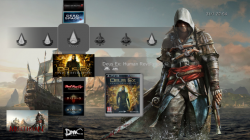
  • Choose which interface you prefere. Actually, there is 4 differents UI : "List", "Grid", "XMB" and "Flow"
For each UI, you can choose a theme. Also, you can create your own theme, you just need to add a directory (the name of the directory is the name of your theme) to the following path: "/dev_hdd0/game/MANAGUNZ0/USRDIR/GUI/name_of_the_UI/name_of_your_theme".
For example, if you want to add your theme named "Example" for the UI "List", then put your images inside the directory named "Example" and then move your folder to the path "/dev_hdd0/game/MANAGUNZ0/USRDIR/GUI/List".
But the name of the images of the theme can't be changed. For each theme you have a list of image :

  • "List" : BG.PNG ; BG_ICON0.PNG
  • "Grid" : TODO
  • "XMB" : BG.PNG ; OPTION.PNG ; FAV.PNG ; PS1.PNG ; PS2.PNG ; PS3.PNG ; PSP.PNG
  • "Flow" : BG.PNG ; BG_TITLE.PNG
II. TO-DO

  • Ftp
  • FileManager
  • Cobra without peek&poke
  • Theme for UI "Grid"
  • Mamba extern
  • Use lastest mamba
  • PS2/PSX (cobra)
  • Retro (RetroArch)
  • Network
  • Generate PKG batch
  • Auto Update
III. History
A.) Changelogs
v1.00
  • Added: confirmation to delete a game
  • Adding: "Fix permission"
  • Correction: Patch black screen
  • Added: "Set Primary USB"
  • Correction: rewrite mode AutoMount
  • Added: New interface of the "Settings" menu
v0.91
  • Added: New ICON0 and PIC1
  • Correction : freeze pour le GUI "Flow"
  • Correction : notification si download cancel
  • Correction: Keyboard
  • Correction: "Turn OFF" is active only if there is at least 1 update
  • Correction : "Get_ICON0()"
v0.90
  • Added: "Game Ext"
  • Added: "Rename"
  • Added: "Copy Game"
  • Added: "Make pkg Stealth"
  • Added: "Fix EBOOT"
  • Adding: "Re-Sign"
  • Added: "Convert/Extract ISO"
  • Adding: "Download Update"
  • Adding: "Properties"
  • Added: A "Game Menu" interface grouping "Game Settings" "Game Option"
  • Correction: Black screen with fw 4.60
v0.80
  • Added: the screen setting
  • Added: Option to configure the startup files scanned
  • Adding: "advanced" mounting options. We can now configure (1) the payload, (2) the type of emulation, (3) libfs.sprx, (4) the assembly / app_home or not, (5) explorer_plugin.sprx patched or not.
  • Fix: black screen with fw 4.60
v0.70
  • Added: GUI "Flow"
v0.60
  • Added: GUI "XMB"
  • Correction: New regex on the name of pkg: [a..z] [A..Z] [0..9] []
  • Fixed: bug for XMB shortcuts: freeze in an ISO montages cobra CFW
  • Added: Favourites list (for now visible only with the GUI "XMB")
  • Correction: Notification is beautiful
v0.50
  • Added: GUI "Grid"
  • Withdrawal: the header "ManaGunZ"
  • Fixed: bug when no games are detected
  • Added: Compatibility 4.65
v0.40
  • Added: Structure GUI/THEME
  • Added: GUI "List"
  • Added: Themes
v0.30
  • Added: creation of explore_plugin.sprx patched files
  • Correction: The EBOOT.BIN is only used to launch managunz.self
  • Correction: only 1 SELF with 2 types of uses, such as "manager" or Type "launcher"
  • Correction: Focusing own debug messages
  • Correction : mise au propre des messages debug
  • Correction: Focusing own offsets for all FW
  • Added: Patch "anti-error"
  • Added: Compatibility with fw 4.60
  • Added: Warning message if multiple ext hdd are connected to the BD-Mirror mountingFixed: minor
  • Fixed: minor
v0.23
  • Added: New ICON0
  • Added: Automatic refresh if you plug or unplug a USB device
  • Correction: the payload mamba is installed only if you start a game as iso with a non-fw cobra
v0.22
  • Added: ICON0 "Bullet"
  • Adding: "Bullet" loading screen
  • Adding USB icon and ISO
v0.21
  • Correction: The name of PKG in ASCII
  • Correction: control flag
v0.20
  • Added: notification
  • Adding: "Make PKG" achieves pkg like "lastman" for mounting the games via xmb
v0.14
  • Added: loading screen
  • Added: joystick information
v0.13
  • Fixed: bug mount iso mamba not split
v0.12
  • Added: NTFS HDD compatibility
v0.11
  • Added: UTF
v0.1
  • version initial


ScreenShots & Video
[video=youtube;UaaVV73GceE]https://www.youtube.com/watch?x-yt-ts=1422503916&feature=player_embedded&x-yt-cl=85027636&v=UaaVV73GceE[/video]
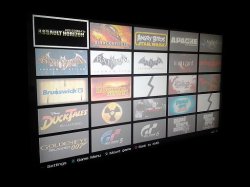
Grid.jpgXMB_mg.jpg

Download & Mirrors

Source: PSX-Place.com

Checkout Additional details via the official ManaGunz forum
 
[MENTION=67]Coldlm[/MENTION] Push :start: then choose "Adjust screen".
Tell me if the range are big enough to fit to your TV

[MENTION=118]kozarovv[/MENTION] if there are few bugs even if they are minor, plz, do not hesitate to tell me ^^'
 
[MENTION=67]Coldlm[/MENTION] Push :start: then choose "Adjust screen".
Tell me if the range are big enough to fit to your TV

[MENTION=118]kozarovv[/MENTION] if there are few bugs even if they are minor, plz, do not hesitate to tell me ^^'
[MENTION=34]Zar[/MENTION] TV switched to retro mod (480p) for some reason!
any way its all good now,
good work and cant wait to see more options
 
[MENTION=67]Coldlm[/MENTION] Push :start: then choose "Adjust screen".
Tell me if the range are big enough to fit to your TV

[MENTION=118]kozarovv[/MENTION] if there are few bugs even if they are minor, plz, do not hesitate to tell me ^^'

Ok. :) First, in game propeties game size for iso (splited or not) is ~12-69 Ko but some games have correctly displayed size, also number of files is wrong. Always show 2 for me, same with directory Always show 0 for isos, all this tested only on cobra. Next is not a bug exactly, but is annoying. There is no confirmation on exit to xmb when i press circle, sometimes i push circle accidental and i need to start managunz again. Next is also not bug itself, but sugestion. In flow UI buttons can be inverted from start.
And next, when i convert iso to folder format i have option to convert to PS3ISO folder, not sure is a bug because game is visible in every game managers but folder format games not should be in PS3ISO folder (i think). Also after conversion from iso to any folder (hdd/Games in this case) i see 3 times same game. 1 iso, and 2 times folder format, but if i restart managunz then i see only 2 what is correct (1 iso, 1 folder). Last one, in xmb UI if i go to game menu, and want to back i need to push :/\: but in others UI back is signed to :o: button.
 
Last edited:
[MENTION=118]kozarovv[/MENTION] thank you. i'll try to answer to everything :p

About game properties, it's displaying the number and the size of = ISO file(s) + the external ICON0.PNG + the external PARAM.SFO but you are right this is not legitimate to add the external files. Same for displaying the number of directories for an ISO, it always 0 ^^'. And I don't think it should look inside the ISO because it's pointless. So, i'll fix it next update.

About confirmation in the exit, you confirm what aldos said, i'll add it too.

About Circle = back and Triangle = back with UI XMB, aldos talked about this too. So, it is on purpose but it's look like it's more weird than i though, i'll uniform it : it will be always Cirlce = back

About inversion the direction for the UI FLOW, Np, it's easy to do that ^^'

About PS3ISO folder, I estimated that the user is smart enough to choose the good directory. Morever, ManaGunZ is not looking at all at the name of the directory, you can put a JB game inside the directory "PS3ISO" it will be added to the the list too. But this will probably change when i'll add the multi-platform feature.... actually, I don't realy know yet.

About "i see 3 times same game after extraction of the iso", thanks, i'll investigate to fix it.
 
Last edited:
Also Zar is looking for user's to make some themes for the manager. ( @opium2k any time or interest? )

I honestly doubt I still have the tools or memory to make anything functional anymore but if anyone would like to make MANAGUNZ versions of any of my old themes I'd be happy to send them as much of the original image files as I can.
I probably can't send PSDs for most of them though due to a hard drive failure that wiped out a lot of my stuff.

Sidenote: nice intro on the video, you earned a sub. Adobe After Effects?
 
ISidenote: nice intro on the video, you earned a sub. Adobe After Effects?

That was done by [MENTION=96]worrorfight[/MENTION]

Understandable on the rest :) just figured i give a talent of yours a mention :)
Hope all is good on your end good seeing you
 
I made a theme for xmb UI, just to test that i can, only custom icons added. But i need to resize some images for better look, when i get some free time because now it dont look so nice (no-antialiasing :P). Here is the link: https://www.mediafire.com/?vmf2k918cksc4a3 if someone want to test it. Theme is in pkg format, just install from IPF and set in ManaGunz options.

Title in PARAM.SFO is still ManaGunz v1.00 if you have newer version (if exist), it change title to mentioned.
 
Last edited:
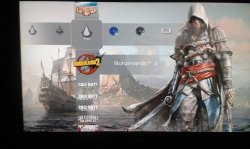
Every theme from MM are disproportionate ? I can move icons to fit with background of MM themes.

So, according to this screenshot :
attachment.php

I just need to move down a little bit every horyzontal icons ? Can you do 2 screenshots with the same theme one with Multiman and another with ManaGunZ, in this way i' will be able to re-adjust the position of the icons. Then I'll see if can do a little function to support MM theme, it will be easier than remaking every theme for ManaGunZ ;)
 

Trending content

Back
Top