Fat launch 60GB fully BC PS3; is there any way to run my huge PS2 ISO collection?

DaddyLongLegs

Forum Noob
Hello all!

I just bought a 5TB external drive for my fat launch BC PS3 (on ReBug CEX) because I want to have my entire PS1, PS2, and PS3 game collection all on one system.

The only issue is I completely forgot you still can't run PS2 ISOs from the external PS3 hard drive. Hackers figured out how to get Gamecube games running from a USB drive on a Wii even though the Wii turns the USB ports off completely in Gamecube mode, so I guess I just kind of assumed the same would have been done for the PS2 by now. My fault for not checking!

Anyway, having to run PS2 games from internal isn't ideal because the PS3 has a limit to the size of the hard drive you can install internally. I ordered a 2TB SSD from Newegg a few days ago without realizing that while it would physically fit in the PS3, the PS3 uses its own proprietary filesystem and that filesystem doesn't like hard drives over 750GB. Supposedly weird stuff will start happening if a 1, 1.5, or 2tb drive is installed. This didn't even occur to me because my XBox 360 has a 2TB internal drive and it operates just fine. Oh well, now I have to return the 2TB SSD.

So now I have no real way to put my 1.5TB PS2 collection on my PS3. The whole reason I love this OG launch PS3 so much is because of the full PS2 compatibility and I loved the idea of having virtually every PS1, PS2, and PS3 game "in one place".

Can anyone smarter than me (that should be easy) think of a better way that I am not thinking of? Technically you can store the PS2 games on an external drive (there is even a folder named PS2ISO on the external), but every time you choose a PS2 game, it has to transfer it to the internal drive which takes as much as 30 minutes which is crazy.

Supposedly OPL (Open Playstation Loader) which is meant for the PS2, will actually work on the PS3 if the PS3 is one of the OG backwards compatible ones. By using that, I could apparently run PS2 ISOs from an external drive. However, regarding the limited info I can find on it, people are saying that games stutter during FMV scenes, which obviously I don't want. Does anyone have any experience with this method?

I was also considering having "absolute best" PS2 games on the internal drive, and "good" PS2 games on the external, and in the rare instances where I would want to play one of the only "good" PS2 games I could just wait the half hour to transfer it.

The third and final thing I could think of was just keeping the PS2 ISOs on my server. I have a PC that's on 24/7 for Plex stuff, so it's trivial to me to have a computer on all day. But I don't know if there's issues with lag or anything, I have no clue how long it takes to transfer the game over the network (I would think slower than a direct USB hard drive connection?), and I have no idea if it even works on the PS3 (I know people do it on the PS2 for those with slim models). Also this is not ideal to me as I really would like everything to be on the system, in case I want to bring it to a friend's house or something, but if I have no other choice I will live with it.

Anyway if anyone knows anything about the above, or if there's something I didn't think of that I should do, I would greatly appreciate any advice!
 
small note: the PS3 supports 1 TB internal drives without issues; I have 2 PS3s with 1 Tb drives and they work just fine. The issue is with 2 Tb internal drives (they're not supported).

Thank you! Yeah because of your post I returned the 2TB SSD I ordered. You saved me like 200 bucks!
 
Hello all! I just bought a 5TB external drive for my fat launch BC PS3 (on Rebug CEX) because I want to have my entire PS1, PS2, & PS3 game collection all on one system.

That's nice, you must own alot of physical copies to be setting up like this.

The only issue is I completely forgot you still can't run PS2 ISOs from the external PS3 hard drive. Hackers figured out how to get Gamecube games running from a USB drive on a Wii even though the Wii turns the USB ports off completely in Gamecube mode, so I guess I just kind of assumed the same would have been done for the PS2 by now. My fault for not checking!

But still, PS2 games via external is one of the only issues we have with the PS3 nowadays. Also, the homebrew is set up that way for the Wii so you can run Wii games from dongle using USB Loader GX and Gamecube from Nintendont with SD card.

Anyway, having to run PS2 games from internal isn't ideal because the PS3 has a limit to the size of the hard drive you can install internally. I ordered a 2TB SSD from Newegg a few days ago without realizing that while it would physically fit in the PS3, the PS3 uses its own proprietary filesystem and that filesystem doesn't like hard drives over 750GB. Supposedly weird stuff will start happening if a 1, 1.5, or 2tb drive is installed. This didn't even occur to me because my XBox 360 has a 2TB internal drive and it operates just fine. Oh well, now I have to return the 2TB SSD.

Your PS3 may have been able to support it, but there is usually more issues with the 2TB drives vs. 1.5TB drives. I've only heard about these hit-and-miss incidents where new 2TB drives will fail to work but the 1.5TB ones usually work like they should.

So now I have no real way to put my 1.5TB PS2 collection on my PS3. The whole reason I love this OG launch PS3 so much is because of the full PS2 compatibility and I loved the idea of having virtually every PS1, PS2, and PS3 game "in one place".

Even in these next few years, we probably won't see any external support for PS2 ISO's beyond that of the 1st gen backwards compatible phats. Also, I understand the idea of "having all of it in one place" but it probably won't work that way anyways.

Can anyone smarter than me (that should be easy) think of a better way that I am not thinking of? Technically you can store the PS2 games on an external drive (there is even a folder named PS2ISO on the external), but every time you choose a PS2 game, it has to transfer it to the internal drive which takes as much as 30 minutes which is crazy.9

^This is probably your best option, I store my PS2 games in the same manner... (On external, only internal when I am playing)

Supposedly OPL (Open Playstation Loader) which is meant for the PS2, will actually work on the PS3 if the PS3 is one of the OG backwards compatible ones. By using that, I could apparently run PS2 ISOs from an external drive. However, regarding the limited info I can find on it, people are saying that games stutter during FMV scenes, which obviously I don't want. Does anyone have any experience with this method?

^That much is probably true, small games might work better but large games of 4GB-8GB will probably struggle to run. I would not expect my PS3 to be able to run large games like Grand Theft Auto or Gran Turismo externally when the PS3 itself can hardly render a 2GB .MKV to play back correctly from external locations and even internal.

I was also considering having "absolute best" PS2 games on the internal drive, and "good" PS2 games on the external, and in the rare instances where I would want to play one of the only "good" PS2 games I could just wait the half hour to transfer it.

Would probably be a good idea, I keep most of the Rockstar Games, shooters and skateboard games on the external that is always connected to my PS3... and yes, when I want to play them I have to wait for the game to be copied to internal but is still better than no options at all, or having to play the original disc copy on our half-baked PS2's.

The third and final thing I could think of was just keeping the PS2 ISOs on my server. I have a PC that's on 24/7 for Plex stuff, so it's trivial to me to have a computer on all day. But I don't know if there's issues with lag or anything, I have no clue how long it takes to transfer the game over the network (I would think slower than a direct USB hard drive connection?), and I have no idea if it even works on the PS3 (I know people do it on the PS2 for those with slim models). Also this is not ideal to me as I really would like everything to be on the system, in case I want to bring it to a friend's house or something, but if I have no other choice I will live with it.

The best option IMO is to keep whatever you are actually going to play on your PS3's external and transfer them to internal whenever you want to play... as for the rest of your collection, you should back it up to an additional external that you do not use with your PS3 at all (i.e. an external that you use with PC only to store files for backup purposes.)

Also, I only do transfers from device to device (never FTP, or very very rarely) as this is the most fool-proof method.

Example 1: if you FTP a PS2 ISO that is larger than 4GB, Filezilla or whatever may not transfer the file correctly. (50/50)

Example 2: If you FTP a PS2 ISO that has Codebreaker + LaunchELF attached, it will break the ISO (100%)

Example 3: If you back up to PC / manually move the ISO type in example 2, then LaunchELF, CB & game should still boot on PS3.
 
Last edited:
In truth, we should wait for PS2 ISOs via external to become a true possibility. (Not there yet but probably close at-hand)

It only took nearly 20 years (lol) for FreeDVDBoot to come around, which makes PS2 as nearly defeated as DreamCast.

and yes, there are videos of 4GB+ PS2 games being ran from USB with OPL, but has been dubbed as the worst way to play them.

Edit: PS3 may handle OPL better than PS2, but I have no knowledge of that


PS3 has to be an original BC Phat and more than likely this will probably only work on CEX

As I am on DEX, and I can't use PS2 Classics Placeholder or anything of the sort

Even if it works on CEX, It is still asking alot from OPL to handle what I'm assuming is probably more than 100 PS2 games from USB. It is going to struggle regardless of how you do it, especially from USB & there currently is no perfected way to run PS2ISO from USB AFAIK
 
Last edited:
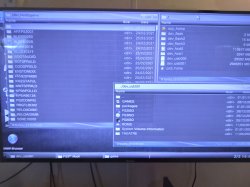
Ok, so here is a photo-based example of how I have my external/internal directories set.

1. All PSXISO's / PS3ISO's are played from external harddrive ONLY

2. When I want to play a PS2 game, I copy it from dev_usb001~PS2ISO to dev_hdd0~PS2ISO (simple enough.)

3. PS2ISO and PS3 ROMs that only work from the "GAMES" folder are the only things I have to copy to internal, ever.

So for the most part, all your PS1 & PS3 games can be ran externally, except for PS3 games ripped as BD-ROM. I am using a 4TB external bought as NTFS and formatted to 4TB FAT32 using Wii Backup Manager. Works fine, plays great.

As you can tell from the image, only about 10GB out of all 120GB of my internal drive are being used. The only things I have in PS3~dev_hdd0~game are homebrew apps and game updates, no ISO's on the internal at all.
 

Attachments

  • HOW TO KEEP HDD CLEAN.jpg
    HOW TO KEEP HDD CLEAN.jpg
    4 MB · Views: 78
Last edited:
So for the most part, all your PS1 & PS3 games can be ran externally, except for PS3 games ripped as BD-ROM.

Wait, I just spent a week converting all my file/folder PS3 rips to ISO because I was told an external NTFS drive using ISOs is better than an external FAT32 using files/folders structure. Is this not the case?
 
Wait, I just spent a week converting all my file/folder PS3 rips to ISO because I was told an external NTFS drive using ISOs is better than an external FAT32 using files/folders structure. Is this not the case?

ISOs will always provide 100% compatibility (no black screens, install errors, etc)

if you want to use ISOs on fat32 that can be done easily, just select the "split" option in makeps3iso.
IIRC, is something like
Code:
makeps3iso -s /path/to/my/ps3game

that will create a PS3 ISO, split in 4GB files, to workaround the fat32 limitation
 
Wait, I just spent a week converting all my file/folder PS3 rips to ISO because I was told an external NTFS drive using ISOs is better than an external FAT32 using files/folders structure. Is this not the case?

Whether the external is FAT32 or NTFS, it should run any ISO's just fine. FAT32 is PS3's native filesystem type, NTFS only works on CFW PS3's because it was reverse-engineered to work. So in other words, a stock un-modified PS3 reads ISOs from discs as FAT32, natively. (NTSC is just a plus for CFW) As far as I've seen, whether using FAT32/NTFS, both should read fairly the same

The #1 problem that people have with "PS3 Rips in GAMES folder format" aka BD-ROM is that people usually only resort to using this format if they don't have actual physical copies of the game. If you are creating ISO from disc, then it should make the ISO with no problem at all more than 95% of the time. BD-ROM usually becomes the constant necessity for pirates, hence why many people are usually unwilling to help those who constantly come through with issues pertaining to the "GAMES" folder.

So, there's really only 2 reasons to put games into the "GAMES" folder format

A. You pirate games (In this case, probably lots of games on your PS3 might be in GAMES folder format.)

B. The game has mods that will only work if the game is in BD-ROM format.

As for games with mods that only work in BD-ROM, there aren't many...
Fallout 3, New Vegas, GTA4, GTA5 & some COD map mods.

Also, typical case for anything involving BLUS to BLES (or vice-versa)
that game will probably need to be BD-ROM as well.

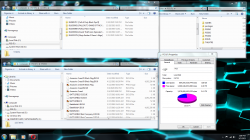
Here is another pic showing only 5 of my games in BD-ROM format,
while all other PS3 games are ripped as ISO.

BD-ROM must always be internal (dev_hdd0~GAMES)

PS2 ISOs must always be internal (dev_hdd0~PS2ISO)

ALL other ISOs can be external (dev_usb001~PS3ISO) or (dev_usb001~PSXISO)

Don't use dev_usb000 for your external (the most-right hub) because this is
the port that your PS3 will call upon when you are installing a system update
or using something in Rebug Toolbox / Package Manager.

Any other port from dev_usb001 to dev_usb012 can / should be used for external.

NTFS might be better at processing games in BD-ROM format (but I really don't know)

and PS3ISO's are native to being processed in FAT32 mode, while NTFS also works fine.

I've never seen any real difference in how the PS3 runs games whether they
are ISO or BD-ROM, or whether they were processed from FAT32 or NTFS.
They both seem pretty equal in performance to me.
 

Attachments

  • EXTERNAL AS FAT32.PNG
    EXTERNAL AS FAT32.PNG
    729.9 KB · Views: 60
Last edited:
Is there any way to play PS2 games on my fully-BC PS3 over my network? I know you can do it on a real PS2.

What do you mean? This question could mean 2 things...

No, you cannot play the "online" part of PS2 games on your BC PS3.

and no, you cannot stream a Playstation game from PC to play it on PS3... The game needs to be internal, you cannot just stream a game from device to device and quite frankly ideas like this are ridiculous in this age where physical games are dying and everyone is trying to make a switch to digital / streaming... physical copies or backup copies will still be better because you know, you can actually own them... unlike streaming where you have to be connected to a server.
 
What do you mean? This question could mean 2 things...

No, you cannot play the "online" part of PS2 games on your BC PS3.

and no, you cannot stream a Playstation game from PC to play it on PS3... The game needs to be internal, you cannot just stream a game from device to device and quite frankly ideas like this are ridiculous in this age where physical games are dying and everyone is trying to make a switch to digital / streaming... physical copies or backup copies will still be better because you know, you can actually own them... unlike streaming where you have to be connected to a server.

Not sure what's so confusing...on a PS2 you can play games over the network, and they work great.

I'd be happy to put my PS2 games on my internal PS3 drive but considering the PS3 can't even hold an internal bigger than 1TB you can see why it's practically useless if you want a large PS2 collection in one spot.
 
Not sure what's so confusing...on a PS2 you can play games over the network, and they work great.

Over the network? But what's the point? To stream a game over your network would require extra usage of your internet data when you could just put the physical copy in your console or copy a backup to a drive and play it that way. I mean I get your point of it being convenient but I don't see the point of trying to stream ABSOLUTELY EVERYTHING unless you don't own what you are trying to stream along with the fact that it's a waste of internet data that would be better spent on updates and getting more files vs. streaming.

I'd be happy to put my PS2 games on my internal PS3 drive but considering the PS3 can't even hold an internal bigger than 1TB you can see why it's practically useless if you want a large PS2 collection in one spot.

There is a type of internal HDD that can be up to 2TB and work inside of a PS3 but it's not a Seagate and I can't remember what it is.

Plus, honestly, a PS2 with Free McBoot is better for playing actual PS2 ROMs because so many people have the same issue that you do with PS3, in where you find it too much of a bother to copy PS2ISO's from external to internal when you want to play

and we are all aware already that externals can be up to 4TB+ and working on PS3, but external backup is not good enough for you.

Also, there is still the factor, that whenever you face corruption, everything that you're fighting so hard to have backed up internally could all be lost in the flash of a second when your console has a bad crash / brick.

Which honestly, the same kind of corruption could happen to an external HDD, but it is far less likely to happen like it does with PS3's

EDIT: I have 75 PS2 games and that only amounts to about 150GB, so I honestly do not believe that you "don't have enough space" unless you have pirated 500 PS2 games or something. Even with everything I physically own and have been collectiong for 15+ years it is still not enough to fill my 4TB external, so you cannot blame me for feeling like these questions you ask are only related to you figuring out how to make piracy more convenient for yourself.
 
Last edited:
Over the network? But what's the point? To stream a game over your network would require extra usage of your internet data when you could just put the physical copy in your console or copy a backup to a drive and play it that way. I mean I get your point of it being convenient but I don't see the point of trying to stream ABSOLUTELY EVERYTHING unless you don't own what you are trying to stream along with the fact that it's a waste of internet data that would be better spent on updates and getting more files vs. streaming.

lol what are you talking about dude? No disrespect but running something over your network doesn't "use your internet data". I am not trying to stream games from remote locations! Just from a nearby PC.

The only reason I am even contemplating this is because it's impossible to fit my entire PS1, PS2, and PS3 collection on the largest compatible portable hard drive, which is 5TB. Trust me I'd much rather play everything on my one system with one hard drive.
 
Over the network? But what's the point? To stream a game over your network would require extra usage of your internet data when you could just put the physical copy in your console or copy a backup to a drive and play it that way. I mean I get your point of it being convenient but I don't see the point of trying to stream ABSOLUTELY EVERYTHING unless you don't own what you are trying to stream along with the fact that it's a waste of internet data that would be better spent on updates and getting more files vs. streaming.


There is a type of internal HDD that can be up to 2TB and work inside of a PS3 but it's not a Seagate and I can't remember what it is.

Plus, honestly, a PS2 with Free McBoot is better for playing actual PS2 ROMs because so many people have the same issue that you do with PS3, in where you find it too much of a bother to copy PS2ISO's from external to internal when you want to play

and we are all aware already that externals can be up to 4TB+ and working on PS3, but external backup is not good enough for you.

Also, there is still the factor, that whenever you face corruption, everything that you're fighting so hard to have backed up internally could all be lost in the flash of a second when your console has a bad crash / brick.

Which honestly, the same kind of corruption could happen to an external HDD, but it is far less likely to happen like it does with PS3's

EDIT: I have 75 PS2 games and that only amounts to about 150GB, so I honestly do not believe that you "don't have enough space" unless you have pirated 500 PS2 games or something. Even with everything I physically own and have been collectiong for 15+ years it is still not enough to fill my 4TB external, so you cannot blame me for feeling like these questions you ask are only related to you figuring out how to make piracy more convenient for yourself.
You can stream games from a PC without internet using PS3 Net Server, you can connect it with a router or directly with an ethernet cable here's the tutorial:

https://www.psx-place.com/threads/ps3-net-server-tutorial.1618/
 
You can stream games from a PC without internet using PS3 Net Server, you can connect it with a router or directly with an ethernet cable here's the tutorial:

https://www.psx-place.com/threads/ps3-net-server-tutorial.1618/


Ok, I'll give you the benefit of the doubt to believe whatever you want but that isn't entirely right... PS3 Net Server has to stream your game through "something" aka Wi-Fi to even make the stream get there... it's not like your PC is going to "stream" the game through thin air so there obviously has to be something in between that is causing your stream to reach it's destination, no? and I get that there is difference between public/private/local servers, but still... some kind of paid-for network service as well as a device with Wi-Fi capabilities are required to run a stream/server. Saying you can "stream without internet" is like saying you can make a 90's phone call without ever needing a signal.

Regardless of whatever, even if the data usage is minimal, you are still using some form of ISP-provided data to perform any task

You can't create a Wi-Fi hotspot either, without some kind of internet data being given to the device that you are attempting to hotspot from

idk what kind of world you live in, where you believe that devices can communicate with each other without trading/using data.

and if you can "stream without internet" then please enlighten me (in a way that DOES NOT involve Local Device > Local Device comms.)

Also, by serving streams over WiFi, those streams are only going to work as fast as the PC can transfer that data over WiFi to the PS3. So if you have an old-ish PC (7-14 years old) then you may want to get a more modernized computer to do these kinds of tasks.

You'd probably want a tower vs. laptop because streaming is well-known for frying laptops.
 
Last edited:
. it's not like your PC is going to "stream" the game through thin air so there obviously has to be something in between that is causing your stream to reach it's destination, no?
Yeah, and I told you, either through the router or directly by cable, are you really actively trying to be dumb or you have this skill by nature?

Ok, I'll give you the benefit of the doubt to believe whatever you want but that isn't entirely right
So essentially what you're saying is that @kozarovv (this program's developer) is a scammer? And everyone participated in that thread and everyone using this program are all in this conspiracy to fool you into believing that PS3 Net Server is ancient voodoo that somehow makes you play games from your PC?

and I get that there is difference between public/private/local servers
OK?...

but still... some kind of paid-for network service as well as a device with Wi-Fi capabilities are required to run a stream/server
lolz, this proves you don't even remotely know what local server means. You remember the days of LAN play or you're too young to know about it? You can connect devices directly without any Internet Service Provider intervention and play, you're not playing overseas, you're playing locally.

Saying you can "stream without internet" is like saying you can make a 90's phone call without ever needing a signal.
Wow very good analogy.

Regardless of whatever, even if the data usage is minimal, you are still using some form of ISP-provided data to perform any task
ISPs are not a part of any LAN connection. Just when I think you can't say something dumber, you still suprise me.

You can't create a Wi-Fi hotspot either, without some kind of internet data being given to the device that you are attempting to hotspot from
Wrong, you can make a Wi-Fi Hotspot and even use it to transfer files from your phone to your PS3 without any ISP's bandwidth usage. You still suprise me. Must be a lifelong family trait

idk what kind of world you live in
The real world. I know you're not familiar with it.

and if you can "stream without internet" then please enlighten me (in a way that DOES NOT involve Local Device > Local Device comms.)
?¿ The whole point of LAN is to have a connection that is not crippled by the internet speed of an ISP the only bottlenecks on local networks are either the devices themselves or the connection medium (cable, router, server)

Also, by serving streams over WiFi, those streams are only going to work as fast as the PC can transfer that data over WiFi to the PS3. So if you have an old-ish PC (7-14 years old) then you may want to get a more modernized computer to do these kinds of tasks
Wow you brought something new to the table, thanks Sherlock.
 
Yeah, and I told you, either through the router or directly by cable, are you really actively trying to be kewl or you have this skill by nature?

OK?...

You remember the days of LAN play or you're too young to know about it? You can connect devices directly without any Internet Service Provider intervention and play, you're not playing overseas, you're playing locally.

Not all devices are compatible with each other and not all devices are ideal to use with each other, either :topsy turvy:

Wrong, you can make a Wi-Fi Hotspot and even use it to transfer files from your phone to your PS3 without any ISP's bandwidth usage.

Ok? and I know people that make hotspots with their phones for PS3 and it consumes their mobile data / internet / 4G / whatever.

?¿ The whole point of LAN is to have a connection that is not crippled by the internet speed of an ISP the only bottlenecks on local networks are either the devices themselves or the connection medium (cable, router, server)

Anyways, that only works with devices that have been programmed or updated to recognize the WiFi of whatever device you are trying to connect it with. and for a LAN party of gamers to play a game on PSN or let's say Steam, you would definitely need an ISP serving internet to your router. But yeah, online, that's where my confusion was. (Plus this topic has changed 3 times, other topics and I'm half-baked.)

Besides, I was more of a split-screen gamer (and most people haven't even experienced that in their Gen X lives)

But back to the topic of hosting games from PC to PS3, have fun using those excess resources on both devices when you could still just play the game with a USB or, you know, the good old disc. :kiwi fruit::kiwi fruit::kiwi fruit:
 
Not all devices are compatible with each other and not all devices are ideal to use with each other, either
I'm wondering are we arguing that every device is compatible with each other or if the PS3 and PC LAN connection is possible... Your cohesion skills are subpar bud, work on em

Ok? and I know people that make hotspots with their phones for PS3 and it consumes their mobile data / internet / 4G / whatever
These people are idiots then, you can host an FTP session on your phone and transfer files without any bandwidth, I'm gonna take a wild guess and say that you fall under their category.

Anyways, that only works with devices that have been programmed or updated to recognize the WiFi of whatever device you are trying to connect it with.
Dude, please use your brain.

and for a LAN party of gamers to play a game on PSN or let's say Steam, you would definitely need an ISP serving internet to your router
No you definitely don't need any internet connection, a router is enough to connect the devices and play a game that supports LAN play like Diablo, CSGO, etc.. But what should I expect from someone who uses the left hemisphere of their ass to think rather than their brain's?
 
Back
Top