
PS3 FBANext MXM MOD v1.0.by SNK

SNK has dropped by our site and sent us a message about a slightly modded version of FBAnext (FBAnext is a port of Final Burn Alpha (FBA) to the PS3 originally by lantus360 For the best emulation of FBA on the PS3 I personally suggest use the more advance "FB Alpha" core within RetroArch (or FB Alpha Retro Loader. As the official FBA developer's have contributed to the libretro port and is synced with the later MAME rom sets for better emulation, but many like the FBAnext builds as the emulator is not as picky about it's roms[break]s[/break] where as the latest FBA ports. So the choice is yours to enjoy your classic arcade favorites.. View the Google Translated Quote below from SNK.


Also be sure to checkout FB Alpha Retro Loader by CaptainCPS-X (Link) for the PS3. CaptainCPS-X is a well known PS3 developer and also a developer of the official FB Alpha Project.
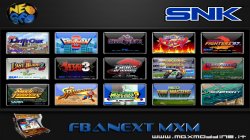

PIC1.jpg\

SNK (Google Translation) said:
Under a user request I decided to make a change in the emulator FBANext Playstation 3. The emulator was initially made by the coder lantus360, this emulator has been amended several times by various users and Developers the PS3 scene, and under the version 1.0.0 we decided to make our changes.

When this emulator was released, I noticed in the various forums of the difficulty many people are able to use it, according to the criticism that at the time they were allocated, I decided to make the process much simpler and easy to use. Let's see in detail the changes ...


Feature

  • Made from version 1.0.0.
  • Added support for the start of the ROM.
  • Place different directory to start the ROM.
  • Added directory for compatibility with multiMAN from the column back.
  • Replaced ICON0.PNG and PIC1.PNG.
  • Several changes and additions in fbanext-ps3.XML.
  • Compatible with MAME ROM and NEO GEO.


[video=youtube;6zmWtQA7M9A]https://www.youtube.com/watch?feature=player_embedded&v=6zmWtQA7M9A[/video]

Emulated Arcade Types

  • Capcom CPS-1

  • Capcom CPS-2

  • Capcom CPS-3

  • Cave

  • Neo Geo

  • Sega System 1, System 16 (and similar), System 18, X-Board and Y-Board

  • Toaplan

  • Taito F2, X, Z and others

  • Psikyo 68EC020

  • PGM

  • Galaxian based hardware

  • IKaneko 16

  • Toaplan 1

  • Toaplan 2

  • Miscellaneous drivers for lots of other hardware


Changes and use
  • Fixed black screen before the first time: The first time you start the emulator gave black screen forcing the user to restart the console, if at least one ROM was not included in a directory the problem could not be resolved and therefore we have solved this problem . This generated an XML file (options) that serves to launch the ROM and the configuration menu. We solved this problem by making sure that the file of the setup menu is already there, ready to take you into the emulator menu where you can start your ROM.
  • Changed the icons on display in XMB.
  • Place different directory for placement of ROM.

How to load the ROM From internal HDD:
"/ Dev_hdd0 / roms" This directory can be exploited to the start of the ROM menu FBANext.
You have to create the folder "roms" in lower case, and upload the folder "/ dev_hdd0 /". You can do this from Filezilla or other FTP server by creating it directly.

"/ Dev_hdd0 / ROMS / fba" This directory can be exploited for the boot ROM of the column back to multiMAN, you must position the ROM folder "fba".
You have to create the folder "ROMS" in uppercase and the folder "fba" in tiny inside "ROMS" folder "fba" you can load your ROM .zip.

From external HDD or USB:
Create a folder "roms" in an external HDD or USB, you are going to charge your ROM .zip. This will launch the ROM menu FBANEXT.
We tried to create the directory to start the ROM from multiMAN through external devices but these were not seen we will try to better understand why and if we do another version.

WARNING !!

All ROM MAME and NEO GEO must be loaded in .zip format, it is to be noted that the best compatibility we found for the ROM MAME, in any case many ROM could prove not compatible or even some are not even views from ' emulator. This is not a problem but the emulator itself well by the manufacturer of the ROM, we found greater compatibility from manufacturers such as: Taito corporation, Tecnos Japan, Capcom, Sega, SNK, Namco, Konami and Tad, other manufacturers do not seem to be compatible emulator FBANext.

Download: FBAnext (mod)

Source: maxmodding.it

Checkout additional Emulators for the PS3 in download Section HERE
&
Also checkout additional information about various emulators HERE

 
the PS3 originally port by lantus360,this MXM "MOD" only changes ICON0.PNG and PIC1.PNG,no support Data East and Irem
 
the PS3 originally port by lantus360,this MXM "MOD" only changes ICON0.PNG and PIC1.PNG,no support Data East and Irem
Made from version 1.0.0.
* Added support for the start of the ROM.
* Place different directory to start the ROM.
* Added directory for compatibility with multiMAN from the column back.
* Replaced ICON0.PNG and PIC1.PNG.
* Several changes and additions in fbanext-ps3.XML.
* Compatible with MAME ROM and NEO GEO.

How to load the ROM
From internal HDD:
"/ Dev_hdd0 / roms" This directory can be exploited to the start of the ROM menu FBANext.
You have to create the folder "roms" in lower case, and upload the folder "/ dev_hdd0 /". You can do this from Filezilla or other FTP server by creating it directly.

"/ Dev_hdd0 / ROMS / fba" This directory can be exploited for the boot ROM of the column back to multiMAN, you must position the ROM folder "fba".
You have to create the folder "ROMS" in uppercase and the folder "fba" in tiny inside "ROMS" folder "fba" you can load your ROM .zip.

From external HDD or USB:
Create a folder roms in an external HDD or USB, you are going to charge your ROM .zip. This will launch the ROM menu FBANEXT.
We tried to create the directory to start the ROM from multiMAN through external devices but these were not seen: strange: we will try to better understand why and if we do another version.

I have not changed and only ICON0.PNG PIC1.PNG

Try to install this: FBAnext r490- firm 4xx
There's a big difference Start.

Hello and thanks for the comment. . :)
 
Last edited:
the PS3 originally port by lantus360,this MXM "MOD" only changes ICON0.PNG and PIC1.PNG,no support Data East and Irem

He had lantus360 in his notes originally. but as i told him i believe FBAnext (PS3) was the port by squarepusher.. (which i could be wrong, been sometime go,)
Its a small mod but bit more then image change..

If it needs a change let me know.. Also i added the emulated systems in the notes as i was going by what FB alpha can emulate. for best emulation FB Alpha Retro Loader or RetroArch is best :) but some people have problems getting roms to work..
 
Try to install this: FBAnext r490- firm 4xx
There's a big difference Start.

Hello and thanks for the comment. . :)

I followed this port emulator from its inception and revisions of Squarepusher, compilations subcon959 and matchung, matchung was the first who added support to the uni-bios neogeo then to subsequent releases were added so the emulator I know him quite well.


I've tried and the only difference with rev4.90 v1.0.0 (latest unofficial Squarepusher rev), as I mentioned earlier, you've changed the ICON and PIC, you have the source code to compare it to the official src?, if not too much trouble, is that I honestly do not see any change unless changes PIC, ICON and you've added bios
 
I followed this port emulator from its inception and revisions of Squarepusher, compilations subcon959 and matchung, matchung was the first who added support to the uni-bios neogeo then to subsequent releases were added so the emulator I know him quite well.


I've tried and the only difference with rev4.90 v1.0.0 (latest unofficial Squarepusher rev), as I mentioned earlier, you've changed the ICON and PIC, you have the source code to compare it to the official src?, if not too much trouble, is that I honestly do not see any change unless changes PIC, ICON and you've added bios

This is designed to help noob to run it, and added new BIOS directory icon not only ...
 
can i play Demon Front and Dodonpachi 2 here? because most emulator cant play this two title esp. Demon Front tnx for the release
 
can i play Demon Front and Dodonpachi 2 here? because most emulator cant play this two title esp. Demon Front tnx for the release

hi, i've been running fba.r439 for a long time, i also would like to get games like ikaruga, espgaluda 2 working.
does this work? thanks for the release!
 
Well, one advantage this has over RetroArch FBA is that button configs, NVRAM, and dip switch settings are saved on a game-by-game basis. However, it seems to be based on a nearly 4-year old version of FBA, while RetroArch's is much more recent. Still any retro gaming news on the PS3 is welcome, considering how long it's been since the next version of RetroArch was announced (over a year ago!)

It's unfortunate that Captain CPS-X had apparently left the scene - FBA Retro Loader hadn't been updated since RetroArch 0.0.9.9.
 
It's unfortunate that Captain CPS-X had apparently left the scene - FBA Retro Loader hadn't been updated since RetroArch 0.0.9.9.

He has not left the scene, he just busy he posted here not long ago and uploaded the webMAN and IRISMAN source codes to his github. He said he may add to some projects in the future when time allows. (link)

The only reason to use this emu IMO, would be it's less picky on the roms then the newer FBA versions. buyt if you have correct set. Then emulation and support of games will be much better on the newer builds.
 
I still think FBA RL is way better than any other emulator in the ps3, despite it only being a frontend for an older version of retroarch. At least it's functional.
 
I prefer MAME 0.125 as my main arcade emulator - in addition to config, dipswitch, and NVRAM support, it also has a cheat engine. (Playing as Onslaught in Marvel vs. Capcom and completely destroying the CPU is great therapy. :) ) I use RetroArch FBA to play CPS3, newer Neo-Geo games, and some other random games that are too big to fit into memory under MAME 0.125. Then I use RetroArch MAME 0.78 and even PSMAME for a few games that don't work under the previous 2 emus.
 

Similar threads

Featured content

Trending content

Back
Top


