PS3 Fix RSoD with E3 Flasher while on OFW 4.82 possible?

Estox

Member
Hey guys,

I just got an RSoD'ed PS3 CECHL04. its on 4.82. I can use the Recovery Menu normal. I tryed out all options. I formated the drive put it back in, redo. All the same.

So last chance is the E3 Flasher but im just do not find any tutorial on the internet how to set up e3 flasher for rsod fixing. How do I have to set the buttons on the flasher. what files do I need? what kind of firmware. what should I do after the e3 flashing process, is it all or do I have to set up such things in the cfw? :ambivalence:

I need any kind of tutorial how to start flashing RSOD with E3 Flasher. :concern: I guess a normal downgrade process with E3 Flasher would not work. So there must be any special set up to fix an RSOD and Flash the NOR brand new.
 
you can just install CFW that have RSOD Bypass option (see custom firmware features in the website) which is patched in basic_plugin.sprx in vsh/module/ most of the custom firmware have it so you must dump the ps3 backup then use PS3DumpChecker the one of v4.82 and do noFSM 4.82 without downagrading then install cfw 4.83 directly from recovery menu then your ps3 will get back to work
 
you can just install CFW that have RSOD Bypass option (see custom firmware features in the website) which is patched in basic_plugin.sprx in vsh/module/ most of the custom firmware have it so you must dump the ps3 backup then use PS3DumpChecker the one of v4.82 and do noFSM 4.82 without downagrading then install cfw 4.83 directly from recovery menu then your ps3 will get back to work

First of all thank you very much for your help, I really appreciate that :)

I do not understand 100%. For NoteS: Okay I got an broken 4.82 OFW, im not able to access XMB. I need an CFW that supports bypassing the RSoD. So far everythings fine.

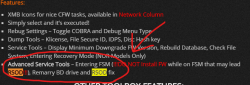
First question. I got experience with The Rebug 4.82.1 – Cobra 7.54 – LITE. This CFW is running on my working consoles and if I understand correctly, it supports RSoD Fixig (see in screenshot). So am I able to use the 4.82 CFW or do it has to be a higher Firmware as installed? because I know how to use the Rebug firmware so it would be easier for me than a new 4.83 I guess.

You said:" so you must dump the ps3 backup then use PS3DumpChecker the one of v4.82 and do noFSM 4.82" I don't understand this completle I guess. I got no backups of this ps3. Its new for me I never saved or dumped anything. Only Thing I got is the Bricked RSOD PS3. So you mean even tough my ps3 nor is corrupted, I should run an NOR backup with the E3 or what du you mean with dumping my ps3 backup. For now i do not have any kind of backup. Just the ps3 with an formated empty 40gig HDD.

How i connect the E3 and Flash the with TF and so on that no problem for me. I allready downgraded consoles with this but all where working and accessing XMB so that was complete other situation.
 

Attachments

  • Anmerkung.png
    Anmerkung.png
    95.8 KB · Views: 592
If its a jailbreakable nor yes.You can just reflash it with the 3.55/3.56 keys and downgrade.

can you explain this in more detail? how do i flash the 3.55 keys? you mean I should falsh a CFW with the e3 Flasher? where do I get e3 compatible firmware files for this? I guess they are in bin format.
 
can you explain this in more detail? how do i flash the 3.55 keys? you mean I should falsh a CFW with the e3 Flasher? where do I get e3 compatible firmware files for this? I guess they are in bin format.
The hex file on **ps3xploit.com >Domain no Longer owned by team** (ps3xploit.me =new) has the keys that are needed which allow you to downgrade and fix the rsod.You need to flash it somehow into the system files with the e3 flasher while its bricked.
 
The hex file on **ps3xploit.com >Domain no Longer owned by team** (ps3xploit.me =new) has the keys that are needed which allow you to downgrade and fix the rsod.You need to flash it somehow into the system files with the e3 flasher while its bricked.

okay I got the HEX file from **ps3xploit.com >Domain no Longer owned by team** (ps3xploit.me =new). now i put this on my TF an place it in the e3. i flash it via flash fun mode? how should i call the file?

and after it, i got to the recovery menü and flash any cfw with rsod fix?
 
okay I got the HEX file from **ps3xploit.com >Domain no Longer owned by team** (ps3xploit.me =new). now i put this on my TF an place it in the e3. i flash it via flash fun mode? how should i call the file?

and after it, i got to the recovery menü and flash any cfw with rsod fix?
Im not familiar on how a e3 flasher works but im pretty sure that hex file is whats needed in order to get the downgrade to work and fix the rsod.
 
and that option you talk about is in PS3 XMB Setting v0.1 which is enabled default in rebug CFW that have dum eid0_root remarry bd drive and Factory Service your only way to fix is taking a fresh backup of nor chip put in computer patch it with noFSM 4.82 using PS3DumpChecker then install CFW 4.82+ and see this link if it not break rules translate it to your language and see
http://www.logic-sunrise.com/dossie...-flasher-partie-4-processus-de-downgrade.html

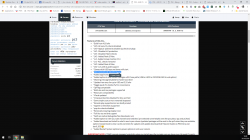
EDIT : this is the feature of RSOD Screen Bypass in a CFW
 

Attachments

  • Capture d’écran (699).png
    Capture d’écran (699).png
    232.7 KB · Views: 546
Last edited:
and that option you talk about is in PS3 XMB Setting v0.1 which is enabled default in rebug CFW that have dum eid0_root remarry bd drive and Factory Service your only way to fix is taking a fresh backup of nor chip put in computer patch it with noFSM 4.82 using PS3DumpChecker then install CFW 4.82+ and see this link if it not break rules translate it to your language and see
http://www.logic-sunrise.com/dossie...-flasher-partie-4-processus-de-downgrade.html

EDIT : this is the feature of RSOD Screen Bypass in a CFW

cool thx. I will try that :)

EDIT: In this tutorial is described that I have to use a dongle. I guess the ps3 jig? I only have the e3 Flasher, no dongle. Can I also do this with the PSP Homebrew PS3 Jig?

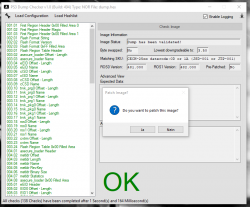
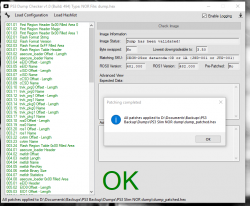
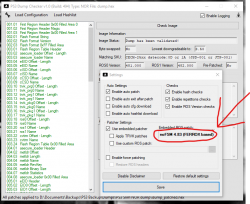
EDIT2: I now tried an dump from another console, just to understand the dumpchecker tool. In the settings stands 4.83 ferrox noFSM. so if i patch my dump with this i have to use a 4.83 ferrox? that would be no problem than I use 4.83 instead of 4.82 rebug. I do not have fun anymore searching for other versions. im so glad found this ^^
 

Attachments

  • 1.png
    1.png
    97.2 KB · Views: 464
  • 2.png
    2.png
    98.1 KB · Views: 521
  • 3.png
    3.png
    118.4 KB · Views: 421
Last edited:
Back
Top