PS2 FMCB CONTROLLER ISSUE HELP HOW DO I FIX?

When Ever I Play a fighting game using fmcb like tekken 5 or virtua fighter 4 the left analog on my controller completely stops working but when I play ANY OTHER GAME it works just fine. Yes I've used different controllers same issue. Freemcboot is causing the issue but It never did this before.
 
FMCB will not allow you to play any game, because it has different purpose\use.
It is an exploit, an entry point for launching homebrew.

Are you playing these games from original discs or through e.g. ESR, OPL?

By analog controller you mean DualShock 2 (DS2) or something else?
 
Last edited:
FMCB will not allow you to play any game, because it has different purpose\use.
It is an exploit, an entry point for launching homebrew.

Are you playing these games from original discs or through e.g. ESR, OPL?

By analog controller you mean DualShock 2 (DS2) or something else?

Im using OPL software to play the games.

Yeah the DualShock 2 controller, it works fine normally on my disc games but when I boot up some games on OPL the left analog
dosent work.
 
Which version of FMCB and OPL are you using?
If 1.966 (FMCB) and v1.0.0 (OPL) can you delete OPL's settings from a memory card (mc?:/OPL).

Did you set OPL to automatically boot after powering on your console?

Can you try OPL 1442:
https://www.psx-place.com/threads/open-ps2-loader.13415/page-48#post-239678.

Additionally can you try FMCB noobie package:
https://www.psx-place.com/threads/fmcb-fhdb-noobie-package.21763/.

Im using OPL VERSION 1559. No it does not boot automatically. Yes im using Fmcb ver. 1966
 
If you have OPL version 1559 then you probably have FunTuna or OpenTuna, am I right?

From I remember both of these releases have a fork of FMCB 1.8X not 1.966.
Additionally can you try this unofficial release of FunTuna (if you have it):
https://www.psx-place.com/threads/funtuna-free-mcboot-for-fortuna.30973/page-8#post-279252.

If somehow you have FMCB 1.966 try this noobie package with updated OPL v1.0.0 (e.g. V1):
https://www.psx-place.com/threads/fmcb-fhdb-noobie-package.21763/.

Have you tried to delete OPL's settings from a memory card?
 
If you have OPL version 1559 then you probably have FunTuna or OpenTuna, am I right?

From I remember both of these releases have a fork of FMCB 1.8X not 1.966.
Additionally can you try this unofficial release of FunTuna (if you have it):
https://www.psx-place.com/threads/funtuna-free-mcboot-for-fortuna.30973/page-8#post-279252.

If somehow you have FMCB 1.966 try this noobie package with updated OPL v1.0.0 (e.g. V1):
https://www.psx-place.com/threads/fmcb-fhdb-noobie-package.21763/.

Have you tried to delete OPL's settings from a memory card?

How do I install the software?
 
Let me start from the beginning...
Which console rev have you got? (e.g. SCPH-90004)...

FMCB starts automatically after boot or you have to initiated it (via PS2 MC Browser)?

If FMCB has to be initialized you probably have FunTuna or OpenTuna.
If you have FunTuna or OpenTuna details about installation are here:
https://www.psx-place.com/threads/funtuna-free-mcboot-for-fortuna.30973/,
https://www.psx-place.com/threads/o...f-fortuna-based-on-reverse-engineering.33010/.

If FMCB starts automatically, download FMCB noobie package on your USB device
and launch FMCBInstaller.elf via wLaunchELF.
 
Let me start from the beginning...
Which console rev have you got? (e.g. SCPH-90004)...

FMCB starts automatically after boot or you have to initiated it (via PS2 MC Browser)?

If FMCB has to be initialized you probably have FunTuna or OpenTuna.
If you have FunTuna or OpenTuna details about installation are here:
https://www.psx-place.com/threads/funtuna-free-mcboot-for-fortuna.30973/,
https://www.psx-place.com/threads/o...f-fortuna-based-on-reverse-engineering.33010/.

If FMCB starts automatically, download FMCB noobie package on your USB device
and launch FMCBInstaller.elf via wLaunchELF.

FMCB automatically boots when I power on the system.

I have console version
Scph-50001/N

Let me start from the beginning...
Which console rev have you got? (e.g. SCPH-90004)...

FMCB starts automatically after boot or you have to initiated it (via PS2 MC Browser)?

If FMCB has to be initialized you probably have FunTuna or OpenTuna.
If you have FunTuna or OpenTuna details about installation are here:
https://www.psx-place.com/threads/funtuna-free-mcboot-for-fortuna.30973/,
https://www.psx-place.com/threads/o...f-fortuna-based-on-reverse-engineering.33010/.

If FMCB starts automatically, download FMCB noobie package on your USB device
and launch FMCBInstaller.elf via wLaunchELF.

I've download the package how do I install on the ps2? the ulaunchELF. just takes me to games selection

Okay I went to the FMCB installer but it tells me to uninstall the previous files to download the new one. Want that erase my settings
and file locations on the homescreen? Also im using an HDD
 
Last edited by a moderator:
OK, so SCPH-50001 is fully compatible with FMCB.
I mean it will automatically launch FMCB after powering on\rebooting your console.

Do you have FMCB or FHDB?
Do you have this exploit on a memory or on a HDD?

What is FMCB?

Free Memory Card Boot (FMCB) is a piece of homebrew software, which is designed to setup your PlayStation 2 console and provides you with means of launching homebrew software, without the need for any extra hardware, modifications to your console or dangerous tricks like the legendary swap trick.

FMCB was originally developed by Neme and Jimmikaelkael, but they have been kind enough to provide me with access to its source code, for me to make some improvements to it.

FMCB is installed onto your memory card. While clone/compatible memory cards may work, they are copies of a proprietary memory card, which often means that they aren't perfectly compatible. Please use clones/compatibles at your own risk.

FMCB will not allow you to boot games that you cannot already play. This means no playing of burned and imported discs.

What is FHDB?

Free Harddisk Drive Boot (FHDB) is basically FMCB that gets installed onto the PlayStation 2 console's HDD unit. It does everything like FMCB does, but is meant to be used with the Sony HDDOSD (Browser update v2.00).

Patched/modified copies of the HDDOSD may not work, although non-Sony disks are supported by FHDB itself.
***Whether the hacked HDD OSD supports non-Sony disks or not depends on whether it was modified to support non-Sony disks.***

Modifying or getting a pre-modified copy of the HDDOSD is not under this project, which is why that topic will not be discussed here.

Like with FMCB, FHDB will not allow you to boot games that you cannot already play. This means no playing of burned and imported discs.

I do not understand this part:
Okay I went to the FMCB installer but it tells me to uninstall the previous files to download the new one. Want that erase my settings
and file locations on the homescreen?
Can you make a photo of this warning?

From what I remember while installing FMCB or FMCB the installer will ask:
- Do you want to update FREEHDB.CNF?
- Do you want to update FREEMCB.CNF?

But only if you already have FMCB or FHDB.
You have to select YES, to make links for all apps from the package.
I mean ESR, OPL...
 
OK, so SCPH-50001 is fully compatible with FMCB.
I mean it will automatically launch FMCB after powering on\rebooting your console.

Do you have FMCB or FHDB?
Do you have this exploit on a memory or on a HDD?


I do not understand this part:

Can you make a photo of this warning?

From what I remember while installing FMCB or FMCB the installer will ask:
- Do you want to update FREEHDB.CNF?
- Do you want to update FREEMCB.CNF?

But only if you already have FMCB or FHDB.
You have to select YES, to make links for all apps from the package.
I mean ESR, OPL...

have FMCB on memory card

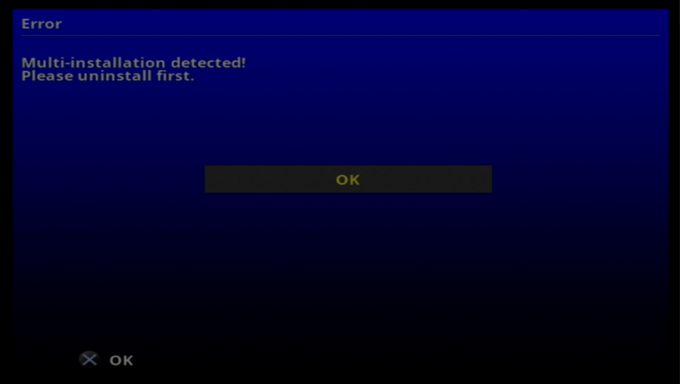
It says multi-installation deteced
Screenshot (291).png
 
Also I tried using FREEHDB on my HDD but It only lets me use OPENLOADER which casues audio issues
on fmv videos.
The HDLOADER dosent have that issue but it dosent seem available for hdd why is that?
 
So Delete all my old FMCB files?

Copy all saves to i.e pendrive into *.psu container by i.e uLE.
Then run FMCB Installer of v1.966.
Format Memory Card and install again.

But better for You if You will make it on another card because if something goes wrong, and installation failed, You will be left with literally clean memory card.

However, I do not see how this can be anyhow related to Your problem... Start from changing OPL version i.e to official v1.0.0.
 
Last edited:
Copy all saves to i.e pendrive into *.psu container by i.e uLE.
Then run FMCB Installer of v1.966.
Format Memory Card and install again.

But better for You if You will make it on another card because if something goes wrong, and installation failed, You will be left with literally clean memory card.

However, I do not see how this can be anyhow related to Your problem... Start from changing OPL version i.e to official v1.0.0.
How do I change versions of OPL? Download it to usb?
 
In example, on USB. Then by file manager copy it to where ever You want. And edit FMCB config to add or replace old OPL executable in it.
 
That is why I wanted to avoid additional posts with "how to update OPL version".

I've thought that since he has multi-install someone else must installed FMCB (not the current user).
He only has these problems with games launched via OPL, not from discs.
I used OPL 1559 and I did not have any problem with the controllers (DS2).

That is why my "lucky guess" was that maybe something is wrong with FMCB.

Additionally for me it was just simpler to recommend FMCB noobie package...
You only have to launch the installer, select install FMCB and that's it.
All the apps will be updated along with FMCB.

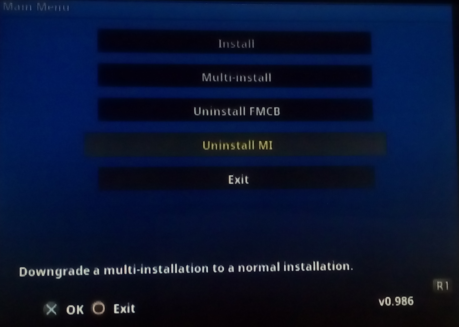
Since FMCB installer tells you that you have to uninstall multi-install.
multi.png

You can do it from the main screen:
FMCB-uninstall.png


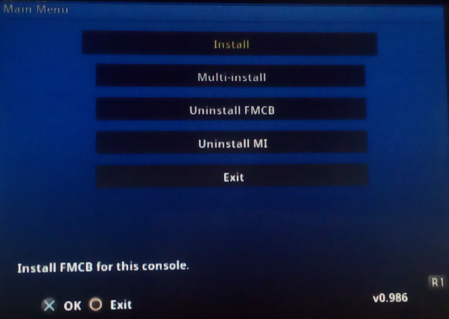
After that you can normally install FMCB:
FMCB-normal-inst.png

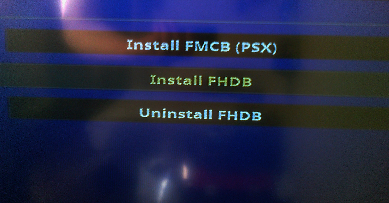
Once you installed FHDB:
slow2.png

Remove a memory card from your console.
Launch OPL from FMCB's menu.
 
Exactly because someone else made the install, I suggested to continue on a clean/empty MemoryCard!

Why? If he uninstalls the Multi-Install and it is reverted to a normal-install which doesn't include the osdxxx.elf his console is looking for, FMCB would not boot for him anymore!!!
 
He can uninstall multi-installation.
After that he can perform (normal) FMCB installation or even multi-installation once again
as long as he do not leave the installer (after uninstalling multi-installation).
 

Similar threads

Back
Top