PS2 FMCB CONTROLLER ISSUE HELP HOW DO I FIX?

He can uninstall multi-installation.
After that he can perform (normal) FMCB installation or even multi-installation once again
as long as he do not leave the installer (after uninstalling multi-installation).

Updating the FMCB didnt seem to help my controller problem, analog stiff dosent work on some games but works on others, and the HDLOADER option is gone which made audio in fmv files move faster
than OPLOADER.
 
Can you test your analog controller with:
https://www.psx-place.com/resources/ps2-controller-tester.670/.
Copy padtest.elf to a USB device.
Launch it with wLaunchELF.

As for HDLOADER, look for it on a memory card.
Start wLaunchELF, enter mc0:/.
Look for HDLOADER.ELF in APPS or in BOOT folder.

Additionally try to delete OPL's settings from the MC Browser:
20V4.png


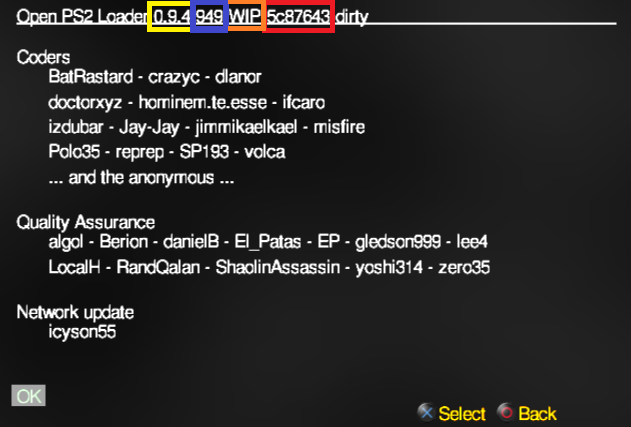
BTW: Are you now on OPL v1.0.0?
Check that in "About" page:
image.png
 
  • Like
Reactions: TnA
Can you test your analog controller with:
https://www.psx-place.com/resources/ps2-controller-tester.670/.
Copy padtest.elf to a USB device.
Launch it with wLaunchELF.

As for HDLOADER, look for it on a memory card.
Start wLaunchELF, enter mc0:/.
Look for HDLOADER.ELF in APPS or in BOOT folder.

Additionally try to delete OPL's settings from the MC Browser:
20V4.png


BTW: Are you now on OPL v1.0.0?
Check that in "About" page:
image.png
Okay I tried the padtest my analog works there but been i load up games using hdl or opl the analog still shuts off.
Im using version 1.0.0 of opl, How do i delete opl settings using the wLaunchElf?
 
Did you try to press the analog
log-ps2.pngp
button after launching a game?

Do you have any kind of a modchip in your console?

I am not sure if this solution gonna help you,
because maybe modchip is interfering with homebrew...

You can delete OPL's settings from the browser:
20V4.png

Or via wLaunchELF (mc?:/OPL)
 
Did you try to press the analog
log-ps2.pngp
button after launching a game?

Do you have any kind of a modchip in your console?

I am not sure if this solution gonna help you,
because maybe modchip is interfering with homebrew...

You can delete OPL's settings from the browser:
20V4.png

Or via wLaunchELF (mc?:/OPL)

Yeah I tried that it didnt work either, Theres no modchip only Fmcb installed.
 
To sum up:
- You have SCPH-50001
- in Tekken 5 or Virtua fighter 4 the left analog on the controller completely stops working
any other games work just fine. Tested with different (DS2) controllers
- These games have this trouble when they are being launched through OPL
- You have OPL v1.0.0
- HDLOADER doesn't have that issue
- You have uninstalled multi-version of FMCB from a memory card
and reinstalled FMCB 1.966 (noobie package)
- You do not have a modchip

Do you have all your games on HDD?
Did you try to take out HDD from PS2 and launch any game from a USB device?
 
Hello, I still never solved the issue with the controller problem.

To sum up:
- You have SCPH-50001
- in Tekken 5 or Virtua fighter 4 the left analog on the controller completely stops working
any other games work just fine. Tested with different (DS2) controllers
- These games have this trouble when they are being launched through OPL
- You have OPL v1.0.0
- HDLOADER doesn't have that issue
- You have uninstalled multi-version of FMCB from a memory card
and reinstalled FMCB 1.966 (noobie package)
- You do not have a modchip

Do you have all your games on HDD?
Did you try to take out HDD from PS2 and launch any game from a USB device?

I have my games on usb and HDD i tried using usb and it was the same outcome the analog didnt work for those particular games
 
Last edited by a moderator:

Similar threads

Back
Top