
You are using an out of date browser. It may not display this or other websites correctly.
You should upgrade or use an alternative browser.
You should upgrade or use an alternative browser.
PS2 FMCB/FHDB v1.9 series release thread
- Thread starter sp193
- Start date
-
- Tags
- fhdb fmcb fmcbinstaller


uyjulian
Developer
eboot..? There is no eboot on PS2found a problem on 1966: if mc is on slot 2 eboot never launch.
fat 50k.
uyjulian
Developer
PS2 doesn't use eboot.bineboot,bin
no other models to test right now.
uyjulian
Developer
Loading is defaulted to the first slot.you know what i mean, explained above.
im working on three diferent consoles right now, mi mind is tired.
please check that.
You can add duplicate entries to load from the first and second slot.
Last edited:

sp193
Developer
That's an over-generalization. I almost always had FMCB on a memory card in slot 2. You aren't the only one who does that.so the code cut whas the cause?
every version from the very first one to 1965 do the work.
never need to add or duplicate nothing before...
if you have a broken slot 1, so, you have to use 1965 or before.
Personally, I used slot 2 because only slot 1 can be used for all games. Unless people have really stopped caring about this console (to a greater degree than I think), then it's hard to believe that it's an actual design problem.
You need to check that you do not have FREEMCB.CNF on another device, particularly in a memory card in slot 1 or a USB disk. When you have FMCB on a memory card in slot 2, then these other devices will take precedence when it comes to locating FREEMCB.CNF.
People have gotten nasty surprises from this design before, but it isn't a new behaviour of FMCB.
When an ELF cannot be booted due to a user or hardware error, FMCB will fall back to the browser.
If it gets stuck, that is suspicious. Does your console have a modchip installed? It is a bit unfortunate, but it seems to me that some code change in FMCB made it a mistaken target for some modchips to patch...

jolek
Senior Member
have 4 originals MC, only the one with 1966 doesnt launch the boot from slot 2, overtested. and the same mc works on slot 1.
I remember that there was a time when something was wrong if MC with FMCB was in 2nd slot.
Please check the date from when you have version 1.966.
Latest version should be from 13\04\2019:
https://sites.google.com/view/ysai187/home/projects/fmcbfhdb#h.p_e31_CKrrgS5f.
EIDT: It was a bug in FMCB 1.965:
http://psx-scene.com/forums/f153/fmcb-v1-9-series-release-thread-116247/index103.html#post1218566.
Are you sure that you have updated FMCB correctly?
Also try to pull out every additional devices.
I mean put a MC with FMCB in second slot,
Pull out MC from 1st slot and any additional USB devices.
EDIT 2: Here is how path to my boot looks like:
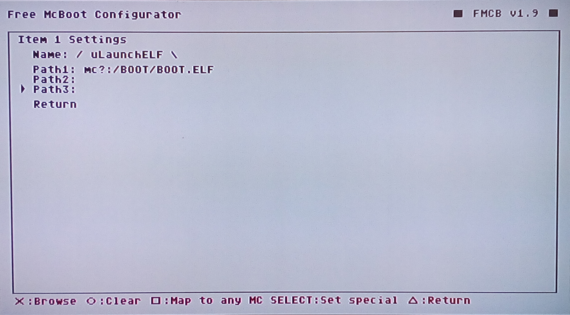
Instead of
 I used
  to search for file:
mc?:/BOOT/BOOT.ELF.
Last edited:
for whom are trying to "help" me : im a 20+ years experienced consoles technician, i was a profesional hw and fw tester, i was there when all these programs came to light, i used them all from the beggining, i create some things for and from them. i am actually one of the major fmcboot installers in the world, dozens of thousands installed. could you be a bit humble and just say: OK, THANKS, I LL CHECK THAT, SEE US LATER ? . i dont need anything, this is for YOU, i am who are trying to help here.

Krah
Developer
OMG! It's you! The bloke that installs software to Memory Cards!... dude no one cares... how about you take your own advice and humble yourself... and maybe try be a bit more respectful when talking to the bloke that actually maintains the software you make money off.. no one needs your help mate and being a douche won't earn you any respect.
sp193
Developer
have 4 originals MC, only the one with 1966 doesnt launch the boot from slot 2, overtested. and the same mc works on slot 1.
the same MC worked nice with 1965 a minute before on slot 2.
Okay, then what about your console? How many consoles did you try?
What did you even try? We have two ways of starting ELFs - either via the hacked OSDSYS (the menu) or through quicklaunch keys. The former is usually affected by modchips, as elaborated below.
Anyone would be surprised if you did.im not crying here
just reporting a bug.
please, check. thanks.
With respect, how do you know that it is surely a bug in FMCB?
Is this console modded? Have you tried it on a console that has no (not just disabled) modchip? That's a multi-million dollar question that I have for you. If it is modded, then there is nothing that says that the modchip cannot patch FMCB in some undefined way (even when disabled), which is why I tend to not not support users of modded consoles (how do you vouch for the behaviour of non-standard hardware?). I just cannot effectively support a console which contains hardware that randomly patches software as it sees fit - no matter what some people think, or even if the modchip came years before FMCB.
This may be particularly the case if you have issues with booting software via options in the hacked OSDSYS, but the quicklaunch keys somehow work - the mechanism for booting ELFs is the same, but yet there is a difference in behaviour.
If you replaced LaunchELF with your own copy, have you tried using the one that came with FMCB? Or even tried starting other ELFs?
Well, thanks. But since you install FMCB for lots of customers, surely you know how many people do use it. Don't you think it's strange that you're the only one who has encountered this?for whom are trying to "help" me : im a 20+ years experienced consoles technician, i was a profesional hw and fw tester, i was there when all these programs came to light, i used them all from the beggining, i create some things for and from them. i am actually one of the major fmcboot installers in the world, dozens of thousands installed. could you be a bit humble and just say: OK, THANKS, I LL CHECK THAT, SEE US LATER ? . i dont need anything, this is for YOU, i am who are trying to help here.
Like I've told you before, I used to have FMCB in slot 2. There's no difference in handling for slot 1 and 2, other than the fact that slot 1 is always checked first for anything.
I can say that it's been more than a year since this release was made, and you're the first to comment about this. If it's a problem that can neither be replicated nor understood, then it cannot be fixed either. Not that anyone ever had really good tools to debug and test FMCB.
Ultimately, I have effectly stopped concerning myself with PS2 software development. So even if there is a problem, it may have to stay that way.

HWNJ
Developer
Fear no more! I made new splashes showing psx-place instead of psx-sceneI can only add that PSX-Scene It is quite good place of knowledge (to read), especially about PS2.
Some stuff (apps, themes, diagrams, etc.) are still out there...
Unfortunately as well there are currently many issues on it (on that site)...
So... there was even an idea to change FMCB logo a bit.


Only url will be add pointing to this site, but unfortunately I cannot get in touch with
Neme or Jimmikaelkael...
Maybe someone else can?
Credits:
Original Designs: @Berion
Small edits: (me)
The font for the original old styled logo is nowhere to be found (not even on the files inside the AIO), so I have to improve. Will be nice if @Berion do the edits himself as he haves all the original files.
Old styled:

New styled:


So, @sp193 you can grab this rar file and update the splash.h on the FMCB code. The splash.h files are inside the rar next to the bmp files: https://cdn.discordapp.com/attachme...23386113892286514/fmcb-splashes-psx-place.rar
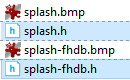
Org Berion splash screen:
https://www.psx-place.com/threads/fmcb-fhdb-v1-9-series-release-thread.13413/page-3#post-129309.
Reason for editing: Added link to org splash screen
Last edited by a moderator:
HWNJ
Developer
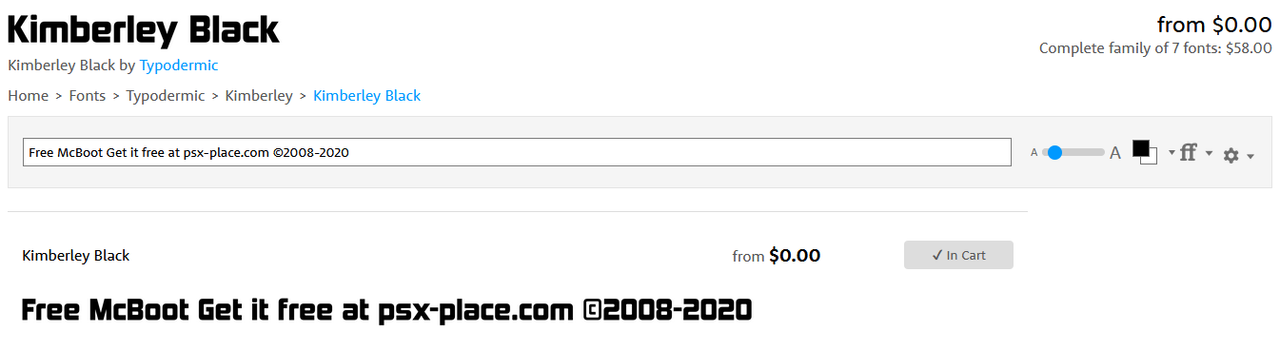
I found the font!
I will later do the "old-styled" edits.
@Berion @sp193
Which one will you prefeer in the end? The old style or the new style?
Also, @Berion ... is there any bigger sized "old" FMCB logo? Or a background only with no text so we can do the FHDB edit on the old style?
Also... the credits text (©2008-2020 jimmykaelkael, neme, sp193 and the anonymous) is way too long for such an small image (it will be basically unreadable on an small sized image), so, should we take it out of the image? Or... should we re-design the launcher2 splash entirely since now the file size is not an issue(*)? We can have three images:
- The logo
- The "get it free at" with multiple translations depending on the OSD language (easy to do)
- The credits at the bottom
It's true that these are BMP files, but a compressed ELF will reduce the "extra space". I think the difference will not be bigger than 20KB.
@sp193 I can code you that specific segment, so you will only need to copy / paste that segement into the FMCB code (no need to share the FMCB code with me)
So, what do you guys decide? @sp193 @Berion
(*) The size was an issue earlier because of the PS2 Slim DVDELF size, but since FMCB is not injecting the ELF anymore, the size is not a limit right now.
HWNJ
Developer
Who is he?Greetings to the DVDPLx-guy!
HWNJ
Developer
@TnA what's your opinion on this: https://www.psx-place.com/threads/fmcb-fhdb-v1-9-series-release-thread.13413/page-14#post-247405 ?
Just curious...
Just curious...
Similar threads
-
 Welcome to PSX-Place (v3) - Upgrade Now Complete !!!
- Started by STLcardsWS
- Replies: 33
-

-
 PS3 PS3 Firmware 4.93 - Update is Live! (CFW and HFW Released)
- Started by LuanTeles
- Replies: 38
-
 PS2 Free McTuna! OpenTuna Installers with Free MCBoots via PS2BBL!
- Started by Ripto
- Replies: 26