PS3 Frankenstein PHAT PS3: CECHA with 40nm RSX

So, the next step needed for the dump is installing CFW? I've already found a good CFW guide on Reddit, so it won't be a problem.
Yes, any fw <= 3.55 should be fine.

Do you have a guide for the steps after that, installing "special" PUP and dumping SYSCON FW with UART?
The special PUP is just any CFW or OFW with changed Syscon patch pkg. This patch does nothing and its only purpose is to overwrite the Sony patch.
Then you need to install a special patch using the UART interface. I'll provide the patch and a python script which automates the task.
The next step is already dumping the firmware. You make sure nothing is plugged into the HDMI port, then listen to the UART interface using e.g. TeraTerm (with the log enabled) and push the power button - the firmware will be dumped.
Then you can use the same python script with the original Syscon patch to restore it.

Will it be destructive for SYSCON and can it be reverted?
The original state can be easily recovered, only the patch changes, but we already have that so we can just write it back.

BTW, could you please explain relation between SoftID and SYSCON FW patch? I've read PSDevWiki but haven't found comprehensible explanation. As I understand reading the Wiki, while in dev consoles to upgrade SYSCON FW it just flashed anew, in retail consoles it is upgraded via patches. But what is the real version of installed SYSCON FW? Is it SoftID (0F38) or patch version (v1.5.1r1)? On the Wiki I saw that one SoftID can have several patch releases: 0C16.v1.1.3r2, 0C16.v1.1.3r3, etc. When we make sure that "no SYSCON patches are installed in the first place", what version of SYSCON we will get?
On prototype units, the Syscon gets full firmware updates because it's a flash based model. Retail Syscons store the firmware in ROM and need patches.
The SoftID is 1:1 the firmware version: https://pastebin.com/LhR6s9rp . The patch just gets applied on top of the firmware.

Just tell me when you're ready and I'll provide the files, just need to do some cleanup.
 
The SoftID is 1:1 the firmware version: https://pastebin.com/LhR6s9rp . The patch just gets applied on top of the firmware.
So, for example, if I had SYSCON with 0B8E.0001000000000006@SC, after removing the patch I would get 0B8E.0001000000000000@SC in "More System Info"? And that 0B8E has FW v1.0.0k1 in your Pastebin - these version strings are taken directly from FW dump?
 
So, for example, if I had SYSCON with 0B8E.0001000000000006@SC, after removing the patch I would get 0B8E.0001000000000000@SC in "More System Info"?
No, the part behind the softid just changes to 0. Normally this value would be read from the patch header, so it can be arbitrary. I've set it to 0123456789.... or FFFF...... in some of my patches.

And that 0B8E has FW v1.0.0k1 in your Pastebin - these version strings are taken directly from FW dump?
Yes, altough you can also get it by using the internal UART commands.
 
Ok, I think I get the point. SYSCON FW has version and it's stored internally and not shown in "More System Info". SYSCON ROM with particular FW version has it's own unique ID called SoftID and this is what is shown in "More System Info". SYSCON patch made for particular FW ROM has it's own version string (and it is shown along with SoftID in "More System Info") which relates to ROM FW version for convenience purposes, but can actually be any string. Amiright?

One more question. This SYSCON dump, what would make out of it? Don't get me wrong, I totally understand if you just want it for the collection, archive or out of purely scientific interest. But can it actually benefit PS scene like help develop new hax?

Alright. Tomorrow I'm going to run PS3Xploit, install recent CFW, enable QA flag and downgrade to 3.55 CFW. I'll get back to you when I'm done.
 
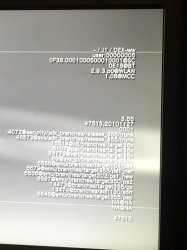
In the "more system information" screen at the 3rd line at top you can see both things, syscon softID and syscon patchID

The softID is an identifyer checked when you install a firmware (with a file PS3UPDAT.PUP)
The firmware installer (the PS3UPDAT.PUP) contains packages that are specific for every SoftID, there is a point of the installation where the firmware installer "asks" to the syscon about his SoftID and his patchID
Incase your SoftID matches with one of the packages inside the file PS3UPDAT.PUP ...and... your patchID is smaller than the one included inside the PS3UPDAT.PUP then is installed (otherway is not because you already have installed the latest aplicable to your syscon)

You have 0F38.0001000500010001 @ SC
Look at the syscon packages that exists (there is only one applicable to your SoftID = 0x0F38), is a file named SYS_CON_FIRMWARE_01050101.pkg
https://www.psdevwiki.com/ps3/System_Controller_Firmware#Known_Retail_syscon_update_packages

----------------------------
What you need to do is do cleanup that patch... and from that point when you enter in the "more system information" screen you are going to see 0F38.0000000000000000 @ SC
All that zeroes means that there are no syscon patches installed. In that state is when you should do the syscon firmware dump :encouragement:

And when you are done with the dumps/tests you can return to the original state just by installing any firmware equal or bigger than 3.41, because the patch SYS_CON_FIRMWARE_01050101.pkg is included in all firmwares since 3.41
https://www.psdevwiki.com/ps3/System_Controller_Firmware#Known_Retail_syscon_update_packages

In other words... after you install a firmware equal or bigger than 3.41 you are going to return to the original: 0F38.0001000500010001 @ SC
 
So, in other words, they wouldn't pay to fab them? :)

Anyway, bad news from my end. I swapped the slim RSX back then put the freshly leaded original back on the CECHA01 and now both systems are working perfectly. So a known working 65nm RSX does not work on a known working CECHA01 motherboard with that resistor grounded. There's more to this story somewhere, but I'm afraid I can't help with anything else. If y'all come up with any bright ideas worth doing it again for, shoot me a PM since those go to my e-mail. Same goes if any of you folks that know what you're doing want their own Frankenstein made for testing, just send me some boards and I'll hack it up for you.

Peace!
 
Last edited:
So, in other words, they wouldn't pay to fab them? :)

Anyway, bad news from my end. I swapped the slim RSX back then put the freshly leaded original back on the CECHA01 and now both systems are working perfectly. So a known working 65nm RSX does not work on a known working CECHA01 motherboard with that resistor grounded. There's more to this story somewhere, but I'm afraid I can't help with anything else. If y'all come up with any bright ideas worth doing it again for, shoot me a PM since those go to my e-mail. Same goes if any of you folks that know what you're doing want their own Frankenstein made for testing, just send me some boards and I'll hack it up for you.

Peace!
So that basicaly means there is need for "updated syscon" before the rsx change. Or can we update the syscon without working rsx somehow?
 
Ok, I think I get the point. SYSCON FW has version and it's stored internally and not shown in "More System Info". SYSCON ROM with particular FW version has it's own unique ID called SoftID and this is what is shown in "More System Info". SYSCON patch made for particular FW ROM has it's own version string (and it is shown along with SoftID in "More System Info") which relates to ROM FW version for convenience purposes, but can actually be any string. Amiright?
Yes.

One more question. This SYSCON dump, what would make out of it? Don't get me wrong, I totally understand if you just want it for the collection, archive or out of purely scientific interest. But can it actually benefit PS scene like help develop new hax?
Well, if it actually supports newer components it might be useful if we can introduce these changes using patches on lower sc firmwares.

The softID is an identifyer checked when you install a firmware (with a file PS3UPDAT.PUP)
It's also used internally by the syscon to generate the patch keys. But that's it.

So that basicaly means there is need for "updated syscon" before the rsx change. Or can we update the syscon without working rsx somehow?
The syscon can be update without working rsx, but only using the patches on retail systems. If you want to change the firmware and don't have a prototype model you need a new IC.
 
@M4j0r What do you think stopped the swap from working on squeept ps3? Just something in the syscon? Once Icferrum dumps his syscon do you think you might be able to find what makes that Frankenstein actually tick so we can make this a viable option on other units? Thank you for the interest and effort you guys have shown and put into picking this apart.
 
@M4j0r What do you think stopped the swap from working on squeept ps3? Just something in the syscon? Once Icferrum dumps his syscon do you think you might be able to find what makes that Frankenstein actually tick so we can make this a viable option on other units? Thank you for the interest and effort you guys have shown and put into picking this apart.

It's hard to do remote diagnose this, but he could read the syscon errlog to see what error syscon finds.
For example by using this script: https://pastebin.com/4ymiFQbi and then running "ERRLOG GET 00", ERRLOG GET 01, ....".
 
It's hard to do remote diagnose this, but he could read the syscon errlog to see what error syscon finds.
For example by using this script: https://pastebin.com/4ymiFQbi and then running "ERRLOG GET 00", ERRLOG GET 01, ....".
@squeept. Any interest in doing that? Not sure it would work now that you have swapped things back. Wonder if it was bc you used a 2k. 65nm one. The one on the Frankenstein looks to be from a 3k model. Not sure it would have made a difference seeing as they share the same footprint. What did it do exactly when you tried to fire her up? YLOD? What was the behavior?
 
So question if a console was sometime in past already updated above fw 3.41 and possibly there is another hardware mod not only the one resistor, there is no need to update syscon after we will change the rsx?
 
Last edited:
Downgraded to REBUG 3.55 CFW, QA flag set. @M4j0r, I'm ready, waiting for your instructions. Make sure they include steps to revert things back ;)

photo_2020-02-08_04-37-16.jpg

I'm curious about the power draw of this unit(logically it should consume less power due to the smaller size of the chip), any chance you have a way to measure its draw in real world use?
Measured with plug power meter:
  • 150W - XMB idle
  • 155-160W - gaming (tested on Tron: Evolution)
  • 140-145W - FW update
Compare with this power consumption data.
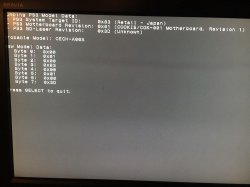
Just curious but I wonder how the "PS3 Model Detector" PKG would react when running on that "Frankenstein" :P

photo_2020-02-08_04-37-20.jpg

Also, I've made FW dump with PS3Xploit and run it through PS3 Dump Checker and PyPS3checker. Both showed that dump is pretty much ok except unknown SKU and absence of second sections of both revoke package and program: trvk_pkg1 and trvk_prg1 are filled with 0xFF. I've found a thread with similar dump problems and it was suggested there that these are the symptoms of refurbished console. And we already concluded that the thing is indeed refurbished, so it all fits. SKU identification data:
Code:
idps = 0x01
metldr0 = 0xE920
metldr1 = 0x0E8E
 
Last edited:
Downgraded to REBUG 3.55 CFW, QA flag set. @M4j0r, I'm ready, waiting for your instructions. Make sure they include steps to revert things back ;)

View attachment 23686


Measured with plug power meter:
  • 150W - XMB idle
  • 155-160W - gaming (tested on Tron: Evolution)
  • 140-145W - FW update
Compare with this power consumption data.


View attachment 23687

Also, I've made FW dump with PS3Xploit and run it through PS3 Dump Checker and PyPS3checker. Both showed that dump is pretty much ok except unknown SKU and absence of second sections of both revoke package and program: trvk_pkg1 and trvk_prg1 are filled with 0xFF. I've found a thread with similar dump problems and it was suggested there that these are the symptoms of refurbished console. And we already concluded that the thing is indeed refurbished, so it all fits. SKU identification data:
Code:
idps = 0x01
metldr0 = 0xE920
metldr1 = 0x0E8E
Could you follow this: https://www.psx-place.com/threads/need-community-help-to-collect-data.20882/

It may help to understand.
 
It's already back to normal, so I can't do anything for the moment. If I do it again, I'd like to start with both consoles known working first so there are no questions about whether the Frankenstein is in working order. I'd also rather just loan it out to one of you fellas since I am zero help with anything firmware related on these. Since this is my job, there's also the issue of tying up $500 worth of consoles just for an experiment while I've got bills to pay. Lemme get my last mountain of dental work paid off and I'll feel a little more comfortable with lending one out for awhile.

In the meantime, if any devs want something made to toy with just send me the parts and I'll put it together for you for free.
 
@M4j0r, PMed you SYSCON dump.

@littlebalup, PMed you data needed for your dump checker.

Guys, can anybody make a good hires photos on front and back of COK-001 motherboard? I want to compare my COK-001 to "standard" one - maybe there are more hardware differences than I've already found.
 
@M4j0r, PMed you SYSCON dump.
Yes ! :victorious:
I didnt mentioned it before, but that dump is very important for the whole PS3 scene, not only for documentation purposes (we kew about it since years ago but there are many pages in wiki where is labeled as "unknown") but also because this research
https://www.psx-place.com/threads/s...c-release-by-zecoxao-what-does-it-mean.26148/

@M4j0r and friends are studying how the syscon works, the data stored in it, and how many things we can do by modifying that data... is like opening a door for lot of potential hacks
But for that research they needs samples of different syscon versions, and you dump is going to help a lot (is one of the easter eggs)
@littlebalup, PMed you data needed for your dump checker.
Nice, that tools are very important too :encouragement:
Guys, can anybody make a good hires photos on front and back of COK-001 motherboard? I want to compare my COK-001 to "standard" one - maybe there are more hardware differences than I've already found.
There are a couple of good COK-001 photos here
https://www.psdevwiki.com/ps3/Motherboard_Revisions

But you should use this tables as reference, the goal of that tables was to have a compacted list of "the things that matters" (either identifyers of motherboard/console, and the electronic components that are either critical, big, or are "paired logically" with others)
https://www.psdevwiki.com/ps3/Talk:SKU_Models#PS3_Fat
 
There are a couple of good COK-001 photos here
https://www.psdevwiki.com/ps3/Motherboard_Revisions
I've already seen the photos on this wiki. Unfortunately, they are not of great quality for my purpose (especially COK-001 backside). You see, I'm looking for the things like missing or awkwardly placed SMD components and such. Things similar to the resistor I've already found.

But you should use this tables as reference, the goal of that tables was to have a compacted list of "the things that matters" (either identifyers of motherboard/console, and the electronic components that are either critical, big, or are "paired logically" with others)
https://www.psdevwiki.com/ps3/Talk:SKU_Models#PS3_Fat
I'll check this table, thanks for the tip.
 
Back
Top