Sadly we cant deduce much from the files he uploaded in his first attempt, the problem is he uploaded 2 files, one named "original" and the other named "modifyed"
The original is from the COK-001... and the modifyed was supposed to be that same file from the COK-001 with the patches applyed (this is what i was expecting to find, so i could make the comparison i mentioned before with HxD and pressing the F6 key to compare the differences), but instead the modifyed file was a dump from other motherboard
At that point i had many doubts of what he did, so i figured i could deduce if it was really original by checking the thermal config regions and the RSX revision byte from the original file and i realized it have the value for 90nm... so yeah... that file named original really looks original, it doesnt seems he applyed any patch on it
You know, the most important step for the frankensteinization is to change that byte
And the other file named modifyed is a dump from the DIA-002, he got the donor RSX and syscon from a DIA-002, and it seems at some point he made a dump from that syscon, thats the file he uploaded named modifyed... but the fact is is not needed to modify that dump, because what we are going to do is to ovrwrite his original contents with the patched dump from the COK-001
Long story short... the file he was supposed to write in the frankestein syscon never was uploaded to the forum, so we cant review his patches and im not sure what he wrote
Ok I fixed the board. I feel like it would be wiser to just put a modchip on it and be done with it. But since we are experimenting, I could have tried the harder syscon way if only somebody could send me a spare bus pirate
Im a bit late on this, I heard by using some modchip this was possible to do. Aside from the bga work, is it really as easy as just removing a resistor and installing the modchip on a E01? If so is there anyone here that can do it and have me send my ps3 to them?
Im a bit late on this, I heard by using some modchip this was possible to do. Aside from the bga work, is it really as easy as just removing a resistor and installing the modchip on a E01? If so is there anyone here that can do it and have me send my ps3 to them?
No, there is a voltage mod that should be done if a 40nm RSX is used. But yes, the modchip and a few changes to the board are all that's needed. It's not super difficult. The BGA rework is what's most challenging. The chance you'll brick a unit is not zero. So it would take someone supremely confident in their equipment and skill to offer this as a service (with any kind of guarantee). So far, no one outside of Indonesia is, that I'm aware of. You may be able to buy a system premodded, however. But you're going to be looking at near launch price for something like that.
Yes. Again, the mod chip makes it possable to replace a 90nm RSX from models A, B, C, E with 40nm RSX. I'm not sure about G (SEM-001) and H (DIA-001) models, but they aren't backwards compatible. So there's no reason to go frankenstein them. Just get a newer Phat or a slim!
I'm not sure what you mean by this? Do you mean which consoles have a 40nm RSX? If so, 21xx - 40xx models have 40nm RSX. That's the majority of PS3 consoles out there. At least 30 million of them. More than enough for the 5.63 million BC models out there. And there is still New Old stock chips to be had, so we don't even have to harvest them from consoles yet.
Yes. Again, the mod chip makes it possable to replace a 90nm RSX from models A, B, C, E with 40nm RSX. I'm not sure about G (SEM-001) and H (DIA-001) models, but they aren't backwards compatible. So there's no reason to go frankenstein them. Just get a newer Phat or a slim!
I'm not sure what you mean by this? Do you mean which consoles have a 40nm RSX? If so, 21xx - 40xx models have 40nm RSX. That's the majority of PS3 consoles out there. At least 30 million of them. More than enough for the 5.63 million BC models out there. And there is still New Old stock chips to be had, so we don't even have to harvest them from consoles yet.
I am sorry about confusion, I mean about frankenstein from Sony, I sold one like this without knees...the new owner unmount and said me...I eat my bubbles since...
On the video the moder seems dont reball his unit.
I am sorry about confusion, I mean about frankenstein from Sony, I sold one like this without knees...the new owner unmount and said me...I eat my bubbles since...
@DeadEnd already modded the console before making that video. You can read about it earlier in this thread. He just made that video to get the word out and to record the proper steps in one place, so people don't have to find all the posts. There's some Indonesian videos, but they're not all using the same version of mod board and are of a quality harder to follow.
To know what RSX is on a PS3, just clean the thermal paste off the RSX well. The model number is written on the IHS. It's faint, but if you get the light at the right angle, you should be able to read it. I find it's easier to take a picture.
Yes. Again, the mod chip makes it possable to replace a 90nm RSX from models A, B, C, E with 40nm RSX. I'm not sure about G (SEM-001) and H (DIA-001) models
For the record... it can be made in all PS3 models up to the CECH-20xx with DYN-001 motherboard
Thats the last PS3 motherboard with a 65nm RSX, and there is a photo here with the modchip installed in it
It surprised me a bit because that combination of a DYN-001 with a 40nm RSX is in the limit of the RSX frankensteins compatibility
I mean... the next PS3 model CECH-21xx with SUR-001 motherboard was shipped from factory with a 40nm RSX... so obviously the modchip is not needed and there are no installation photos of it
But i bet the modchip is compatible with newer motherboards too
Lets say... the modchip allows to use a 90nm RSX on a superslim CECH-40xx with motherboard MSX-001 or MPX-001, because the RSX pad layout is the same, and the modchip is going to satisfy all the syscon requests about the RSX ID... technically, this combination is the most extreme and horrible frankenstein that should never seen the light of sun
Im just mentioning all this for curiosity sake and because coincidentially i was reviewing that photos... because the modchip is soldered in one of the SPI buses of syscon... and i been organizing and updating some pages in wiki related with syscon pinouts, feel free to contribute by editing them or reporting your findings to other wiki editors
Basically... there are 2 good ways to "navigate" the pages related with syscon... from the main page... or from this tables that appears in https://www.psdevwiki.com/ps3/Syscon_Hardware
The "BGA 200" is for all the mullion syscons, it was created years ago pretty much like the actual state
The "LQFP 128" is for sherwood syscons from the SW and SW2 series (used in last PS3 fat and Slims), it has been edited a lot by zerotolerance, zecoxao, me and some more people but it still have a lot of unknown pins
The "LQFP 100" is for sherwood syscons of the SW3 series (used in last Slim and Superslims)
---------------
And returning to the reason why im writing this... @vyktormvmpay25 i need you to check something in your slim scrap boards (syscon SW2)
Take a look at the pinout "LQFP 128"... we know the syscon have at least 3 SPI buses for SB, RSX, CELL... and every SPI bus is composed by at least 3 pins (CLK, SI, SO)
The syscon pins can be configured, we dont know that configuration, but we know there are some pins that are specifically designed to carry the clock signals, with names starting with "SCK" eg:
SCK20 (pin 1)
SCK01 (pin 9)
SCK00 (pin 69)
SCK10 (pin 93)
Ok so... the SPI clock line for RSX is one of those 4 pins, but which one ?
Thats what i would like you to find, because im trying to compare a JSD-001 i have with the photo of the DYN-001 where can be seen where are soldered the 3 wires of the modchip (working as a "man in the middle" in the RSX SPI bus) and are very different... so sadly i cant use that photo as reference, and i cant check with the multimeter in the RSX pads directly because is not removed in my JSD-001
But for you is relativelly easy to find it... you know... take a motherboard with the RSX removed and use the image made by kiaw as reference, it seems he marked the SPI CLK in pad AY8
There are no components in between the RSX pad and the syscon pin, is a direct line, so... touch with a probe of the multimter in that RSX pad, and then move the other probe touching around the syscon SW2 pins and you are going to have a BINGO for sure https://www.psdevwiki.com/ps3/File:RSX_SKEMA.jpg
*After you find the SPI CLK line it could be handy to complete the research by finding also the others for SPI data marked as "MISO" and "MOSI" in pads BA6 and BA7... and the "chip select" signal that seems to be at pad AW8 as "SPI CS"
Yes sure will reply soon with test, still forgot to remove from his RSX pads AU40 pin is not there(it should be blank, for me not big deal)
Edit
AY8 does not go to syscon, nor anything to bottom, could be under SB/CELL.
Edit 2
BA7 goes in to a resistance of 33 ohms then to a small ic beside hdmi ic
Yes sure will reply soon with test, still forgot to remove from his RSX pads AU40 pin is not there(it should be blank, for me not big deal)
Edit
AY8 does not go to syscon, nor anything to bottom, could be under SB/CELL.
Edit 2
BA7 goes in to a resistance of 33 ohms then to a small ic beside hdmi ic
Damn, thanks for trying anyway, right now i dont understand what went wrong in this check, i thought it was going to be easy peasy
I bet the image made by kiaw is fine, and you are soldering the wire in the correct pad in your photos... so i guess it was me who made some mistake trying to understand how works this SPI connection in between syscon and RSX
Have you checked the other pins of that small IC next to RSX ?... maybe the IC is the responsible of dealing with the SPI bus
Btw... try to find the SPI "clock" line first (and forget about the other lines by now) because SW2 only have 4 posible candidate pins for it
I have been working on a PDN (Paint.net, basically a freeware version of photoshop) of Kiaw's pinout. I have put a lot of work into tracing out all the power and etc. @sandungas I have some photos you may want to upload to the wiki. This one I find useful for working on the board as you two seem to be doing.
I disagree with the schematic, though. It say's that all but one pad for VDDA are not connected (NC). Bottom left of the picture above, in green. Kiaw went with what the schematic say's, but if you probe the board they are connected. They're all on the same power plane and the solder balls are connected to those pads. At least on the board side they are connected. So the schematic lied! Perhaps only AP8 is connected on the RSX and the rest are NC on the RSX, @vyktormvmpay25 could you confirm?
Tried again, no luck. But this board was a refail from a reball, and I had already repaired like half a dozen traces under the RSX from physical damage. So it was on 3034 and stayed on 3034 after the swap. Not sure this one counts either. I think I'll try the next one straight away instead....
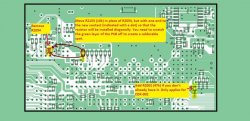
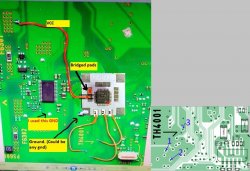
I guess I just need to check, did I miss anything buried in this thread for a CECHA01? Swap to 65nm, add modchip per picture, remove one resistor, then move a 10K over to the diagonal spot. That's all?
Tried again, no luck. But this board was a refail from a reball, and I had already repaired like half a dozen traces under the RSX from physical damage. So it was on 3034 and stayed on 3034 after the swap. Not sure this one counts either. I think I'll try the next one straight away instead....
I guess I just need to check, did I miss anything buried in this thread for a CECHA01? Swap to 65nm, add modchip per picture, remove one resistor, then move a 10K over to the diagonal spot. That's all?
I have been working on a PDN (Paint.net, basically a freeware version of photoshop) of Kiaw's pinout. I have put a lot of work into tracing out all the power and etc. @sandungas I have some photos you may want to upload to the wiki. This one I find useful for working on the board as you two seem to be doing.
I disagree with the schematic, though. It say's that all but one pad for VDDA are not connected (NC). Bottom left of the picture above, in green. Kiaw went with what the schematic say's, but if you probe the board they are connected. They're all on the same power plane and the solder balls are connected to those pads. At least on the board side they are connected. So the schematic lied! Perhaps only AP8 is connected on the RSX and the rest are NC on the RSX, @vyktormvmpay25 could you confirm?
Now that you made a wiki account try to upload the image yourself, it "should" work (and dont worry incase you break something in wiki because i will keep an eye to fix it)
I wrote an small tutorial (saturday night edition) in my user page
So... click in the image made by kiaw... then click in "edit" in it... copy the line with the text... then click at the link "upload file" at left... and paste the text you copyed, but modifying it a bit, lets say... this way:
Code:
[[Category:Hardware]] RSX 41x41 pinout. rotated like in the service manual
... click also in the button to browse the file in your PC... and upload it... done
After that you need to edit https://www.psdevwiki.com/ps3/Template:RSX_pad_layout_41x41
And add the link to the image at bottom, in the section <gallery> next to the other
By now there are only 2 images in that gallery, but is intended to add as much we need
-------
Btw, a tip i realized the other day (when i was doing the same you did by overlapping a screenshot from the service maunal with colored traces
The problem i had (and you had too) is in the service manual the VIAS (holes) are represented by an small black circle... and that black circles are not helping at all because can be confused wth the pads
When i realized about that i stopped adding colors to it because i realized the solution involved starting again
Im mentioning it just incase you have the original file well ordered in separated layers
The best way to do this (in the first step), is to take the screenshot from the service manual (where green=PAD/copper and black=VIAS)... and replace the black by green
In few words... is needed to "hide" the VIAS... or at least reduce the contrast of them because having the VIAS in black is weird
Well, one went to get recycled, and the other had too much damage/rework for me to bother with any more rework. So I moved on to a third one and I'm still having problems.
I've reballed several hundred CECHA01, I know what I'm doing. So I'm starting to think I just got a bad couple of knock off mod chips. Can I get a link to the exact chip whoever got this working already bought from? Imma order some new chips before I waste any more time scratching my head over this.
With @vyktormvmpay25 help, I've ordered the elusive bus pirate. Will soon attempt new syscon swap experiments.
@squeept Are you still talking about the modchip? I haven't been following what you are trying to do at this point. Just take a step back, put the overused/overabused boards aside. Take a CECHA01 with a confirmed problematic RSX, and then swap its RSX with the working one from slim/super slim. And then solder the modchip and resistors according to the images I had posted earlier on.
@squeept Are you still talking about the modchip? I haven't been following what you are trying to do at this point. Just take a step back, put the overused/overabused boards aside. Take a CECHA01 with a confirmed problematic RSX, and then swap its RSX with the working one from slim/super slim. And then solder the modchip and resistors according to the images I had posted earlier on.