PS3 Frankenstein PHAT PS3: CECHA with 40nm RSX

Interesting, the 2030-33 errors were related to the Power/Eject Daughter-board. I'm making note of it in my copy of the SYSCON codes PDF (I add comments as I go of various ways we've triggered/removed errors).

It actually seems like the power eject board was a lucky coincidence. The thermal 2030-2033 errors were related to resistors that weren't making proper contact ( R4030 R4031 R4083 R4084) . As it goes through them to the thermal ICs.

But now I've got another unrecoverable error 3003. It seems to indicate a power fail, no more info given. The board has been through too much abuse. I installed the original syscon back, but with the wrong temperature profile. So some components around it didn't like it. I have checked them and replaced some of them, but this time the error won't go away. I tracked it down to IC6103 (CPU VRM controller) where pin7 is 0v (no power good), and no Enable signal at pin 29. Pin22 (VCC) gets 12v.

At this point I got a bit lost so maybe this board can be set aside for spares. But ofc, @RIP-Felix , since you've got the knack for studying schematics, feel free to give some pointers...

 
Last edited:
It actually seems like the power eject board was a lucky coincidence. The thermal 2030-2033 errors were related to resistors that weren't making proper contact ( R4030 R4031 R4083 R4084) . As it goes through them to the thermal ICs.

But now I've got another unrecoverable error 3003. It seems to indicate a power fail, no more info given. The board has been through too much abuse. I installed the original syscon back, but with the wrong temperature profile. So some components around it didn't like it. I have checked them and replaced some of them, but this time the error won't go away. I tracked it down to IC6103 (CPU VRM controller) where pin7 is 0v (no power good), and no Enable signal at pin 29. Pin22 (VCC) gets 12v.

At this point I got a bit lost so maybe this board can be set aside for spares. But ofc, @RIP-Felix , since you've got the knack for studying schematics, feel free to give some pointers...

Check 3.3v_MISC. Start with PS6001 and the components around Q6001 to ensure 12v --> 3.3v. I doubt there is an issue there because I have another hypothesis that seems to make sence with where a 3003 is placed on the SYSCON error code list. So far we know 3004 is an RSX VDDC Power failure. I'm thinking 3003 is a BE VDDC power failure. I triggered a VDDC RSX failure while removing tokins from the RSX. I never triggered a power failure when removing the tokins from the CELL side. However, had I removed more of them, I might have. Engineers like to cluster related errors, since the CPU is always enumerated before the RSX, I think it stands to reason the error code just before the RSX VDDC power failure would be the same error for the CPU!

So just be sure 3.3v_MISC is good at it's source. Then trace 3.3v to the CPU's VRM controller (IC6103). It needs 3.3v to enable (Pin 29) and Power good (Pin 7), along with VID pins 0-5, otherwise the controller cannot enable the switching (IOR) VRM that provide VDDC to the CELL_BE.

First thing I notice from looking atthat controller's datasheet is a 60s maximum above 183-Deg C thermal rating. Exposure to reflow temps for lead free at 230-260C for longer than 60s can reduce it's reliability. Given the numerous reworks cycles, that can be an issue. You could try replacing it if all else fails.

Otherwise, check R6103 against a good board. It's supposed to be 1500 (+/-)7.5 Ohms. There are more of these resistors along that voltage rail and they could be easily cooked out of spec from reflow temps. Since R6103 is attached to the Power good pin, if it's out of spec, that could cause the voltage to fall below PG threshold (whatever it's set to). @1500 Ohms the voltage is 3.3v, at 1400 ohms it'd fall to 3.08v. I suspect they don't want it to fall below 3.25v. That means the resistance between a good board and this one cannot be off by more than 22 Ohms (for example only). The true number depends on what they set the power good threshold to. You'd have to inject 3.3v to the voltage rail on a good board, then slowly lower it until it triggers an error. Then we'd know what the threshold is.

Check IC6107 (CMOS) and the immediate area for damage. Compare voltages/resistance against a good board. Also check C6119 and R6119, if either of those are shorting it'll pull the enable pin low. It needs to be pulled high to enable the CMOS Out_Y, which enables the IOR Switching VRM (for CPU VDDC). Check C6113, if it's shorting it'll probably blow that 3.3v fuse protecting the Power Supply (PS6001). Just double check you are getting 3.3v on one side of it and GND on the other. All of these 1500 ohm resistors, also on VID pins 0-5, are close to the CPU region and could be easily damaged by reflow/reball/tokin repair attempts.

Speaking of tokins, if they are totally shot, this error could be due to any SMD in the VDDC circuit. However, that's all down stream from the controller. Since you're not getting 3.3v at the controller that initiates everything downstream, the filter is probably fine. I'm just bringing it up to be thorough. Another part of the filter no one checks, is the first stage RC filter (R6155/C6137, R6154/C6136, & R6153/C6135). These values are very important for the "tuning" of the second stage RC filter (Tokins). If the first stage is significantly off, the noise could be so bad it might trigger a power failure outright, skipping the 1002's altogether. You can compare their resistance value to that of a good board.

Long story short, it's complicated! You could start by opening the schematic and listing all the SMD's immediately surrounding IC6003, IC6107 (unless 3.3v_MISC is fine) and Q6001. Then, print a close-up of the schematic so you know which is which when probing. Then record the resistance values of everything on the list for both a known good board and your bad board. Then compare them to see what's different. Your looking for values that are significantly off. This will give you clues to what "might" be wrong. Or at least where to look and start voltage testing/injecting. Or it might narrow it down to the IC itself, which will give you more certainty before replacing it.

 
Last edited:
Check 3.3v_MISC. Start with PS6001 and the components around Q6001 to ensure 12v --> 3.3v. I doubt there is an issue there because I have another hypothesis that seems to make sence with where a 3003 is placed on the SYSCON error code list. So far we know 3004 is an RSX VDDC Power failure. I'm thinking 3003 is a BE VDDC power failure. I triggered a VDDC RSX failure while removing tokins from the RSX. I never triggered a power failure when removing the tokins from the CELL side. However, had I removed more of them, I might have. Engineers like to cluster related errors, since the CPU is always enumerated before the RSX, I think it stands to reason the error code just before the RSX VDDC power failure would be the same error for the CPU!

So just be sure 3.3v_MISC is good at it's source. Then trace 3.3v to the CPU's VRM controller (IC6103). It needs 3.3v to enable (Pin 29) and Power good (Pin 7), along with VID pins 0-5, otherwise the controller cannot enable the switching (IOR) VRM that provide VDDC to the CELL_BE.

First thing I notice from looking atthat controller's datasheet is a 60s maximum above 183-Deg C thermal rating. Exposure to reflow temps for lead free at 230-260C for longer than 60s can reduce it's reliability. Given the numerous reworks cycles, that can be an issue. You could try replacing it if all else fails.

Otherwise, check R6103 against a good board. It's supposed to be 1500 (+/-)7.5 Ohms. There are more of these resistors along that voltage rail and they could be easily cooked out of spec from reflow temps. Since R6103 is attached to the Power good pin, if it's out of spec, that could cause the voltage to fall below PG threshold (whatever it's set to). @1500 Ohms the voltage is 3.3v, at 1400 ohms it'd fall to 3.08v. I suspect they don't want it to fall below 3.25v. That means the resistance between a good board and this one cannot be off by more than 22 Ohms (for example only). The true number depends on what they set the power good threshold to. You'd have to inject 3.3v to the voltage rail on a good board, then slowly lower it until it triggers an error. Then we'd know what the threshold is.

Check IC6107 (CMOS) and the immediate area for damage. Compare voltages/resistance against a good board. Also check C6119 and R6119, if either of those are shorting it'll pull the enable pin low. It needs to be pulled high to enable the CMOS Out_Y, which enables the IOR Switching VRM (for CPU VDDC). Check C6113, if it's shorting it'll probably blow that 3.3v fuse protecting the Power Supply (PS6001). Just double check you are getting 3.3v on one side of it and GND on the other. All of these 1500 ohm resistors, also on VID pins 0-5, are close to the CPU region and could be easily damaged by reflow/reball/tokin repair attempts.

Speaking of tokins, if they are totally shot, this error could be due to any SMD in the VDDC circuit. However, that's all down stream from the controller. Since you're not getting 3.3v at the controller that initiates everything downstream, the filter is probably fine. I'm just bringing it up to be thorough. Another part of the filter no one checks, is the first stage RC filter (R6155/C6137, R6154/C6136, & R6153/C6135). These values are very important for the "tuning" of the second stage RC filter (Tokins). If the first stage is significantly off, the noise could be so bad it might trigger a power failure outright, skipping the 1002's altogether. You can compare their resistance value to that of a good board.

Long story short, it's complicated! You could start by opening the schematic and listing all the SMD's immediately surrounding IC6003, IC6107 (unless 3.3v_MISC is fine) and Q6001. Then, print a close-up of the schematic so you know which is which when probing. Then record the resistance values of everything on the list for both a known good board and your bad board. Then compare them to see what's different. Your looking for values that are significantly off. This will give you clues to what "might" be wrong. Or at least where to look and start voltage testing/injecting. Or it might narrow it down to the IC itself, which will give you more certainty before replacing it.

Thank you so much. Most of it has been my thinking also. The fuses are all fine. I have checked 1500 ohms resistors and other components many times. I have even replaced the IC6103 and IC6107 with no change. There is something off about the 3.3v_MISC line. At Q6001, there is a very weak attempt to provide 3.3v, but it fades before it could start. The syscon shuts everything down reaaally fast. I have compared the resistances against the working board and the only thing that seems different is that the resistance from 3.3v to ground shows 1k in the working board, but 0.5k in mine. But there are quite a few components that are placed in between, so tracking one of them down would be quite an endeavour.

I am afraid there is no point in trying to revive it anymore as it has become more trouble than it's worth...
 
Thank you so much. Most of it has been my thinking also. The fuses are all fine. I have checked 1500 ohms resistors and other components many times. I have even replaced the IC6103 and IC6107 with no change. There is something off about the 3.3v_MISC line. At Q6001, there is a very weak attempt to provide 3.3v, but it fades before it could start. The syscon shuts everything down reaaally fast. I have compared the resistances against the working board and the only thing that seems different is that the resistance from 3.3v to ground shows 1k in the working board, but 0.5k in mine. But there are quite a few components that are placed in between, so tracking one of them down would be quite an endeavour.

I am afraid there is no point in trying to revive it anymore as it has become more trouble than it's worth...
Okay, well there is a more dramatic way to find shorts. The idea is to choose a juicy target, like an inductor, that sits between 3.3v and the stuff downstream. I'll have a look at the schematics later and see if I can find a likely target.

Then comes the dangerous part. You remove the component and probe both pads to see which side has the short (or low resistance). That narrows it down. Then you inject 3.3v on that side. The short will get hot. You can feel around for it and (oh God I'm going to say it) use IPA to see what evaporates quickest. You could use a Flir camera but the resolution sucks unless you have a very expensive one. A small amount of IPA is going to evaporate quick and not have much time to catch fire and burn. Of course this method is pretty hard core, but if the choice is between the scrap pile and this, then why not?
 
@DeadEnd I think I have the target for you. Next to Q6001 is L6001. Remove it. Then probe. It should read open line on one side of it and 0-0.5k on the side of the short. It doesn't sound like you have a complete short, more like it's on it's way out. Inject 3.3 volts on the side of the short and the component that's shorting will get hot. Warning, you may get magic smoke at this point and the burn could cause permanent damage. Have a look at page 23 of the COK-002 schematic. 3.3v goes to a bunch of IC's downstream of that inductor (IC's 6019,6008, 6011, 6012, 6007, 6013, 6014, Q6004, etc.) Each of them looks to have a capacitor to GND, so if any one of them is shorting it could cause the problem. They are literally all over the board, so you'll have to feel around for awhile to find it. A flir camera would come in handy for this. Even a cheap one (cheap is $300). Or you could use an IR thermometer if you are careful to aim at the right places. I guess the IPA trick could work. I just wouldn't recommend spraying the whole board. Just each IC one at a time.

Hmm I've had it in this setup for about 10 mins and no heat. I have my power supply set to 1 Volt and the board is pulling 528mA. I'm spraying the board down with 99% IPA to see what is drying quicker. I can't really see any sections sticking out. RSX is not warm.

43Wu5Hl.jpg

8b1bd3d2-1b2e-4837-bd70-223eb12d36b9
Oh, dear God! Please don't spray a flammable polar liquid on an energized board! It just seem to me like a bad idea, for obvious reasons.
First I need to apologize for the above comment. While I stand by the sentiment that this is a pretty extreme thing to do and not ideal, I was being an elitist worry wort! I recently watched this video by Louis Rossman where he uses the same method and explains his reasoning.
I get that it's cheap and effective, it's just not the ideal solution in my mind. Regardless, if it works and isn't expensive, who am I to judge the way you repair YOUR boards! So I apologize for being too quick to pass judgment! I can now appreciate the utility of what you were up to and don't want to discourage you from contributing. I maintain this is a risky method and shouldn't be attempted if avoidable! If you have no other way to find the short, then I guess you have nothing to loose.

Here is another example.
 
Last edited:
@DeadEnd I think I have the target for you. Next to Q6001 is L6001. Remove it. Then probe. It should read open line on one side of it and 0-0.5k on the side of the short. It doesn't sound like you have a complete short, more like it's on it's way out. Inject 3.3 volts on the side of the short and the component that's shorting will get hot. Warning, you may get magic smoke at this point and the burn could cause permanent damage. Have a look at page 23 of the COK-002 schematic. 3.3v goes to a bunch of IC's downstream of that inductor (IC's 6019,6008, 6011, 6012, 6007, 6013, 6014, Q6004, etc.) Each of them looks to have a capacitor to GND, so if any one of them is shorting it could cause the problem. They are literally all over the board, so you'll have to feel around for awhile to find it. A flir camera would come in handy for this. Even a cheap one (cheap is $300). Or you could use an IR thermometer if you are careful to aim at the right places. I guess the IPA trick could work. I just wouldn't recommend spraying the whole board. Just each IC one at a time.

This was actually very useful and I appreciate your research, but as it has turned out there is no 0.5k anymore on that line at all. Perhaps it was dependent on one of the mosfets being opened or closed, or capacitor being charged or discharged. Either ways, it's showing fine resistance, yet the board is convinced there is a power fail. I have actually tried to inject 3.3v into the power good line of IC6103, only to get errors 201001 (BE Vram power fail?) and 203010. So I'm afraid this is going to be left as a mystery board.
 
Thermal Tests Continued...
(Optimized Stock BC Model)​

Today I tested PS3#7 (90nm CELL/RSX). Both the CPU and GPU have been delided. There is MX-4 on the interface between the IHS/DIE's. I chose not to use LM between the IHS/DIE's because I didn't feel like getting out the nail polish and covering the exposed RSX SMDs. Electrically non-conductive thermal paste is just safer and easier to use.

I soldered the IHS's to the Heatsink using indium foil which melts at 57C. Don't let that fool you! It will not melt if you try to "burn it in" on the console itself. Getting a HS up to 57C is the hard part, especially one with heat pipes directly underneath! It took a A LOT of heat with a hot air station to heat soak the HS and get the foil to finally melt. But now I have a HS that is essentially in direct die contact now.

Liquid Metal (LM) can be used on the interface between the IHS and DIEs, but not the aluminum HS. So that's why I used the Indium foil.
Indium foil has a thermal conductivity of 84W/mK. For comparison, Thermal Grizzly Conductonaut LM is 73W/mK. Unlike LM, Indium is non-corrosive to aluminum. It's the Gallium that makes LM corrosive to aluminum. Also, Gallium only has a conductivity of 40.6W/mK, so that's what brings LM's conductivity down. However, Gallium lowers the melting point to room temperature. That's the tradeoff.

Results (1hr NBA Live 2010):
CPU = 73°C (ΔT=49°C)
GPU = 67°C (ΔT=43°C)
Fan = 30% (0x4d)
Ambient = 24°C
Exhaust = 50°C (ΔT=26°C)

That's the highest change in exhaust temperature I've recorded. It's a qualitative measurement of the thermal interface material's performance. I just move an IR thermometer around the back of the console looking for the hottest spot/reading I can find. The console doesn't need to be opened at all for this measurement to be used for comparisons. You want the Delta T to be as high as possible, because it means it's pulling the heat out of the console more efficiently.

I need a baseline test with just MX-4 to compare. All in all, these temps are reasonable for a BC, Perhaps a few C better. That's about what I'd expect from a significantly better thermal paste. The gains are usually not spectacular.
 
Mx4, Mx2, or AS5 are good enough for ps3, LM will give few grades difference and I'm afraid is a bit unstable there. Grease form is more likely to give confidence. Testing LM before didn't surprise me and personally I've chosed not to buy anymore until I get ps5 on repairs. If that unit was designed for that I will use it for it.
 
A few degrees lower seems insignificant, but the difference it makes in component lifespan is much greater. A couple degrees could stave off a YLOD for months to years, who knows. It depends on a lot of other variables, but every little bit counts.

The bigger issue is how much you're willing to spend to eek out those last few degrees. If MX-5 gets you 90% of the performance and expensive Liquid Metal + Indium Foil buy's you the last 10%, then is it worth it to you? I would argue that it isn't for a shop selling consoles or repair services.

Even that cheap white stuff SONY used is fine for where they put it. The HS/IHS interface has much more surface area than does the DIE/IHS interface. They used good stuff on the DIE/IHS interface, which is more important. The larger surface area of the IHS/HS interface will make up the difference in thermal conductivity of using the cheap stuff there.

IMO the best solution is to use indium foil on the DIE/IHS interface and glue the IHS back on for rigidity. (Side note: I think that last point is important for reducing BGA stress! Looking at PS4/5 APU's they have a metal piece that braces the chip's substrate. Later PS3 revisions have plastic bumps that contact the IHS, which I think serve the same purpose. When we delid we are not gluing the IHS back on, it looses the structal support that the IHS was providing and it might warp more, leading to premature BGA failure again. Even with leaded solder balls. We really should be gluing them back on.) Anyway, Indium will not degrade or loose performance, so it's a permanent solution with the best performance. Then MX-5 on the HS/IHS interface will be more than enough.
 
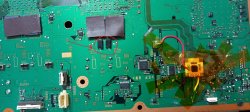
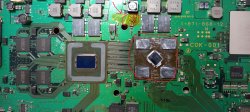
A small update. I've been working on @truemaster's cok-001 board and faced a lot of difficulties. I had to go back to practicing boards to find out what was causing the problem. I must emphasise that it is extremely important to secure the board firmly in position during the heat-up and also ensure a slow cool-off. The board can warp more than you'd expect and some of the balls may not take contact or will end up merging, which may cause a short or all kinds of strange/random errors. After learning my mistakes I performed the swap correctly.

It is a japanese CECHA and I had to jailbreak it to test ps2 games. I only had a few, so it is not a definitive test. I got 3 games to run from disc, one of which is Gran Turismo 4. But one game that I used in the video, Broken Sword, would hang after logo screen. It seems it is one of the rare ones CECHA cannot handle? Which is strange, because CECHC can actually run it just fine as you remember. I could not find info online whether anyone had tested it on a CECHA, so it's most likely just one of those games....
 
Last edited:
A small update. I've been working on @truemaster's cok-001 board and faced a lot of difficulties. I had to go back to practicing boards to find out what was causing the problem. I must emphasise that it is extremely important to secure the board firmly in position during the heat-up and also ensure a slow cool-off. The board can warp more than you'd expect and some of the balls may not take contact or will end up merging, which may cause a short or all kinds of strange/random errors. After learning my mistakes I performed the swap correctly.

It is a japanese CECHA and I had to jailbreak it to test ps2 games. I only had a few, so it is not a definitive test. I got 3 games to run from disc, one of which is Gran Turismo 4. But one game that I used in the video, Broken Sword, would hang after logo screen. It seems it is one of the rare ones CECHA cannot handle? Which is strange, because CECHC can actually run it just fine as you remember. I could not find info online whether anyone had tested it on a CECHA, so it's most likely just one of those games....

Cool another A model. I'm not alone anymore (well, besides botakompong)! I'm curious, 40nm or 65nm RSX? Voltage mod?

I read some post where a user claimed the HW based PS2 BC on A/B models is something like 94%. IDK where they were getting their information, but I couldn't find a compatibility list online. Is anyone aware of a PS2 compatibility on PS3 list that breaks it down by A/B (full HW) and C/E (Hybrid)? I saw one, but it didn't list A/B models vs C/E models. Seems like someone would have. Wikipedia often has that sort of thing, but "PS2 compatibility on PS3" yields terribly useless search results!
 
Cool another A model. I'm not alone anymore (well, besides botakompong)! I'm curious, 40nm or 65nm RSX? Voltage mod?

I read some post where a user claimed the HW based PS2 BC on A/B models is something like 94%. IDK where they were getting their information, but I couldn't find a compatibility list online. Is anyone aware of a PS2 compatibility on PS3 list that breaks it down by A/B (full HW) and C/E (Hybrid)? I saw one, but it didn't list A/B models vs C/E models. Seems like someone would have. Wikipedia often has that sort of thing, but "PS2 compatibility on PS3" yields terribly useless search results!

This time it was a 40nm with a voltage mod and two extra capacitors. But now I realized, I didn't add the 47k resistor... Hmm, would it make a difference, I wonder?

I could only find this list. That game is not in it, it was only released in EU.

https://en.everybodywiki.com/List_of_PlayStation_2_games_compatible_with_PlayStation_3

cok-001-1.jpg
cok-001.jpg
 
Last edited:
hehe love it. im also glad my console had something to learn regarding reball. although i can swear that visually i cant see thikness difference from cok-002 regarding ps2 functionality i think too that broken sword is one of the games that cant be handled. Gt4 is one of the heavy ps2 games that streach ee/gs to full work and that is playing ok, the ps2 hardware is initialized and play software. For example @RIP-Felix ps3 will hang if ps2 software is launched (hope to fix it cause a cecha with no ps2 support its just like a dia or sem) so propably my ps3 is fine. But more ps2 software tests will show more.that 47k resistor isnt only for cook-002? and for cok-001 if glod?
 
Last edited:

This peaked my interest. DEMOCRATIZE THERMAL PASTE! Hell, yes. So looking forward to the next video in which he releases the formula. You know that I'll be making it! @vyktormvmpay25 you may want to pay attention. 1 penny per gram vs $1 will save you lots of money. And your customers will get one of the worlds best performing products.

BUT...it's still new. How long will it perform before breaking down? Who knows!
 
This time it was a 40nm with a voltage mod and two extra capacitors. But now I realized, I didn't add the 47k resistor... Hmm, would it make a difference, I wonder?

I could only find this list. That game is not in it, it was only released in EU.

https://en.everybodywiki.com/List_of_PlayStation_2_games_compatible_with_PlayStation_3

View attachment 34854
View attachment 34855
It might! @botakompong said they only did that because somtimes the system would hang. Sounds kinda like what you described. I'd say do it and see. Easy thing to do and prevents a potential problem. I'm sure truemaste will want it.

EDIT: that link was exactly what I was looking for. Thanks. They don't mention the freeze where I encountered it in Harry Potter and the Chamber of secrets, but do say there is a freezing issue. Thing is it's only on C/E models. They just say yes for A/B compatibility. I can't be the only one to have collected the first wizzard tokin on an A/B model. So I wonder what gives. I just need to pull out another console and see if it's just this one, but I'm very lazy. Maybe later.
 
Last edited:
For example @RIP-Felix ps3 will hang if ps2 software is launched (hope to fix it cause a cecha with no ps2 support its just like a dia or sem) so propably my ps3 is fine. But more ps2 software tests will show more.that 47k resistor isnt only for cook-002? and for cok-001 if glod?
Yeah, I still haven't troubleshooted that console yet. I...hate...troubleshooting. And it's not like I have a shortage of PS3's underfoot. I've turned my sights to an E model. I'm just waiting for my mod chips to arrive.
 
Yeah, I still haven't troubleshooted that console yet. I...hate...troubleshooting. And it's not like I have a shortage of PS3's underfoot. I've turned my sights to an E model. I'm just waiting for my mod chips to arrive.

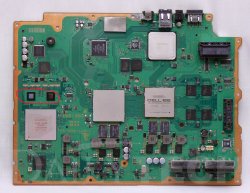
Little did I realize there are several types of COK-001 boards. So Important question, @RIP-Felix , does your board have the chips with exposed die next to EE/GS ? Because I have now tested the revision that has black encased chips. So it could be that your model of the board is a different beast and its compatibility with a modchip is still unclear.

PS3_NTSC_COK-001_motherboard_(60GB_version).jpg
 
Last edited:
A little update. Yeah, Broken Sword will not start even on an untouched working japanese CECHA (Which I managed to receive from Japan earlier than anticipated). Must be something about the game... Works only on a CECHC/E. Maybe has something to do with pal region. Ironic, you would think there is nothing CECHA can't handle, but apparently there is at least one :D
 
Back
Top