PS3 Frankenstein PHAT PS3: CECHA with 40nm RSX

You just gave me an idea for a special jig for using with that molybdenum wire you're talking about. I'm thinking some kind of jig to hold an RSX with a screw knob that the wire mounts to. Pop the chip into the jig, screw down a second half of the jig to hold the chip firmly in place and then turn the screw to apply even tension to the molybdenum wire so it cuts evenly into the thermoglue of the RSX.

This is kinda an early WIP but maybe shows what I'm trying to describe a bit. The two channels will be for the molybdenum wire.

<Edit> I updated the design which shows what I mean a lot better. The idea is to turn the RSX upside down, so BGA pad side facing up and hook the molybdenum wire between the IHS and the VRAM modules and to two posts on the gears on the right hand side.

After that place a cover I've yet to design over the top, clamp it down and screw down a small plastic bolt to hold the RSX firmly in position. Finally, use the wheel to tighten the molybdenum and slice right through the thermoglue on the RSX VRAM modules.
I ilke the idea of creating a jig for the cutting wire, the goal is to adjust the position of the wire very accuratelly and also to simplify the work (handling the wire with our hands is a pita because is the kind of work that takes lot of time)
But i think there is a problem in your design, in the way how is aligned the wire you are trying to cut one side of the square... or better said you are trying to cut 2 corners + 1 side all together
Thats a problem because is going to generate too much friction

What we need to do is to start cutting in the weakest point (a corner) to minimize the friction, after that we need to rotate the jig 90º to cut other corner, and so on
In other words, the jig should be re-attached 4 times to the RSX in 4 different positions

While thinkinig in it i started drawing it with pen and paper :D (i had to review it 2 or 3 times), i dont have any cad design app, but i made a dirty sketchup in photochof
Is not finished though... still open to more improvements, i have not dedicated much time to it but i think it can be made in a 3D printer with plastic
Wire-delidding-jig-copy.jpg


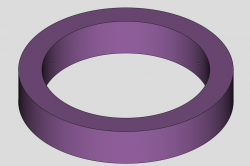
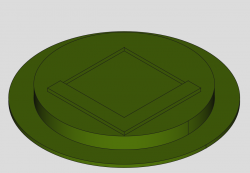
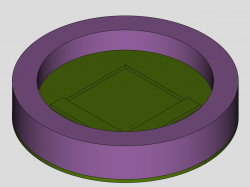
The geometry is simple, is just an square inside a circle, and is composed by 2 pieces... the external piece is a "ring" because i want to be able to hold the ring with a hand and rotate it back and forth to create the "sawing" effect

The depth of the square is the thickness of the IHS (upper side of the IHS)
The 2 little holes of the ring are intended to insert the wire... by now i have not though in how to attach the wire to the ring, but keep in mind we just need to hold one of the extremes of the wire to one point of the ring. The other extreme of the wire doesnt needs to be fixed, we can grab the wire roll/tape with a hand
 
Last edited:
I used this wire when I delid on my device:
https://pt.aliexpress.com/item/1005...216512011364544459e4403|12000015685172737|sea

I bought the 0.08mm one and it's an extremely resistant wire, I don't know what the average thickness of the glue on the CELL BE IHS is, but it cut it extremely easily, so much so that I scratched the IHS from pulling the wire upwards so it wouldn't scratch the MB , but it was successful, no CPU or MB damage :)
 
I ilke the idea of creating a jig for the cutting wire, the goal is to adjust the position of the wire very accuratelly and also to simplify the work (handling the wire with our hands is a pita because is the kind of work that takes lot of time)
But i think there is a problem in your design, in the way how is aligned the wire you are trying to cut one side of the square... or better said you are trying to cut 2 corners + 1 side all together
Thats a problem because is going to generate too much friction

What we need to do is to start cutting in the weakest point (a corner) to minimize the friction, after that we need to rotate the jig 90º to cut other corner, and so on
In other words, the jig should be re-attached 4 times to the RSX in 4 different positions

While thinkinig in it i started drawing it with pen and paper :D (i had to review it 2 or 3 times), i dont have any cad design app, but i made a dirty sketchup in photochof
Is not finished though... still open to more improvements, i have not dedicated much time to it but i think it can be made in a 3D printer with plastic
Wire-delidding-jig-copy.jpg


The geometry is simple, is just an square inside a circle, and is composed by 2 pieces... the external piece is a "ring" because i want to be able to hold the ring with a hand and rotate it back and forth to create the "sawing" effect

The depth of the square is the thickness of the IHS (upper side of the IHS)
The 2 little holes of the ring are intended to insert the wire... by now i have not though in how to attach the wire to the ring, but keep in mind we just need to hold one of the extremes of the wire to one point of the ring. The other extreme of the wire doesnt needs to be fixed, we can grab the wire roll/tape with a hand

Oooh, I really like your design! I went ahead and replicated this using FreeCAD. I've attached the CAD file and some screenshots. @sandungas hopefully it'll save you some time.
 

Attachments

I think you guys are WAY overreacting.

About solvents, they won't work. Epoxy works by crosslinking polymers. They chemically interlock once cured and are resistant to solvents. They do soften at higher temps though. But you need temps above 150C. I would say closer to 180, measured with a thermocouple to be sure. Most people I see trying to use a hairdryer or hot air wand are not using a preheater or jig to keep the MB strait. That method wont get it hot enought. The heat will dissipate too quickly. Or it'll warp the board.

The best time to delid a 40nm RSX is when it's off the board. But you could delid before removing it from the slim it was installed on. When it gets up to 180C use the lever method. Then continue with pull. But, no, there really is no good method to delid the 40nm RSX. IMO, any method risks damage. So what's wrong with the wedge method? Yes you are essentially pulling up, and can damage the VRAM, but you take that chance anytime you delid the RSX. It's why I don't recomend doing it. If you have to because the TIM is bad, then you have to chance it. If it destroys the VRAM, well that sux. You'll have to replace the RSX. Best to not worry about it until you have to.

It's not going to happen very often if you use heat wedge/lever method. Or razorblade cutting method while off the board. So I wouldn't overthink it.

Curious if you can pull the cell and RSX off the board, can you solder the IHS on to both and remove the problem with thermal paste?
No need for solder. If anyone wants a permanant solution that is very good and permanant, then just use graphite thermal pads and the MG chemicals epoxy I linked before. Even if the epoxy is so strong you can never delid again, the thermal pad will never degrade or loose performance (Which is surprisingly great). So it never needs to be. You can seal it and forget it.
 
Oooh, I really like your design! I went ahead and replicated this using FreeCAD. I've attached the CAD file and some screenshots. @sandungas hopefully it'll save you some time.
Im glad you like it because now we have a basic design to discuss, as said before there are some details that needs to be reviewed, when i was painting it in photoshop i was not "steeping back" because i was in a hurry, but when it was finished i had one of that "auch" moments

Btw, you did well in adding a base to the inner piece, because we need them to be well aligned with each other, maybe there are other alternatives to achieve that but by now im not sure how to improve that connection in between the 2 pieces... anyway, the base you added is fine as a concept, is really needed

The problem i had is i wanted to use the jig while the RSX is soldered to the motherboard... but the height of the ring doesnt allows it
I mean... the actual design if fine to place it on top of a table, a desoldered RSX inside it with the solder balls aiming to top... but to do the delidding "onboard" the design would not change too much
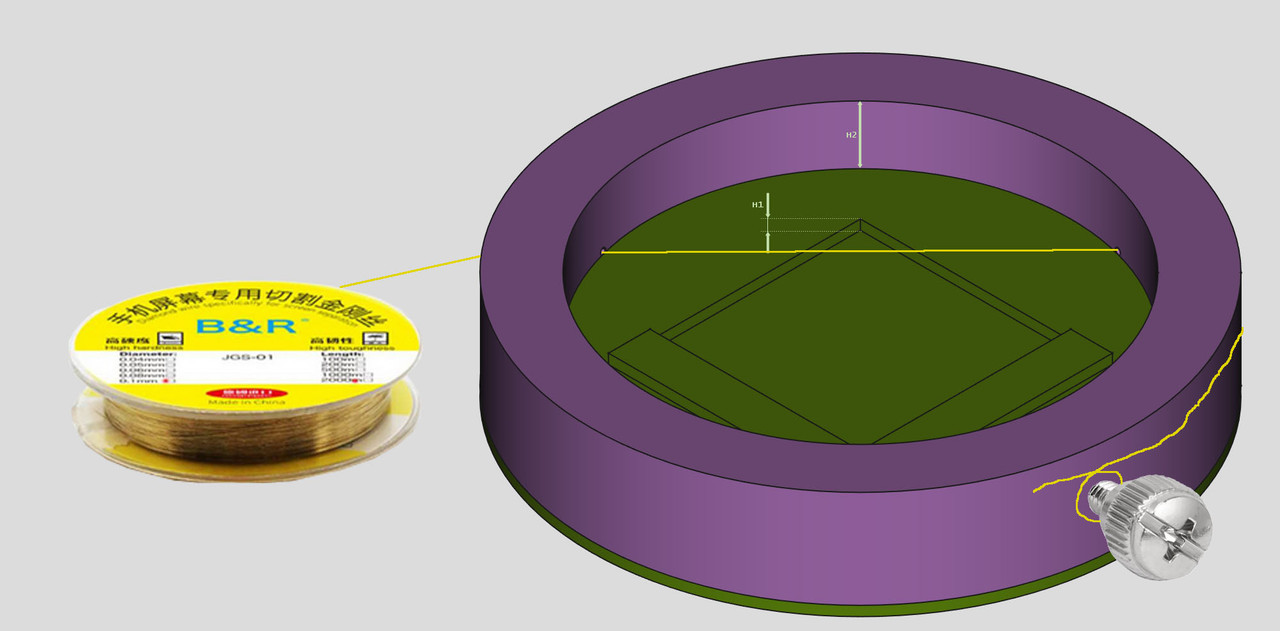
Screenshot-from-2022-04-29-10-55-51-copy.jpg


H1 = is the thickness of the IHS (around 2.5mm for RSX, and 1.5mm for CELL)
H2 = is the distance in between the bottom of the IHS and the top of the surrounding motherboard components (around 1mm)
Can you redraw it with this proportions ? (doesnt needs to be accurate, by now we are just doing sketchups)
The distance H2 doesnt makes any difference when delidding a desoldered RSX, but i hope is going to allow to do the deliddind "onboard"

I also added a bolt to show you an easy way to grab the wire... the point is.... the better way to grab a wire is if we "roll" it around something
Is pretty much the same effect if we try to pull from a cotton thread with our bare hands... if we keep the thread straight is tricky to grab, but if we roll it around one of our fingers it can be grabbed much better
So... im rolling the wire around a bolt... i choosed that PC bolts because are designed to screw them with our bare hands (this way when the wire breaks, we can replace it very fast and without any tool)
The only flaw i see is if the jig pieces are going to be 3D printed in plastic and im not so sure if the plastic is going to handle the pulling tensions without deforming the thread for the bolt... anyway... this is another "prototype" idea open to improvements... is better to add something for it just because is another concept to keep in mind, is really needed too, at least in one of the holes
And btw... this bolt needs to be located veeery close to the hole (to optimize the amount of wire we use, if the wire breaks we need to minimize the lenght of the broken wire section)

At the other hole i painted the roll/tape of wire because we can grab it with our bare hand... i know it would be better to grab the wire at the 2 sides of the ring (with some kind of clips), but by now i dont have any better suggestion for it yet

Im not going to build it btw... is just i like this kind of games :)

----------------
Edit:
I mean...
screenshot-from-2022-04-29-10-56-20-png.37044

The height of the ring is fine, we need to grab it with a hand, so we should not reduce it... actually it would be easyer to use if we increase it
screenshot-from-2022-04-29-10-56-06-png.37045

But to do the delidding "onboard" it would be needed to increase the height of the inner piece (at the inner circle), it needs to be around double the height we painted

*and move the holes of the ring, veeery close to the ring flat surface
 
Last edited:
And couldnt the design be simplified to only have half the square?

Because the way the force is being applied, only one corner of the heatspreader/chip is being held against the "jig", but the opposite corner is not. The wire itself would hold it/push it against the jig on the opposite side.

Do it fo once for each corner and rotate, 4 times in total. And sure, should be possible on board too. Maybe if somebody gets the idea can illustrate it better, I am on phone only right now hehe.

About solvents, they won't work. Epoxy works by crosslinking polymers. They chemically interlock once cured and are resistant to solvents. They do soften at higher temps though. But you need temps above 150C. I would say closer to 180, measured with a thermocouple to be sure. Most people I see trying to use a hairdryer or hot air wand are not using a preheater or jig to keep the MB strait. That method wont get it hot enought. The heat will dissipate too quickly. Or it'll warp the board
About solvents not working in theory, well... Maybe it was just placebo but to me it seemed to help. Obviously just alcohol didnt make the thing fall off by itself but it seemed to reduce the force required. It certainly didnt hurt.
And afterwards, to remove the "cement" residue off the ram chips and IHS, the simple alcohol really seemed to help.
Also I dont know what kind of adhesive they used and whator if it was epoxy at all, or what kind...

In any case, yeah you are right. It shouldnt be that difficult to do it right without destroying, we are just trying to remove the remaining risk and make it foolproof, like the CELL already is with the proper tool. (In my opinion at least)
 
And couldnt the design be simplified to only have half the square?

Because the way the force is being applied, only one corner of the heatspreader/chip is being held against the "jig", but the opposite corner is not. The wire itself would hold it/push it against the jig on the opposite side.

Do it fo once for each corner and rotate, 4 times in total. And sure, should be possible on board too. Maybe if somebody gets the idea can illustrate it better, I am on phone only right now hehe.
I guess you are thinking in how to simplify it even more, but the point is... when we cut in a corner we need to counterfeit the applyed force in the opposite corner (is the action-reaction motion law of newton btw), so we need to "surround" the square with some material anyway to "grab" it from the opposite side, and the inner piece is intended to grab the IHS all around
If we reduce the amount of material from the inner piece is going to become a bit weak
And the ring... well, it allows to do the "sawing" movement with the wire located at an accurate height

By now im not so sure how far we can go with this design... in my initial drawing i added a couple of "walls" in the inner piece to prevent doing the full 360º rotation... but is just because im not so sure if is posible to do it (geometrically)
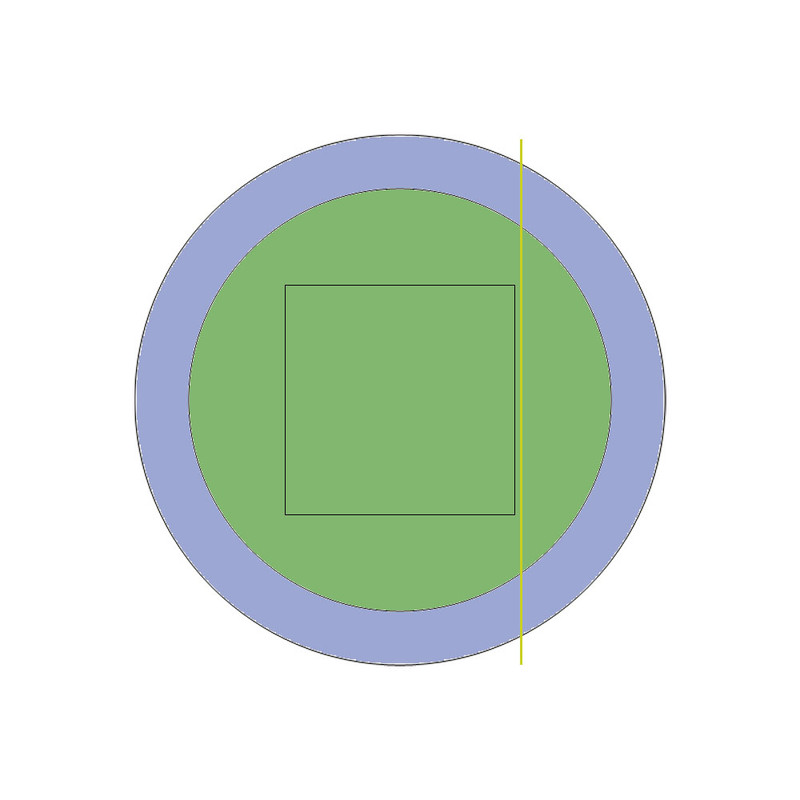
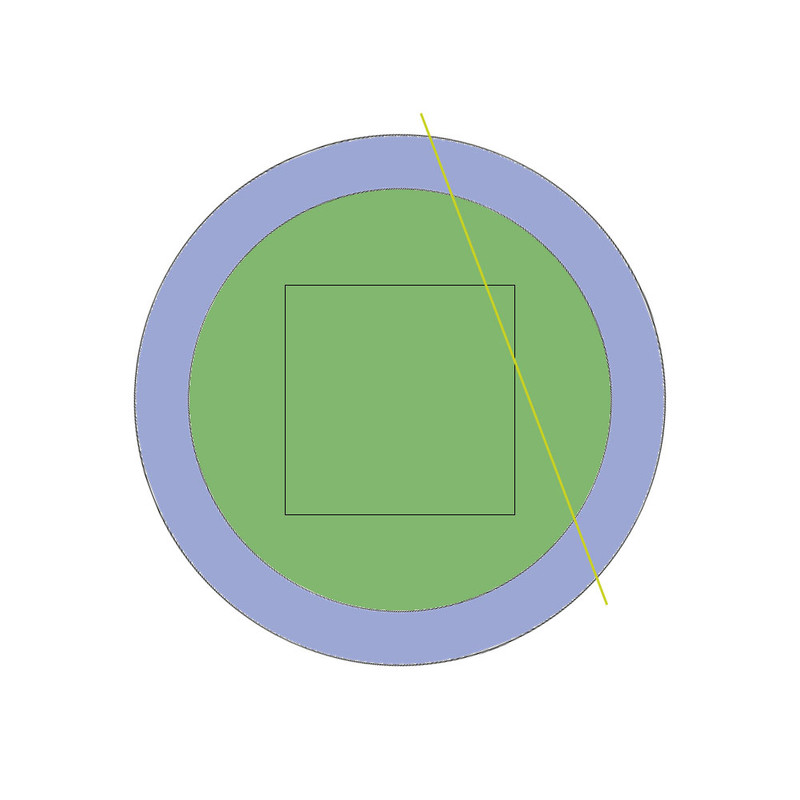
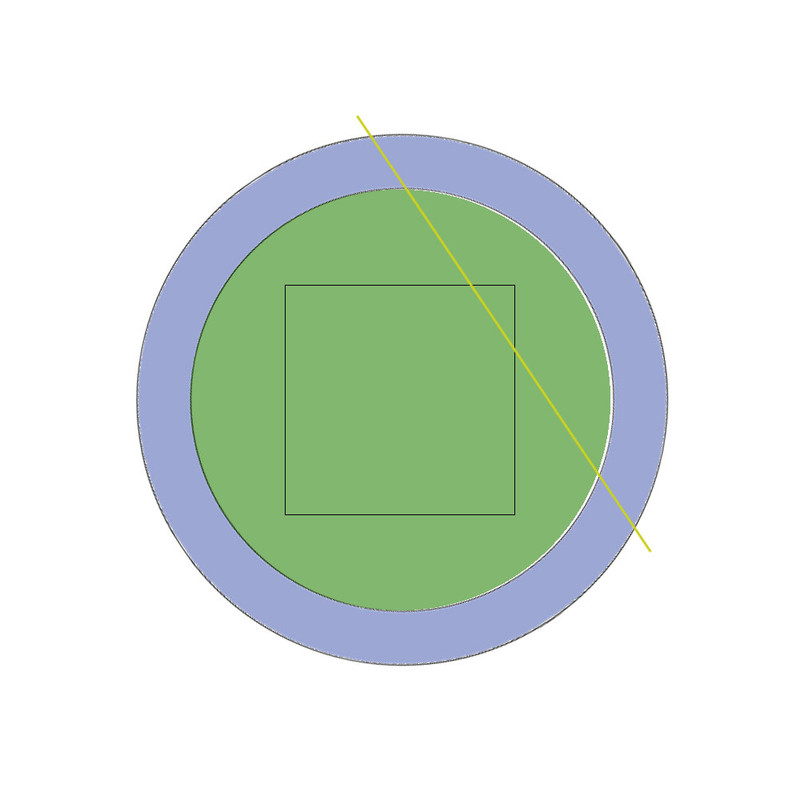
At some point someone needs to do some "real world" meassures because the position of the ring little holes (to insert the wire) are very important, i made 3 drawings to show the concept from a "top view" perspective:

rot-1.jpg

rot-2.jpg

rot-3.jpg


In the initial position the wire should not touch the IHS... but it needs to be veeery close to the IHS border
When we start rotating the ring we are doing the same effect when a butcher is trying to cut a piece of meat with a huge knife in a single slow movement but moving the arm a lot... the "attack angle" of the wire varies... i guess this variable angle is going to improve the cut :)

But... we dont know how far we could go with the rotation... in this drawing it looks like is only able to cut the corners but im not sure if at some point we could improve it to do the whole delidding in a single 360º rotation (in that case we should remove the walls i added in my initial design)

I guess the only way to know how much we can cut is to meassure evrything and "redraw" it again (prototype 2 \o/)
 
In all seriousness, though, I'm definitely eventually getting a capable CNC machine. I've borked 2 out of 10 now, when I haven't borked one before that in years / hundreds. The added benefit of cutting out lead free rework cycles entirely to prevent the occasional popcorned board is just icing on the cake.
 
@NewRetroRepair there is another design detail that is rolling around my head and worths to be mentioned as soon as posible, just incase you start drawing more versions of it, keep this "problem" in mind
Screenshot-from-2022-04-29-10-55-51-copy.jpg

Im going to use this image as reference because is very tricky to draw it

The flat surface of the external ring that is fully visible in this image, is a candidate to hit with some components of the motherboard, the location of this disturbing components depends of the motherboard model, and there are a lot of motherboard models... so by now... we need to minimize that surface area

The solution... is to make the external wall of the ring "conical", but only to half of his height (or 1/3 of his height) because we still need to grab the ring with our hands and a ring entirelly conical is not much ergnonomic, lol
I hope you got the mental image... the point is the flat surface visible in that image needs to have a width of just a few milimeters (something in between 3mm and 5mm)
This way we are reducing the probabiities to "hit" with some motherboard component

---------
As a bonus... this "semi-conical" ring is going to allow to take a better look at the wire
Actually.... i guess it can be removed some more material from the ring (in paralell to the wire little holes) to have a better view of the cut
Aaaand the little holes can be replaced by an "slot" in paralell to the flat surface i was mentioning previously (this last idea is harder to explain with words... i will return to it later, it simplifyes it a bit more i guess)
 
Last edited:
CNC dude says the Z axis resolution may be problematic in small, affordable machines that are capable of milling copper, but that it's close. Seems like worst case scenario is that it's not silly cheap.

But, that all depends on what we consider safe. Can we peel half a millimeter of malleable copper off of the RSX with no chance of damage? A full millimeter?
 
@NewRetroRepair there is another design detail that is rolling around my head and worths to be mentioned as soon as posible, just incase you start drawing more versions of it, keep this "problem" in mind
Screenshot-from-2022-04-29-10-55-51-copy.jpg

Im going to use this image as reference because is very tricky to draw it

The flat surface of the external ring that is fully visible in this image, is a candidate to hit with some components of the motherboard, the location of this disturbing components depends of the motherboard model, and there are a lot of motherboard models... so by now... we need to minimize that surface area

The solution... is to make the external wall of the ring "conical", but only to half of his height (or 1/3 of his height) because we still need to grab the ring with our hands and a ring entirelly conical is not much ergnonomic, lol
I hope you got the mental image... the point is the flat surface visible in that image needs to have a width of just a few milimeters (something in between 3mm and 5mm)
This way we are reducing the probabiities to "hit" with some motherboard component

---------
As a bonus... this "semi-conical" ring is going to allow to take a better look at the wire
Actually.... i guess it can be removed some more material from the ring (in paralell to the wire little holes) to have a better view of the cut
Aaaand the little holes can be replaced by an "slot" in paralell to the flat surface i was mentioning previously (this last idea is harder to explain with words... i will return to it later, it simplifyes it a bit more i guess)

Well the first prototype is half ready. The RSX test fit is pretty much perfect as well :D
 

Attachments

  • PXL_20220430_134326203.jpg
    PXL_20220430_134326203.jpg
    254.9 KB · Views: 90
I suppose it's good that you guys are obcessing over what I consider a minor thing. I'd love to be wrong and have a better way to delid the rsx. So I'm rooting for you to succeed.

This one just doesn't fire me up.
 
Hello, guys!
Sorry for the weak English.
Immediately the question is: was there at least one successful case of replacing 90 nm RSX with 65 nm? Specifically on DIA-001?

Backstory: I have a PS3 Phat CECHH, 65/90 nm. (DIA-001, Syscon CXR714120-301GB, RSX CXD2971 ) IHS removed on both chips, tokins replaced on tantalum caps.
RSX recently died.

I warmed up the RSX a bit to check. Console booted up.
Then, my friends gave me a DYN-001 with 65nm RSX (CXD2991EGB) board with a dead BE (unsuccessful attempt to remove IHS from BE).
Previously, I had a successful experience of replacing the chip with a similar one ...
I soldered a 65 nm chip instead of 90 nm. Obviously - console not boot.

Okay, next I patched syscon for 65 nm RSX. (+corrected checksums).
65nm RSX Series (with IHS): CXD2982xxx, CXD2991xxx
w 3242 03 A2 03 B0 07 71
w 3254 21 E8
w 348B 88
w 34AF 88
The miracle didn't happen.

But with the modification of the resistors, I still do not fully understand.
R2045 is not present on DIA-001\002(not soldered, place for it available). R2153 is on DIA-001 but not on 002.

Hence, I tried three options:
- As is * (didn't touch anything)
Err: = err in last method

- R2153 to R2054(on GND, as in COK-001 resistor mod)
Err: ([POWERSEQ] Error : BitTraining RSX:RRAC:BX0:BX:BX_STATUS)
(0xa0403034)

- removed R2153/2054 (As in DIA-002)
Err: ([POWERSEQ] Error : BitTraining BE:RRAC:RX0:GLOBAL1:RX_STATUS)(0xa0403034)

Resistances(22-23С):
RSX(on "tokin") 3.4 Ω
BE (on "tokin") +/- 4 Ω

Maybe I'm making some non-obvious mistake for me?
Thanks for all replies.
 
I cant remember if dia001 need 10 k resistance out. I own first Frankie that made patches possible. What I can see both boards don't request resistance to gnd, they both keep rsx CG reset signal to gnd with 100 ohms. You can test with resistance on place or removed (2504)it should be 100 ohms.
You can try reball cell, from experience I'm afraid they both have problems under bga ic.
I have atm both models done and tested and they are working well.
Mine gave me bit of headache on software side but even if with a blank nor ic all nor units have to start with glod (when cell/rsx soldered well) and waiting software side to load from nor, no fatal errors recorded in syscon.
b1d2b694dc51191e0d51f7ef9283a094.jpg
One more thing is to keep any board on flat /straight position while working on them (delid or desolder).
 
Last edited:
Thanks for reply.
I check resistance on R2054. Without any resistors - really 100 ohm.

But about R2153 is not yet clear. It seems to belong to the /RS_TRSTNEG signal. On DIA-002 it has been removed. I think after checking the RSX (soldering) it's worth trying with and without it.

As i see, R2153 removed\not soldered. But do I need to do this...?
**DIA-002 comes wqith 65 nm RSX from factory, as I remember.

In BE, I'm pretty sure the soldering there is good.
Since the console started up, after a spot warm-up of the RSX 90 nm(warmed ic die).
Therefore, I will first check the soldering of the RSX that I soldered. Perhaps I really made a mistake somewhere, or did not notice something. (e.g. bad pads on PCB)
I see three scenarios:
1. BGA problem (RSX)
2. BGA Problem (BE), although I don't want to believe it.
3. Dead RSX, this can also be.

*Additionally, I'll look at the resistances on the rest of the RSX supply lines, as far as it's realistic without a schematic. (for SEM-001 schematic I have, it seems, but not 100%)
 
Last edited:
@NewRetroRepair there is another design detail that is rolling around my head and worths to be mentioned as soon as posible, just incase you start drawing more versions of it, keep this "problem" in mind
Screenshot-from-2022-04-29-10-55-51-copy.jpg

Im going to use this image as reference because is very tricky to draw it

The flat surface of the external ring that is fully visible in this image, is a candidate to hit with some components of the motherboard, the location of this disturbing components depends of the motherboard model, and there are a lot of motherboard models... so by now... we need to minimize that surface area

The solution... is to make the external wall of the ring "conical", but only to half of his height (or 1/3 of his height) because we still need to grab the ring with our hands and a ring entirelly conical is not much ergnonomic, lol
I hope you got the mental image... the point is the flat surface visible in that image needs to have a width of just a few milimeters (something in between 3mm and 5mm)
This way we are reducing the probabiities to "hit" with some motherboard component

---------
As a bonus... this "semi-conical" ring is going to allow to take a better look at the wire
Actually.... i guess it can be removed some more material from the ring (in paralell to the wire little holes) to have a better view of the cut
Aaaand the little holes can be replaced by an "slot" in paralell to the flat surface i was mentioning previously (this last idea is harder to explain with words... i will return to it later, it simplifyes it a bit more i guess)

This looks good
 
Back
Top