PS2 Greetings, I'm new here (plus a question or two)

SanjoXJ218

Member
Hello there, folks. For quite a while, I've been watching this site from the sidelines (some forums more than others). I was having issues with login for some time before, thinking I had already signed up, until I went and decided to sign up. How are you people doing as of now?
Also, How does one properly configure the ethernet for online on PS2 these days, be it for a phat model, (which requires an external modem to be placed into the expansion bay. I have a SCPH-500XX "Fat" variant) or a slim model (unit designations SCPH-7000 and up)?
I would really like to hear back from other users.
 
Just configure it like your home computer. Either let it be given an IP address or give it a static IP. There's no official online PS2 services available anymore afaik.
 
Just configure it like your home computer. Either let it be given an IP address or give it a static IP. There's no official online PS2 services available anymore afaik.
I already know that there are no longer any official online PS2 services available. Oh and I already got the ethernet modem for my fat model PS2 (SCPH-50001, to be exact) with working cables on both ends attached, with some help. How do I give the PS2 a Static IP, or let it be given one automatically? What do I do next in order for either to happen? :confused3:
 
well it's been a while for me, but I believe you can configure it in BIOS which you can access without a disc in the drive. After that you need specialized software like installing linux to a HDD or a specific request of what game you want to configure cause it doesn't have much networking utility just through the PS2 BIOS itself.
 
well it's been a while for me, but I believe you can configure it in BIOS which you can access without a disc in the drive. After that you need specialized software like installing linux to a HDD or a specific request of what game you want to configure cause it doesn't have much networking utility just through the PS2 BIOS itself.
Oh, alright then. I don't have the HDD, nor the PS2 Linux kit yet, just so you know. Oh, and for the time being, I'd most like to have Star Wars Battlefront 2 Classic, MAYBE COD 2: Big Red One, SOCOM 3, and Killzone 1 updated to and re-configured for homebrew servers. Furthermore, I already know of a Google drive list that lists which online-compatible PS2 games will absolutely work, won't work at all, or will work (with certain conditions being met), along with the existence of Openspy.
 
I'm not specifically knowledgeable on anything, but usually the ones with custom servers out there have FAQS you can look up. I do know that almost every single one will require you to use a custom DNS so they can redirect your network traffic to them instead of the dead official servers and you can set that DNS in the BIOS. You should have no problems at all connecting to them with what you've got.
 
Oh and I already got the ethernet modem for my fat model PS2 (SCPH-50001, to be exact) with working cables on both ends attached, with some help. How do I give the PS2 a Static IP, or let it be given one automatically? What do I do next in order for either to happen?

Let me get this simple.
Once you boot your PS2 it does not have any IP because the network modules are not being loaded.
So not like in PS3, PS4, PS5...
You are not able set, change or modify IP in "BIOS" (BOOT ROM) because the ROM it is read only.

These network modules are being loaded in games (especially when a game was\is able to play online e.g. PES).
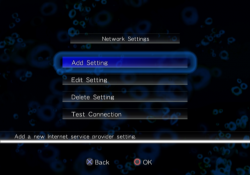
Some games have built-in Network configuration utility, some don't.
9.png (these network settings can be saved on a memory card for all games)

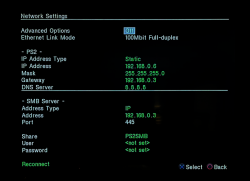
In some PS2 homebrew apps you can configure network settings e.g. OPL:
ps2 opl network.png
But these IP settings will be available just in this homebrew app.


To play online games (at least some of them) you need to enter a specific DNS server, but that is a different story.
This is an old video but it might be still up to date:

Or just search "Online with the PlayStation 2" 2025 on YouTube.
 
Last edited:
Let me get this simple.
Once you boot your PS2 it does not have any IP because the network modules are not being loaded.
So not like in PS3, PS4, PS5...
You are not able set, change or modify IP in "BIOS" (BOOT ROM) because the ROM it is read only.

These network modules are being loaded in games (especially when a game was\is able to play online e.g. PES).
Some games have built-in Network configuration utility, some don't.
View attachment 46983 (these network settings can be saved on a memory card for all games)

In some PS2 homebrew apps you can configure network settings e.g. OPL:
View attachment 46982
But these IP settings will be available just in this homebrew app.


To play online games (at least some of them) you need to enter a specific DNS server, but that is a different story.
This is an old video but it might be still up to date:

Or just search "Online with the PlayStation 2" 2025 on YouTube.
Thank you very much for the info on this! It truly is interesting food for thought, overall. I already have at least a few games that are known to have/have had online features available.
 
Back
Top