PS2 Gui Overhaul, Part 2

If I am not mistaken, the purpose of the "Get it free at psx-scene.com" line was mainly to prevent people getting misled by somebody trying to sell OPL as their own program (emphasis being on "free").

There are things I have noticed that may or may not be bugs (OPL r1406 with PADEMU) :

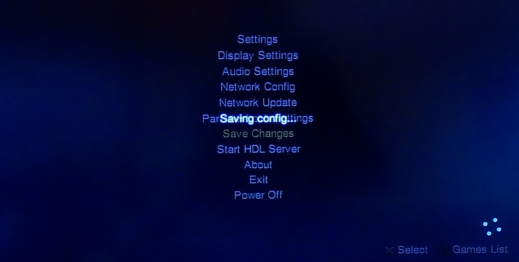
1. When any of the Settings page menus are exited with 'back' (Circle), the entry pointer/cursor (highlighted line) after exiting is the one that was entered, but when exiting by clicking X on OK in the submenu, the marker goes to the first line "Settings" (this excludes Parental control setting submenu, as it has a message that uses Circle to exit and some of the other submenus as well) - it happens on DisplaySettings, SoundSettings, NetworkSettins, but not on About.

2. (Cyrillic UTF-8 encoding) When saving settings to MC, not all characters of the line "Settings saved to %s" get printed - only the first 16 (15 Cyrillic characters (2 bytes each I guess?) and one space) and the string is cut there. The %s string is not printed at all (or maybe it is printed, but is backspace(s)?). Is this a bug, or does the line in the translation need to be shorter than a set number of characters/bytes?
Same goes for the "Customized Settings" line.

3. When the game's per-game settings page (Triangle) is opened and the game does have a cover, the "Customized Settings" line is not displayed at all, while it is when there is no cover, the line is displayed. (but note that my OPL settings and covers are very old and that might be the cause of this).

4. Consider changing the compatibility modes table, so that there is no "Mode 1", "Mode 2", ... strings, as that makes it not fit the screen for some languages and also makes no sense to repeat the word "Mode" so many times. Instead it might be better to add a "Compatibility modes:" string above them all, and have only the numbers listed below as "1", "2", etc. (removing the word "Mode" or not - either way seems fine).

Thanks for the GUI update! :)
 
EDIT: Something is wrong with HDLServer,
I mean when I'll Enable Write Operations (On), HDLServer is not showing at main menu.
HDLServer requires both write operations & HDD set to AUTO in order for it to display, AFAIK it has always been this way?

@wisi
1. Interesting, never noticed this before :-P

2. Pretty sure that's just a buffer size issue, they're both 32 bytes, I thought 1 char = 1 byte so 32 characters is plenty.. didn't know a char was 2 bytes, I'll bump it up to 64.

3. Can't see any reason this one would happen, we'll test it out.

4 & above. Thanks for testing and feedback. It's helpful and appreciated! :-)
 
When any of the Settings page menus are exited with 'back' (Circle), the entry pointer/cursor (highlighted line) after exiting is the one that was entered, but when exiting by clicking X on OK in the submenu, the marker goes to the first line "Settings" (this excludes Parental control setting submenu, as it has a message that uses Circle to exit and some of the other submenus as well) - it happens on DisplaySettings, SoundSettings, NetworkSettins, but not on About.
I think this ones been around a long time, those dialog windows that do this all destroy and re-render the menu, in case it needs to add HDL svr in based on changed settings I guess?
I cant see any other reason for menuReinitMainMenu to be called.. Moving the call out of applyConfig() and into guiShowConfig() stops this from happening and as far as I can tell..... has no drawbacks?...

When the game's per-game settings page (Triangle) is opened and the game does have a cover, the "Customized Settings" line is not displayed at all, while it is when there is no cover, the line is displayed. (but note that my OPL settings and covers are very old and that might be the cause of this)
I tried this one but couldn't find any change whether I had art or not, that string is only displayed if your game has saved custom settings (you probably know that already).. it just checks your game cfg for $ConfigSource. or you could be having this issue due to the lang string issue you mentioned as well? not sure but I couldn't reproduce it unfortunately.

Thanks again, nice to have some feedback :)
 
I thought that pressing X on OK and pressing Circle had the same function.

I didn't know that the "Customized Settings" string was displayed only when there are customized settings. So this is not a bug either.
You can tell I don't really have much experience using OPL :D
 
Test build

HDLServer requires both write operations & HDD set to AUTO in order for it to display, AFAIK it has always been this way?

facepalm.gif

My bad, false alarm.
I have tried this rev on SCPH-77004, so without HDD. That is why this setting was off.
On SCPH-50004 with write operation & HDD set to AUTO, everything should be fine.

Sorry for the inconvenience.
Best regards.
 
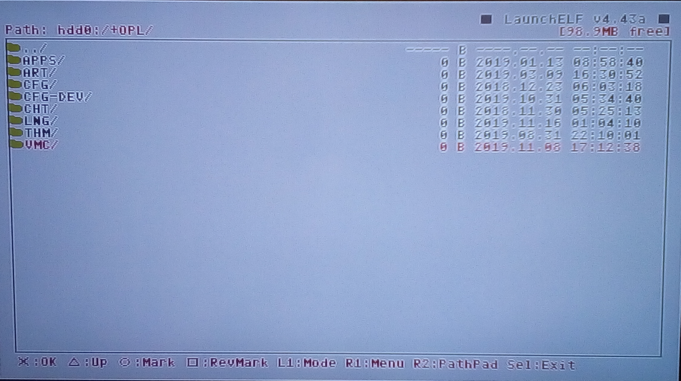
When I delete all config files from HDD leaving only folders:
error-settings.png

Launch OPL, try to change e.g. PS2 Logo, HDD Device Start Mode - Auto,
Save Settings, OPL will freeze:
new-error-OPL.png

I've tried few rev (1392, 1406 and current one from 13\11\2019).
While making these tests there was no MC inside PS2 (only HDD was connected).
 
@jolek
Thanks for finding another bug. :-p

Should be sorted now, I'm using a dev9 plugin to test on PCSX2 and I had the same result as you described but it seems all good now.
Hopefully there will be a final test build with all changes coming in a few days.


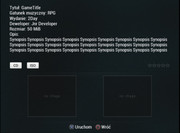
This is something else that will be included.. Info Page config keys can now be translated (lang files will need to be updated, im using a polish google translated one to test).. so now
Code:
Description=This is my game description
in your game cfgs will display as your chosen language..obviously only the keys are translated so the value is displayed as is and will need to be something like this
Code:
Description=To jest mĂłj opis gry
 
The Info-Page-Implementation still needs a lot of changes and some game-dependent info should rather be in a 'SLES_XYZ.AB_Info.db/cfg' etc.

The non-standartization of handling a lot of info and leaving it dependent on the theme is quite borked...

I reaaally think it still has a lot of issues implementation-wise... The User-Handling in the GUI is definetly by far better now with the separated button, but the backend and how it got intermingled with something technically unrelated (the theme-engine) is just bollocks and limits this feature in a lot unnecessary ways, due to a bollocks implementation...


I've been on 'moderation-status' over at the person's board/forum, which suggested this kind of borked implementation, Btw.!


Edit: On another note: Great work "Bug-Hunter" @jolek! :)
 
Last edited:
I apologise for the delay with this...

I'm currently dealing with some personal issues and as a result I do not have access to my PC/PS2/children :'(

@Krah is going to lend me a laptop so hopefully there should be another test build soon.
 
Last edited:
I apologise for the delay with this...

I'm currently dealing with some personal issues and as a result I do not have access to my PC/PS2/children :'(

@Krah is going to lend me a laptop so hopefully there should be another test build soon.

It would be possible to add the games language selection??

The discussion started here: https://www.psx-place.com/threads/open-ps2-loader-v0-9-3.13415/page-37#post-162504

Quick links to highlights:

- https://www.psx-place.com/threads/open-ps2-loader-v0-9-3.13415/page-38#post-163090
- https://www.psx-place.com/threads/open-ps2-loader-v0-9-3.13415/page-38#post-163555
 
Yes, that's possible!

It would need a new settings-entry for OSDSYS-Init-Override and... well... the init-functions to choose from!


Adding the Menu-Entries and even a new sub-menu is pretty straightforward! Even if you had never programmed on OPL, it's pretty easy...

The only thing which might need a bit more work, is setting up the handling of the functions which are selected (still relatively easy) and then comes the stuff where a bit specific knowledge regarding the PS2 is needed... The thing of calling the right functions with the correct arguments and so on...


@Krah and @Tupakaveli are certainly able to implement it (if they want and chose to)! ;)
 
Last edited:
Obviously there's no need to add this in per-game settings, just a overall/global setting in place of the Ps2 official Language selection (since on USA/JAP Ps2, you've Language selection limits on PAL games that automatically set the bios Language).
 
IMO this makes ONLY sense in "per-game-settings"!!! ;)

A pretty good example for this are some games, which default only to English and Japanese or if someone wants to use a multi-language-game on a Japanese Console!

It would make no sense to force the init-settings upon every game, IMO!

Btw.: I edited my previous post!
 
IMO this makes ONLY sense in "per-game-settings"!!! ;)

A pretty good example for this are some games, which default only to English and Japanese or if someone wants to use a multi-language-game on a Japanese Console!

It would make no sense to force the init-settings upon every game, IMO!

Btw.: I edited my previous post!

I don't see the reason of adding it to per-game settings. This option will be just for replacing (overwriting) the BIOS setting in case of PAL games played on JAP (and USA too if you're not english or spanish) consoles, that's all.

i.e. My Ps2 is set in italian in configuration setting. It's a PAL model, so no problem.
- If my Ps2 was JAP (only jap and eng on configuration menu), i'd have it set in english and so certain PAL-multi-5 games, even having italian will be in english.

Now if OPL is able to overwrite this setting, even with a JAP Ps2 I'd set italian in OPL language settings and the PAL-multi-5 game will output in italian.

NTSC-U/J games obviously will keep outputting at their languages, there's no problem about it. Actually this modification is useless for PAL console, there's no need of it. It's usefull only for PAL users with JAP/USA Ps2s.
 
Well... I like Korium, but...
No plasma (except for the sub-menus)?
 
Last edited:
Well... I like Korium, but...
No plasma (except for the sub-menus)?

The plasma is drawn in the Main Menu, Game Menu and behind the Info Page background since it has transparency.

It's actually drawn behind the Main Page background as well otherwise the first time you go from Main Page to a menu the plasma fades in from black to the background colour.

I actually think it looks kind of cool but I figured others may not.
 
  • Like
Reactions: TnA
Back
Top